Guide
Custom Software Development: The Complete Guide for 2026
Every growing business hits the same wall: your spreadsheets are buckling, your off-the-shelf tools don’t talk to each other, and your team spends more time fighting software than using it.
This is the build-vs-buy moment. And getting it wrong costs more than money—it costs momentum.
Over 15 years, we’ve built 200+ custom systems across logistics, healthcare, fintech, and e-commerce. Some were greenfield builds. Others were rescues of failed projects. The patterns are clear: custom software done right becomes a competitive moat. Done wrong, it becomes a money pit.
This guide covers everything you need to decide, plan, and execute custom software development in 2026.
What is Custom Software Development?
Custom software development is the process of designing, building, and maintaining software tailored specifically to your organisation’s needs—as opposed to purchasing pre-built, off-the-shelf solutions.
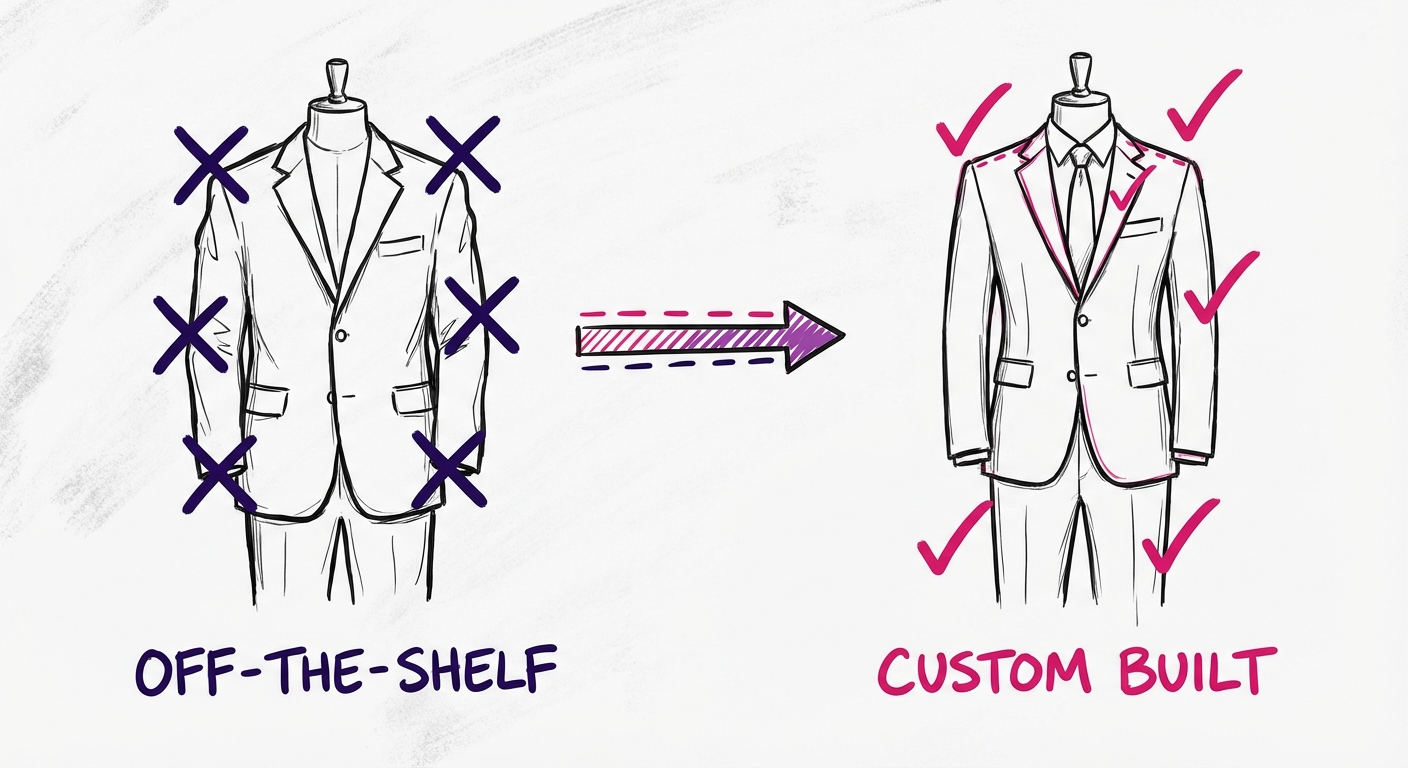
Think of it this way:
- Off-the-shelf software = buying a suit from a department store
- Custom software = having a suit tailored to your exact measurements
Both can work. But they solve different problems.
Custom Software vs Off-the-Shelf: Quick Comparison
| Factor | Custom Software | Off-the-Shelf |
|---|---|---|
| Fit | Built for your exact workflow | You adapt to the software |
| Upfront Cost | Higher ($50K-$500K+) | Lower ($0-$50K/year) |
| Ongoing Cost | Maintenance (15-20%/year) | Subscription fees compound |
| Time to Deploy | 3-12 months | Days to weeks |
| Competitive Advantage | Potential moat | Same tools as competitors |
| Ownership | You own the code | Vendor owns everything |
Neither option is universally better. The right choice depends on how core the function is to your business.
Rule of thumb:** If the software IS your product or directly creates competitive advantage, build custom. If it’s a commodity function (email, accounting, basic CRM), buy.
Types of Custom Software
Custom software isn’t one thing. It spans a spectrum from internal tools to customer-facing platforms.
1. Enterprise Systems
Large-scale platforms that run core business operations:
- ERP (Enterprise Resource Planning) — Integrates finance, HR, supply chain, and operations
- CRM (Customer Relationship Management) — Manages customer data, sales pipelines, and relationships
- WMS (Warehouse Management System) — Controls inventory, picking, packing, and shipping
- OMS (Order Management System) — Orchestrates orders across channels
These systems typically serve multiple departments and integrate with dozens of other tools.
2. Customer-Facing Applications
Software your customers or end-users interact with directly:
- Web applications — Portals, dashboards, self-service platforms
- Mobile apps — iOS and Android applications
- E-commerce platforms — Custom storefronts beyond Shopify/WooCommerce
- Booking systems — Appointments, reservations, scheduling
These require more attention to UX, performance, and scalability.
3. Integration & Middleware
The connective tissue between systems:
- API layers — Unified interfaces to disparate systems
- ETL pipelines — Extract, transform, and load data between platforms
- Automation engines — Business logic that orchestrates multiple systems
Often invisible but critical for operational efficiency.
4. Internal Tools & Automation
Software built for your team, not customers:
- Admin dashboards — Operational visibility and control
- Workflow automation — Replacing manual, repetitive processes
- Reporting tools — Custom analytics beyond what off-the-shelf provides
Frequently undervalued, but often delivers the fastest ROI.
The Custom Software Development Process
Building custom software follows a predictable (if not always linear) process. Here’s how it works in practice.
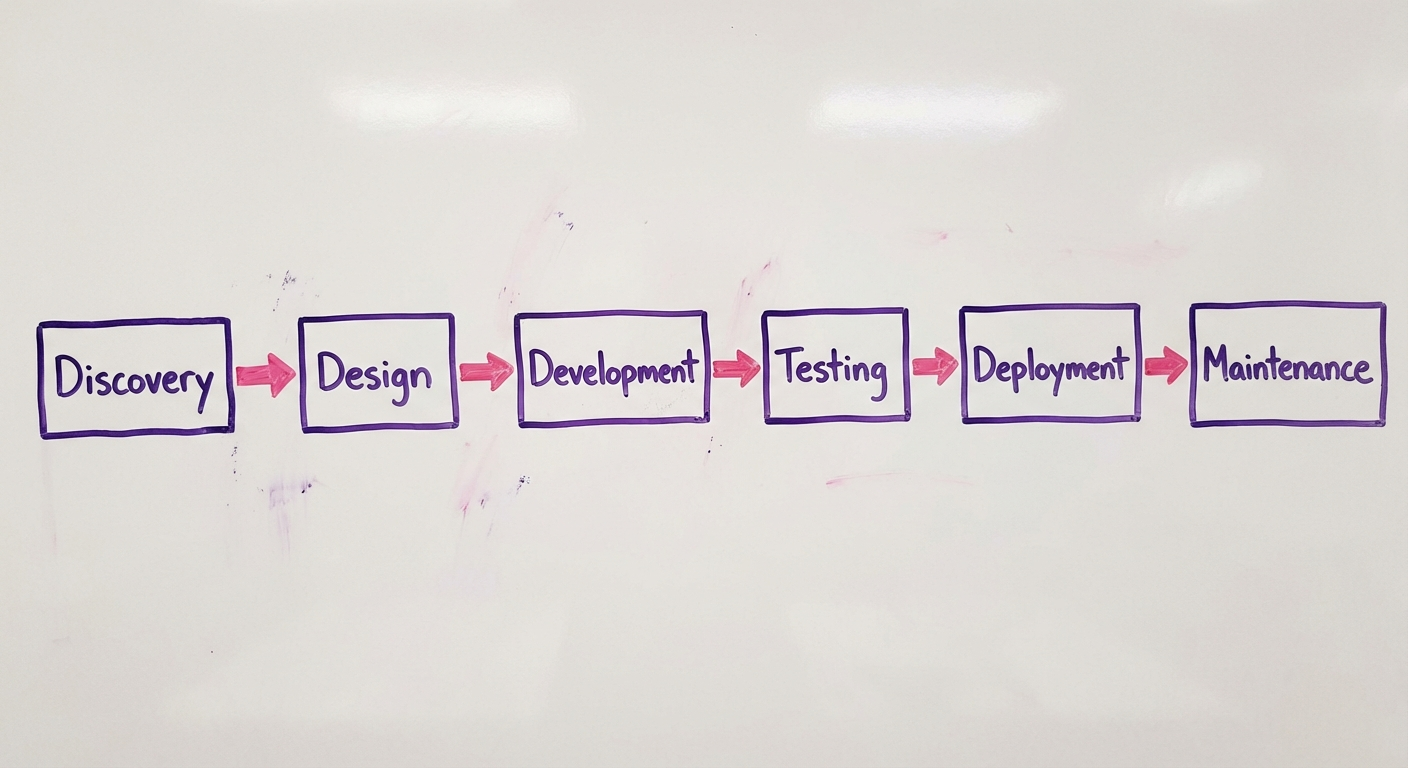
Phase 1: Discovery & Requirements (2-4 weeks)
Before writing any code, you need clarity on what you’re building and why.
Key activities:
- Stakeholder interviews — What problems are we solving?
- Current state mapping — How do things work today?
- Requirements documentation — Features, constraints, priorities
- Feasibility assessment — Technical and budgetary reality check
Deliverables:
- Project brief or Product Requirements Document (PRD)
- High-level scope and timeline estimate
- Go/no-go decision
Common mistake:** Rushing this phase. Every hour invested in discovery saves 10+ hours in development.
Phase 2: Architecture & Design (2-4 weeks)
With requirements defined, architects design the system structure while designers shape the user experience.
Key activities:
- System architecture — How components connect, scale, and fail gracefully
- Technology selection — Languages, frameworks, databases, infrastructure
- UI/UX design — Wireframes, prototypes, user flows
- Security planning — Authentication, authorisation, data protection
Deliverables:
- Architecture diagram
- Tech stack documentation
- UI/UX designs (Figma, Sketch, or similar)
- API specifications
Common mistake: Over-engineering for scale you don’t have yet. Design for current needs with extension points for future growth.
Phase 3: Development (8-20 weeks)
Where ideas become working software. Modern development typically follows Agile principles: iterative cycles with regular delivery.
Key activities:
- Sprint planning — Break work into 2-week cycles
- Coding — Writing and reviewing code
- Daily standups — Team coordination and blocker removal
- Demo sessions — Show progress to stakeholders
Deliverables:
- Working software (incrementally)
- Code repository with documentation
- Regular progress updates
Best practice: Deploy to a staging environment early and often. The sooner stakeholders see real software, the better the feedback.
Phase 4: Testing & QA (Ongoing + 2-4 weeks)
Testing isn’t a phase at the end—it’s woven throughout development. But a dedicated QA period before launch catches what slipped through.
Testing types:
- Unit tests — Individual components work correctly
- Integration tests — Components work together
- End-to-end tests — Complete user flows function properly
- User Acceptance Testing (UAT) — Real users validate against requirements
- Performance testing — System handles expected (and peak) load
- Security testing — Vulnerabilities identified and addressed
Deliverables:
- Test coverage reports
- Bug tracker with resolved issues
- UAT sign-off
Common mistake:** Treating QA as optional when deadlines slip. Technical debt from skipped testing always comes due—usually at the worst moment.
Phase 5: Deployment (1-2 weeks)
Moving from staging to production requires careful coordination.
Key activities:
- Infrastructure provisioning — Servers, databases, CDNs
- CI/CD pipeline setup — Automated build and deployment
- Data migration — Moving from legacy systems (if applicable)
- Rollback planning — How to revert if something breaks
Deployment strategies:
- Big bang — All at once (higher risk, simpler)
- Phased rollout — Department by department
- Blue-green — Run old and new in parallel, switch traffic
- Canary — Route small percentage of users to new version first
Deliverable: Production system, live and monitored.
Phase 6: Maintenance & Evolution (Ongoing)
Launch is the beginning, not the end. Software requires ongoing care.
Ongoing activities:
- Bug fixes and patches
- Security updates
- Performance optimisation
- Feature enhancements
- Infrastructure scaling
Budget expectation: Plan for 15-20% of initial build cost annually for maintenance.
Common mistake:** No budget or team allocated post-launch. Orphaned software decays fast.
When to Build Custom Software
Custom development isn’t always the answer. Here’s how to know when it makes sense.
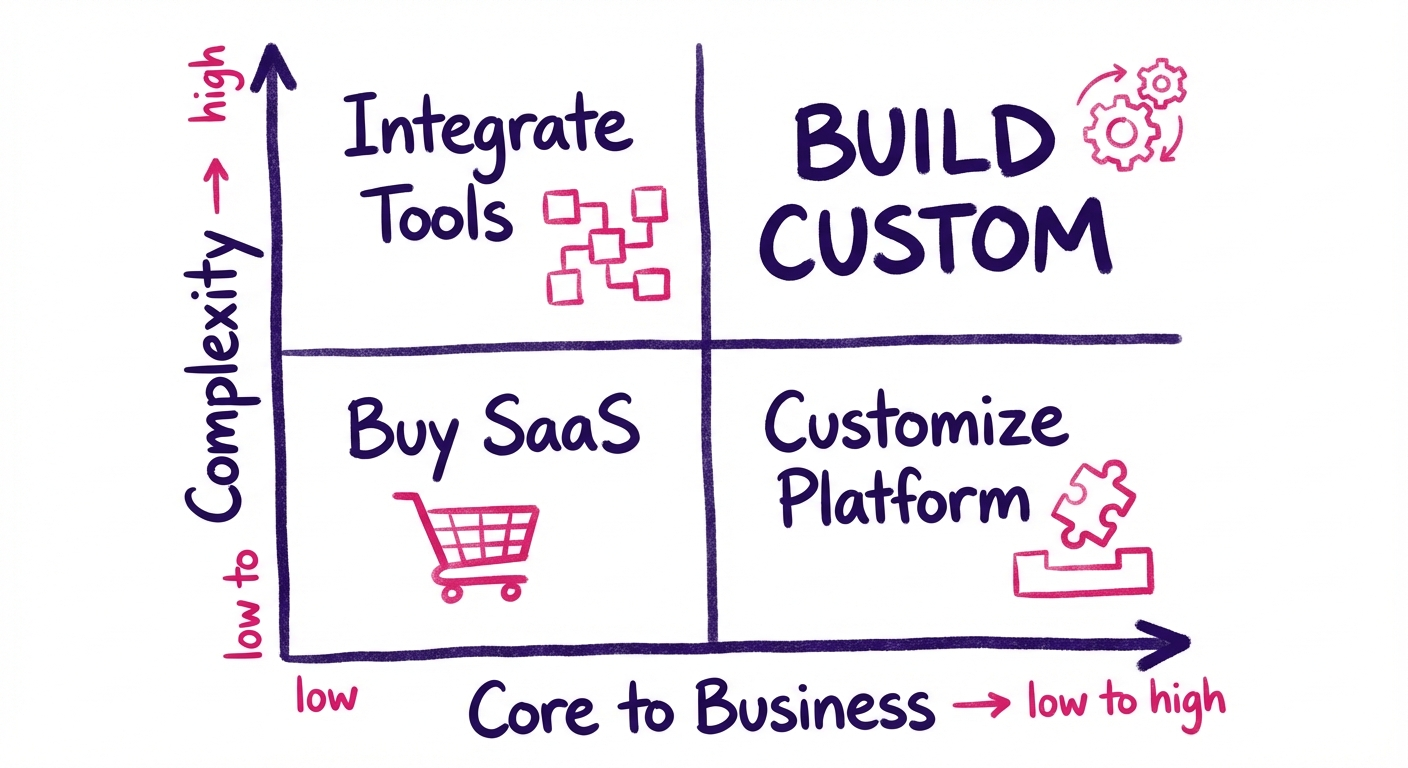
Signs You Need Custom Software
1. Off-the-shelf tools are fighting your workflow
If your team constantly works around the software—exporting to spreadsheets, maintaining manual processes alongside “automated” tools, or complaining “it doesn’t work the way we work”—that’s a signal.
2. You’re paying for features you don’t use (and missing ones you need)
Enterprise software is built for the average customer. If you’re far from average, you’re subsidising features irrelevant to you while lacking what actually matters.
3. Integration complexity is exploding
Three tools connected through Zapier is manageable. Fifteen tools connected through multiple integration platforms, with data inconsistencies and sync delays, is a house of cards.
4. The software IS your competitive advantage
If your business model depends on doing something better than competitors—faster fulfilment, unique customer experience, proprietary algorithms—generic tools won’t get you there.
5. Compliance or security requirements exceed standard offerings
Healthcare, finance, and government often have requirements that SaaS vendors can’t meet. Custom software can be built to spec.
When to Buy Instead
- Commodity functions — Email, document storage, basic accounting
- Rapidly evolving domains — AI/ML tools where the market changes quarterly
- Time-critical deployment — Need something working next week, not next quarter
- Small team without technical leadership — Custom software requires ongoing technical stewardship
The Hybrid Path
Often the best answer is neither fully custom nor purely off-the-shelf:
- Customise existing platforms — Salesforce, HubSpot, and others offer extensive APIs and customisation
- Build integration layers — Keep best-of-breed tools but unify them through custom middleware
- Custom front-end, standard back-end — Use Shopify for e-commerce backend but build a custom storefront
- Start SaaS, migrate custom** — Validate with off-the-shelf, then build custom once you understand requirements deeply
How Much Does Custom Software Cost?
The honest answer: it depends. But here are realistic ranges based on complexity.
Cost Tiers
| Complexity | Timeline | Cost Range (AUD) | Examples |
|---|---|---|---|
| Simple | 2-3 months | $50K - $100K | Internal dashboard, basic CRUD app, simple automation |
| Moderate | 3-6 months | $100K - $250K | Customer portal, inventory system, booking platform |
| Complex | 6-12 months | $250K - $500K | Full CRM/ERP, marketplace, multi-tenant SaaS |
| Enterprise | 12+ months | $500K - $2M+ | Core banking system, healthcare platform, logistics network |
What Drives Cost
1. Scope and features More screens, more integrations, more user roles = more cost. Ruthless prioritisation of MVP features controls budget.
2. Technical complexity Real-time processing, complex algorithms, high availability requirements, and offline-capable mobile apps all add cost.
3. Design requirements A functional admin tool costs less than a consumer-grade, polished user experience.
4. Integrations Each external system you connect adds weeks. Legacy systems with poor documentation add more.
5. Team composition Onshore Australian teams: $150-250/hour. Offshore teams: $30-80/hour. Hybrid models balance cost and communication.
6. Timeline pressure Rushing adds cost through team scaling, overtime, and technical shortcuts that create future debt.
Hidden Costs to Plan For
- Infrastructure — Hosting, databases, CDN, monitoring ($500-$5,000/month)
- Third-party services — APIs, authentication services, email providers
- Ongoing maintenance — Bug fixes, security patches, updates (15-20%/year)
- Training and change management — Getting users to actually adopt the software
- Future enhancements — The backlog of “Phase 2” features
ROI Calculation Framework
Custom software should pay for itself. Model it:
Annual value created:
- Time saved × hourly cost of employees
- Revenue enabled by new capabilities
- Cost avoided (replacing multiple subscriptions, reducing errors)
- Competitive advantage (harder to quantify but real)
Break-even timeline:
- Total build cost ÷ Annual net value = Years to break even
If break-even exceeds 3 years, scrutinise assumptions. If it’s under 18 months, move quickly.
Choosing the Right Development Partner
Most organisations don’t have internal teams to build custom software. Selecting the right partner is critical.
What to Look For
1. Relevant experience
Not just “we’ve built software” but “we’ve built this type of software.” Ask for case studies in your industry or with similar technical requirements.
2. Technical capability
Can they articulate architectural decisions? Do they follow modern practices (version control, automated testing, CI/CD)? Ask about their tech stack and why they chose it.
3. Process and communication
How do they run projects? What visibility will you have? How are decisions made when requirements are ambiguous? A partner who goes dark for weeks is a red flag.
4. Team stability
Will the people you meet in sales be the ones building your software? High turnover mid-project creates knowledge loss and delays.
5. Post-launch support
What happens after deployment? Is maintenance included? What’s the response time for critical bugs?
Red Flags
- Fixed price for vague scope** — Either they’ll cut corners or you’ll face change orders
- No discovery phase — Jumping straight to coding means assumptions will be wrong
- Reluctance to show previous work — Good partners are proud of their portfolio
- Single point of failure — One developer who knows everything is a bus factor of one
- Offshore-only with no local presence — Timezone and communication challenges compound
Engagement Models
| Model | Best For | Risk Profile |
|---|---|---|
| Fixed price | Well-defined, bounded scope | Low flexibility, change orders likely |
| Time & materials | Evolving requirements, ongoing development | Requires trust and active management |
| Dedicated team | Long-term product development | Higher commitment, better alignment |
| Hybrid | Phased projects with some certainty | Balances predictability and flexibility |
Case Study: Logistics Order Management System
To make this concrete, here’s a recent project example.
The Challenge
A regional logistics company was managing orders through a combination of spreadsheets, emails, and a legacy system from 2008. As order volumes grew 40% year-over-year, the manual processes couldn’t keep up. Errors were increasing, customers were frustrated, and the operations team was drowning.
The Solution
We built a custom Order Management System (OMS) that:
- Centralised orders from multiple sales channels into a single dashboard
- Automated routing based on delivery zones and carrier capacity
- Integrated with carriers via API for real-time tracking
- Provided customer self-service for order status and proof of delivery
- Generated operational reports for capacity planning
The Numbers
- Timeline: 5 months from discovery to launch
- Investment: $180K build + $2K/month infrastructure
- Results (6 months post-launch):
- 65% reduction in order processing time
- 80% fewer customer service calls about order status
- 3 FTEs reallocated from manual processes to growth initiatives
- ROI break-even in 11 months
Key Success Factors
- Executive sponsorship** — CEO was involved in discovery and removed blockers
- Phased rollout — Started with one distribution centre, expanded after validation
- User involvement — Operations team shaped the UI through weekly feedback sessions
- Realistic scope — “Phase 2” features were explicitly deferred, not crammed in
Getting Started
If you’ve read this far, you’re likely weighing custom software for your organisation. Here’s how to take the next step.
1. Document the Problem
Before talking to vendors, write down:
- What specific problems are you trying to solve?
- What does success look like? How will you measure it?
- What’s the cost of not solving this? (Status quo isn’t free)
2. Assess Build vs Buy
Use the framework above. If off-the-shelf might work, try it first—it’s faster and cheaper to validate. If you’re confident custom is the path, proceed.
3. Define Your Budget Range
You don’t need an exact number, but know your order of magnitude. $50K, $200K, and $500K projects look very different.
4. Talk to 2-3 Partners
Get perspectives on approach, timeline, and cost. Pay attention to how they ask questions—good partners probe deeply before proposing.
5. Start with Discovery
Don’t commit to a full build based on a proposal. Invest in a paid discovery phase (2-4 weeks) to validate scope, reduce risk, and build confidence before the big commitment.
Ready to Explore Custom Software?
At Synetica, we specialise in turning complex business problems into software that actually works. Our Blueprint process takes you from idea to validated plan in 2 weeks—so you can commit to building with confidence.
We’ll discuss your challenge, assess fit, and outline potential approaches. No obligation, no pitch deck—just a practical conversation about what’s possible.
Have questions about custom software development? Contact us or connect on LinkedIn.
Need help putting this into practice?
Book a Blueprint session and we'll turn the ideas in this article into your next validated release.
Book a Discovery Call