Guide
Legacy System Modernization: A Strategic Approach
Your legacy system works. That’s the problem.
It works just well enough that nobody wants to touch it, but poorly enough that every new feature takes three times longer than it should. Your developers spend more time writing workarounds than writing code. Your integration costs keep climbing. And somewhere in the back of your mind, you know the person who built that system retired four years ago.
You’re not alone. According to MuleSoft’s connectivity report, enterprises spend up to 70% of their IT budgets just maintaining legacy systems. That’s money flowing into preservation, not progress.
Legacy system modernization isn’t about chasing shiny technology. It’s about reclaiming the ability to move fast.
This guide covers how to assess, plan, and execute a modernization strategy that actually works.
What is a Legacy System?
A legacy system is any software or infrastructure that still serves a critical business function but has become difficult to maintain, extend, or integrate with modern tools.
It’s not just about age. A five-year-old system can be “legacy” if:
- The framework is no longer maintained
- The original developers are gone and documentation is thin
- It can’t connect to modern APIs or services
- Scaling it requires disproportionate effort
Conversely, a twenty-year-old COBOL system running on a mainframe isn’t necessarily a problem—if it does its job, the team can maintain it, and it doesn’t bottleneck the business.
The real test: does the system constrain your business, or support it?
7 Signs You Need Legacy System Modernization
Not every old system needs replacing. But these signals suggest yours is costing more than it’s worth:
1. Maintenance Costs Are Climbing
When your team spends 60-80% of their time on bug fixes, patches, and keeping the lights on—rather than building features—you’re paying a maintenance tax. That tax compounds every year.
2. Integration Is Painful (or Impossible)
Modern business runs on connected systems. If connecting your legacy platform to a new CRM, payment gateway, or analytics tool requires custom middleware and prayer, it’s a red flag.
3. Security Vulnerabilities Are Growing
Older systems often run on unsupported frameworks and operating systems. No security patches means you’re an increasingly attractive target. Compliance requirements (SOC 2, ISO 27001) become impossible to meet.
4. Performance Can’t Scale
The system handled 100 concurrent users fine in 2018. Now you have 2,000, and response times are measured in geological epochs.
5. Talent Is Hard to Find
Try hiring a developer fluent in ColdFusion, Visual Basic 6, or Delphi in 2026. The talent pool shrinks every year, and the remaining specialists charge accordingly.
6. User Experience Is Suffering
Internal users work around the system rather than with it. External users complain. Mobile support is an afterthought—or non-existent.
7. Business Agility Is Blocked
This is the ultimate test. If your technology can’t keep pace with your strategy—new products, new markets, new business models—the system has become a constraint, not an enabler.
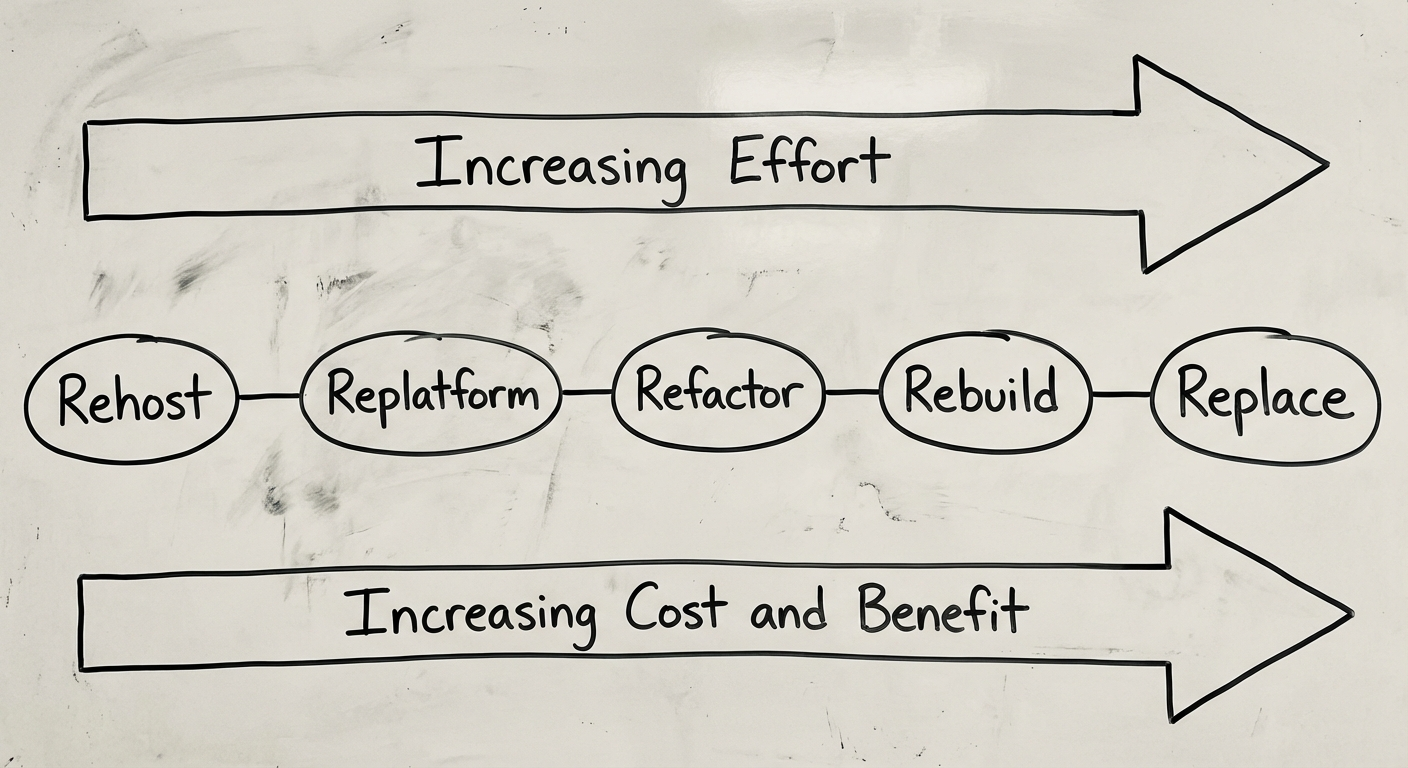
The 5 Rs: Legacy System Modernization Strategies
There’s no single right way to modernize. The 5 Rs framework gives you a spectrum of options, from minimal disruption to complete transformation.
1. Rehost (“Lift and Shift”)
Move the application to modern infrastructure (typically cloud) without changing the code.
- Best for: Systems that work fine functionally but run on aging hardware
- Effort: Low
- Risk: Low
- Outcome: Better infrastructure, same application
- Timeline: 2-8 weeks
Rehosting buys you time. It’s not true modernization, but it eliminates hardware risk and often improves performance through better infrastructure.
2. Replatform (“Lift and Optimise”)
Move to new infrastructure while making targeted optimisations—upgrading the database, switching to managed services, or updating the runtime.
- Best for: Systems that are mostly sound but tied to outdated platforms
- Effort: Low to moderate
- Risk: Low to moderate
- Outcome: Improved performance and reduced ops overhead
- Timeline: 1-3 months
3. Refactor (Restructure)
Rework the internal structure of the code without changing its external behaviour. This might mean breaking a monolith into services, improving the architecture, or adopting modern patterns.
- Best for: Systems with solid business logic trapped in poor architecture
- Effort: Moderate to high
- Risk: Moderate
- Outcome: Better maintainability, extensibility, and developer productivity
- Timeline: 3-9 months
Refactoring is where the most nuance lives. Done well, it preserves your investment in existing business logic while making the system workable for the next decade. Done poorly, it’s an expensive rearranging of deck chairs.
4. Rebuild (Rewrite)
Start from scratch using modern technology, guided by the requirements and domain knowledge from the existing system.
- Best for: Systems where the code is unsalvageable but the business logic is well-understood
- Effort: High
- Risk: High
- Outcome: Modern, maintainable system built to current standards
- Timeline: 6-18 months
The classic trap with rebuilds: underestimating the hidden complexity in the old system. That “simple” legacy app has a decade of edge cases, business rules, and integrations baked in. Budget accordingly.
5. Replace (Buy)
Retire the legacy system entirely and adopt a commercial off-the-shelf (COTS) or SaaS solution.
- Best for: Commodity functions where the market has matured (CRM, ERP, HRIS)
- Effort: Moderate (data migration and change management)
- Risk: Moderate
- Outcome: Vendor-supported, regularly updated solution
- Timeline: 2-6 months
Sometimes the best custom system is one you don’t build. If the market offers a mature solution that covers 85%+ of your needs, replacement often beats rebuild. See our custom software development guide for more on the build-vs-buy decision.
How to Assess Your Legacy System
Before choosing a strategy, you need a clear picture of where you stand.
Technical Assessment
| Dimension | Questions to Answer |
|---|---|
| Architecture | Monolith or modular? How coupled are the components? |
| Code Quality | Test coverage? Documentation? Technical debt score? |
| Infrastructure | On-premises or cloud? How hard is the deployment process? |
| Dependencies | Unsupported libraries? EOL operating systems? |
| Data | How clean is the data? Are schemas documented? |
Business Assessment
- Criticality: What breaks if this system goes down?
- Cost of Ownership: Total annual spend (hosting, licenses, maintenance, opportunity cost)
- Strategic Alignment: Does this system support or hinder your 3-year plan?
- User Satisfaction: What do the people using it every day actually think?
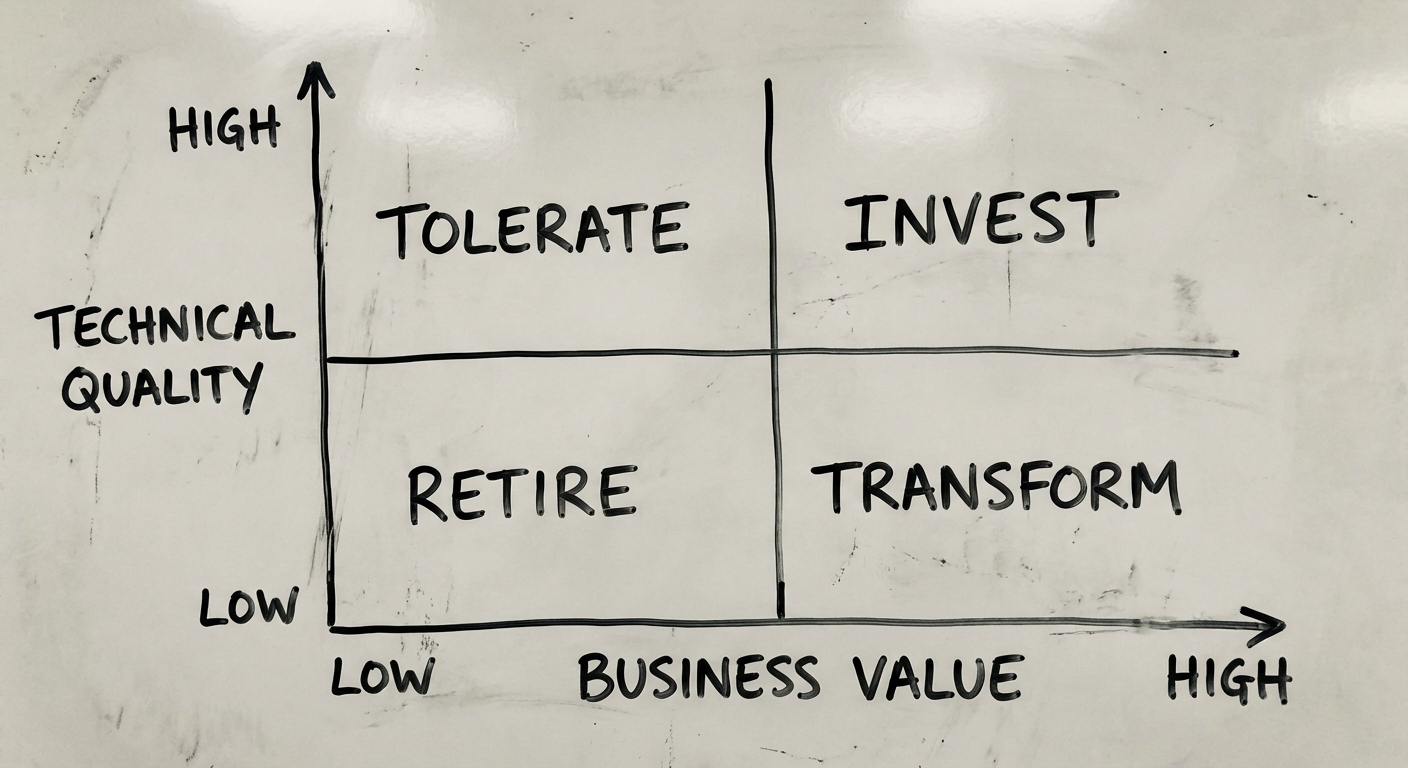
The Modernization Decision Matrix
Plot each system on two axes:
- Business value (high to low)
- Technical quality (good to poor)
- High value, poor quality → Refactor or Rebuild (priority)
- High value, good quality → Rehost or Replatform
- Low value, poor quality → Replace or Retire
- Low value, good quality → Leave it alone
Focus your modernization budget where business value is high and technical quality is low. That’s where the ROI lives.
Step-by-Step Legacy System Modernization Process
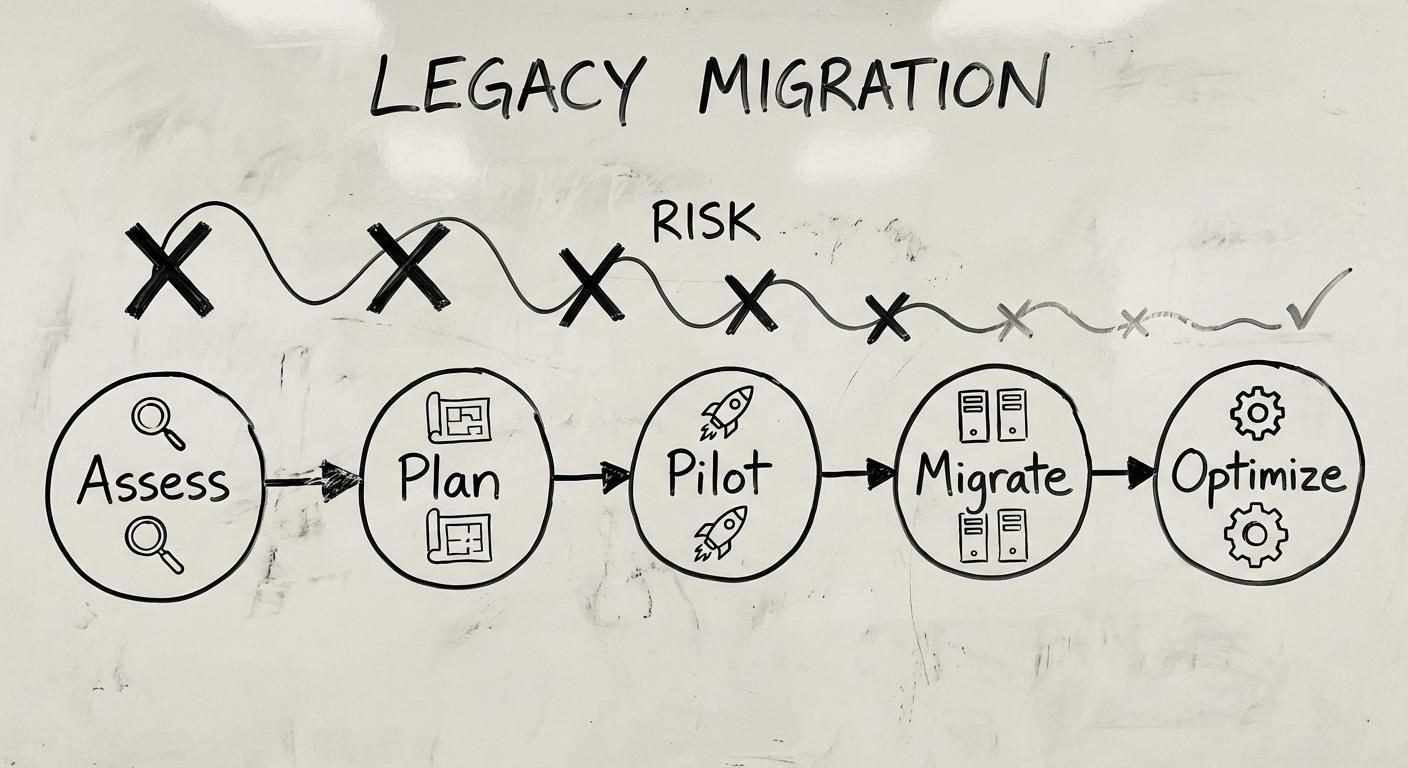
Modernization isn’t a weekend project. Here’s the process we follow at Synetica, refined over 200+ enterprise engagements.
Phase 1: Discovery and Assessment (2-4 Weeks)
- Audit current architecture, infrastructure, and code quality
- Map business processes and dependencies
- Interview stakeholders (IT, operations, end users)
- Identify quick wins and high-risk areas
- Deliverable: Modernization assessment report with recommended strategy
This phase follows the same rigour as any software development life cycle—you wouldn’t build without requirements, and you shouldn’t modernize without assessment.
Phase 2: Strategy and Roadmap (1-2 Weeks)
- Select modernization approach (from the 5 Rs)
- Define success metrics and KPIs
- Plan migration in phases (never big-bang)
- Establish rollback procedures
- Deliverable: Phased modernization roadmap with timelines and costs
Phase 3: Foundation and Quick Wins (4-8 Weeks)
- Set up modern CI/CD pipelines
- Implement monitoring and observability
- Execute low-risk improvements (rehost, update dependencies)
- Build automated test coverage for existing functionality
- Deliverable: Stabilised environment with modern DevOps practices
Phase 4: Core Modernization (3-12 Months)
This is where the heavy lifting happens:
- Execute the chosen strategy (refactor, rebuild, or replace)
- Migrate data in planned batches
- Run old and new systems in parallel where possible
- Validate each phase with users before proceeding
- Iterate based on feedback
Phase 5: Transition and Optimisation (2-4 Weeks)
- Decommission legacy components
- Complete data migration and verification
- Train users on new systems
- Establish ongoing maintenance processes
- Deliverable: Fully operational modernized system with documentation
Risk Management in Legacy Modernization
Modernization projects fail more often than greenfield builds. The complexity is hidden, the stakes are high, and the system can’t go down during the transition.
The Top 5 Risks (and How to Mitigate Them)
1. Scope Creep Once you open the hood, you find more problems. Mitigate with fixed-scope phases and clear boundaries.
2. Data Loss or Corruption Legacy data is messy. Mitigate with comprehensive data mapping, validation scripts, and parallel runs.
3. Business Disruption Users depend on the current system, warts and all. Mitigate with phased migration—never big-bang cutover.
4. Knowledge Loss The old system’s behaviour IS the documentation. Mitigate by extracting business rules into tests before touching code.
5. Budget Overrun Modernization estimates are notoriously optimistic. Add 30-50% contingency to your modernization budget. If you don’t need it, celebrate. If you do, you’ll be glad you planned for it.
The Non-Negotiable Rule
Always maintain a rollback path. At every phase, you should be able to revert to the previous working state. The moment you burn that bridge, you’ve turned a controlled migration into a gamble.
Costs and Timeline: What to Realistically Expect
Let’s talk numbers. These are ranges based on mid-market enterprise systems (not simple apps, not banking platforms).
| Strategy | Typical Cost (AUD) | Timeline | Risk Level |
|---|---|---|---|
| Rehost | $20K-$80K | 2-8 weeks | Low |
| Replatform | $50K-$200K | 1-3 months | Low-Medium |
| Refactor | $100K-$500K | 3-9 months | Medium |
| Rebuild | $200K-$1M+ | 6-18 months | High |
| Replace | $50K-$300K | 2-6 months | Medium |
What Drives Cost
- System complexity: Number of integrations, business rules, and data volumes
- Documentation quality: Well-documented systems are cheaper to modernize
- Team availability: Internal SMEs who understand the legacy system are invaluable
- Compliance requirements: Regulated industries add testing and validation overhead
The ROI Case
Most organisations see payback within 18-24 months through:
- 40-60% reduction in maintenance costs
- 2-3x faster feature delivery
- Improved security and compliance posture
- Better talent attraction (developers want modern stacks)
When NOT to Modernize
Not every legacy system needs modernization. Leave it alone if:
- It works, it’s stable, and it doesn’t constrain the business
- The cost of modernization exceeds the cost of maintenance over 5+ years
- The system is approaching end-of-life naturally (business unit closing, product sunsetting)
- You don’t have the organisational appetite for the disruption
Sometimes the right strategy is “wait and see.” Just make sure you’re choosing to wait, not simply avoiding the decision.
Ready to Modernize? Start with an Assessment.
The biggest risk in legacy modernization isn’t the technology. It’s starting without a clear picture of where you are and where you need to be.
At Synetica, we start every modernization engagement with a structured assessment—no commitment to build, no predetermined solution. Just a clear-eyed evaluation of your systems, your constraints, and your options.
Here’s what you get:
- Technical architecture audit
- Business process mapping
- Risk and dependency analysis
- Recommended strategy with phased roadmap
- Honest cost and timeline estimates
If your legacy systems are holding you back, let’s talk. We’ll help you figure out the smartest path forward—whether that’s a surgical refactor, a full rebuild, or simply leaving it alone.
No pitch. Just evidence-based advice from a team that’s done this 200+ times.
Need help putting this into practice?
Book a Blueprint session and we'll turn the ideas in this article into your next validated release.
Book a Discovery Call