Guide
How to Build a Custom CRM: Step-by-Step
Most CRM implementations fail not because the software was bad, but because it was built for someone else’s business.
You’ve tried Salesforce. You’ve tried HubSpot. Maybe you even tried bolting Notion together with duct tape and prayer. And every time, the same problem: you’re bending your sales process around someone else’s assumptions about how selling works.
Here’s what we’ve learned after building CRM systems for logistics companies, health platforms, and B2B services: a custom CRM isn’t about having more features—it’s about having exactly the right features for how your team actually sells.
This guide walks you through how to build a custom CRM, step by step. No theory. Just the process that works.
Why Build Custom Instead of Buying?
We covered the full build-vs-buy analysis in our CRM software guide. The short version:
Build custom when:
- Your sales process is genuinely unique (not just “we’re special” unique—actually unique)
- You need deep integrations with internal systems that APIs can’t solve
- Per-seat pricing is bleeding you at scale
- Data ownership and compliance matter (healthcare, finance, government)
- Off-the-shelf tools force you into workarounds that slow your team down
Stick with off-the-shelf when:
- Your process follows a standard pipeline
- You have fewer than 10 salespeople
- You need it working this week, not this quarter
If you’re still reading, you’ve probably already hit the limits of packaged CRM software. Let’s build.
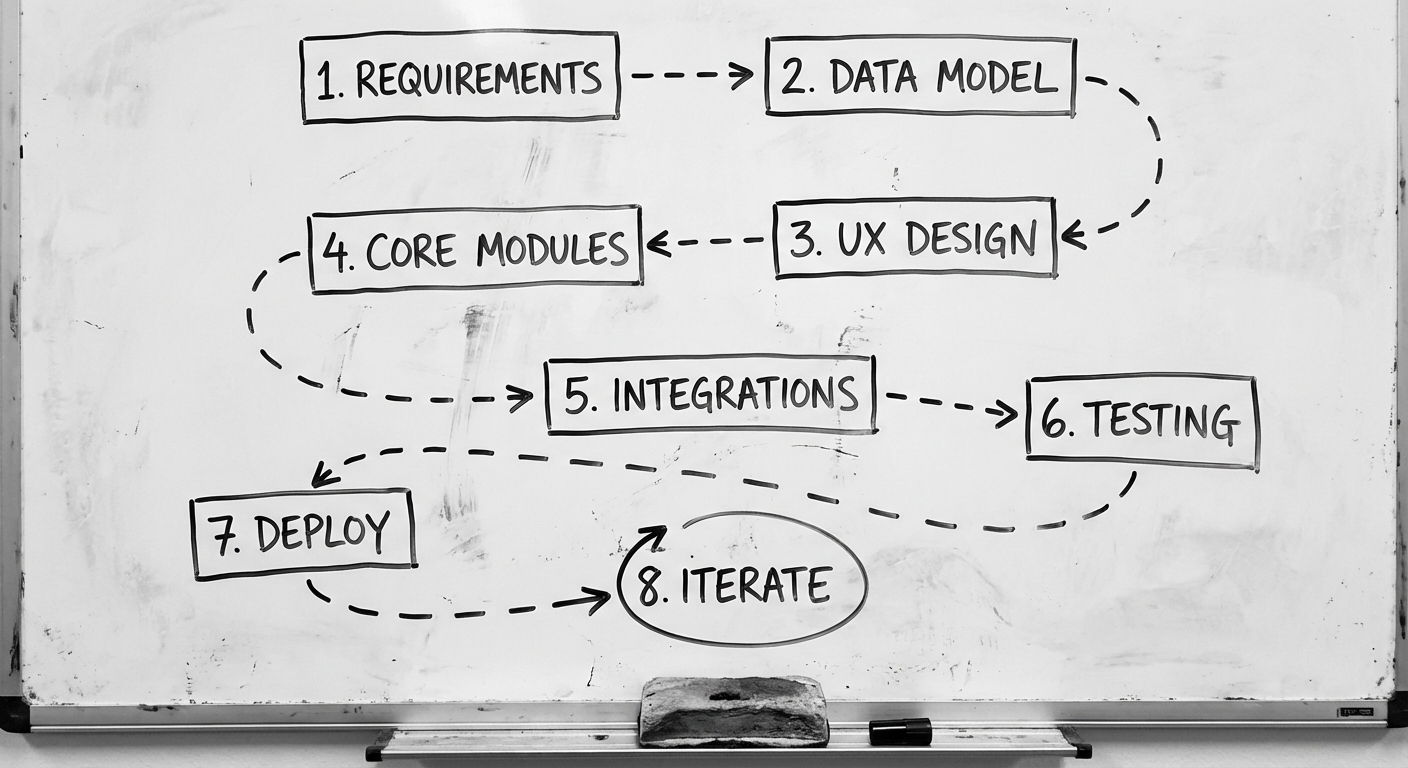
The 8-Step Process to Build a Custom CRM
This is the same process we follow in our custom software development projects, adapted specifically for CRM builds.
Step 1: Requirements Gathering (Week 1-2)
This is where most CRM projects go wrong. Not because teams skip requirements—but because they gather the wrong ones.
Don’t start with features. Start with these questions:
- Who uses the CRM? Sales reps, account managers, support, leadership—each has different needs
- What does your sales process actually look like? Map it end-to-end, including the messy parts
- What data do you track today? Spreadsheets, email threads, sticky notes—audit everything
- What decisions does leadership make from CRM data? This shapes your reporting layer
- What systems must the CRM connect to? Accounting, email, project management, billing
The output of this step isn’t a feature list—it’s a workflow map. Every feature you build later should trace back to a real workflow.
Deliverable: A documented workflow map with user roles, data flows, and integration points.
Step 2: Data Modeling (Week 2-3)
Your data model is the skeleton of your CRM. Get this wrong and you’ll feel it for years.
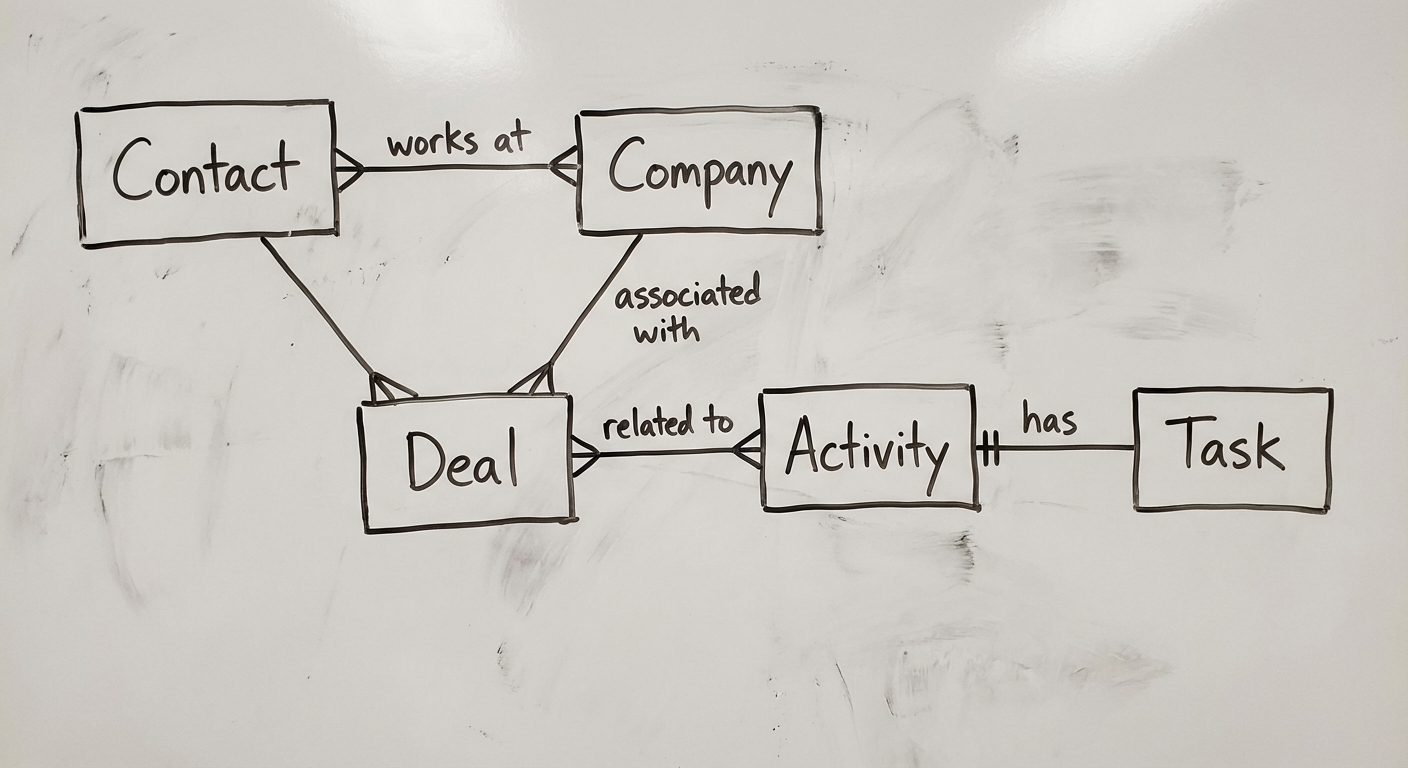
Core entities in most CRM systems:
- Contacts — People you interact with
- Companies/Organisations — Groups contacts belong to
- Deals/Opportunities — Revenue-generating activities with stages
- Activities — Calls, emails, meetings, notes tied to contacts or deals
- Pipelines — The stages deals move through
- Custom fields — The data unique to your business
Key decisions at this stage:
- Relational vs. document-based? Most CRMs work best with relational databases (PostgreSQL). Document stores (MongoDB) add flexibility but complicate reporting
- Multi-tenancy? Building for one organisation or reselling as SaaS?
- Audit trail? In regulated industries, you need to track every change to every record
Design for extensibility. Your CRM will evolve. Build the data model so adding a new field or entity doesn’t require restructuring the database.
Step 3: UX Design (Week 3-5)
CRM adoption lives or dies on UX. If your sales team has to click six times to log a call, they’ll go back to spreadsheets.
Design priorities for CRM:
- Speed over beauty — Sales reps care about fast data entry, not animations
- Minimal clicks to log activity — One-click call logging, inline editing, keyboard shortcuts
- Dashboard-first design — The home screen should answer “what do I need to do right now?”
- Mobile-ready — Field sales teams need to update deals from their phone
- Role-based views — Reps see their pipeline. Managers see the team. Execs see the forecast
Pro tip: Shadow your sales team for a day before designing anything. Watch where they waste time. That’s your design brief.
Step 4: Build Core Modules (Week 5-10)
Now you build. Start with these modules in this order:
Module 1: Contact & Company Management The foundation. CRUD operations for contacts and companies with search, filters, and tagging. Get this right before moving on.
Module 2: Pipeline & Deal Management Visual pipeline (Kanban-style), deal stages, probability weighting, and value tracking. This is the heartbeat of any CRM.
Module 3: Activity Tracking Call logging, email tracking, meeting notes, task assignment. Every interaction with a contact should be one click away from their record.
Module 4: Reporting & Dashboards Pipeline value, conversion rates, activity metrics, forecast accuracy. Build reports that answer real questions, not vanity dashboards.
Module 5: User Management & Permissions Role-based access control. Sales reps see their deals. Managers see their team. Admins see everything.
Build in vertical slices, not horizontal layers. Ship a working pipeline module before perfecting the contact search. Real users testing real features beats a polished prototype every time.
Step 5: Integrations (Week 8-12)
A CRM that doesn’t connect to your other tools is just a fancy spreadsheet. Plan integrations from day one, build them after core modules are stable.
Common CRM integrations:
| Integration | Purpose | Complexity |
|---|---|---|
| Email (Gmail/Outlook) | Auto-log emails, send from CRM | Medium |
| Calendar | Schedule meetings, sync events | Low |
| Accounting (Xero/MYOB) | Sync invoices, payment status | High |
| Marketing (Mailchimp/ActiveCampaign) | Sync contacts, track campaigns | Medium |
| Phone/VoIP (Twilio) | Click-to-call, call recording | Medium |
| Project Management (ClickUp/Jira) | Convert deals to projects | Low |
| Website (forms, chat) | Capture leads automatically | Low |
Integration architecture tip: Use a message queue (like RabbitMQ or AWS SQS) between your CRM and external systems. This decouples systems so a slow API doesn’t freeze your CRM.
Step 6: Testing (Week 10-13)
CRM testing is different from typical app testing because bad data has real revenue impact.
What to test thoroughly:
- Data integrity — Duplicate detection, merge logic, field validation
- Pipeline calculations — Weighted values, stage duration, conversion rates
- Permission boundaries — Can a rep see another rep’s contacts? They shouldn’t
- Email sync accuracy — Are emails matching to the right contacts?
- Performance under load — 10,000 contacts is different from 100,000
- Mobile experience — Test on real devices, not just browser emulation
User acceptance testing (UAT): Get 2-3 sales reps to use the CRM for a real week with real deals. Their feedback is worth more than 100 hours of QA.
Step 7: Deployment & Data Migration (Week 13-14)
Deployment is straightforward. Data migration is where projects stumble.
Migration checklist:
- Audit source data — What’s in the old system? What’s garbage?
- Clean before migrating — Deduplicate, standardise formats, remove dead records
- Map fields — Old system fields → new system fields, with transformation rules
- Dry run — Migrate to staging first. Verify counts, spot-check records
- Go-live plan — Pick a low-activity day. Have rollback ready
Parallel running: Keep the old system accessible (read-only) for 2-4 weeks after go-live. People will need to reference historical data.
Step 8: Iterate Based on Real Usage (Ongoing)
Your CRM on launch day is version 0.1. The real product emerges after your team has used it for 3-6 months.
Post-launch priorities:
- Track adoption metrics — Daily active users, features used, data entry completion rates
- Weekly feedback sessions — Short (15 min) check-ins with power users
- Quick wins first — Fix the small annoyances before building new features
- Review quarterly — Sales process evolves. Your CRM should evolve with it
Choosing a Tech Stack
Your tech stack should match your team’s skills and your scale requirements. Here’s what works for most CRM builds:
Frontend:
- React or Next.js — Component-based, huge ecosystem, easy to find developers
- Tailwind CSS — Fast styling without fighting CSS frameworks
Backend:
- Node.js (Express/Fastify) or Python (Django/FastAPI) — Both work well. Pick what your team knows
- GraphQL — Useful for CRM’s complex data relationships. REST works too
Database:
- PostgreSQL — The default choice. Relational, robust, excellent for CRM data
- Redis — For caching pipeline views and session management
Infrastructure:
- AWS or GCP — Managed services reduce ops burden
- Docker + CI/CD — Consistent deployments from day one
Don’t over-engineer. A CRM for 50 users doesn’t need microservices. Start monolithic. Split later when you have a reason to.
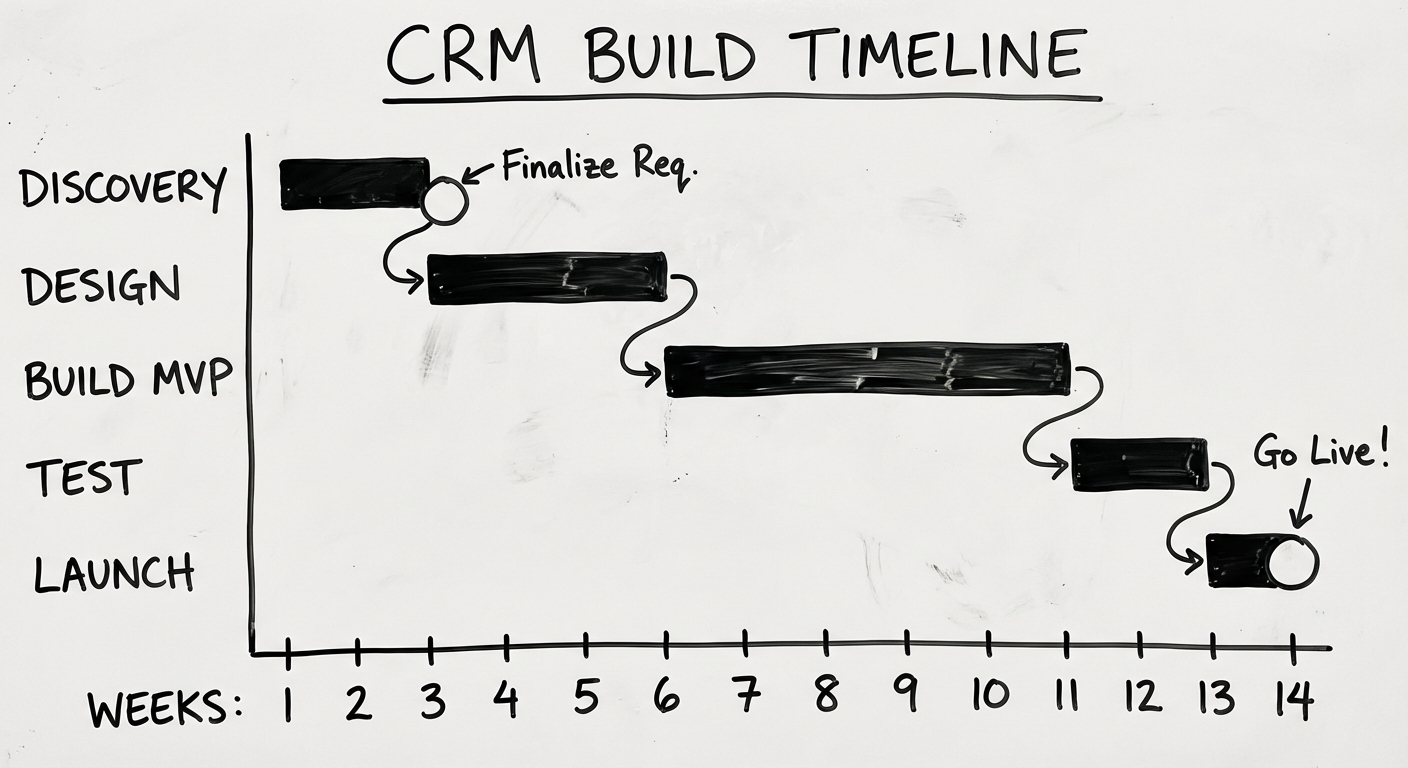
Timeline & Costs
Realistic timeline for an MVP CRM:
| Phase | Duration | Focus |
|---|---|---|
| Discovery & Design | 3-4 weeks | Requirements, data model, UX |
| Core Build | 6-8 weeks | Modules 1-5 |
| Integrations & Testing | 4-5 weeks | Connections, QA, UAT |
| Deployment & Migration | 1-2 weeks | Go-live, data transfer |
| Total MVP | 14-19 weeks |
Cost ranges (Australian market, 2026):
- Simple CRM (contacts, pipeline, basic reporting): $40K-$80K
- Mid-range CRM (+ integrations, automation, mobile): $80K-$150K
- Enterprise CRM (multi-team, advanced analytics, API platform): $150K-$300K+
Ongoing costs: Budget 15-20% of build cost annually for maintenance, hosting, and iteration.
The maths that matters: If your team of 20 pays $150/seat/month for Salesforce, that’s $36K/year. A $100K custom CRM pays for itself in under 3 years—and you own the asset.
Common Mistakes (and How to Avoid Them)
1. Building Salesforce from scratch You’re not building a platform for thousands of companies. You’re building a tool for YOUR company. Resist feature bloat.
2. Skipping the workflow map Jumping to “we need a pipeline view” without mapping the actual sales process guarantees rework.
3. Ignoring mobile from the start Retrofitting mobile into a desktop-first CRM is painful and expensive. Design responsive from day one.
4. No data migration plan “We’ll figure out migration later” is how you end up with a beautiful empty CRM and a team still using spreadsheets.
5. Building integrations too early Integrations are fragile. Build them after your core data model is stable, not before.
6. Not measuring adoption If you don’t track whether people actually use the CRM, you won’t know it’s failing until it’s too late.
7. Treating launch as the finish line Launch is the starting line. Budget time and money for 3-6 months of post-launch iteration. This is where good CRMs become great ones.
Ready to Build Your CRM?
Building a custom CRM is a significant investment—but for the right business, it’s the difference between a sales team fighting their tools and a sales team powered by them.
The key is starting with your workflow, not a feature list. Map how your team actually sells, design a system that supports that process, and iterate based on real usage.
If you’re evaluating whether a custom CRM makes sense for your business, we’ve helped companies across healthcare, logistics, and professional services build CRM systems that their teams actually use.
Want to understand the full build-vs-buy picture? Read our CRM Software Guide. For a broader look at custom software, check out our Complete Guide to Custom Software Development.
Need help putting this into practice?
Book a Blueprint session and we'll turn the ideas in this article into your next validated release.
Book a Discovery Call