Guide
CRM Software: The Complete Guide for Business
Your sales team is copying leads from emails into spreadsheets. Your account manager has “the relationship” in their head—not in a system. Marketing sends campaigns to people who already bought last month. And when someone leaves the company, their entire client knowledge walks out the door with them.
This isn’t a people problem. It’s a systems problem. And it gets worse as you grow.
A CRM system doesn’t just organise contacts—it becomes the single source of truth for every customer interaction your business has. Get it right, and your team spends less time on admin and more time closing deals. Get it wrong, and you’ve just built an expensive address book nobody uses.
This guide breaks down what CRM software actually does, when off-the-shelf works, when to build custom, and how to make the right call for your business.
What is CRM Software?
CRM software (Customer Relationship Management software) is a system that centralises all customer data, interactions, and business processes into a single platform—giving sales, marketing, and support teams a shared view of every relationship.
Think of it as the operating system for your revenue engine. Instead of scattered information across inboxes, spreadsheets, and sticky notes, a CRM captures every touchpoint: first website visit, sales calls, emails, proposals, invoices, and support tickets.
The result: anyone on your team can pick up any customer relationship and know exactly where things stand.
Why CRM Software Matters
Businesses don’t fail because they lack customers. They fail because they can’t manage the ones they have.
The Real Cost of No CRM
Without a CRM, you’re likely experiencing:
- Data silos — Sales knows things marketing doesn’t. Support has context nobody else sees.
- Dropped leads — Enquiries fall through the cracks when there’s no system tracking follow-ups.
- Inconsistent experience — Customers repeat themselves because your team doesn’t share context.
- Zero visibility — Management can’t see the pipeline, forecast revenue, or identify bottlenecks.
- Key-person risk — When a salesperson leaves, their relationships and deal context leave too.
These aren’t minor inconveniences. They compound. A study by Nucleus Research found that CRM systems return an average of $8.71 for every dollar spent. But only when actually adopted—which is the hard part.
When You Need a CRM
If any of these sound familiar, it’s time:
- You have more than 2-3 people talking to customers
- Your sales cycle involves multiple touchpoints over weeks or months
- You’ve lost a deal because someone forgot to follow up
- Your reporting relies on asking people “how’s your pipeline looking?”
- You’re spending more time tracking work than doing work
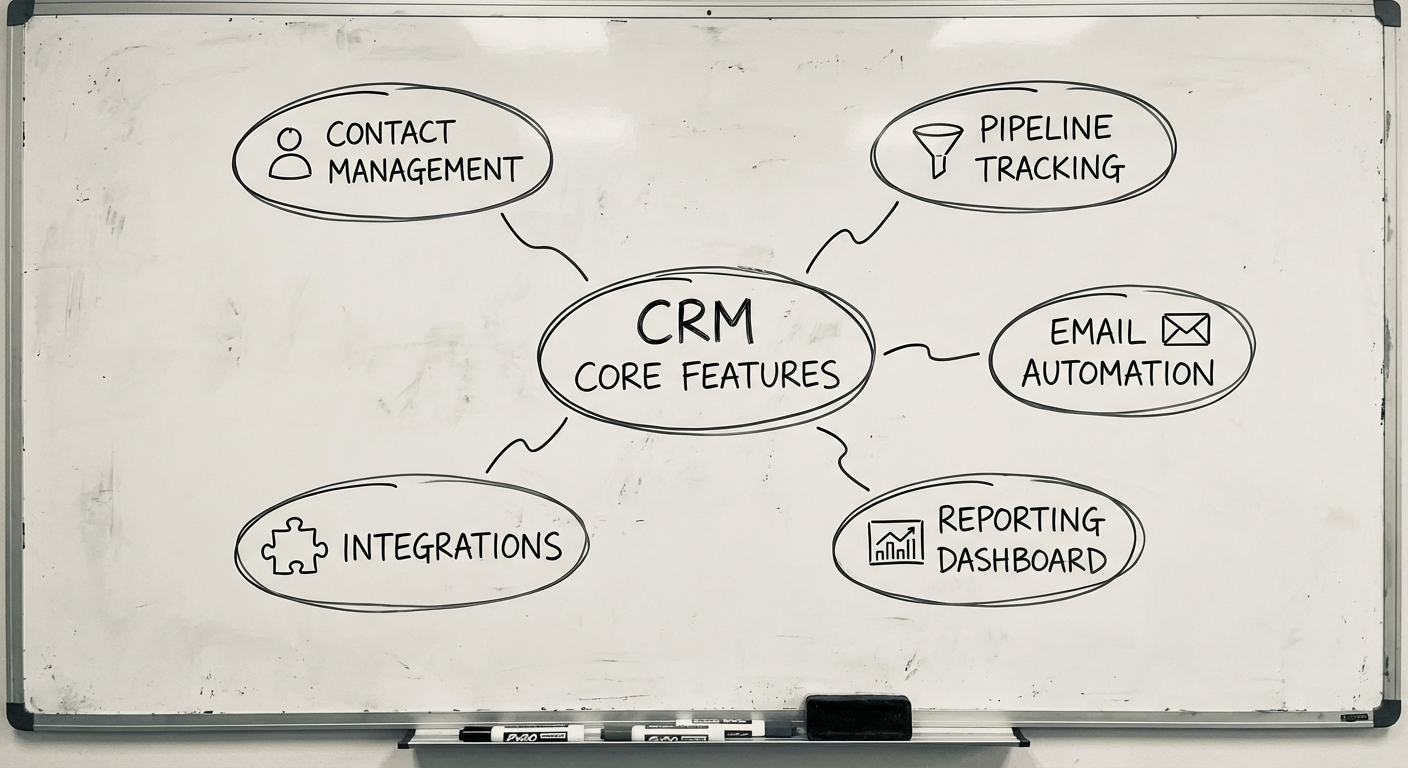
Core Features of CRM Software
Not all CRMs are built the same, but the core building blocks are consistent.
1. Contact & Account Management
The foundation. Every customer, prospect, and company in one place with full interaction history.
What good looks like:
- Unified contact records with custom fields
- Company hierarchies (parent/child accounts)
- Automatic enrichment from emails, calls, and web activity
- Segmentation and tagging for targeted outreach
2. Sales Pipeline Management
Visual tracking of every deal from first touch to close.
What good looks like:
- Drag-and-drop pipeline stages (customisable per business)
- Deal probability and weighted forecasting
- Activity tracking (calls, meetings, emails) per deal
- Automated reminders for stale deals
This is where most businesses see immediate ROI. A visible pipeline forces accountability and exposes bottlenecks that were previously invisible.
3. Marketing Automation
Turning leads into qualified prospects without manual effort.
What good looks like:
- Email campaign management with personalisation
- Lead scoring based on behaviour and demographics
- Landing page and form builders that feed directly into the CRM
- Campaign attribution — which marketing efforts actually produce revenue
4. Customer Support & Ticketing
Post-sale relationship management that turns buyers into repeat customers.
What good looks like:
- Ticket creation from email, chat, or phone
- SLA tracking and escalation rules
- Knowledge base integration
- Customer satisfaction scoring (CSAT, NPS)
5. Reporting & Analytics
Turning data into decisions.
What good looks like:
- Real-time dashboards for pipeline, revenue, and activity
- Custom reports without needing a developer
- Forecasting models based on historical conversion rates
- Team performance metrics
6. Integration Layer
A CRM that doesn’t connect to your other tools is just another silo.
Essential integrations:
- Email (Gmail, Outlook) — Auto-log conversations
- Calendar — Schedule meetings without leaving the CRM
- Accounting (Xero, MYOB, QuickBooks) — Quote-to-invoice flow
- Marketing tools — Mailchimp, HubSpot, or custom platforms
- Communication — Slack, Teams, or SMS for internal notifications
Build vs Buy: The CRM Decision Framework
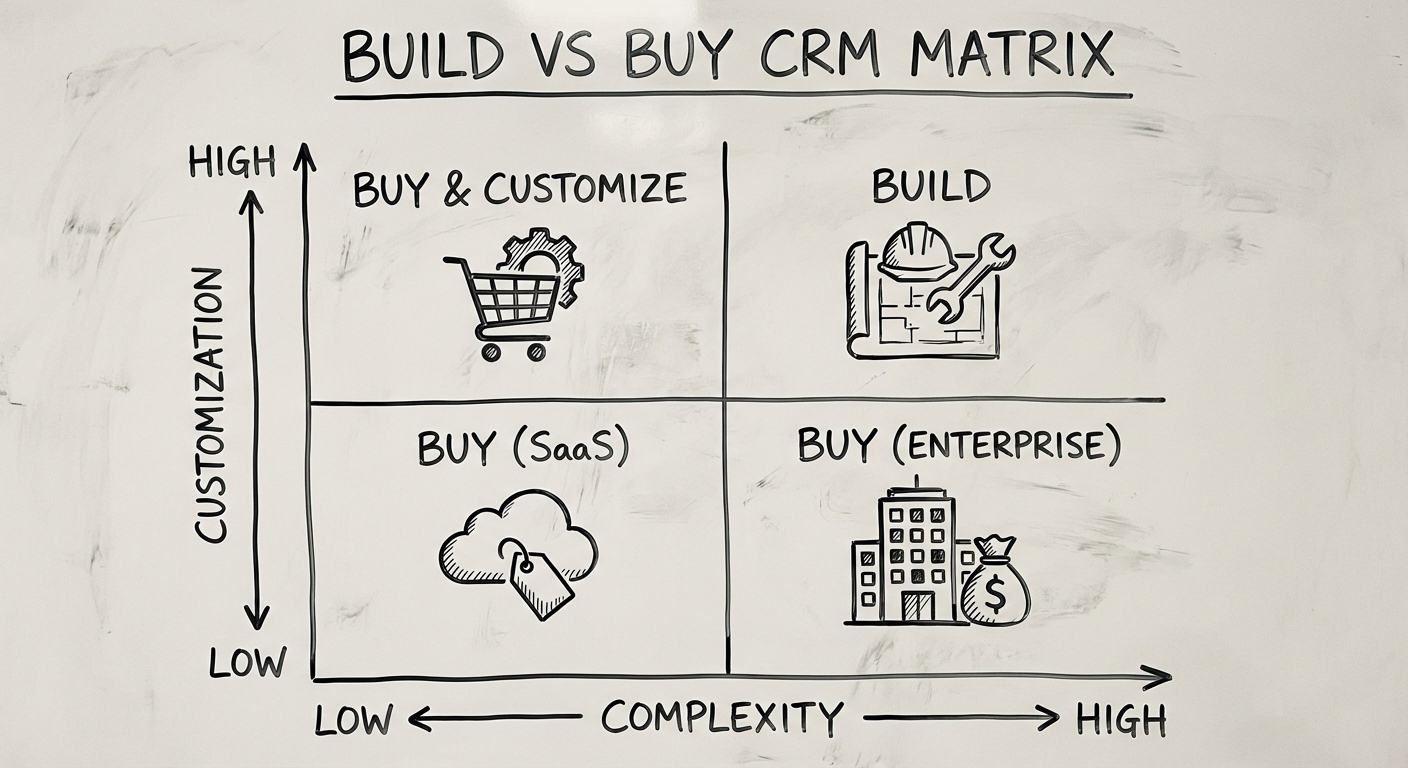
This is where most businesses get stuck. The market has hundreds of off-the-shelf options. But plenty of companies still build custom. The right answer depends on how your business actually works.
When to Buy Off-the-Shelf
Buy when your sales process is standard and your team is small.
Off-the-shelf CRM software works well if:
- Your sales process follows a conventional funnel (lead → qualify → propose → close)
- You have fewer than 50 users
- Standard integrations cover your tech stack
- You don’t need proprietary workflows or algorithms
- You want to be operational in days, not months
Top options by business size:
| Business Size | Recommended | Starting Price (AUD/user/month) |
|---|---|---|
| Micro (1-5) | HubSpot Free, Pipedrive | Free - $21 |
| Small (5-20) | HubSpot Starter, Zoho CRM | $25 - $45 |
| Mid-market (20-200) | Salesforce, HubSpot Professional | $100 - $200 |
| Enterprise (200+) | Salesforce Enterprise, Microsoft Dynamics | $200+ |
When to Build Custom
Build when your CRM needs to do things no off-the-shelf product was designed for.
Custom CRM development makes sense when:
- Your industry has unique workflows — healthcare patient journeys, logistics dispatch, real estate property matching
- You need deep integration with proprietary systems or legacy platforms
- Per-user pricing is killing you — 200 users × $150/month = $360K/year (that buys a lot of custom development)
- You need full data sovereignty (regulated industries, government contracts)
- Your CRM IS your competitive advantage — the way you manage relationships is fundamentally different from competitors
For a deeper analysis of this decision, see our Build vs Buy guide.
The Hybrid Path
Often the smartest move is somewhere in between:
- Start with off-the-shelf, customise via APIs — Use Salesforce or HubSpot as the core, build custom modules around it
- Custom front-end, standard back-end — Build the interface your team wants on top of a CRM’s API
- Off-the-shelf CRM + custom integrations — Keep the CRM simple but build middleware that connects everything
Our recommendation: Start with off-the-shelf unless you have a clear, validated reason to build custom. You’ll learn your real requirements faster by using a system than by specifying one.
Custom CRM Development: Tech Stack Recommendations
If you’ve decided custom is the right path, here’s what a modern CRM tech stack looks like from our perspective.
Front-End
| Technology | Why |
|---|---|
| React or Next.js | Component-based, massive ecosystem, easy to hire for |
| TypeScript | Catches bugs before they reach users |
| Tailwind CSS | Rapid, consistent UI development |
Back-End
| Technology | Why |
|---|---|
| Node.js (NestJS) or Python (FastAPI) | Fast development, strong ecosystem |
| PostgreSQL | Reliable, scalable, excellent for relational data (which CRM data is) |
| Redis | Caching, session management, real-time features |
Infrastructure
| Technology | Why |
|---|---|
| AWS or Google Cloud | Enterprise-grade, Australian data centres available |
| Docker + Kubernetes | Consistent deployments, horizontal scaling |
| Vercel or Railway | Simpler alternative for smaller CRM builds |
Key Architectural Decisions
- Multi-tenant vs single-tenant — Multi-tenant if you’re building CRM-as-a-product; single-tenant for internal use
- API-first design — Build the API before the UI. This future-proofs mobile apps, integrations, and automation
- Event-driven architecture — Use events (not direct calls) for notifications, audit logs, and integrations. Makes the system extensible without spaghetti code
For a complete walkthrough of the development process, read our Custom Software Development Guide.
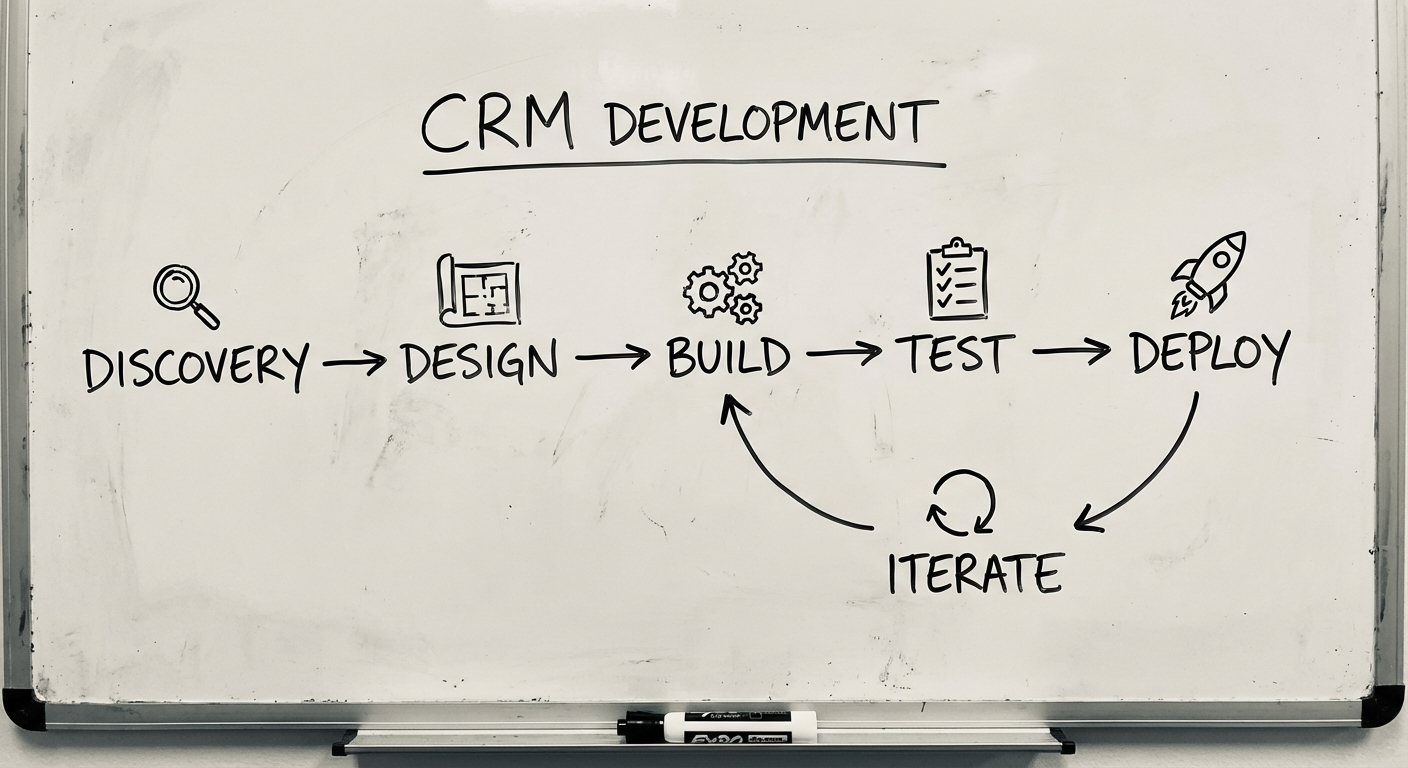
The CRM Development Process
Building a custom CRM follows a structured process. Here’s what each phase looks like specifically for CRM projects.
Phase 1: Discovery & Requirements (2-4 weeks)
Map your current customer journey first. Before designing screens, understand:
- How do leads enter your world? (Website, referral, cold outreach, events?)
- What does your sales process actually look like? (Not the idealised version—the real one.)
- Where does information get lost or duplicated?
- What reports does management need to make decisions?
Deliverables: Customer journey map, data model, feature priority matrix, and go/no-go decision.
Phase 2: Design & Prototyping (2-3 weeks)
CRM software lives or dies on usability. If it’s harder to use than a spreadsheet, your team will go back to spreadsheets.
- Design for daily workflows, not edge cases
- Minimise clicks for the actions people do 50 times a day (logging calls, updating deals, sending follow-ups)
- Build interactive prototypes and test with actual users before writing code
Phase 3: Development (8-16 weeks)
Build in phases, not all at once:
- Core data model — Contacts, companies, deals, activities
- Pipeline and workflow engine — The heart of the CRM
- Communication integration — Email sync, calendar, notifications
- Reporting and dashboards — Visibility for management
- Automation rules — Follow-up reminders, lead assignment, escalations
Each phase should produce working software your team can test.
Phase 4: Data Migration (1-2 weeks)
Moving from spreadsheets or an old CRM is where projects get messy.
- Clean your data before migrating — Duplicates, incomplete records, and outdated contacts will poison the new system
- Map fields between old and new systems
- Run parallel systems for 2-4 weeks before cutting over
Phase 5: Training & Adoption (2-4 weeks)
The best CRM in the world fails if nobody uses it. Adoption is a change management challenge, not a software challenge.
- Train by role (sales reps need different training than managers)
- Identify internal champions who drive adoption within their teams
- Make the CRM the only place to log activity (remove the spreadsheet option)
- Measure adoption metrics: daily active users, data completeness, pipeline accuracy
Phase 6: Iteration (Ongoing)
Launch is version 1.0, not the finish line. Plan for continuous improvement based on real usage data.
How Much Does CRM Software Cost?
Transparency matters. Here are realistic numbers for the Australian market.
Off-the-Shelf CRM Costs
| Tier | Monthly Cost (AUD) | Annual Cost (50 users) |
|---|---|---|
| Free/Starter | $0-25/user | $0 - $15,000 |
| Professional | $50-150/user | $30,000 - $90,000 |
| Enterprise | $150-300/user | $90,000 - $180,000 |
Don’t forget: Implementation ($10K-$100K), customisation, training, and ongoing admin. The license is often less than half the total cost of ownership.
Custom CRM Development Costs
| Scope | Timeline | Cost Range (AUD) |
|---|---|---|
| Basic — Contacts, pipeline, basic reporting | 2-3 months | $50K - $100K |
| Standard — Above + email integration, automation, dashboards | 4-6 months | $100K - $250K |
| Advanced — Above + custom workflows, AI features, mobile app | 6-12 months | $250K - $500K |
| Enterprise — Multi-division, complex integrations, advanced analytics | 12+ months | $500K+ |
Plus ongoing costs:
- Hosting and infrastructure: $500-$3,000/month
- Maintenance and updates: 15-20% of build cost annually
- Support and enhancements: based on scope
The Break-Even Question
Custom CRM typically breaks even against enterprise SaaS licensing within 2-3 years for organisations with 50+ users. The math shifts further in custom’s favour as your user count grows — SaaS charges per seat, custom doesn’t.
Run the numbers for your specific case. Compare 3-year total cost of ownership, not just upfront price.
Common CRM Implementation Mistakes
We’ve seen these patterns across dozens of CRM projects. Avoid them.
1. Buying the biggest platform “just in case” Salesforce Enterprise is powerful. It’s also $200+/user/month and takes months to configure properly. Start with what you need today, not what you might need in 2028.
2. Customising without a strategy Adding every custom field, workflow, and automation someone requests creates a maintenance nightmare. Every customisation is a decision you’ll live with for years.
3. Ignoring data quality A CRM is only as good as the data in it. Establish data entry standards, automate where possible, and assign someone to own data quality from day one.
4. No executive sponsorship CRM adoption requires top-down commitment. If leadership doesn’t use it, nobody will. The CEO should be the first person checking the pipeline dashboard every Monday.
5. Treating it as an IT project CRM is a business transformation project that happens to involve technology. Sales, marketing, and customer success should drive requirements — not IT alone.
Getting Started with CRM Software
Ready to move from spreadsheets to a system? Here’s how to take the first step.
1. Audit Your Current State
Document how customer data flows through your business today. Where does it live? Who touches it? Where does it break?
2. Define Your Must-Haves
List the 5-10 features you absolutely need on day one. Everything else is Phase 2. Ruthless prioritisation controls both cost and complexity.
3. Evaluate 2-3 Options
Whether buying or building, get multiple perspectives. Pay attention to how vendors ask questions — the best partners probe your business before pitching features.
4. Start Small, Prove Value
Pick one team or one process. Get it working. Measure the impact. Then expand. A successful pilot builds internal momentum that no amount of executive mandates can match.
5. Invest in Discovery
If you’re considering custom CRM development, don’t jump straight to building. A 2-4 week discovery phase validates requirements, reduces risk, and builds confidence before you commit serious budget.
Ready to Build Your CRM Strategy?
At Synetica, we’ve helped businesses across healthcare, logistics, and professional services implement CRM systems that people actually use. Whether you need help evaluating off-the-shelf options or building something custom, our Blueprint process takes you from idea to validated plan in 2 weeks.
We’ll map your customer journey, assess your options, and recommend the right path — buy, build, or hybrid. No obligation, no pitch deck — just a practical conversation about what your business actually needs.
Have questions about CRM software for your business? Contact us or connect on LinkedIn.
Need help putting this into practice?
Book a Blueprint session and we'll turn the ideas in this article into your next validated release.
Book a Discovery Call