Guide
CRM Software: Custom vs SaaS for Your Sales Team
CRM software should fit the way your sales team wins and serves customers. If you are choosing between SaaS and custom CRM, start with the work that breaks today: an unassigned inquiry, a quotation stuck in approval, or a won deal that operations never receives. Buying more features will not settle those decisions.
At Synetica, our delivery portfolio includes connecting Seva.id with Astra’s existing CRM and sales systems. That is a useful starting point: sometimes the valuable work is connecting an established system, rather than replacing it.
This guide gives you a SaaS, custom, and hybrid decision framework, a vendor test, an explicit three-year cost example, and a phased rollout. The cost model is illustrative, not a vendor quote or a promise that custom always saves money.
TL;DR — the whole guide in five lines:
- Choose SaaS when configuration supports the workflows that matter, even if your team is large.
- Choose custom when a proven, valuable workflow cannot fit existing software, and you can own its ongoing operation.
- Choose hybrid when the CRM core works but a specific handoff needs engineering.
- Compare three-year operating cost, not subscription against build price. Include migration, maintenance, integrations, and exit.
- Validate one complete sales workflow before expanding. A working pilot is better evidence than a polished demo.

What does a real CRM integration project show?
The Seva.id case demonstrates a connection strategy, not evidence that every company needs a custom CRM. The documented scope includes automotive and property lead-generation websites, routing into Astra CRM, and connections to finance and partner APIs.
| Documented component | Job it performs | Decision it illustrates |
|---|---|---|
| Multi-site website | Capture inquiries across product verticals | Build the customer-facing experience where needed |
| Existing Astra CRM | Receive leads for the appropriate sales teams | Keep a working relationship system |
| Custom integrations | Connect finance and partner systems | Engineer the handoff between systems |
This case does not publish a CRM implementation budget or a conversion uplift. I would not use it to promise either. Its practical lesson is narrower: identify which layer needs changing before commissioning a replacement.
Read the Seva.id delivery scope and sketch the equivalent boundaries in your business.
What is CRM software?
CRM software is an application that gives customer relationships a shared record, a responsible owner, and a next action. SaaS means subscribing to a provider-operated application. Custom means commissioning software around agreed requirements. Hybrid combines a purchased CRM with deliberately scoped custom components.
Your starting application should help you:
- Capture inquiries without losing their source.
- Assign ownership and record the next follow-up.
- Track opportunities through agreed stages.
- Share relationship history with service and operations.
For strategy, CRM types, and the customer lifecycle, use the separate CRM definition guide. Here, the decision is which implementation fits your sales work.
CRM software: SaaS vs custom vs hybrid
Use workflow fit as the first filter; use cost and operating responsibility to choose between options that pass. A cheap system that cannot complete the critical handoff is an incomplete proposal.
| Route | Upfront cost | Time to useful pilot | Flexibility | Best fit |
|---|---|---|---|---|
| SaaS | Configuration, migration, onboarding | Usually the shortest route for standard workflows; verify in trial | Within the product, plan, and extension limits | Established sales processes |
| Custom | Discovery, design, engineering, migration | Requires validation and build before production | High within the budget and architecture | Valuable requirements existing products cannot support |
| Hybrid | SaaS setup plus scoped engineering | Depends on the difficult integration | Flexible at defined boundaries | Working CRM core with a specific operational gap |
These are relative planning differences, not delivery guarantees. A messy SaaS migration can take longer than a narrow custom component. Map the workflow first before turning either into a schedule.
Which CRM software features are essential?
Specify a completed action for each capability, so your vendor must demonstrate work rather than a menu. Start with six capabilities and a named business owner.
| Capability | Acceptance test | Business owner |
|---|---|---|
| Lead capture and deduplication | A repeated inquiry updates the correct customer | Sales operations |
| Pipeline and follow-up | Every active deal has an owner, stage, and dated next action | Sales manager |
| Activity history | A colleague can continue the conversation from the record | Account manager |
| Quotation and approval | An exception reaches the approver and records the decision | Commercial lead |
| Handoff and integration | A won deal reaches operations without duplicate entry | Operations lead |
| Access and reporting | A rep sees permitted accounts; reports reconcile with records | System owner |
Ask a field rep to complete the same actions on their phone. If updating a visit requires a laptop and another spreadsheet, the workflow remains unfinished.
Take these tests into your vendor due-diligence review. Extra dashboards can wait until the underlying records are trustworthy.
When is SaaS enough, and when should you build custom CRM?
An unusual preference is not the same as a commercially important requirement. Before choosing custom, test whether configuration, a supported extension, or a simpler process resolves the gap.
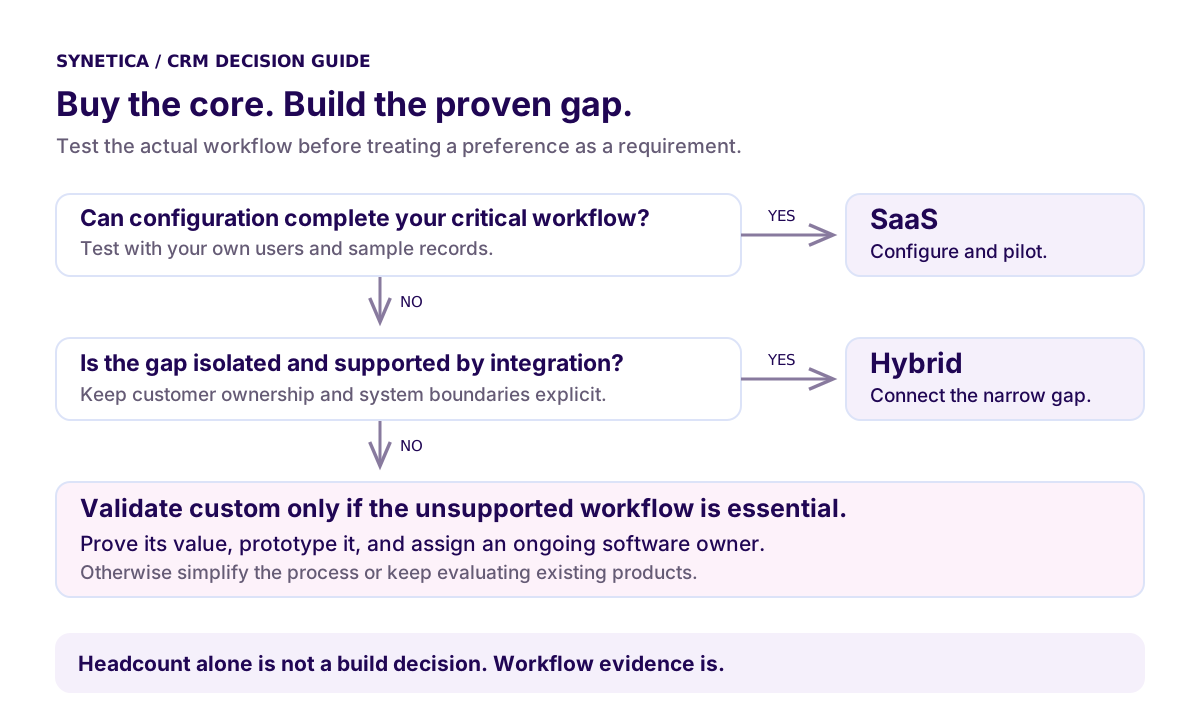
For example, consider a distributor with 20 salespeople. Territory assignment, follow-up reminders, and a shared pipeline are requirements to test in SaaS first. An extra field alone is weak justification for a new application.
Now suppose pricing depends on contract tiers, available stock, and finance approval. If CRM can hold the customer and opportunity while an integration retrieves approved prices, hybrid deserves a trial. If the entire selling process depends on a relationship model existing products cannot represent, a custom prototype becomes reasonable.
These are illustrative scenarios, not client results. Team size does not settle the answer: 50 users is neither a build trigger nor a guaranteed break-even point.
“A CRM earns adoption one completed workflow at a time. Start with the handoff that currently drops the most context.” — Ganis Atmawarin, CRM definition guide
Custom also needs an owner for access reviews, defects, releases, backups, and future changes. If nobody will own those jobs, resolve that gap before approving engineering.
Validate it in 2 weeks. Through Blueprint & Prototype, map the riskiest workflow, test a working prototype with users, and define the scope and costs before committing to production.
How do you evaluate a CRM vendor?
Give each shortlisted vendor the same test dataset and scenarios. A repeatable test makes different proposals comparable. Use synthetic or anonymised records, not an uncontrolled export of customer data.
Ask vendors to demonstrate and document these eight checks:
- Workflow fit: run inquiry → qualification → quotation → won → operations handoff.
- Exceptions: handle a duplicate customer, reassignment, and rejected discount.
- User effort: time the common actions on desktop and mobile.
- Integration: identify the source of truth and show how a failed transfer is retried.
- Migration: import a sample and reconcile records, relationships, and history.
- Controls: demonstrate access restrictions, activity logs, and account removal.
- Commercial scope: list plan restrictions, add-ons, onboarding, and support charges.
- Exit: export records and relationships, identify excluded data, and document handover.
Keep a simple evidence scale: 0 = unsupported, 1 = claimed, 2 = demonstrated, 3 = completed by your user. This is a proposed evaluation rubric, not an industry benchmark. A must-have that fails blocks selection regardless of the overall score.
For deeper contract and delivery questions, use the software vendor checklist. Ask who fixes an integration incident when two providers each say their application is healthy.
How much does CRM software cost in Indonesia?
A subscription price and a build quote cover different things. Compare the same operating period and scope. The Zoho CRM pricing page separates editions and monthly versus annual billing; check the required edition and billing terms before collecting a quote.
For custom work, Synetica’s Indonesian service pages currently list Blueprint & Prototype from IDR 49 million and Production Grade Software from IDR 200 million. These are separate starting prices, not a complete CRM project quote. Migration complexity and integrations still need scoping.
A three-year CRM cost example
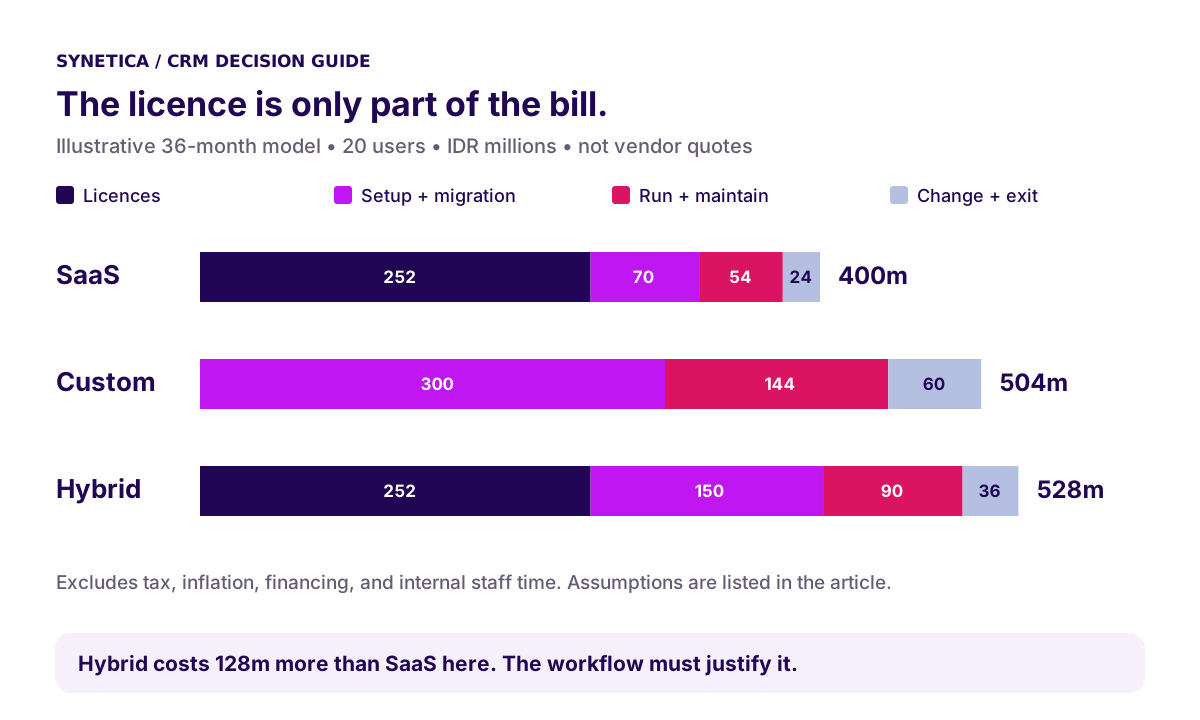
Use this illustrative IDR model for 20 users, with no seat growth. The assumed subscription of IDR 350,000 per user per month is a modelling input, not a quoted vendor rate.
| Cost over 36 months | SaaS | Custom | Hybrid |
|---|---|---|---|
| Licences | 252m | 0m | 252m |
| Setup/build, migration, training | 70m | 300m | 150m |
| Hosting, support, maintenance | 54m | 144m | 90m |
| Change and exit allowance | 24m | 60m | 36m |
| Total | 400m | 504m | 528m |
The licence calculation is 20 × IDR 350,000 × 36 = IDR 252 million. Custom’s zero licence entry assumes no per-seat CRM fee; infrastructure and any paid dependencies must still be budgeted.
What changes the CRM cost decision?
SaaS wins this example on cost; hybrid must earn its extra IDR 128 million through workflow value. It does not become cheaper merely because it sounds like a compromise.
This model excludes tax, inflation, financing, and internal staff time. Add those consistently, then test higher seat counts, licence increases, additional integrations, and maintenance needs. A custom project is not automatically profitable after two years.
If you claim time savings, measure a baseline first. Minutes saved only become a business benefit when the team can use that capacity. Bring both your assumptions and vendor quotes to a Blueprint discussion.
How do you roll out CRM software in phases?
Expand after a workflow passes its acceptance test, not just because a calendar date arrives. HubSpot’s implementation guidance emphasises clear lead ownership, data cleanup, and moving data in sections. Those principles apply to custom implementations too.
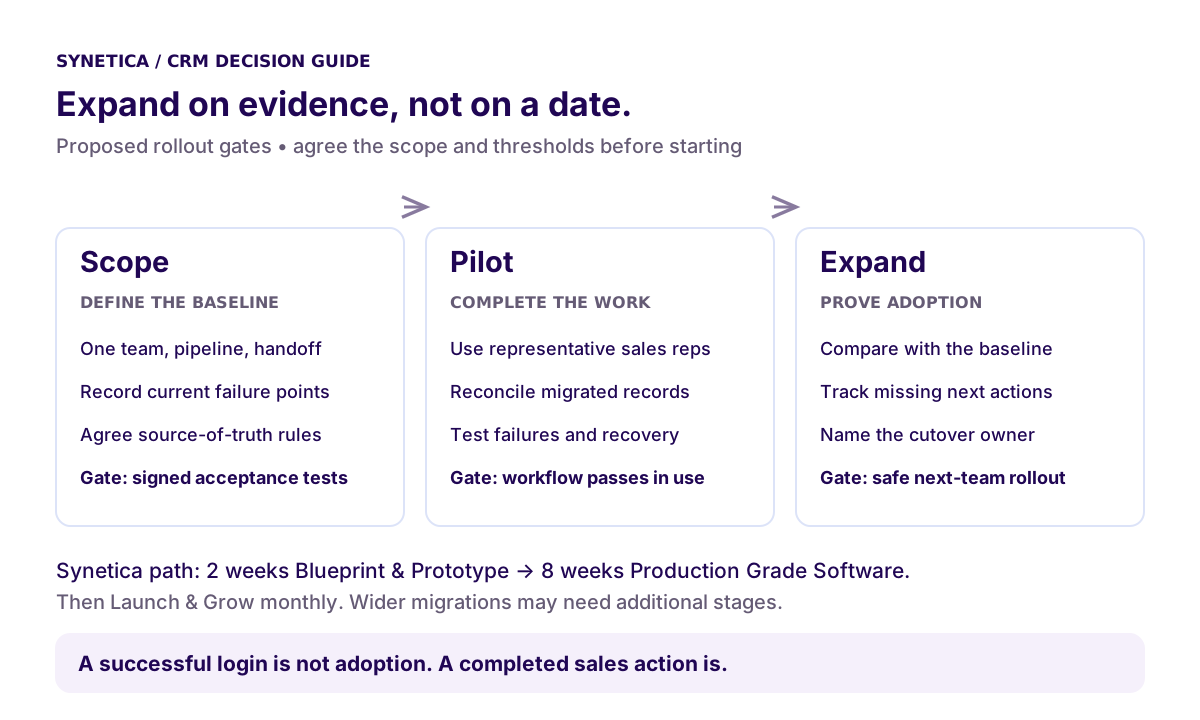
Scope: agree what success means
Choose one team, one pipeline, and one handoff. Record existing follow-up coverage, duplicate records, and time to assign leads. Agree which source owns customer identity and how migrated records will be reconciled.
Synetica’s Blueprint & Prototype phase takes two weeks to validate direction. It produces a decision-ready plan and working prototype; it is not the production release.
Pilot: make one workflow work in production
For an agreed, validated scope, Production Grade Software is the next eight-week phase: ten weeks from idea to production release across the two phases. A broader CRM migration may require additional stages. SaaS configuration follows the agreed vendor plan, not an assumed custom-build schedule.
Use a small representative group, including someone who handles exceptions. Require every pilot record to have an owner, reconcile the migration, and test failed handoffs and recovery before wider release.
Expand: use evidence to add the next team
A login is not adoption; a completed sales action is. Track completed follow-ups, missing next actions, duplicate rates, and unresolved sync errors. Compare them with the baseline and investigate the actual records behind the numbers.
Keep a cutover owner, a backup export, and clear rollback conditions. Launch & Grow then supports analytics and iteration through an ongoing monthly retainer. Review the production delivery scope before agreeing which rollout responsibilities belong to whom.
What I would recommend to your sales team
Start with the smallest route that completes your highest-value workflow. For Dreamers with a straightforward pipeline, that often means testing an existing application. Growing Businesses should pay closer attention to cross-team ownership and integration boundaries.
Buy the standard capabilities. Build only the gaps whose value you can explain and test. If the argument for custom is simply “we want everything in our own system,” spend another session on the business case.
Your next step: bring one broken sales workflow to Blueprint & Prototype.
FAQ
What is CRM software?
CRM software records customer information, activities, deal stages, owners, and follow-ups so teams can coordinate sales and service. Its value depends on clear processes and reliable use.
What is the best CRM application?
The best fit completes your critical workflows, supports your integrations, and fits your operating budget. Have your own users run the same acceptance tests in each shortlisted application.
How much does CRM software cost?
Request licences, onboarding, migration, integrations, support, and exit costs over the same period. This guide’s IDR 400–528 million three-year example is an illustrative model, not a market price range.
Can you build a custom CRM?
Yes. Validate the unsupported workflow first, then define production scope, data migration, access controls, and ongoing ownership. Custom development is justified by valuable requirements, not headcount alone.
Is SaaS or custom CRM better?
SaaS suits workflows that fit configuration. Custom suits proven requirements existing products cannot support. Hybrid can retain a useful SaaS core and connect specific operational gaps, with an explicit owner for each boundary.
Related Posts
Two weeks to a real answer
Need help putting this into practice?
Book a Blueprint session and we'll turn the ideas in this article into a tested prototype in front of real users—2 weeks, from $3,000.