Guide
What Is CRM? A Practical Guide for Indonesian Businesses
CRM is a system for managing customer relationships through shared data, clear ownership, and repeatable workflows. If you are searching for a definition, the acronym is the easy part. The harder question is whether CRM will fix missed follow-ups, fragmented context, and an unreliable sales pipeline—or merely move the same disorder into a new screen.
We have spent 15+ years mapping and building business systems where sales, operations, and service must work from the same facts. The pattern is consistent: CRM creates value when the team agrees on the customer journey before configuring fields and automation.
This guide explains what CRM means, how it works, how it differs from nearby tools, its three main types, practical examples, and the mistakes to avoid before choosing a platform.
TL;DR — the whole guide in five lines:
- CRM is a shared operating record for customer relationships, not an expensive contact list.
- It connects identity, history, ownership, status, and next action across sales, marketing, and service.
- Operational CRM moves work, analytical CRM explains patterns, and collaborative CRM shares context.
- The right first scope is one complete customer workflow, not every feature in the demo.
- Adoption is the real launch metric: ten out of ten sampled records should be current and actionable.
Proof first: run a ten-lead audit
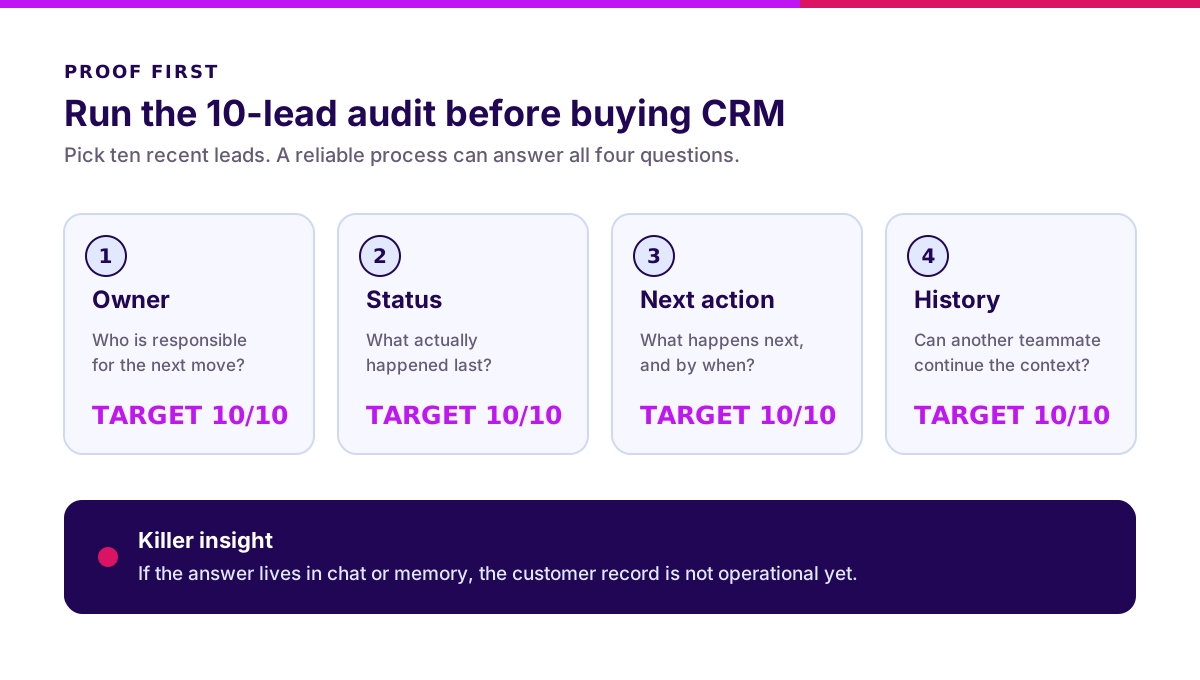
Before comparing vendors, pick ten recent leads. For each one, answer four questions without asking the salesperson who owns the relationship:
- Who owns the next move?
- What happened last?
- What happens next, and by when?
- Can another teammate continue with the full context?
Score one point for every complete answer. The target is 40 out of 40. If ownership sits in a spreadsheet, the next action in WhatsApp, and the latest proposal in someone’s inbox, your problem is not “we need a dashboard.” Your problem is that the customer record is not operational.
This audit is a better CRM business case than a 70-feature checklist. It exposes the exact handoff and data failures a first implementation must fix.
Use the result as your baseline. Repeat the audit after a four-week pilot. If the score does not improve, adding AI will not rescue the implementation. It will only automate uncertain data faster.
What is CRM? A short definition
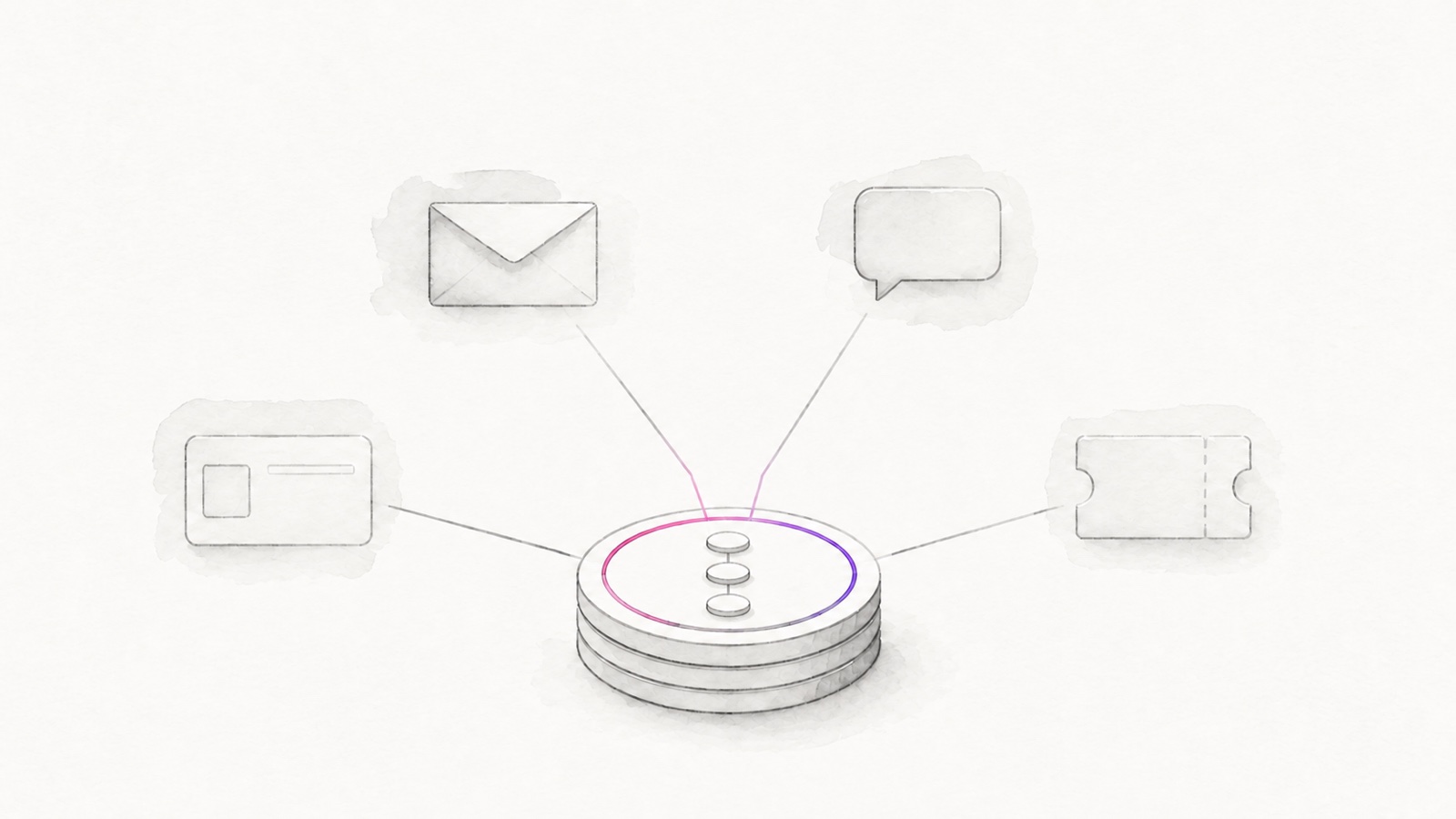
CRM stands for Customer Relationship Management: the strategy, process, and software used to manage interactions with prospects and customers across their lifecycle. It gives each relationship a durable record instead of leaving context across memory, chat, email, and separate files.
Salesforce defines CRM as a system for managing interactions with current and potential customers. The useful word is system. CRM includes the operating rules around the software: what counts as a qualified lead, who owns follow-up, when a deal becomes stale, which service promise applies, and who may access personal data.
A contact list answers, “Who is this?” A working CRM also answers:
- Where did the relationship begin?
- What has happened across channels?
- Who owns the next action?
- When must it happen?
- Why did the opportunity progress, stall, win, or lose?
- What should the team learn from the outcome?
Think of CRM as air-traffic control for customer work. It does not fly the planes. It gives every team one view of identity, priority, movement, and risk so two people do not land on the same runway.
CRM vs spreadsheet, contact database, marketing automation, and help desk
CRM overlaps with several tools, but its defining job is coordinating the customer lifecycle across teams. A business may still use specialist tools; the CRM becomes the relationship record and handoff layer.
| Tool | Primary job | What it usually knows | When it is enough |
|---|---|---|---|
| Spreadsheet | Flexible list and calculation | Rows entered manually | One owner, low volume, simple follow-up |
| Contact database | Store identities and details | Names, companies, contact fields | Directory or address-book use |
| Marketing automation | Acquire and nurture audiences | Sources, campaigns, engagement | Campaign execution with limited sales complexity |
| Help desk | Resolve service requests | Tickets, SLA, resolution history | Support workflow after purchase |
| CRM | Coordinate the relationship lifecycle | Identity, activity, owner, stage, next action, outcome | Multiple people or channels share customer work |
You do not need to replace every tool. You need to decide which system owns each fact. Email can remain the conversation channel. Accounting can own invoices. A help desk can own ticket operations. The CRM should connect the relationship context without pretending to be the whole company.
For the platform decision, use our separate CRM software guide. It covers SaaS, custom, and hybrid choices without turning this definition page into a vendor catalogue.
Why is CRM important for a growing business?
Growth creates relationship debt. More leads, channels, branches, products, and salespeople create more places for context to disappear. Early on, a founder can remember every conversation. At 500 active accounts, memory is no longer a system.
CRM matters when the cost of coordination becomes visible in revenue, service, or management time. Common symptoms include:
- Leads receive duplicate outreach—or none.
- Pipeline reviews depend on verbal updates.
- Forecast values change without an audit trail.
- Customers repeat their story after every handoff.
- Marketing cannot connect campaigns to qualified opportunities.
- Sales does not know about open service issues.
- A resignation removes months of relationship context.
The benefit is not “better data” in the abstract. A useful CRM makes a next action visible, a handoff accountable, and a pattern measurable. Microsoft’s CRM overview similarly groups CRM benefits around stronger relationships, sales automation, shared data, decisions, and efficiency.
The honest limitation: CRM cannot repair an undefined process. If two managers disagree on what “qualified” means, the system will preserve that disagreement with cleaner typography.
How does CRM work? A practical example
CRM works by adding context and ownership to the same customer record as the relationship moves from first touch to ongoing service. Consider a B2B distributor receiving an enquiry from a new retail chain:
- Capture. A website form creates the company and contact record with source, consent, product interest, and timestamp.
- Match. The system checks whether the company already exists so a second salesperson does not create a duplicate account.
- Qualify. Sales confirms fit, expected volume, buying process, decision-maker, and timing.
- Create opportunity. The deal receives a stage, estimated value, owner, probability rule, and next action.
- Coordinate. Meetings, emails, product samples, quotations, and approval tasks attach to the same timeline.
- Handoff. A won deal sends the approved customer and order context to operations or ERP. The CRM keeps commercial ownership.
- Serve. Support issues, renewals, feedback, and expansion opportunities enrich the same relationship history.
- Learn. The team compares source, conversion, cycle time, lost reason, margin, and retention to improve the next cycle.
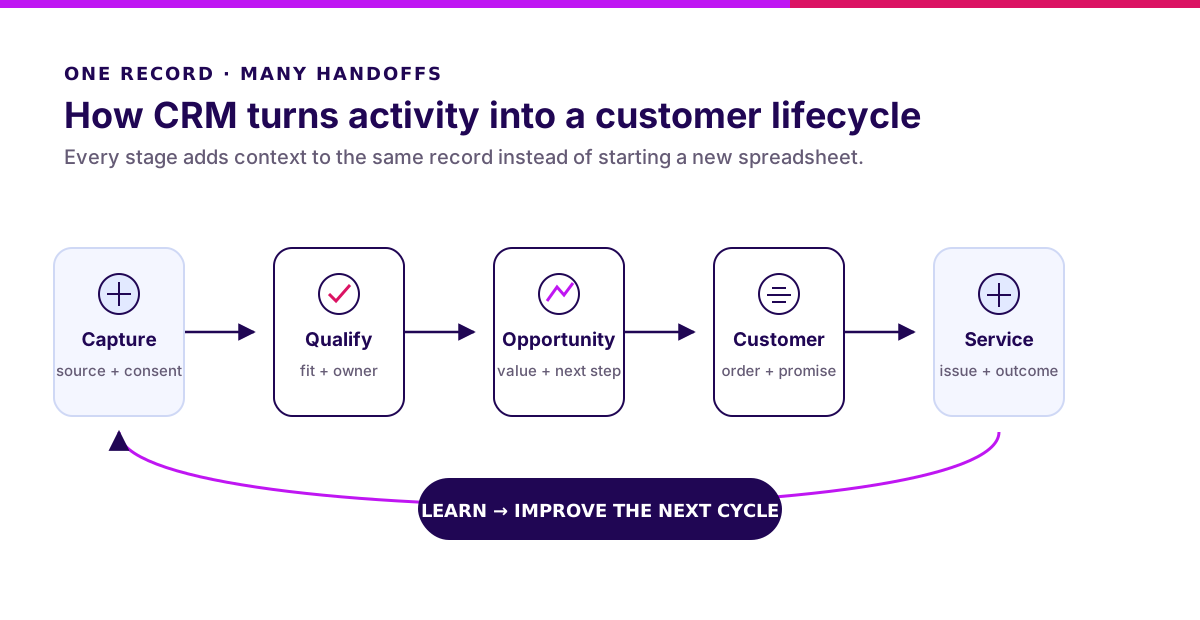
The important part is continuity. Marketing does not “hand over a lead” and lose sight of the outcome. Sales does not close a deal and erase the promise made to the customer. Service does not begin with a blank ticket.
“A CRM earns adoption one completed workflow at a time. Start with the handoff that currently drops the most context.” — Ganis Atmawarin, Synetica
If the handoff to finance, inventory, or fulfilment is the main constraint, map the boundary with the system integration guide before building more CRM screens.
What are the core components of CRM?
A practical CRM needs fewer modules than most demos suggest, but every core component needs an owner and operating rule. Start with these:
Customer and account record
Store identity, company relationships, channels, preferences, consent, and classification. Define duplicate rules and one accountable data owner.
Activity timeline
Capture calls, meetings, emails, messages, notes, documents, and outcomes. Logging everything is not the goal; preserving decision context is.
Lead and opportunity workflow
Define entry criteria, stages, required evidence, value, probability, next step, due date, and lost reason. A stage without an exit rule is decoration.
Tasks and automation
Create reminders, assignments, approvals, and SLA alerts for predictable work. Automate stable rules first. Do not automate unresolved politics.
Service and retention context
Connect tickets, complaints, commitments, renewals, feedback, and customer health. Revenue does not stop being a relationship after the invoice.
Reporting and governance
Track conversion, cycle time, pipeline movement, activity outcomes, retention, access, and data quality. Every report needs a decision it changes.
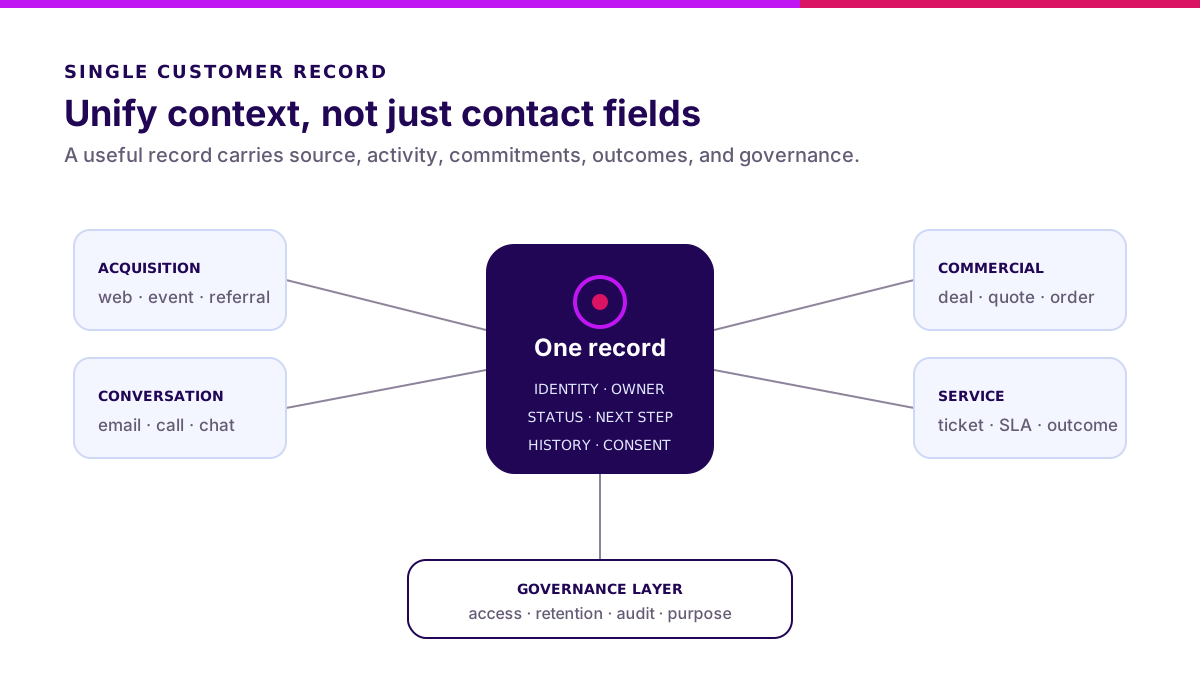
For Indonesian businesses, customer data governance belongs in the first release. Indonesia’s Law No. 27 of 2022 on Personal Data Protection regulates personal-data processing and the responsibilities around it. Translate that into product decisions: purpose, lawful basis, access, correction, retention, deletion, export, and auditability.
What are the three types of CRM?
Microsoft describes three broad CRM categories: operational, analytical, and collaborative. Modern platforms often combine them, but the distinction helps you prioritise.
Operational CRM
Operational CRM moves customer-facing work. It standardises lead capture, pipeline stages, campaigns, tasks, service queues, approvals, and follow-ups. This is usually the first need when work is being dropped.
Analytical CRM
Analytical CRM explains customer patterns. It turns reliable activity and outcome data into segments, forecasts, conversion analysis, retention signals, and next-best actions. It is valuable only after definitions and source data are trustworthy.
Collaborative CRM
Collaborative CRM shares context across boundaries. It gives sales, marketing, service, operations, and sometimes partners a consistent timeline and handoff model. It matters when customers interact through many channels or teams.
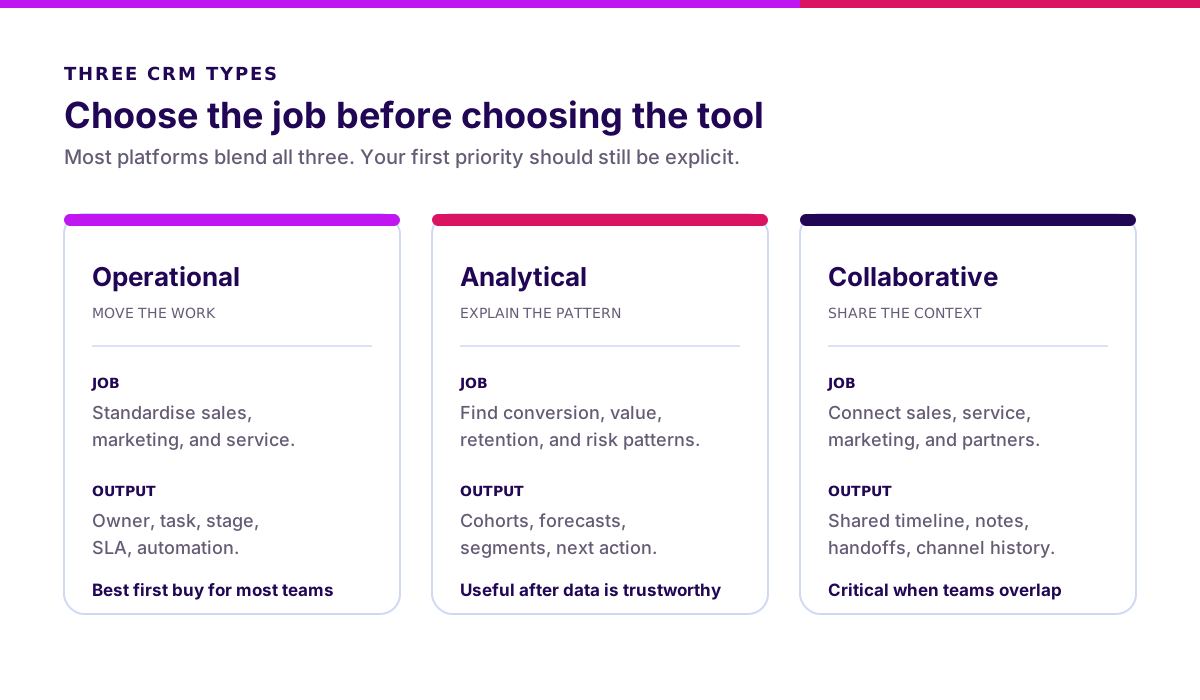
Most growing businesses should sequence the types in that order: make work visible, make data reliable, then deepen analysis. Buying advanced forecasting before sales updates next actions is a very polished way to predict stale data.
What are real examples of CRM use?
A CRM example is useful only when it names the workflow and outcome—not merely the industry. Here are three grounded patterns.
B2B distribution: enquiry to repeat order
The CRM matches enquiries to accounts, assigns territories, tracks samples and quotations, records decision criteria, and alerts account owners when a buyer becomes inactive. ERP still owns stock, invoice, and payment. The integration returns order and payment context to sales.
Property sales: source to unit reservation
The CRM connects campaign source, agent ownership, site visits, preferences, document readiness, unit availability, reservation, and follow-up. The critical controls are duplicate buyers, lead reassignment, consent, and the boundary with the inventory system.
Professional services: relationship to delivery signal
The CRM links referrals, discovery notes, stakeholders, proposals, project handoff, feedback, renewal windows, and expansion opportunities. Delivery tooling owns tasks; CRM owns the commercial relationship and promises made.
In every case, the test is the same: can a teammate understand the relationship, continue the next action, and explain the outcome from one governed record?
What common CRM mistakes should you avoid?
Most CRM failures are operating-model failures wearing a software costume. Avoid these mistakes:
- Starting with fields. Map decisions and handoffs first; fields follow.
- Migrating every old record. Clean a bounded active set before importing digital archaeology.
- Treating activity as performance. Ten calls are not success if nobody records an outcome.
- Automating too early. A broken follow-up rule becomes a faster broken follow-up rule.
- Ignoring frontline speed. If logging the common action takes longer than the spreadsheet, shadow systems return.
- Giving everyone full access. Customer data needs role-based access, review, and retention rules.
- Launching without a manager routine. Adoption rises when pipeline reviews use CRM evidence, not separate slides.
- Buying for imagined scale. Solve the next complete workflow, not the org chart you hope to have in five years.
The antidote is a small release with hard evidence: one workflow, one accountable owner, a clean active dataset, real users, and an acceptance test.
Validate it in 2 weeks. Before committing to a CRM platform or custom build, Blueprint & Prototype maps the workflow, data, permissions, and riskiest handoff—then tests the smallest useful slice with real users. See Blueprint & Prototype.
When does your business need CRM?
You probably need CRM when three conditions appear together: multiple people touch the same relationship, the journey spans several steps or weeks, and lost context affects revenue or service.
You may not need CRM yet when one person owns a small customer base, follow-up is simple, and a disciplined spreadsheet still provides current ownership and next actions. Software should remove coordination cost, not create ceremonial data entry.
The buying signal is process complexity, not company prestige. Start when the ten-lead audit reveals repeatable gaps—not because another company posts screenshots of its dashboard.
What I recommend before choosing CRM
- Name one customer workflow. “Enquiry to qualified opportunity” beats “digitalise sales”.
- Define five terms. Agree on lead, qualified, opportunity, customer, and lost.
- Audit ten records. Establish the baseline before selecting a tool.
- Assign system ownership. Sales operations or another named owner must govern stages and data.
- Protect personal data by design. Purpose, access, retention, and deletion are product requirements.
- Pilot with real users. Measure record completeness, next-action coverage, workflow completion, and time saved.
The next step is not a software demo. Pick ten recent leads, score the audit, and choose the single handoff that would create the clearest business result if it stopped failing.
FAQ
What is CRM?
CRM stands for Customer Relationship Management. It is the strategy, process, and software used to manage customer identities, interactions, ownership, next actions, and outcomes across the relationship lifecycle.
What is an example of CRM?
A practical example is a B2B sales process where one record connects enquiry source, qualification, meetings, quotation, decision, order handoff, service issues, and renewal activity.
What is the main function of CRM?
Its main function is to give teams a shared, actionable record of each customer relationship so work can continue without lost context or unclear ownership.
What is the difference between CRM and an information system?
CRM is one type of information system focused on customer relationships. An information system is the broader category and may cover finance, operations, HR, inventory, or other business domains.
Why is CRM important?
CRM becomes important when multiple people and channels share customer work. It makes ownership visible, preserves history, coordinates follow-up, and turns outcomes into learning.
Related Posts
Two weeks to a real answer
Need help putting this into practice?
Book a Blueprint session and we'll turn the ideas in this article into a tested prototype in front of real users—2 weeks, from $3,000.