Guide
Order Management System: Development Guide
Your order volume just crossed the threshold where spreadsheets and disconnected systems start breaking. Orders slip through cracks. Inventory counts drift. Customers email asking “where’s my stuff?” and your team scrambles across three tabs to find the answer.
This is the moment most businesses start shopping for order management software. Some buy off-the-shelf. Others build custom. Both paths have merit—but both can go sideways fast if you don’t understand what you’re actually building (or buying).
This guide breaks down what an order management system does, the core features it needs, how to build one, and what it’ll cost. No fluff. Just the decisions that matter.
What is Order Management Software?
Order management software (OMS) is a system that tracks and manages the entire lifecycle of an order—from the moment a customer clicks “buy” to the moment the package lands on their doorstep (and beyond, if they return it).
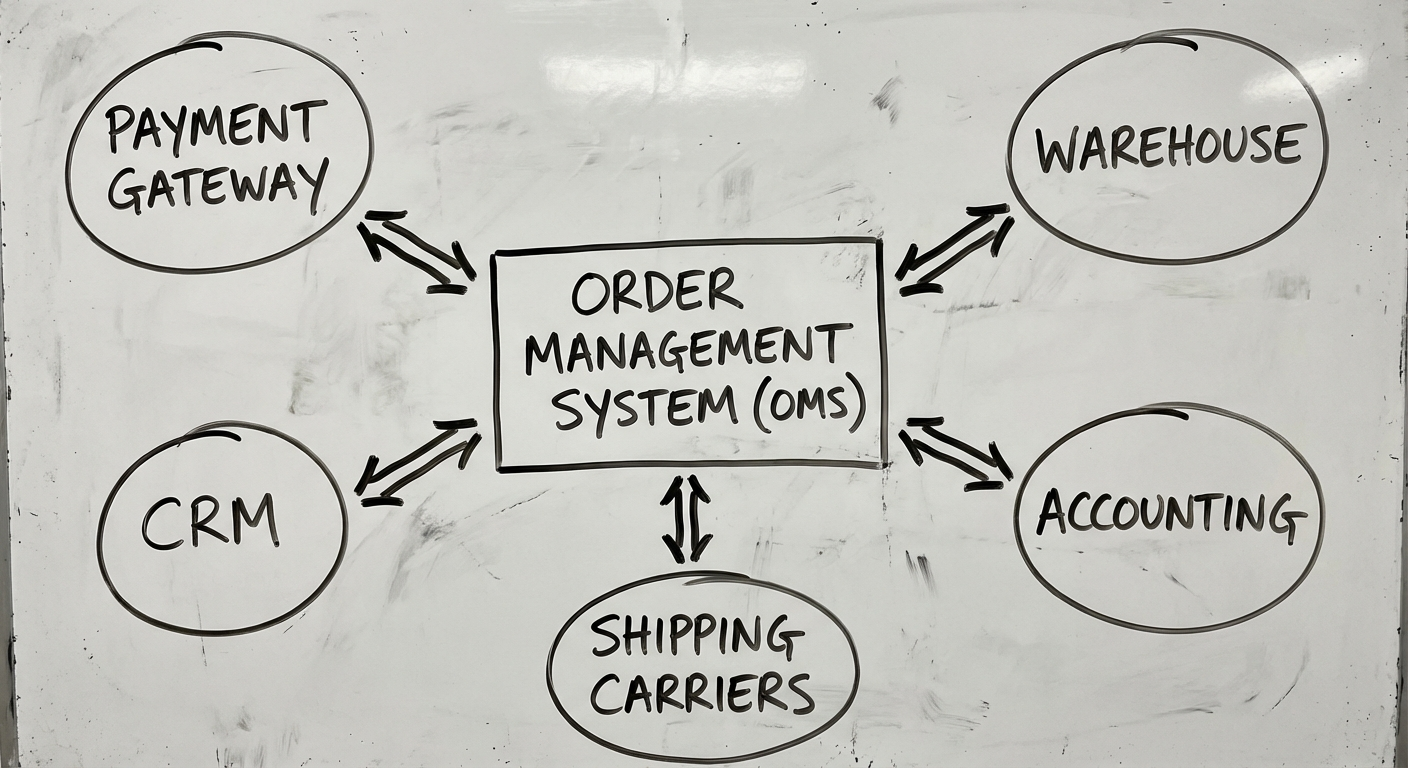
It connects your sales channels, inventory, warehouse operations, shipping providers, and accounting into a single source of truth for every order.
Think of it as the central nervous system of your commerce operations. Without it, every channel operates in isolation. With it, you get a unified view of what’s happening across your entire business.
A good OMS handles:
- Order capture from multiple channels (website, marketplace, POS, phone)
- Inventory allocation across warehouses and fulfilment centres
- Fulfilment orchestration — routing orders to the right location
- Shipping and tracking integration
- Returns and refunds processing
- Reporting and analytics on order performance
If you’re also evaluating broader systems, our ERP software guide covers how OMS fits within enterprise architecture, and our warehouse management software guide dives deeper into the fulfilment side.
Core Features of Order Management Software
Not every OMS needs every feature on day one. But these six capabilities form the foundation that separates a real system from a glorified spreadsheet.
1. Order Processing & Workflow Engine
The heart of any OMS. This handles:
- Order ingestion — Accepting orders from all channels into a unified queue
- Validation rules — Checking payment, address, fraud signals, and inventory before confirmation
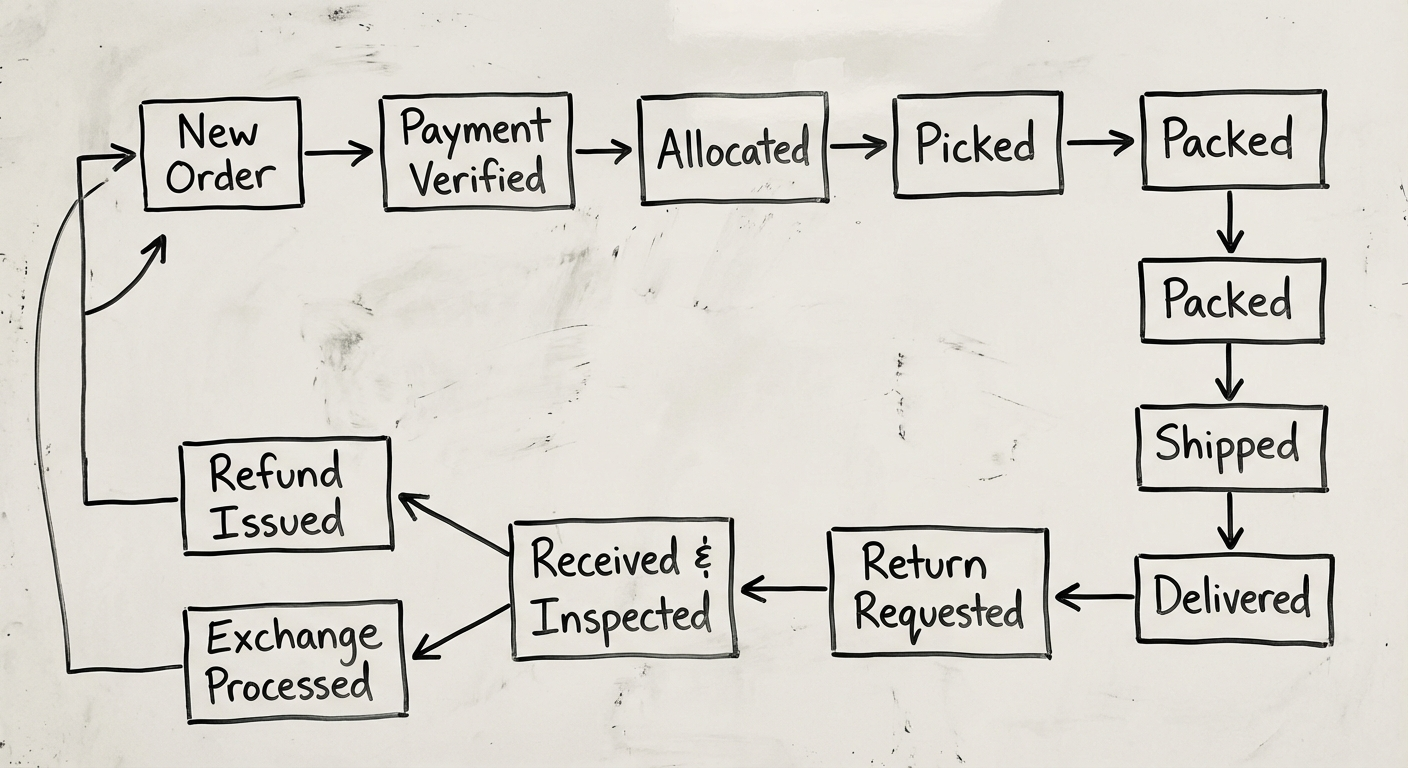
- Status management — Moving orders through states (pending → confirmed → picking → shipped → delivered)
- Exception handling — Flagging and routing problem orders (partial stock, payment issues, address errors)
The workflow engine is what differentiates custom OMS from a basic order tracker. It encodes your business rules—not someone else’s.
A well-designed workflow engine lets you change business rules without changing code. Configure routing logic, approval thresholds, and priority rules through an admin interface, not developer tickets.
2. Multi-Channel Synchronisation
Modern commerce doesn’t happen in one place. Your OMS needs to pull orders from:
- Your website (Shopify, WooCommerce, custom storefront)
- Marketplaces (Amazon, eBay, Catch, The Iconic)
- Point of sale systems (in-store purchases)
- B2B channels (EDI, email orders, purchase order portals)
- Social commerce (Instagram, TikTok Shop)
The key challenge isn’t connecting channels—it’s keeping them in sync. When inventory updates in your warehouse, every channel needs to reflect the change within minutes, not hours. Overselling across channels is the fastest way to tank customer trust.
3. Inventory Allocation & Reservation
This is where many off-the-shelf tools fall short. Real inventory allocation requires:
- Real-time stock visibility across all locations (warehouses, stores, 3PLs, drop-ship suppliers)
- Soft reservations — Holding stock when an order is placed, before it’s confirmed
- Allocation rules — Ship from nearest warehouse? Cheapest? The one with the most stock?
- Safety stock thresholds — Preventing overselling by reserving buffer quantities per channel
- Backorder management — Queuing orders against incoming purchase orders
Inventory allocation logic is often the most complex part of an OMS—and the most valuable. Get it right, and you reduce shipping costs, delivery times, and stockouts simultaneously.
4. Returns & Refunds Management
Returns aren’t an edge case. In e-commerce, return rates run 20-30%. Your OMS needs to handle them as a first-class workflow:
- RMA (Return Merchandise Authorisation) generation and tracking
- Return reason capture — Structured data for product and operational improvement
- Refund processing — Full, partial, store credit, or exchange
- Inventory re-integration — Returned items back into sellable stock (after quality check)
- Reverse logistics — Coordinating return shipping labels and carrier pickup
A return handled poorly costs you the customer. A return handled well often earns a repeat purchase.
5. Shipping & Carrier Integration
Your OMS should abstract away carrier complexity:
- Multi-carrier rate shopping — Comparing rates across Australia Post, Sendle, StarTrack, CouriersPlease, and others in real time
- Label generation — Printing shipping labels directly from the order screen
- Tracking integration — Pulling tracking events back into order status
- Shipping rules — Auto-selecting carriers based on weight, destination, speed, and cost
- Delivery notifications — Triggering customer emails/SMS at key tracking milestones
Don’t build carrier integrations from scratch. Use middleware like Shippit, ShipStation, or EasyPost as an abstraction layer. They handle the 47 different carrier API formats so you don’t have to.
6. Reporting & Analytics
If you can’t measure it, you can’t improve it. Essential OMS reporting includes:
- Order volume and trends — Daily, weekly, monthly, by channel
- Fulfilment performance — Order-to-ship time, pick accuracy, carrier performance
- Inventory health — Stock turnover, dead stock, reorder alerts
- Return analytics — Return rates by product, reason, and channel
- Financial reconciliation — Revenue, refunds, shipping costs, and margin by order
Build dashboards for operators, not executives. The people running orders daily need real-time actionable data. Executive summaries can be generated from the same underlying data.
Build vs Buy: Making the Right Call
This is the decision that matters most. Here’s how to think about it:
| Factor | Build Custom | Buy Off-the-Shelf |
|---|---|---|
| Best for | Complex, multi-channel operations with unique workflows | Standard e-commerce with typical fulfilment |
| Upfront cost | $80K-$300K+ | $200-$2,000/month |
| Time to launch | 3-6 months | 1-4 weeks |
| Customisation | Unlimited | Limited to vendor’s roadmap |
| Integration depth | Deep, tailored to your stack | Pre-built connectors (may not fit) |
| Ownership | You own the IP | Vendor lock-in |
| Scaling cost | Hosting + maintenance | Per-order or per-user fees compound |
Buy when:
- You’re processing fewer than 500 orders/day
- Your workflows are standard (no complex routing, allocation, or compliance requirements)
- Speed to market matters more than differentiation
- You don’t have in-house technical capacity
Build when:
- Your order routing logic is a competitive advantage
- Off-the-shelf per-order pricing becomes prohibitive at your volume
- You need deep integration with proprietary systems (custom ERP, legacy warehouse systems)
- Regulatory or compliance requirements demand control over data and processing
The crossover point is usually around 1,000-2,000 orders per day. Below that, SaaS platforms like Linnworks, Brightpearl, or TradeGecko are likely sufficient. Above that, the per-order fees and customisation limits start hurting.
Tech Stack for Custom OMS Development
If you’re building, here’s what a modern OMS tech stack looks like:
Backend
- Language: Python (Django/FastAPI), Node.js (NestJS), or Go for high-throughput systems
- Database: PostgreSQL for transactional data, Redis for caching and real-time inventory locks
- Message queue: RabbitMQ or Apache Kafka for async order processing and event streaming
- API layer: REST for external integrations, GraphQL for internal frontend queries
Frontend
- Admin dashboard: React or Next.js with a component library (Ant Design, Shadcn)
- Real-time updates: WebSockets for live order status and inventory changes
Infrastructure
- Cloud: AWS or GCP (ECS/EKS for containers, RDS for managed database)
- CI/CD: GitHub Actions or GitLab CI
- Monitoring: Datadog or Grafana + Prometheus
- Logging: ELK stack or CloudWatch
Key Integrations
- Shipping middleware: Shippit, ShipStation, or EasyPost
- Payment gateways: Stripe, PayPal, Afterpay
- Accounting: Xero or MYOB (critical for Australian businesses)
- Channel connectors: Marketplace APIs (Amazon SP-API, eBay, etc.)
Architecture principle: Design your OMS as an event-driven system from day one. Orders generate events. Events trigger workflows. This makes the system extensible without rewriting core logic.
Development Process
Building an OMS follows a structured process. Here’s what it looks like in practice:
Phase 1: Discovery & Requirements (2-3 weeks)
- Map current order flows end-to-end
- Identify pain points and bottlenecks
- Define integration requirements (channels, carriers, accounting)
- Document business rules (allocation logic, routing, fraud checks)
- Set success metrics (order-to-ship time, accuracy rate, cost per order)
Phase 2: Architecture & Design (2-3 weeks)
- System architecture and data model design
- API specifications for all integrations
- UI/UX design for the admin dashboard
- Security and compliance planning
Phase 3: Core Development (8-12 weeks)
- Sprint 1-2: Order ingestion, basic workflow engine, database schema
- Sprint 3-4: Inventory management, allocation logic, multi-location support
- Sprint 5-6: Shipping integration, label generation, tracking
- Sprint 7-8: Returns workflow, reporting dashboards, admin tools
- Sprint 9-10: Channel integrations, testing, performance optimisation
Phase 4: Testing & UAT (2-3 weeks)
- Load testing with realistic order volumes
- End-to-end flow testing across all channels
- User acceptance testing with operations team
- Security audit and penetration testing
Phase 5: Migration & Launch (1-2 weeks)
- Data migration from existing systems
- Parallel running (old and new systems simultaneously)
- Staged rollout by channel or region
- Team training and documentation
Total timeline: 16-24 weeks from kickoff to production, depending on complexity.
What Does It Cost?
Custom OMS development costs vary based on scope, but here are realistic ranges for the Australian market:
| Component | Cost Range (AUD) |
|---|---|
| Discovery & design | $15,000 - $30,000 |
| Core OMS development | $80,000 - $200,000 |
| Channel integrations (per channel) | $5,000 - $15,000 |
| Shipping integration | $10,000 - $25,000 |
| Reporting & analytics | $15,000 - $30,000 |
| Testing & QA | $10,000 - $25,000 |
| Total (typical project) | $120,000 - $300,000 |
Ongoing costs:
- Hosting & infrastructure: $500-$3,000/month
- Maintenance & support: 15-20% of build cost per year
- Feature development: As needed
Compare this against SaaS: A mid-tier OMS SaaS at $1,500/month = $18,000/year. At 3,000+ orders/day with per-order surcharges, you might be paying $40,000-$80,000/year. Custom breaks even in 3-5 years and gives you full ownership.
When to Start Building
You don’t need a custom OMS on day one. Most businesses follow this progression:
- Spreadsheets & manual processes (0-50 orders/day)
- Off-the-shelf OMS (50-1,000 orders/day)
- Custom OMS (1,000+ orders/day or complex operations)
The right time to build is when your off-the-shelf tool starts costing you more in workarounds, manual processes, and lost orders than a custom build would cost to develop.
If you’re at that inflection point—or approaching it—the worst thing you can do is wait until the pain is unbearable. Discovery and planning take weeks, development takes months. Start the conversation before the crisis.
Next Steps
Building order management software is a significant investment. Getting the architecture right from day one saves you from painful (and expensive) rebuilds later.
If you’re evaluating whether to build or buy—or if you’ve already decided to build and need a team that’s done it before—let’s talk. We’ll help you map your order flows, define the right scope, and build a system that actually fits how your business operates.
No pitch decks. Just a practical conversation about what you need and how to get there.
Need help putting this into practice?
Book a Blueprint session and we'll turn the ideas in this article into your next validated release.
Book a Discovery Call