Guide
Warehouse Management Software: Complete Guide
Your warehouse runs on people, movement, and timing. When any of those break down, you feel it immediately—missed shipments, phantom inventory, pickers walking in circles. And the usual fix? More people, more spreadsheets, more shouting across the floor.
Warehouse management software exists to replace that chaos with systems. Not flashy dashboards for the sake of it, but operational control: knowing what’s where, what needs to move, and what’s about to go wrong—before it does.
We’ve built warehouse systems for logistics operators, e-commerce brands, and 3PLs across Australia and Southeast Asia. The difference between a warehouse that scales and one that collapses isn’t more staff—it’s better software.
This guide covers everything: what WMS actually does, the features that matter, whether to build or buy, and what it costs.
What is Warehouse Management Software?
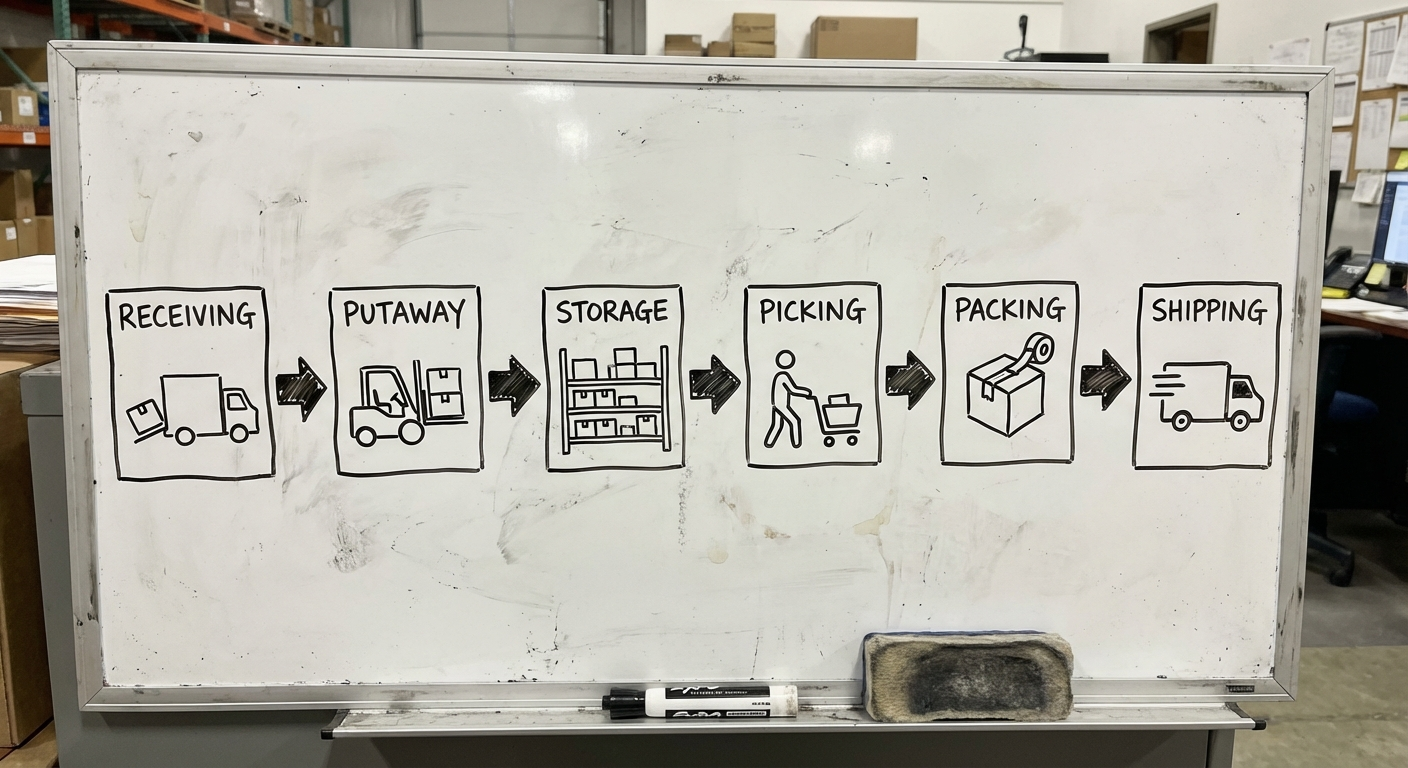
Warehouse management software (WMS) is a system that controls and optimises daily warehouse operations—from receiving goods at the dock to shipping them out the door. It tracks inventory in real time, directs workers through tasks, and integrates with your broader supply chain.
A WMS sits between your order management system (or ERP) and your physical warehouse floor. It answers three questions constantly:
- What do we have? (inventory visibility)
- Where is it? (location tracking)
- What needs to happen next? (task orchestration)
If your ERP system is the brain of your business, your WMS is the nervous system of your warehouse.
Core Features of Warehouse Management Software
Not every WMS needs every feature. But these are the modules that define a capable system.
Receiving & Inbound Management
The moment goods arrive at your dock, the clock starts. A WMS handles:
- Purchase order matching — Scan incoming goods against expected POs
- Quality inspection workflows — Flag items that need QC before putaway
- ASN (Advanced Shipping Notice) processing — Know what’s coming before trucks arrive
- Exception handling — Short shipments, damaged goods, wrong items
Good receiving is the foundation of accurate inventory. If you get this wrong, every downstream process inherits the error.
Putaway Optimisation
Putaway is where most warehouses leave money on the table. A basic system says “put it on a shelf.” A good WMS says:
- Rule-based putaway — Heavy items low, fast-movers near packing stations
- Zone and location assignment — Direct workers to the optimal bin, shelf, or pallet location
- Dynamic slotting — Reassign locations based on velocity changes
- Capacity management — Prevent overloading zones or aisles
Smart putaway reduces travel time by 20-30%, which directly translates to faster picking and lower labour costs.
Picking
Picking is typically the most labour-intensive warehouse activity—accounting for 50-60% of operating costs. Your WMS should support multiple strategies:
- Single order picking — One order at a time (simple, low volume)
- Batch picking — Multiple orders in one pass (fewer trips)
- Wave picking — Grouping orders by carrier, priority, or zone
- Zone picking — Workers own specific areas, orders flow between zones
The right picking strategy depends on your order profile. High-SKU, low-quantity operations need different logic than bulk B2B shipments.
Packing & Shipping
The last metre before the customer:
- Pack verification — Scan to confirm the right items are in the right box
- Cartonisation — Suggest optimal box sizes to reduce dimensional weight charges
- Shipping label generation — Integration with carriers (Australia Post, StarTrack, DHL, TNT)
- Rate shopping — Compare carrier rates in real time
Inventory Tracking
The core promise of any WMS:
- Real-time stock levels — Across locations, zones, and channels
- Lot and batch tracking — Essential for food, pharma, and regulated goods
- Serial number tracking — High-value items tracked individually
- Cycle counting — Continuous counting that replaces painful annual stocktakes
- Expiry management (FEFO) — First-expired, first-out for perishables
Without accurate inventory, everything else is guesswork. Returns, overselling, stockouts—they all trace back to inventory visibility.
Barcode & RFID
The interface between digital and physical:
- Barcode scanning — 1D/2D barcodes via handheld scanners or mobile devices
- RFID — Radio-frequency identification for hands-free, bulk scanning
- Label printing — Generate location labels, item barcodes, shipping labels
Barcodes are table stakes. RFID is worth it when you’re processing high volumes or need hands-free operation—think fashion retail, cold chain, or high-security environments.
Reporting & Analytics
What gets measured gets managed:
- Throughput dashboards — Units received, picked, packed, shipped per hour
- Labour productivity — Performance by worker, shift, or zone
- Inventory accuracy — Variance between system and physical counts
- Order fulfilment rates — On-time, in-full (OTIF) metrics
- Space utilisation — Are you using your warehouse efficiently?
Build vs Buy: The Critical Decision
This is where most companies either save or waste hundreds of thousands of dollars.
When to Buy Off-the-Shelf
Off-the-shelf WMS solutions (like NetSuite WMS, Fishbowl, or Cin7) make sense when:
- Your workflows are standard — receive, store, pick, pack, ship with minimal customisation
- You’re running under 10,000 SKUs — Complexity is manageable
- Speed matters more than fit — You need a system in weeks, not months
- Budget is under $50K — You can’t justify custom development
When to Build Custom
Custom software development makes sense when:
- Your workflows are your competitive advantage — Unique picking logic, custom routing, specialised handling
- Integration complexity is high — Multiple ERPs, carrier APIs, IoT devices, legacy systems
- You’re a 3PL — Multi-tenant warehousing with client-specific rules
- Off-the-shelf tools need so much customisation they’re no longer off-the-shelf
The real question isn’t “build or buy?” It’s “how much of our warehouse operation is truly unique?” If the answer is “most of it,” build. If it’s “just a few things,” buy and integrate.
The Hybrid Approach
Increasingly, the smartest move is hybrid:
- Buy a core WMS for standard operations
- Build custom modules for your unique workflows
- Connect everything via APIs
This gives you speed-to-market with flexibility where it matters.
Tech Stack for Custom WMS Development
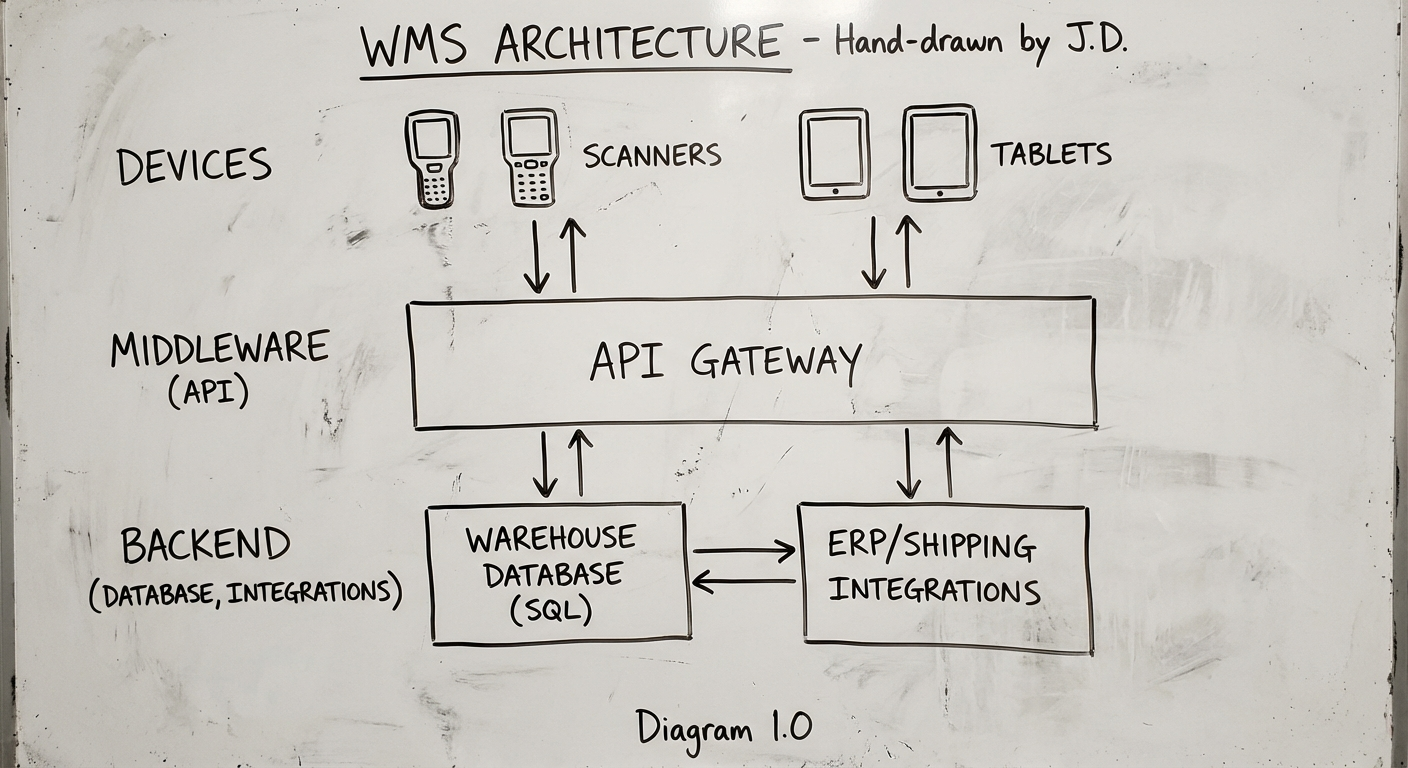
If you’re going the custom route, here’s what a modern WMS tech stack looks like:
Backend
| Component | Recommended Options |
|---|---|
| Language | Python (Django/FastAPI), Node.js, Go |
| Database | PostgreSQL (primary), Redis (caching/queues) |
| API | REST or GraphQL |
| Message Queue | RabbitMQ or Apache Kafka (for event-driven operations) |
| Search | Elasticsearch (for fast SKU/product lookup) |
Frontend
| Component | Recommended Options |
|---|---|
| Web Dashboard | React or Next.js |
| Mobile/Scanner App | React Native or Flutter |
| Real-time Updates | WebSockets or Server-Sent Events |
Infrastructure
| Component | Recommended Options |
|---|---|
| Cloud | AWS or GCP |
| Containerisation | Docker + Kubernetes (at scale) |
| CI/CD | GitHub Actions or GitLab CI |
| Monitoring | Datadog, Grafana, or Sentry |
Hardware Integration
- Barcode scanners — Zebra TC series, Honeywell CT series
- RFID readers — Impinj, Zebra FX series
- Label printers — Zebra ZD/ZT series
- Weighing scales — Serial/USB integration for weight capture
Development Process
Building a WMS is not a weekend project. Here’s a realistic process:
Phase 1: Discovery & Blueprint (2-4 weeks)
- Map current warehouse workflows (walk the floor, literally)
- Identify pain points and bottlenecks
- Define integration requirements
- Create system architecture and data model
- Estimate effort and timeline
Phase 2: Core Build (8-12 weeks)
- Inventory management and location system
- Receiving and putaway modules
- Basic picking and packing workflows
- User management and permissions
- Barcode scanning integration
Phase 3: Advanced Features (4-8 weeks)
- Advanced picking strategies (batch, wave, zone)
- Carrier integrations and rate shopping
- Reporting and analytics dashboards
- RFID integration (if required)
- Mobile app for floor workers
Phase 4: Testing & Deployment (2-4 weeks)
- Parallel run — Run new WMS alongside existing processes
- Data migration — Move inventory data, locations, and product master
- User training — Floor staff, supervisors, and admin users
- Go-live support — On-site or remote support during cutover
Total timeline: 4-7 months for a production-ready custom WMS.
Costs
Let’s talk numbers. These are Australian market ranges based on our experience:
Off-the-Shelf WMS
| Tier | Monthly Cost | Annual Cost |
|---|---|---|
| Entry-level (Cin7, Ordoro) | $300-$800/mo | $3,600-$9,600 |
| Mid-range (Fishbowl, Unleashed) | $800-$2,500/mo | $9,600-$30,000 |
| Enterprise (NetSuite WMS, Manhattan) | $5,000-$20,000+/mo | $60,000-$240,000+ |
Plus implementation costs: $10K-$100K+ depending on complexity.
Custom WMS Development
| Scope | Investment | Timeline |
|---|---|---|
| MVP / Core modules | $80,000-$150,000 | 3-4 months |
| Full-featured WMS | $150,000-$350,000 | 5-7 months |
| Enterprise multi-site | $350,000-$700,000+ | 8-14 months |
Ongoing maintenance: 15-20% of build cost per year for updates, support, and hosting.
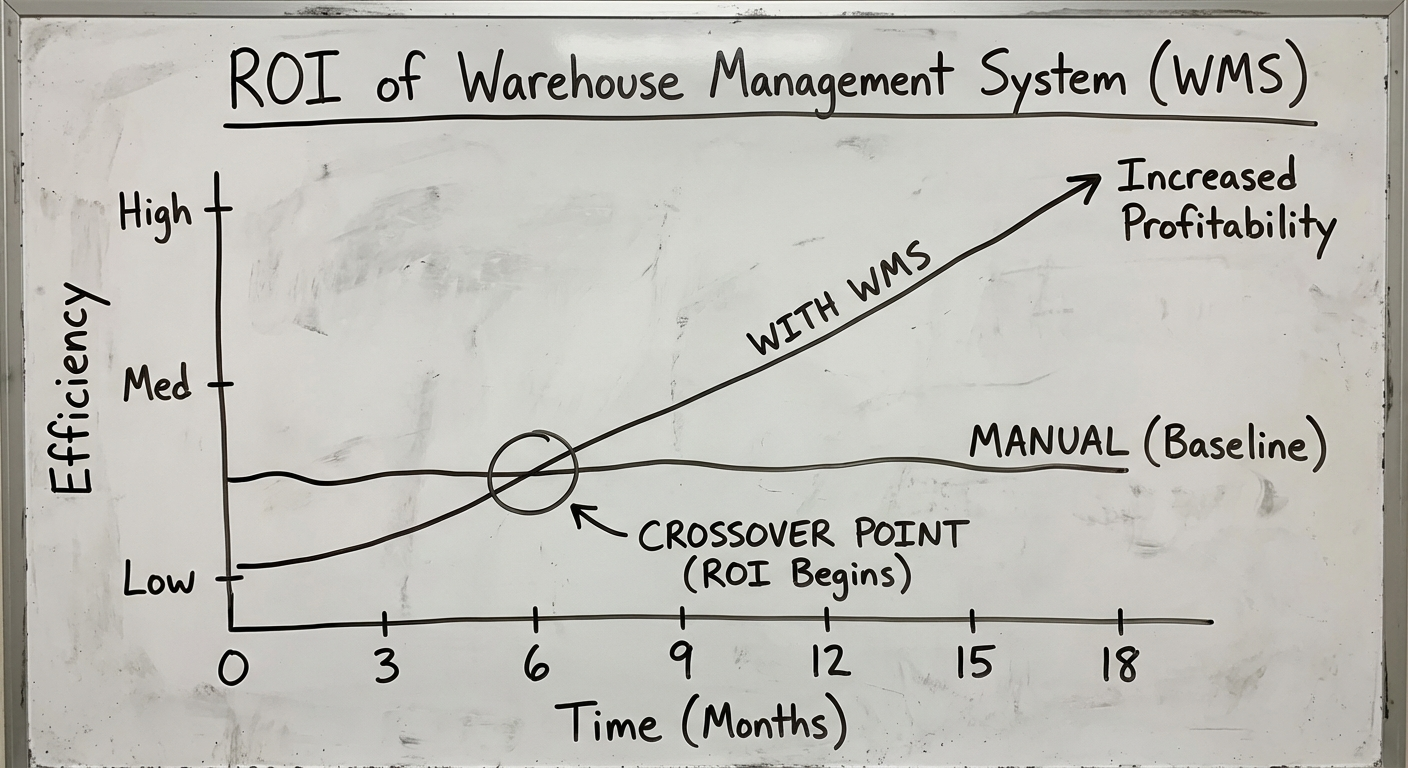
The break-even point: custom typically pays for itself within 2-3 years when you factor in licensing savings, productivity gains, and reduced workarounds.
Hidden Costs to Watch
- Data migration — Moving from spreadsheets or legacy systems is never clean
- Hardware — Scanners, printers, RFID readers ($500-$3,000 per unit)
- Training — Floor staff need hands-on training, not just a PDF manual
- Change management — People resist new systems; budget time for adoption
Choosing the Right Partner
Whether you build or buy, the implementation partner matters as much as the software. Look for:
- Warehouse domain experience — Have they actually built WMS before? Can they talk about putaway strategies without reading notes?
- Integration capability — Your WMS doesn’t exist in isolation. It talks to ERPs, carriers, e-commerce platforms, and accounting systems.
- Post-launch support — Warehouses don’t stop at 5pm. What does support look like after go-live?
- Willingness to walk the floor — The best WMS projects start with the development team physically walking through the warehouse.
What’s Next for Warehouse Management Software
A few trends worth watching:
- AI-driven demand forecasting — Predicting what to pre-position and where
- Autonomous mobile robots (AMRs) — Goods-to-person picking systems
- Digital twins — Virtual warehouse models for testing layout changes
- Composable WMS — Modular systems where you assemble exactly the features you need, rather than paying for everything
The direction is clear: more intelligent, more modular, more integrated with the broader supply chain.
Start With a Conversation
If you’re evaluating warehouse management software—whether that’s choosing an off-the-shelf tool, building custom, or figuring out a hybrid approach—we can help.
We’ve built warehouse systems across e-commerce, 3PL, manufacturing, and distribution. We’ll tell you honestly whether custom development is the right move, or if a $300/month tool solves your problem just fine.
Need help putting this into practice?
Book a Blueprint session and we'll turn the ideas in this article into your next validated release.
Book a Discovery Call