Guide
ERP Software: Complete Development Guide for 2026
Your finance team runs one system. Your warehouse runs another. Sales lives in a spreadsheet. HR has their own tool that nobody else can access. And every Monday, someone spends half the day copying numbers between them.
This is the reality for most mid-market businesses before ERP. Not a single dramatic failure—just a slow, expensive leak of time, accuracy, and sanity.
The cost of disconnected systems isn’t obvious until you calculate it: duplicated data entry, reconciliation errors, delayed reporting, and decisions made on information that’s already stale.
Enterprise Resource Planning software exists to solve exactly this. But the ERP market is noisy—bloated legacy vendors, overpromising SaaS startups, and implementation horror stories that make the evening news. This guide cuts through it.
What is ERP Software?
ERP (Enterprise Resource Planning) software is a unified system that integrates core business processes—finance, operations, HR, supply chain, and customer management—into a single platform with a shared database.
Instead of each department running its own isolated tool, ERP creates one source of truth across the entire organisation. When a sales order is placed, inventory updates automatically. When inventory drops below threshold, procurement is triggered. When goods ship, finance records the revenue. One event, multiple departments updated in real time.
The “enterprise” in the name is misleading. Modern ERP software serves businesses from 20 employees to 20,000. The question isn’t whether you’re big enough—it’s whether your operations are complex enough to benefit from integration.
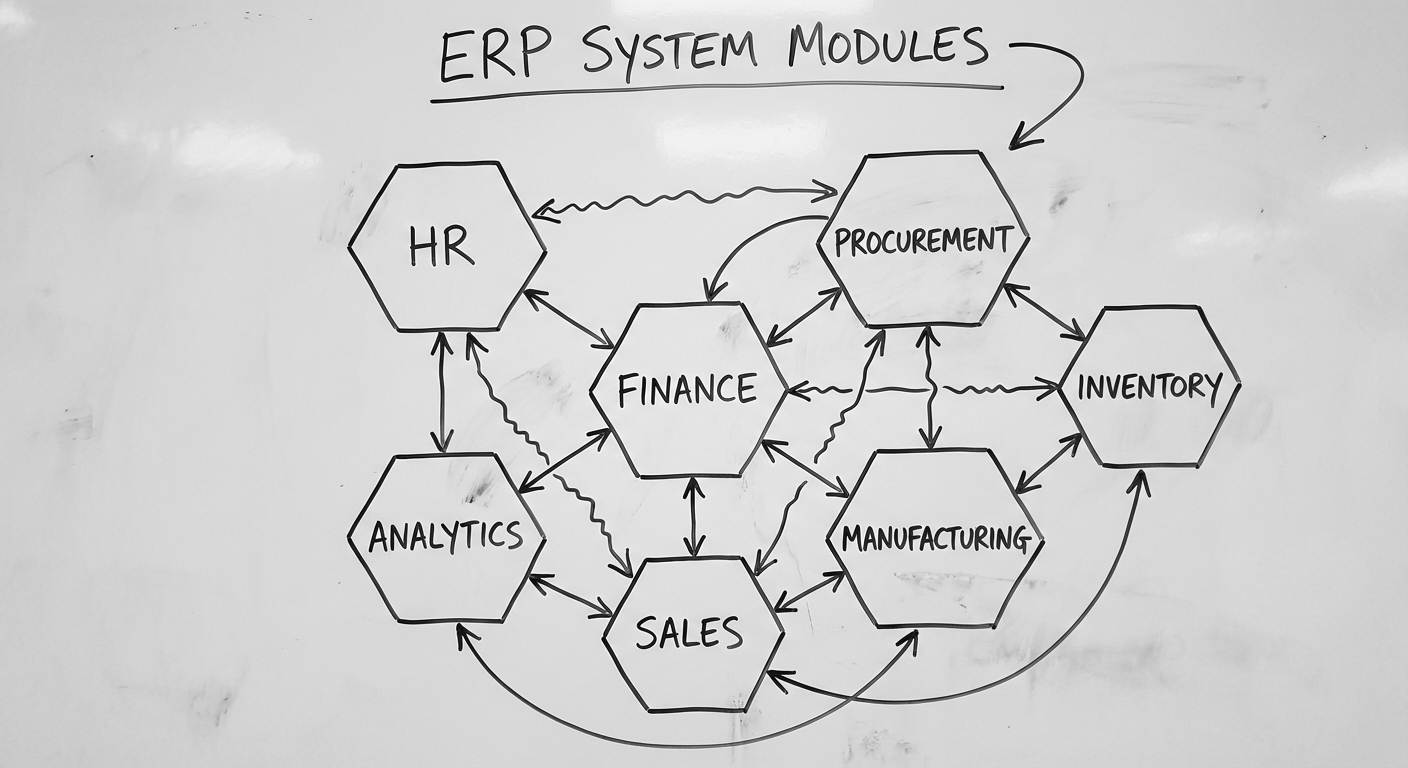
Core ERP Modules Explained
ERP systems are modular. You don’t need everything on day one. Here’s what each module does and when it matters.
Financial Management
The backbone of any ERP. Handles general ledger, accounts payable/receivable, budgeting, and financial reporting.
Why it matters: Every other module feeds into finance. Without a solid financial core, you’re just building on sand. Automated journal entries, real-time P&L, and audit trails replace the month-end scramble.
Human Resources & Payroll
Employee records, leave management, payroll processing, performance tracking, and compliance reporting.
Why it matters: Australian payroll is complex—superannuation, STP reporting, award interpretation, leave accruals. Manual payroll processing for 50+ employees is a compliance risk waiting to happen.
Supply Chain & Inventory
Procurement, warehouse management, inventory tracking, demand forecasting, and supplier management.
Why it matters: Inventory is cash sitting on shelves. Without visibility, you either overstock (tying up capital) or understock (losing sales). Good supply chain modules reduce carrying costs by 15-25%.
Manufacturing & Production
Bill of materials, production scheduling, quality control, shop floor management, and capacity planning.
Why it matters: If you make things, this module connects what you sell to what you need to produce, buy, and schedule. It turns “how many can we make this week?” from a guess into a calculation.
Customer Relationship Management (CRM)
Sales pipeline, customer data, marketing automation, service tickets, and account management.
Why it matters: CRM inside your ERP means sales can see order history, support can see invoices, and finance can see pipeline forecasts—without logging into three different systems. For a deeper dive, see our CRM software guide.
Reporting & Business Intelligence
Dashboards, custom reports, KPI tracking, and data analytics across all modules.
Why it matters: Data trapped in individual modules is useful. Data combined across modules is powerful. Cross-functional reporting—like linking marketing spend to production capacity to cash flow—is where ERP earns its keep.
Build vs Buy: The ERP Decision Framework
This is the most consequential decision in your ERP journey. Get it right and you save years of pain.
Option 1: Buy Off-the-Shelf ERP
Major players: SAP Business One, Oracle NetSuite, Microsoft Dynamics 365, MYOB Advanced, Xero (for smaller operations)
Best when:
- Your processes are relatively standard for your industry
- You need to deploy within 3-6 months
- You have $50K-$200K for implementation (not including licensing)
- You’re willing to adapt your workflows to the software
Watch out for:
- Licensing costs compound. A $500/user/month system for 50 users is $300K/year—forever.
- Customisation limits. You’ll hit walls where the software can’t do what you need.
- Vendor lock-in. Your data and processes become dependent on their roadmap and pricing decisions.
Option 2: Build Custom ERP
Best when:
- Your operations are genuinely unique (not just “we think we’re special”)
- Off-the-shelf solutions require so much customisation they’d lose their advantage
- You need the ERP to be a competitive differentiator, not just an operational tool
- You have the budget ($200K-$1M+) and timeline (6-18 months)
Watch out for:
- Scope creep is the #1 killer. ERP touches everything, so “just one more module” never ends.
- You need ongoing technical stewardship. Custom ERP without a maintenance team decays fast.
- Regulatory compliance is your responsibility. Off-the-shelf vendors handle tax updates; with custom, you do.
Option 3: The Hybrid Path (Often the Smartest)
In practice, the best ERP strategies are hybrid: buy commodity modules, build competitive-advantage modules, integrate everything through APIs.
For example:
- Buy financial management (Xero or MYOB—compliance updates handled)
- Buy HR/Payroll (Employment Hero or KeyPay—award interpretation is complex)
- Build custom operations modules unique to your business
- Build an integration layer connecting everything with a unified dashboard
This approach gives you speed where standards exist and flexibility where you need it. For more on the custom build side, see our custom software development guide.
Decision Matrix
| Factor | Buy (SAP, NetSuite) | Build Custom | Hybrid |
|---|---|---|---|
| Time to value | 3-6 months | 6-18 months | 4-9 months |
| Upfront cost | $50K-$200K impl. | $200K-$1M+ | $100K-$400K |
| Ongoing cost | License + support | Maintenance 15-20%/yr | Mixed |
| Flexibility | Limited to platform | Unlimited | High where it counts |
| Competitive advantage | Same as competitors | Potential moat | Selective moat |
| Risk | Vendor dependency | Technical complexity | Integration complexity |
Tech Stack for Custom ERP Development
If you’re going the custom or hybrid route, technology choices matter. Here’s what we recommend in 2026.
Backend
- Node.js (TypeScript) or Python (Django/FastAPI) — Both have strong ecosystems for business logic, API development, and integration
- PostgreSQL — The default choice for transactional ERP data. Rock-solid, feature-rich, free
- Redis — Caching layer for dashboards and frequently-accessed data
Frontend
- React or Next.js — Component-based architecture scales well for complex ERP interfaces with dozens of screens
- Tailwind CSS — Rapid UI development for admin-heavy interfaces
Infrastructure
- AWS or Google Cloud — Both offer managed database, compute, and compliance certifications for Australian data residency
- Docker + Kubernetes — Containerised deployment for reliability and scaling
- Terraform — Infrastructure as code, so environments are reproducible
Integration Layer
- REST APIs with OpenAPI documentation for external integrations
- GraphQL for complex internal data queries across modules
- Message queues (RabbitMQ or AWS SQS) for asynchronous processing (e.g., batch payroll runs, report generation)
Architecture principle: Design modules as loosely-coupled services with clear API contracts. This lets you replace, upgrade, or scale individual modules without rebuilding the whole system.
Step-by-Step ERP Development Process
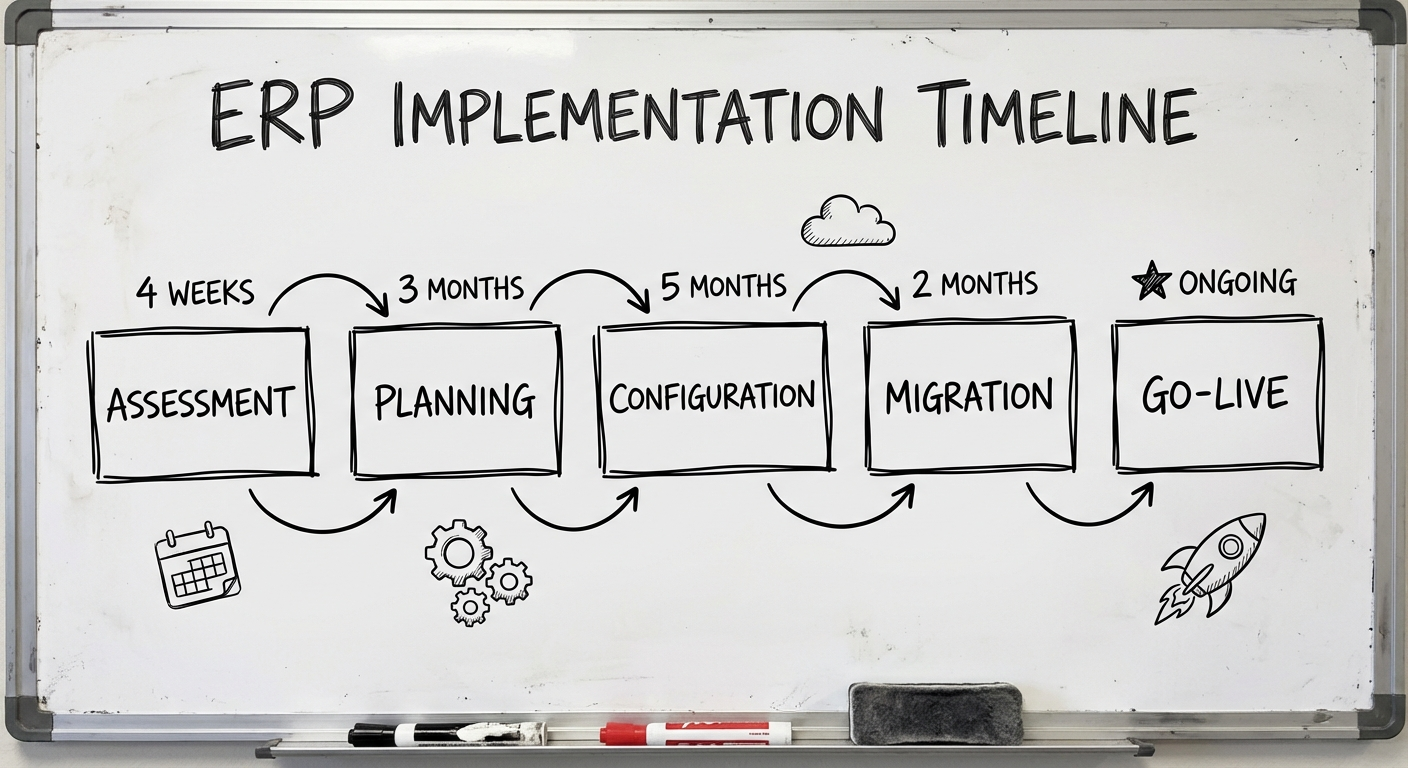
Step 1: Process Mapping & Requirements (3-4 weeks)
Before any technology decisions, map every business process the ERP will touch. Not how you want it to work—how it works today, warts and all.
- Interview stakeholders across all departments
- Document current systems, integrations, and data flows
- Identify pain points, bottlenecks, and manual workarounds
- Define what “done” looks like for each module
Deliverable: Process maps, requirements document, and a prioritised module roadmap.
Step 2: Architecture & Design (2-4 weeks)
Design the system structure, data model, and user experience.
- Data architecture — What entities exist, how they relate, what’s the source of truth
- Module boundaries — What’s in scope for Phase 1 vs later
- Integration architecture — How ERP connects to existing systems
- UI/UX design — Wireframes and prototypes for key workflows
Deliverable: Architecture document, data model, UI designs, API specifications.
Step 3: Core Module Development (8-16 weeks)
Build the foundational modules first—typically finance and one operational module.
- Agile sprints (2-week cycles) with stakeholder demos
- Automated testing from day one (unit, integration, e2e)
- Staging environment that mirrors production
- Regular user feedback sessions—not just demos, but hands-on testing
Step 4: Integration & Data Migration (2-4 weeks)
Connect the ERP to existing systems and migrate historical data.
- Build and test API integrations with third-party systems
- Develop data migration scripts with validation checks
- Run parallel systems during migration—never cut over cold
- Reconcile migrated data against source systems
Step 5: User Acceptance Testing (2-3 weeks)
Real users, real scenarios, real data.
- Structured test scripts covering critical business processes
- Edge case testing (month-end close, bulk operations, error handling)
- Performance testing under expected load
- Security audit and penetration testing
Step 6: Phased Rollout (2-4 weeks)
Never big-bang an ERP launch. Roll out department by department, starting with the team most eager to adopt.
- Train power users first—they become internal champions
- Run old and new systems in parallel for one full business cycle
- Monitor closely for data discrepancies
- Gather feedback and fix issues before expanding
Step 7: Ongoing Maintenance & Evolution
Post-launch is where the real value compounds.
- Monthly maintenance releases (bug fixes, small improvements)
- Quarterly feature releases (new modules, enhancements)
- Annual architecture review (scaling, security, technology updates)
- Plan for 15-20% of initial build cost annually
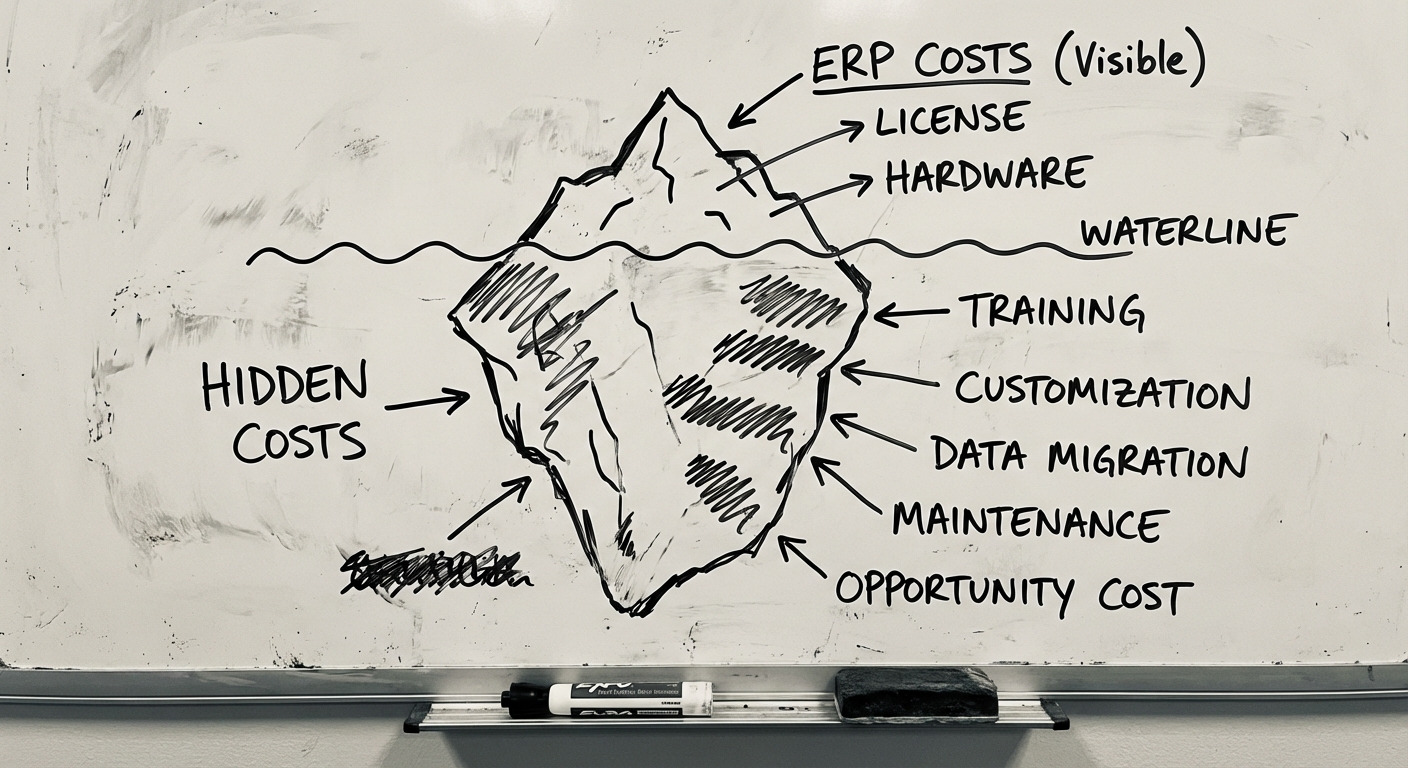
What Does ERP Software Cost?
Transparency matters here because the ERP market is notorious for hidden costs.
Off-the-Shelf ERP Costs (Annual)
| Solution | Users | Licensing/Year (AUD) | Implementation |
|---|---|---|---|
| Xero + add-ons | 1-20 | $5K-$15K | $5K-$20K |
| MYOB Advanced | 10-50 | $20K-$60K | $30K-$80K |
| NetSuite | 20-100 | $60K-$200K | $50K-$200K |
| SAP Business One | 20-200 | $80K-$300K | $100K-$500K |
Custom ERP Development Costs
| Scope | Timeline | Cost Range (AUD) |
|---|---|---|
| Single module (e.g., inventory) | 2-4 months | $60K-$150K |
| Core ERP (3-4 modules) | 6-10 months | $200K-$500K |
| Full enterprise ERP | 12-18 months | $500K-$1.5M+ |
Cost Factors That Move the Needle
- Number of modules — Each module adds 2-4 months of development
- Integration complexity — Legacy system APIs (or lack thereof) can double integration timelines
- Data migration — Clean data migrates fast; messy data requires transformation work
- Compliance requirements — Industry-specific regulations add testing and documentation overhead
- User count and concurrency — 50 concurrent users vs 500 changes infrastructure requirements significantly
The 5-Year Total Cost Comparison
This is what matters. A $30K/year SaaS license looks cheap until you multiply by 5 years and 50 users.
For a 50-user business over 5 years:
- Off-the-shelf (mid-tier): $150K licensing + $100K implementation + $50K customisation = ~$300K
- Custom build: $350K build + $250K maintenance (5 years) = ~$600K
- Hybrid: $80K licensing + $200K custom modules + $150K maintenance = ~$430K
Custom costs more upfront but gives you ownership, flexibility, and zero licensing fees that compound forever. The break-even against off-the-shelf typically happens at year 4-6 for mid-complexity systems.
Common ERP Pitfalls (and How to Avoid Them)
1. Boiling the ocean Trying to build every module at once. Start with 2-3 core modules, prove value, then expand. Your Phase 1 should deliver ROI on its own.
2. Ignoring change management The best ERP in the world fails if people won’t use it. Budget 10-15% of your project cost for training, documentation, and adoption support.
3. Underestimating data migration “We’ll just export from the old system” is never that simple. Allocate real time for data cleaning, mapping, and validation.
4. No executive sponsor ERP crosses department boundaries. Without someone with authority to resolve conflicts and prioritise trade-offs, projects stall in committee.
5. Choosing technology over fit Don’t pick SAP because it’s SAP. Don’t build custom because it sounds impressive. Pick the approach that matches your actual operational complexity and budget.
Getting Started with ERP
If your business is running on disconnected systems and the pain is real, here’s how to move forward.
1. Audit Your Current State
List every system, spreadsheet, and manual process involved in your core operations. Map the data flows between them. Where are the gaps, duplications, and delays?
2. Define Your Non-Negotiables
What must the ERP do that your current setup can’t? Be specific. “Better visibility” isn’t a requirement. “Real-time inventory across 3 warehouses with automated reorder triggers” is.
3. Set a Realistic Budget
Use the cost ranges above as a starting point. Include implementation, training, data migration, and 2 years of maintenance in your total budget.
4. Evaluate 2-3 Options
Look at one off-the-shelf, one custom, and one hybrid approach. The comparison will clarify what you actually need.
5. Start with Discovery, Not Commitment
A 2-4 week discovery phase—whether with an ERP vendor or a custom development partner—validates assumptions before you commit six or seven figures. For businesses considering a broader tech strategy, our POS software guide covers similar build-vs-buy thinking for retail operations.
Ready to Plan Your ERP Strategy?
At Synetica, we help businesses navigate the build-vs-buy decision with evidence, not sales pitches. Our Blueprint process maps your operations, evaluates options, and delivers a clear ERP roadmap—so you invest with confidence.
We’ll assess your current systems, identify quick wins, and outline what an ERP strategy looks like for your specific situation. No obligation, no vendor bias—just a practical conversation.
Questions about ERP software for your business? Contact us or connect on LinkedIn.
Need help putting this into practice?
Book a Blueprint session and we'll turn the ideas in this article into your next validated release.
Book a Discovery Call