Guide
POS Software: Features, Tech Stack & Costs
Your POS system crashes on a Saturday lunch rush. The queue backs up. Staff revert to handwritten dockets. Inventory counts are wrong by Monday. And you’re paying $300/month for the privilege.
This isn’t a horror story. It’s a Tuesday for businesses running POS software that wasn’t built for how they actually operate. Off-the-shelf point of sale systems work brilliantly—until they don’t. The moment your business outgrows the template (multi-location inventory, custom loyalty programs, integrations with your existing ERP), you’re fighting the tool instead of serving customers.
The question isn’t whether you need a POS system. It’s whether the one you have is helping you grow or holding you back.
This guide covers what POS software actually does, the features that matter, what it costs to build, and how to decide between buying and building.
What is POS Software?
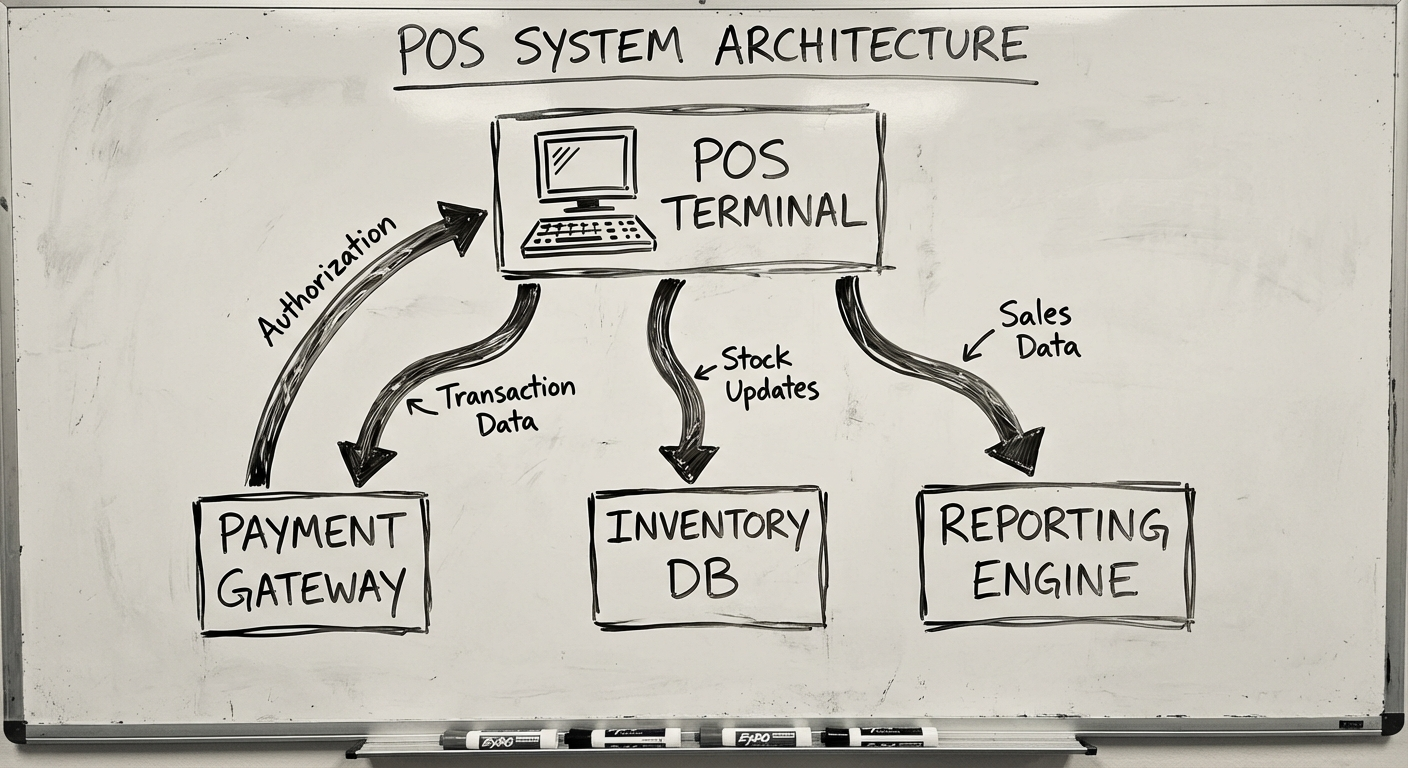
POS software (point of sale software) is the system that processes sales transactions, manages inventory, and captures customer data at the point where a customer pays for goods or services. Modern POS software extends far beyond the cash register—it’s the operational nervous system connecting your shopfront to your back office.
A modern POS system typically includes:
- Hardware — Terminals, barcode scanners, receipt printers, payment terminals
- Software — The application layer managing transactions, inventory, and reporting
- Integrations — Connections to accounting, e-commerce, CRM, and supply chain systems
Think of it as the bridge between your customer-facing operations and your business data. Every transaction flows through it, which makes it either your most valuable data asset or your biggest operational bottleneck.
Core POS Features That Actually Matter
Not every feature on a vendor’s checklist deserves your attention. Here’s what drives real operational value.
Payment Processing
The non-negotiable foundation. Your POS must handle:
- Multiple payment methods — Card (tap, chip, swipe), cash, mobile wallets (Apple Pay, Google Pay), buy-now-pay-later (Afterpay, Zip)
- Split payments — Customers splitting bills across methods or between people
- Refunds and voids — Clean reversal workflows that keep your books accurate
- Offline processing — Transactions queue locally when internet drops and sync when connectivity returns
Why it matters: Payment failures directly equal lost revenue. A system that can’t handle a split bill at a restaurant or process transactions offline during an outage isn’t a POS—it’s a liability.
Inventory Management
This is where most off-the-shelf systems start breaking. Basic stock counts are table stakes. What you actually need:
- Real-time stock tracking — Every sale, return, and transfer updates inventory instantly
- Low stock alerts — Automated notifications before you run out, not after
- Purchase order management — Generate and track supplier orders from within the system
- Variant management — Size, colour, weight, and other product attributes without creating separate SKUs for every combination
- Waste and shrinkage tracking — Know what’s disappearing and why
For retail and hospitality, inventory accuracy directly impacts margin. A 2% shrinkage rate on $2M annual revenue is $40,000 walking out the door. Your POS should make that visible, not invisible.
Reporting & Analytics
Raw transaction data is useless. Your POS should turn it into decisions:
- Sales dashboards — Revenue by hour, day, week, product, staff member, and location
- Product performance — Best sellers, slow movers, margin analysis by category
- Staff performance — Sales per employee, average transaction value, shift comparisons
- Customer insights — Purchase frequency, basket size, returning vs new customers
- Financial summaries — End-of-day reconciliation, tax reporting, payment method breakdowns
Best practice: Build reports around the decisions they inform. A “top products” report is nice. A “products with declining sales velocity that are consuming warehouse space” report drives action.
Multi-Location Management
Single-store POS is simple. Multi-location is where complexity explodes:
- Centralised product catalogue — Update pricing or add products once, push to all locations
- Per-location inventory — Stock levels tracked independently, with inter-store transfer workflows
- Location-level reporting — Compare performance across sites without exporting to spreadsheets
- Role-based access — Store managers see their location; owners see everything
- Centralised customer data — A customer’s loyalty points work at any location
If you’re running three or more locations on separate systems, you’re already paying the cost of a custom build—you’re just paying it in labour, errors, and missed insights.
Customer Management & Loyalty
Your POS sees every transaction. That data should work harder:
- Customer profiles — Purchase history, preferences, contact details linked to transactions
- Loyalty programs — Points, tiers, rewards—automated, not tracked in a spreadsheet
- Targeted promotions — Discounts based on purchase history, not blanket offers
- Gift cards — Issuance, redemption, and balance tracking
Staff Management
- Clock-in/clock-out — Time tracking tied to the POS terminal
- Permission levels — Cashiers can’t modify prices; managers can
- Sales attribution — Know who sold what for commission tracking or performance reviews
- Shift reporting — Cash drawer reconciliation per shift
Build vs Buy: The Decision Framework
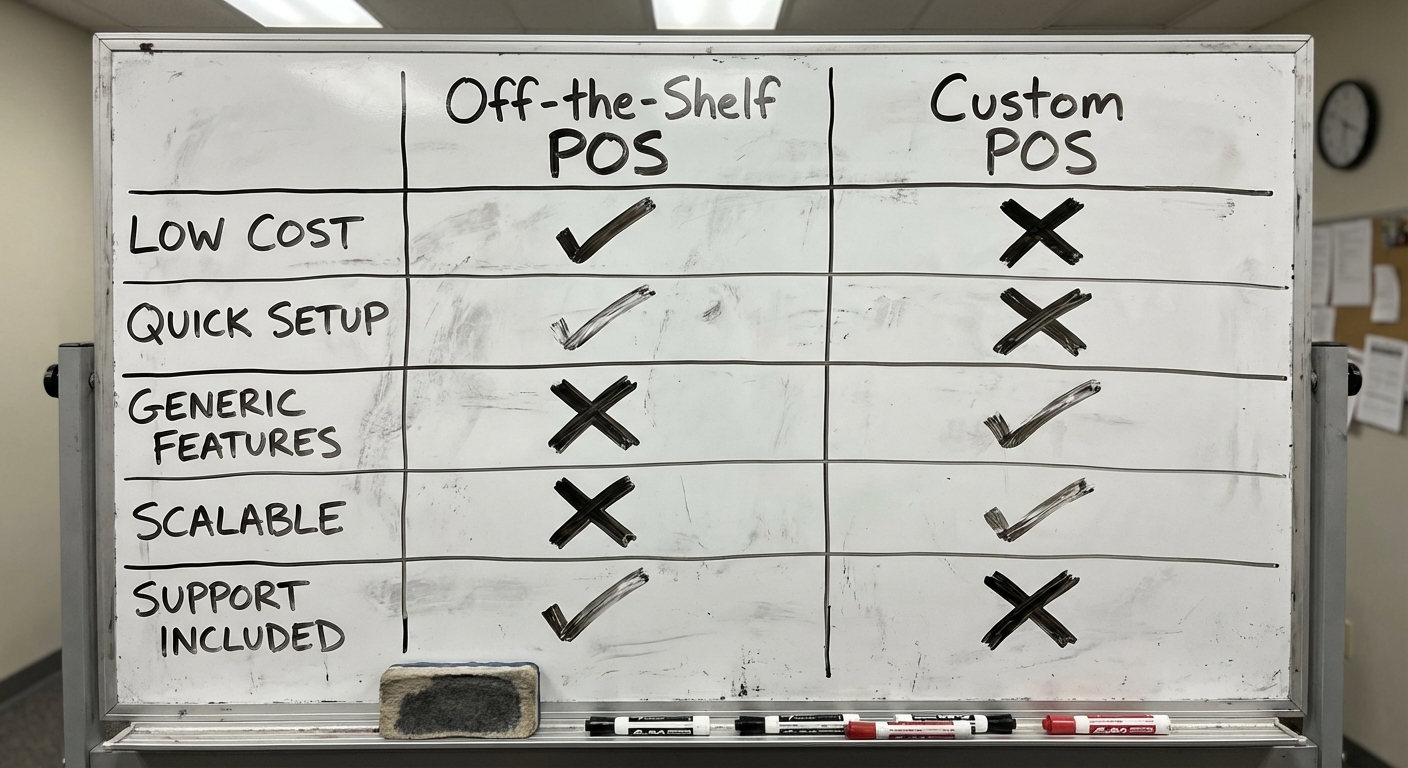
This is the real question. And the answer depends on your business, not on what a vendor or agency tells you.
When Off-the-Shelf POS Works
Buy if:
- You’re a single-location retail store or café with standard workflows
- Your needs are covered by Square, Lightspeed, Vend, or similar platforms
- You don’t need deep integrations with existing enterprise systems
- Your competitive advantage isn’t in operations—it’s in product, brand, or location
- You need something working this week, not this quarter
Popular platforms in Australia: Square (free tier available), Lightspeed (from ~$89/month), Vend by Lightspeed, Hike POS, Kounta (hospitality-focused).
These platforms serve 80% of businesses well. There’s no shame in buying. It’s often the smart move.
When Custom POS Makes Sense
Build if:
- Your workflow doesn’t fit any template. If you’ve tried three POS systems and customised each one beyond recognition, you’re buying the wrong thing.
- Integration complexity is high. You need your POS talking to a custom ERP, warehouse system, e-commerce platform, and accounting software—in real time.
- Multi-location with unique per-site requirements. Franchise models, mixed retail/hospitality, or locations with different tax jurisdictions.
- You need to own your data. SaaS platforms hold your transaction data hostage. Custom means it’s yours, in your database, queryable however you want.
- Compliance or industry-specific requirements. Regulated industries (pharmacy, liquor, firearms) often need capabilities beyond what generic POS offers.
The Hybrid Path
Often the smartest approach sits between the extremes:
- Off-the-shelf POS + custom integrations — Use Square for transactions but build a custom layer for inventory and reporting
- Custom front-end, standard payment processing — Build your own interface on top of payment APIs (Tyro, Stripe Terminal)
- Start SaaS, migrate custom — Run on Lightspeed while you validate requirements, then build once you know exactly what you need
Rule of thumb: If your POS subscription plus workaround costs exceed $2,000/month and you’re still fighting the system, the economics of custom start making sense.
Tech Stack for Custom POS Development
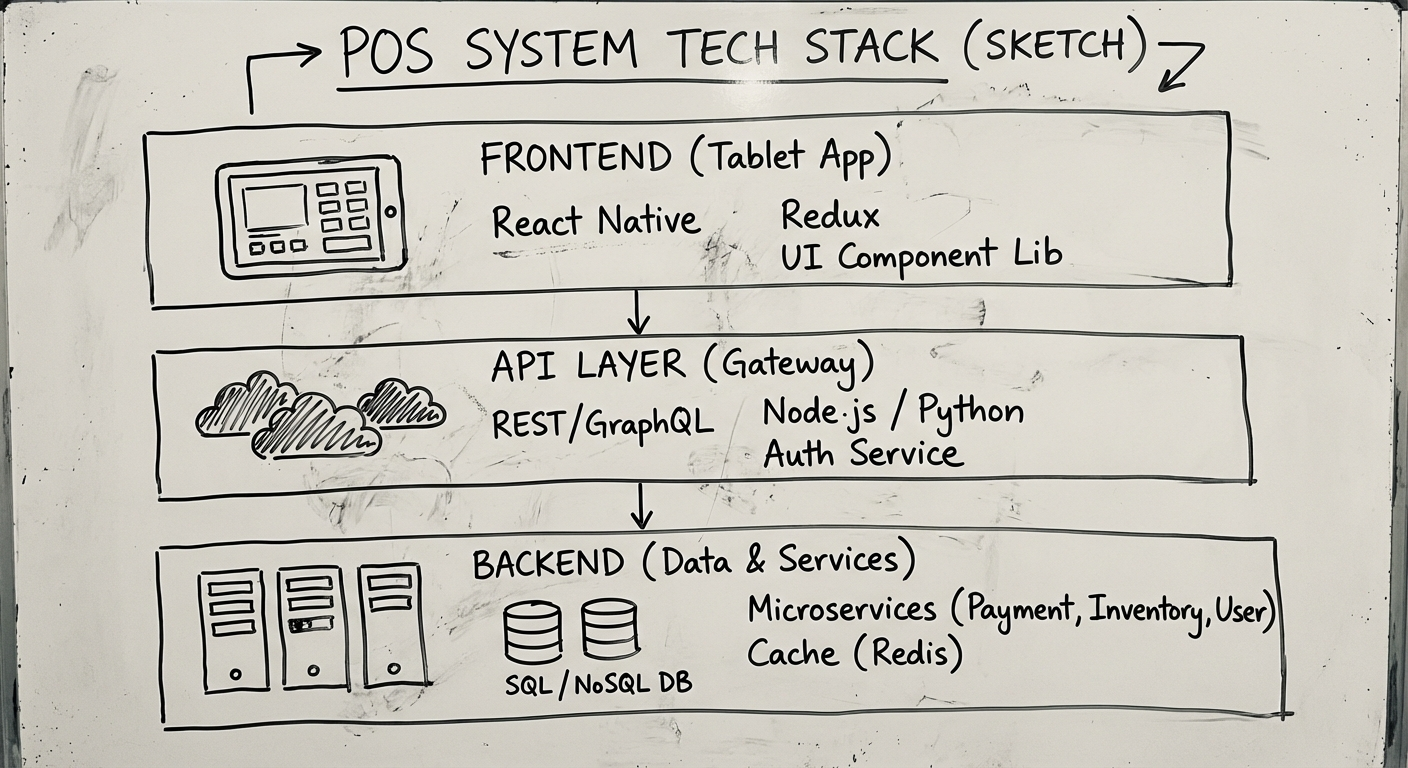
If you’re building, technology choices matter. Here’s what we recommend and why.
Frontend (What Staff See)
| Option | Best For | Why |
|---|---|---|
| React + Electron | Desktop terminals | Rich UI, offline-capable, cross-platform |
| React Native / Flutter | Tablet-based POS | Single codebase for iPad and Android tablets |
| Progressive Web App (PWA) | Lightweight deployments | No app store, instant updates, works offline |
Our default: React-based frontends. The ecosystem is mature, developers are available, and it handles the complex state management POS interfaces demand (cart state, payment flows, offline queues).
Backend (Where the Logic Lives)
| Option | Best For | Why |
|---|---|---|
| Node.js (Express/Fastify) | Real-time, event-driven | Fast, handles concurrent connections well |
| Python (Django/FastAPI) | Data-heavy, reporting-focused | Excellent for analytics pipelines |
| Go | High-throughput, multi-location | Performance at scale, low resource usage |
Our default: Node.js for most POS builds. The real-time capabilities matter when you’re syncing transactions across locations, and the JavaScript full-stack reduces context switching for the team.
Database
| Option | Best For | Why |
|---|---|---|
| PostgreSQL | Primary data store | ACID compliance, reliability, JSON support for flexible schemas |
| Redis | Session and cache layer | Fast lookups for active carts, user sessions |
| SQLite | Offline-first local storage | Runs on the terminal, syncs to cloud when online |
Our default: PostgreSQL + Redis + SQLite for offline. This combination handles the critical POS requirement: transactions must never be lost, even when the internet is down.
Payment Integration
In Australia, your primary options:
- Tyro — Purpose-built for Australian hospitality and retail, strong POS integration
- Stripe Terminal — Developer-friendly, good API documentation, growing Australian presence
- Linkly (formerly PC-EFTPOS) — Legacy standard, connects to most Australian banks
- Square Reader SDK — If you want Square’s hardware with your custom software
Infrastructure
- Cloud: AWS or Google Cloud for backend services
- Local: On-premise server or NAS for businesses requiring data sovereignty
- Hybrid: Cloud for reporting and analytics, local for transaction processing (resilience)
The Development Process
Building a custom POS follows a structured path. Rushing any phase creates problems downstream. For a deeper look at the full software development lifecycle, see our complete guide to custom software development.
Phase 1: Discovery & Requirements (2-4 Weeks)
Before touching code, you need to understand the business:
- Observe current workflows — Spend time in the store, watch how staff actually work
- Map transaction flows — Every path from “customer picks up item” to “transaction complete”
- Identify integration points — What existing systems must the POS connect to?
- Define offline requirements — What happens when internet drops?
- Document compliance needs — GST handling, industry-specific regulations
Deliverable: A requirements document that the development team and business owner both sign off on.
Phase 2: Architecture & UX Design (2-3 Weeks)
POS UX has unique constraints. Staff use it hundreds of times per day under pressure. Every extra tap costs time.
- System architecture — How components communicate, fail, and recover
- UI/UX design — Large touch targets, minimal navigation depth, one-handed operation
- Offline architecture — Local-first data model with cloud sync
- Security design — PCI DSS compliance planning, data encryption
Deliverable: Architecture documentation, Figma prototypes, and a clickable demo for stakeholder review.
Phase 3: Core Development (8-16 Weeks)
Build in iterations, starting with the transaction engine:
- Sprint 1-2: Transaction processing and payment integration
- Sprint 3-4: Inventory management and product catalogue
- Sprint 5-6: Reporting, dashboard, and staff management
- Sprint 7-8: Multi-location sync, loyalty, and advanced features
Each sprint delivers working software. Stakeholders see and test real functionality every two weeks—not a demo six months in.
Phase 4: Testing & Hardening (2-4 Weeks)
POS systems can’t afford bugs at the point of sale:
- Load testing — Simulate Saturday rush: 50+ concurrent transactions
- Offline resilience testing — Kill the internet, keep transacting, restore and sync
- Payment edge cases — Partial refunds, split payments, declined cards, timeouts
- User acceptance testing — Real staff, real transactions, real feedback
- Security audit — PCI DSS compliance verification
Phase 5: Deployment & Training (1-2 Weeks)
- Staged rollout — One location first, then expand
- Staff training — Hands-on sessions, not just documentation
- Parallel running — Old and new systems side by side for a transition period
- Support escalation — Clear process for issues during the first month
Phase 6: Maintenance & Evolution (Ongoing)
Launch is day one, not the finish line. Plan for:
- Bug fixes and performance tuning
- Payment provider updates and compliance changes
- New feature development based on real usage data
- Hardware lifecycle management
Budget 15-20% of the initial build cost annually for ongoing maintenance.
How Much Does Custom POS Software Cost?
Transparency matters here. Custom POS development costs vary based on scope, but here are realistic ranges for the Australian market.
Cost Tiers
| Complexity | Timeline | Cost Range (AUD) | What You Get |
|---|---|---|---|
| Basic | 2-3 months | $50K - $100K | Single-location, core transactions, basic inventory, standard reporting |
| Moderate | 3-6 months | $100K - $250K | Multi-location, offline-first, loyalty program, advanced reporting, 2-3 integrations |
| Complex | 6-12 months | $250K - $500K+ | Enterprise multi-site, franchise model, custom analytics, deep ERP/WMS integration |
What Drives Cost Up
- Number of integrations — Each external system (accounting, e-commerce, ERP) adds 2-4 weeks
- Offline-first architecture — Significantly more complex than cloud-only
- Multi-location sync — Conflict resolution and real-time inventory across sites
- Custom hardware integration — Specialised scales, scanners, or kitchen display systems
- Compliance requirements — PCI DSS, industry-specific regulations
What Drives Cost Down
- Clear requirements — Ambiguity is expensive. Know what you need before you start
- MVP-first approach — Launch with core features, add complexity based on real usage
- Standard hardware — iPads with card readers vs custom terminal builds
- Existing integrations — Using platforms with well-documented APIs (Xero, Stripe)
Ongoing Costs
Don’t forget the recurring line items:
- Hosting and infrastructure: $200-$2,000/month depending on scale
- Payment processing fees: 1.5-2.5% per transaction (unavoidable)
- Maintenance and support: 15-20% of build cost annually
- Hardware replacement: Terminals, printers, and scanners have a 3-5 year lifecycle
ROI Reality Check
Custom POS makes financial sense when:
- Current SaaS subscriptions + workaround labour exceed $24,000/year
- Inventory accuracy improvements save more than maintenance costs
- Operational efficiency gains (faster checkout, better reporting) translate to measurable revenue or margin improvement
If you can’t model a break-even within 2 years, start with off-the-shelf and revisit when your scale justifies the investment.
What’s Next?
If you’re evaluating whether a custom POS system is right for your business, start here:
- Audit your current system. List every workaround, manual process, and integration gap. That’s your cost of inaction.
- Define your must-haves vs nice-to-haves. Not every feature needs to be in v1.
- Talk to a team that’s built this before. Not a sales team—a build team.
We’ve built transaction-heavy systems across retail, hospitality, and logistics. If you want a straight conversation about whether custom POS makes sense for your situation, get in touch. No pitch deck—just an honest assessment.
For more on the custom software process, read our complete guide to custom software development. If CRM is also on your radar, our CRM software guide covers similar build-vs-buy territory.
Need help putting this into practice?
Book a Blueprint session and we'll turn the ideas in this article into your next validated release.
Book a Discovery Call