Guide
POS Software in Indonesia: 4 Options, Prices & 10 Tests Before You Buy
POS software in Indonesia ranges from a free checkout app to multi-outlet subscriptions. If you are choosing one, the monthly fee is only the start: every sale must match across payments, inventory, and reports.
The real buying risk is rarely a missing feature on a vendor page. It is an untested operational edge case: the internet drops, a payment succeeds but the receipt fails, a return reaches the wrong outlet, or a cashier closes a shift with a mismatch. A polished demo can hide all four.
This guide compares four products using official pricing sources, then explains how a POS transaction works, ten vendor tests, and first-year cost. The shortlist is desk research from 15 September 2026, not a hands-on test or a quality ranking.
TL;DR — the whole guide in five lines:
- A POS connects checkout, payment, stock, and finance. It is more than a digital cash register.
- Four starting points: Loyverse for a low initial software cost, Moka for cloud outlets, majoo for bundled operations, and Mekari POS for Mekari Jurnal integration.
- Test failures before feature lists: payment timeouts, lost internet, refunds, and shift close.
- Compare first-year cost, including hardware, migration, integrations, training, and support.
- Pilot with your data, reconcile daily, and expand only after clear gates pass.
What Is POS Software? A Short Explanation
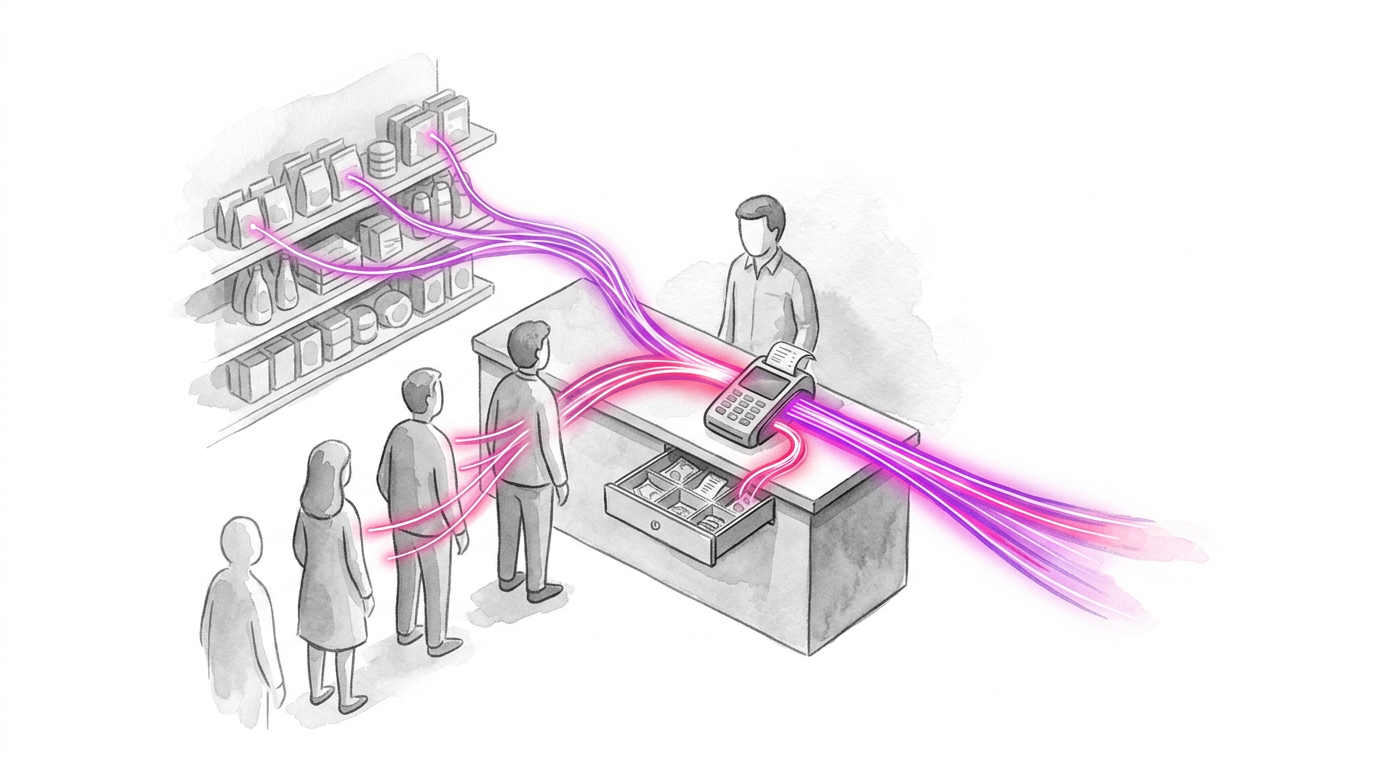
POS software is the application that records a sale at the point of payment and coordinates the operational records created by that sale. It calculates the basket, applies tax and promotions, records payment status, moves inventory, produces a receipt, and sends data to reporting or accounting systems.
That definition matters because a checkout screen can look successful while the records behind it disagree. Consider an illustrative day with 100 orders: the payment gateway reports 100 paid transactions, the POS report contains 99, and inventory moved for only 98. Revenue, cash, and stock now tell three different stories.
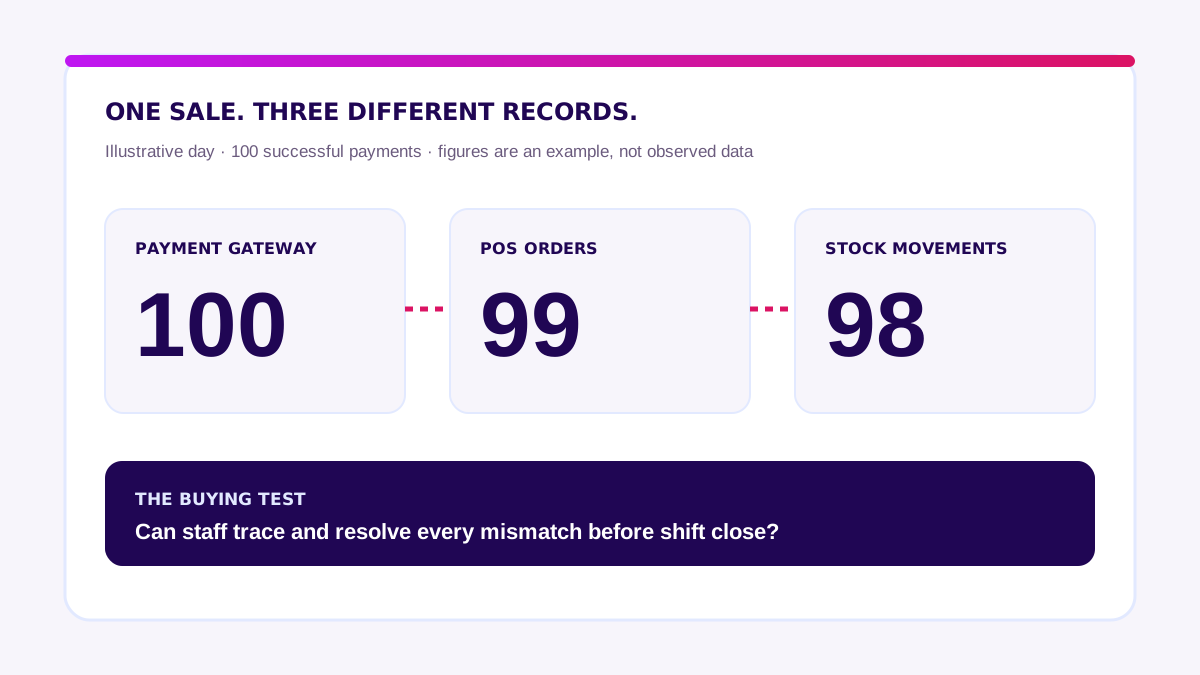
A reliable POS gives every transaction a unique identity and an auditable state. It makes retrying safe. It also shows staff what to do when a connected system is unavailable.
Bank Indonesia describes QRIS as Indonesia’s national QR payment standard and notes that merchants receive transaction notifications. That does not remove the merchant’s responsibility to reconcile payment confirmation with the correct POS order. Read Bank Indonesia’s QRIS overview.
Which POS Software Belongs on an Indonesia Shortlist?
Start with your workflow, not a “best” label. These four products offer different starting points. Prices below come from official pages checked on 15 September 2026; packages, taxes, devices, and payment terms can change. We have not piloted these products. The final column is a test to request, not a performance claim.
| Product | Reasonable starting point | Software price shown by vendor | Test before choosing |
|---|---|---|---|
| Loyverse POS | A single store testing checkout at a low initial software cost | POS is free; employee management, advanced inventory, and longer sales history are paid add-ons billed in USD | Calculate add-ons; check exports, local payments, and integration limits |
| Moka POS | Outlets seeking a cloud POS with multi-store reports | The FAQ displays Rp299,000/month/outlet for Premium | Test offline recovery, refunds, cross-outlet stock, and hardware costs |
| majoo | Businesses seeking cashier, inventory, and operations modules together | Starter Rp249,000/month/outlet; Advance Rp499,000/month/outlet on its pricing page | Confirm multi-outlet features and terminal limits in the chosen tier; price add-ons |
| Mekari POS | Food businesses that need POS-to-Mekari Jurnal integration | F&B Essentials is Rp299,000/month quarterly or Rp269,000/month annually on its pricing page | Test journal mapping, settlement, refunds, and ecosystem cost |
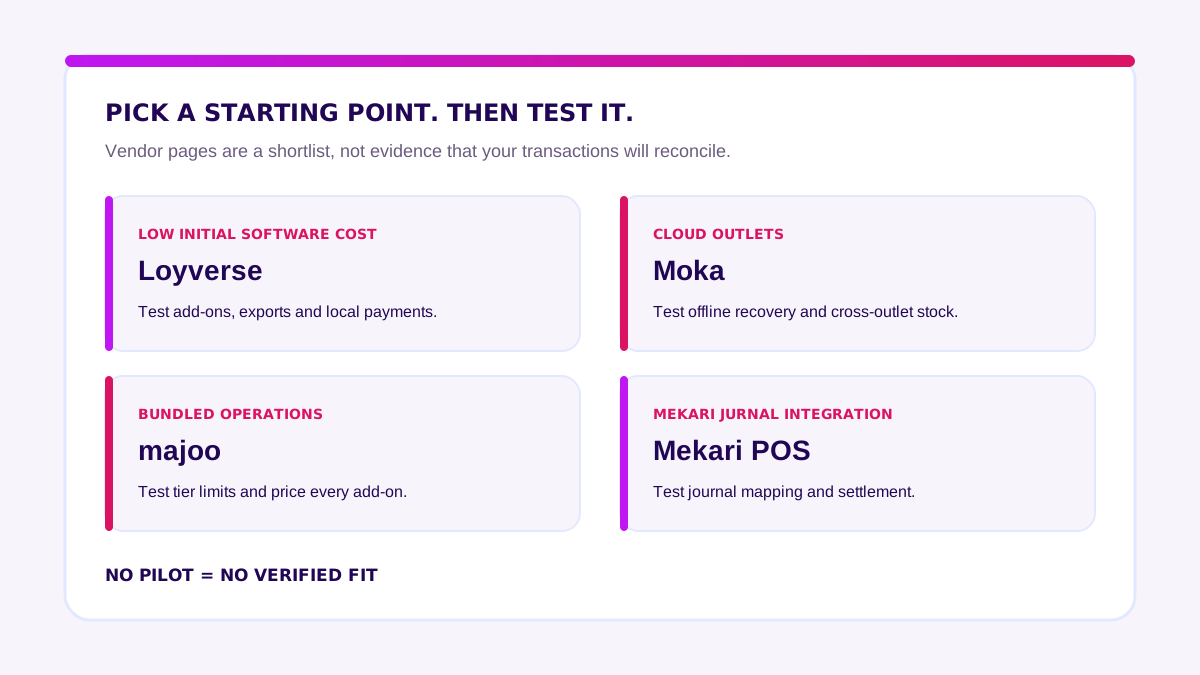
The software price is not total cost. Loyverse bills add-ons in USD, while majoo says prices exclude VAT and installation. Mekari POS presents packages by industry and billing period. Ask each vendor to quote the same outlet count, terminals, add-ons, support, tax, and migration scope.
With five outlets, inspect the multi-outlet tier and limits rather than an entry-level price. If checkout is standard but inventory or finance is distinctive, read the multi-branch POS guide before deciding whether a hybrid approach is needed.
Ready-Made vs Custom POS Software: A Quick Comparison
Do not start with “Which vendor has the most features?” Start with “Which operating model creates the least unmanaged risk?”
| Decision factor | Ready-made POS | Hybrid: product + integrations | Custom POS |
|---|---|---|---|
| Best fit | Standard outlet workflow | Standard checkout, distinctive back office | Proven workflow that products cannot support safely |
| Time to pilot | Days to a few weeks | Several weeks | Months, after validation |
| Up-front cost | Lowest | Medium | Highest |
| Flexibility | Configuration only | Extensions around a stable core | Full control |
| Main risk | Workarounds and lock-in | Fragile integration ownership | Delivery and maintenance burden |
| Evidence required | Reference outlets and trial | API proof and end-to-end test | Validated scope and long-term owner |
For a deeper route decision, read SaaS vs custom vs hybrid for cashier applications. This guide stays focused on how to evaluate the system you may buy.
How Does a POS Application Work?
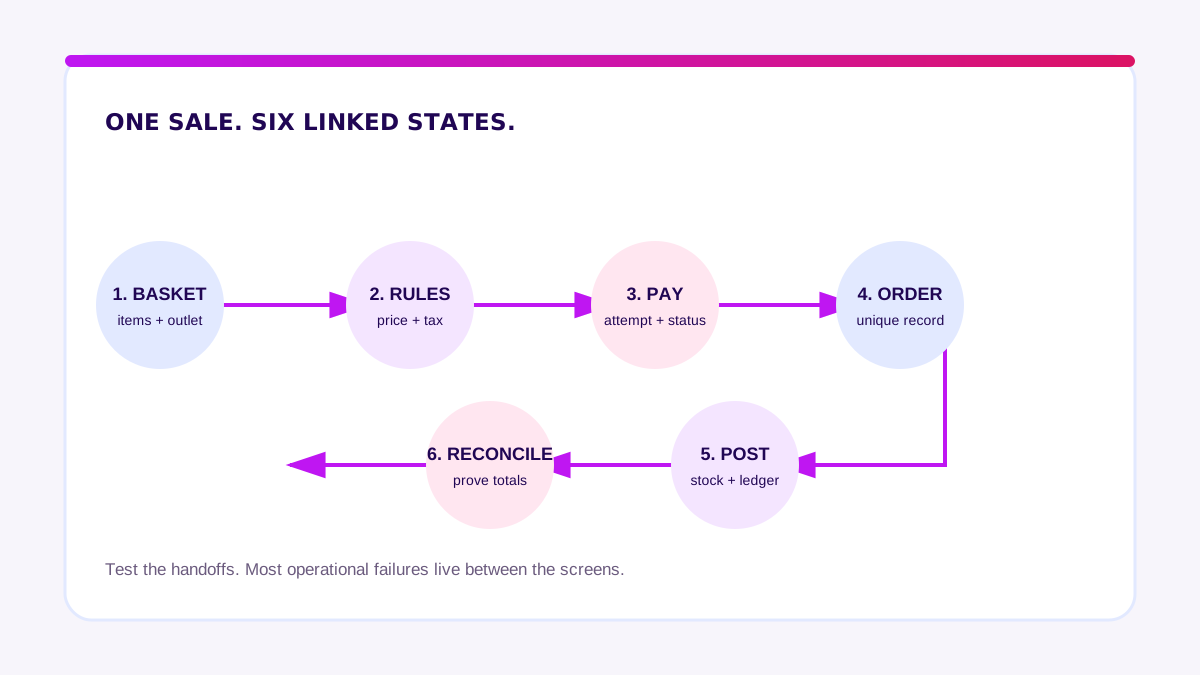
A complete sale moves through six stages:
- Basket creation. The cashier selects products, quantities, modifiers, customer details, and the outlet.
- Rule calculation. The system applies price books, tax, discounts, vouchers, and authorization rules.
- Payment request. Cash, card, QRIS, e-wallet, or split payment creates one or more payment attempts.
- Order commitment. A successful transaction receives a unique ID and an immutable record.
- Downstream posting. Inventory, loyalty, kitchen or fulfillment, and accounting receive the event.
- Reconciliation. Shift close compares POS orders, tenders, refunds, cash, and settlement data.
The important design question is what happens between those stages. If a terminal times out after the gateway approves payment, can the cashier retry without double-charging? If inventory is offline, is the event queued with a visible status? If a supervisor voids an order, is the original record preserved?
Turn these scenarios into acceptance tests before procurement. They expose more than a polished demo.
Which POS Features and Modules Are Essential?
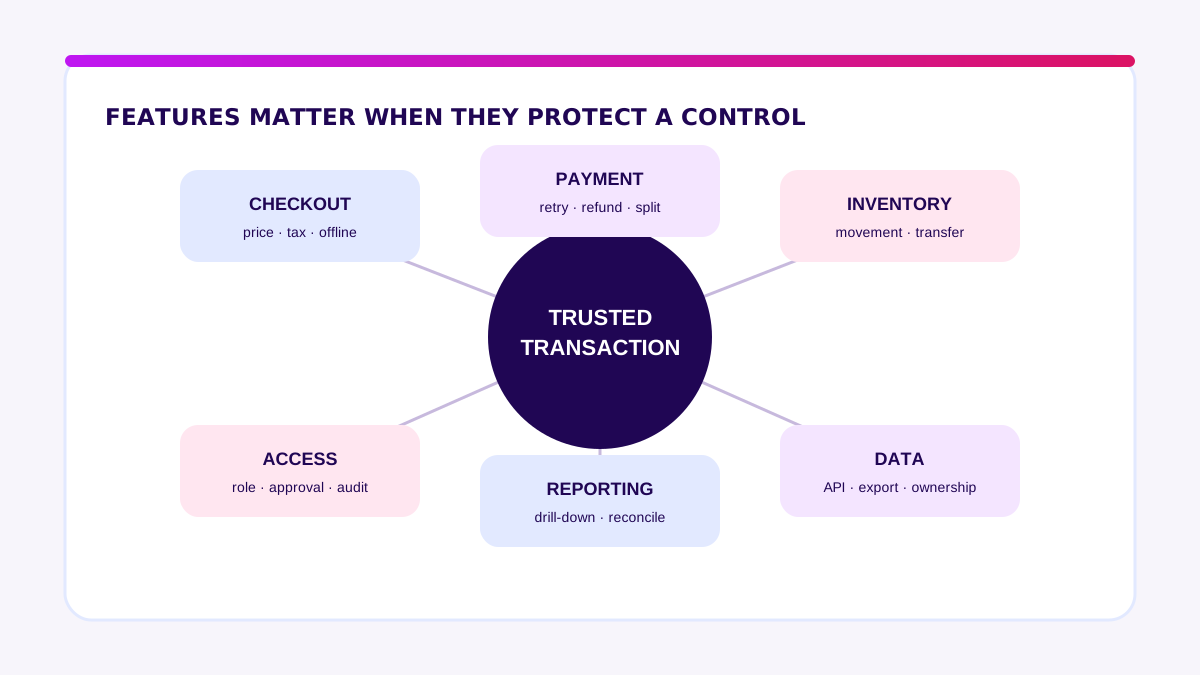
Most feature lists are too long. Group requirements by the business control they protect.
1. Checkout and pricing controls
Test barcode speed, product search, modifiers, price books, tax, rounding, discounts, split payments, suspended baskets, and offline behavior. Define which actions require supervisor approval.
2. Payment and refund controls
Test approved, declined, cancelled, timed-out, and duplicate payment attempts. Refunds should reference the original sale, capture a reason, and follow role limits. If card-account data is stored, processed, transmitted, or its environment can be affected, use the PCI DSS requirements as a baseline—not an optional badge.
3. Inventory controls
Define when stock moves: order confirmed, payment approved, or fulfillment completed. Test returns, waste, transfers, bundles, units of measure, and negative-stock rules. Reports should distinguish physical, reserved, and available stock.
4. Staff and audit controls
Every discount, void, refund, cash-drawer opening, and manual price change needs an actor, timestamp, reason, and approval trail. Shared cashier accounts defeat this control.
5. Reporting and reconciliation
Managers need drill-down from a summary to source transactions. Demand exports for sales, tenders, taxes, refunds, inventory movement, and audit logs. A dashboard without exportable evidence is not enough.
6. Integration and data ownership
Check API coverage, webhooks, rate limits, retry behavior, sandbox access, identifiers, and export formats. Confirm who owns transaction data and how quickly you can retrieve it when the subscription ends.
When Is Off-the-Shelf Enough—and When Do You Need Custom?
Ready-made software is enough when outlet workflows are common, required integrations exist, configuration covers roles and approvals, and a real trial passes failure scenarios. That is the default worth proving first.
Custom work becomes reasonable when a distinctive workflow has been validated, its revenue or control impact is measurable, product workarounds create material risk, and someone will own the system after launch. Often the best answer is hybrid: keep certified payment and standard checkout components, then build the operational layer that differentiates the business.
Use a two-week Blueprint & Prototype to map transaction states, test risky workflows, and produce a decision-ready backlog before signing a large implementation. If evidence supports a custom layer, Production Grade Software turns that validated scope into secure, observable software.
How to Choose POS Software: A Vendor Evaluation Checklist
Use the same scripted scenarios for every shortlisted vendor. Score evidence, not presentation quality.
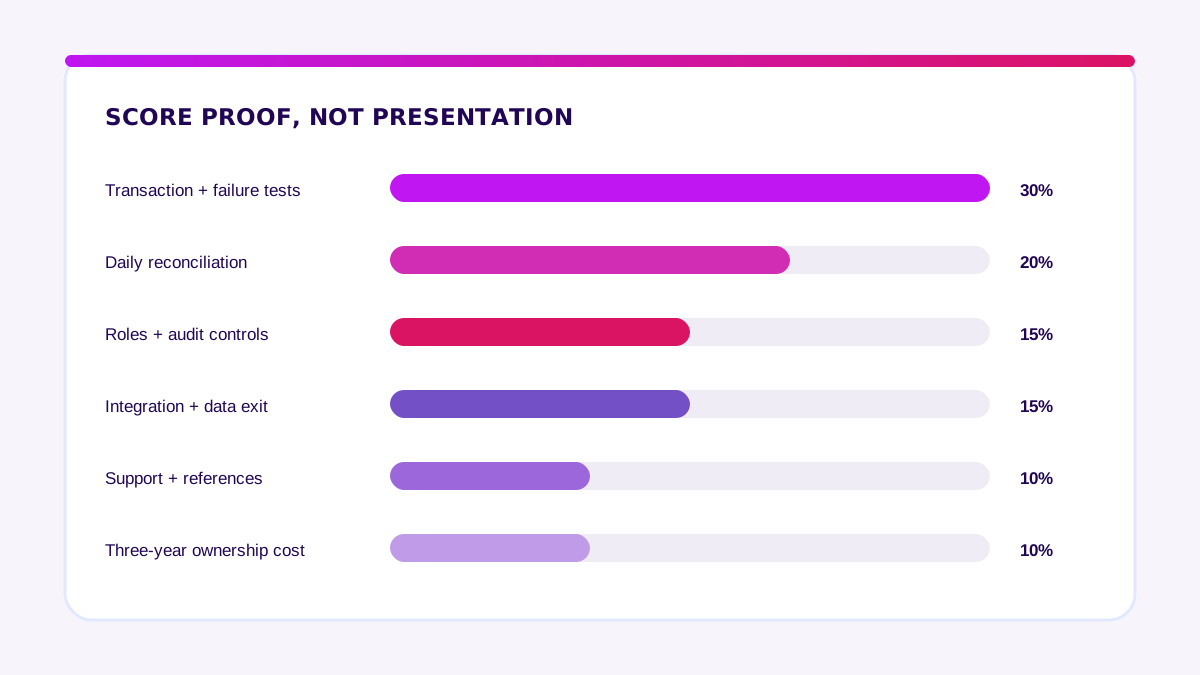
- Map three real shifts. Observe opening, peak trade, and closing. Record exceptions, not only the happy path.
- Bring your data. Import representative SKUs, modifiers, taxes, users, and opening balances.
- Run failure tests. Disconnect the internet, time out a payment, retry, and recover a device.
- Reconcile a full day. Compare order totals, payment tenders, cash count, refunds, and settlement.
- Test permissions. Attempt unauthorized discounts, refunds, voids, exports, and settings changes.
- Inspect the audit trail. Confirm every sensitive action can be traced and exported.
- Prove integrations. Use a sandbox or live test. A roadmap promise is not evidence.
- Export everything. Request raw transaction, product, inventory, customer, and audit-log files.
- Read the service terms. Check support, backups, incident handling, exit assistance, and price increases.
- Call reference customers. Choose businesses with similar outlets, peak volume, and complexity.
Download the POS purchasing checklist and bring it to every demo.
How Much Does POS Software Cost in Indonesia?
Compare first-year total cost, not just the monthly subscription:
subscription + hardware + setup and migration + integrations + training and rollout + support and contingency
Here is an illustrative budget for five outlets and 15 checkout devices. It is a planning example, not a vendor quotation.
| Cost component | Illustrative first-year amount |
|---|---|
| Subscription | IDR 54 million |
| Devices and peripherals | IDR 90 million |
| Setup and data migration | IDR 30 million |
| Integrations | IDR 50 million |
| Training and rollout | IDR 25 million |
| Support and contingency | IDR 31 million |
| Total | IDR 280 million |
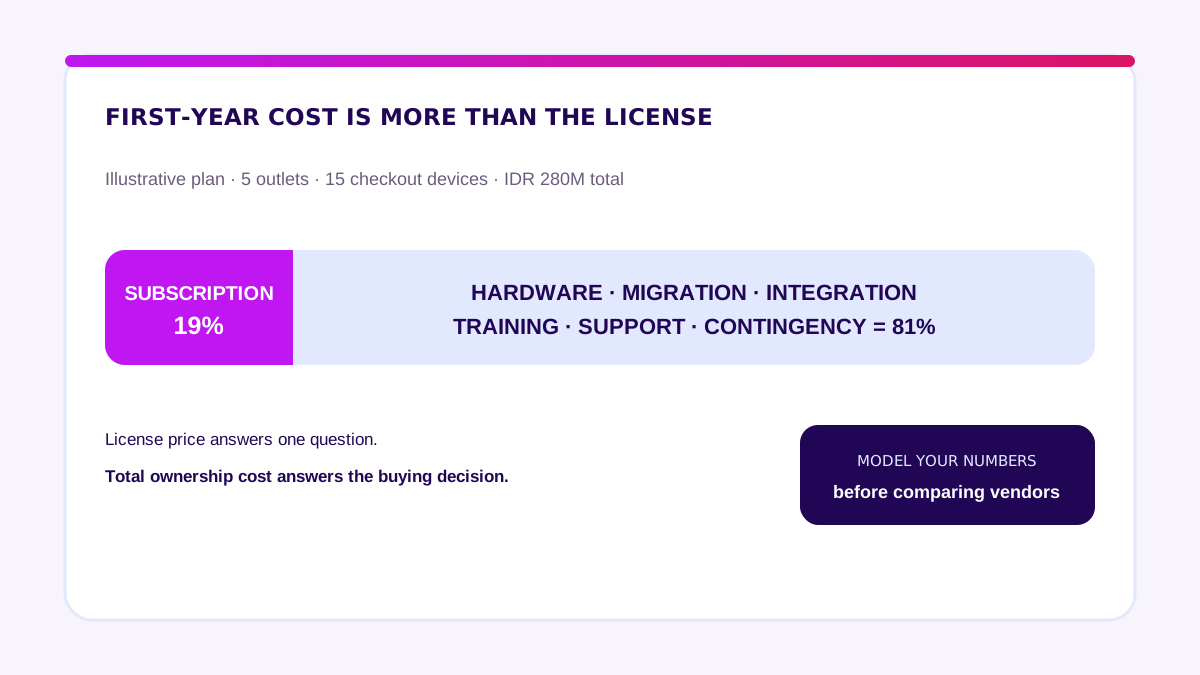
Subscription is only 19% of this example’s first-year cost. That is why a cheap license can still produce an expensive implementation. Model outlets, devices, volume, integrations, support hours, and replacement hardware using your numbers.
How Do You Implement a POS Without a Failed Rollout?
A rollout should earn the right to expand.
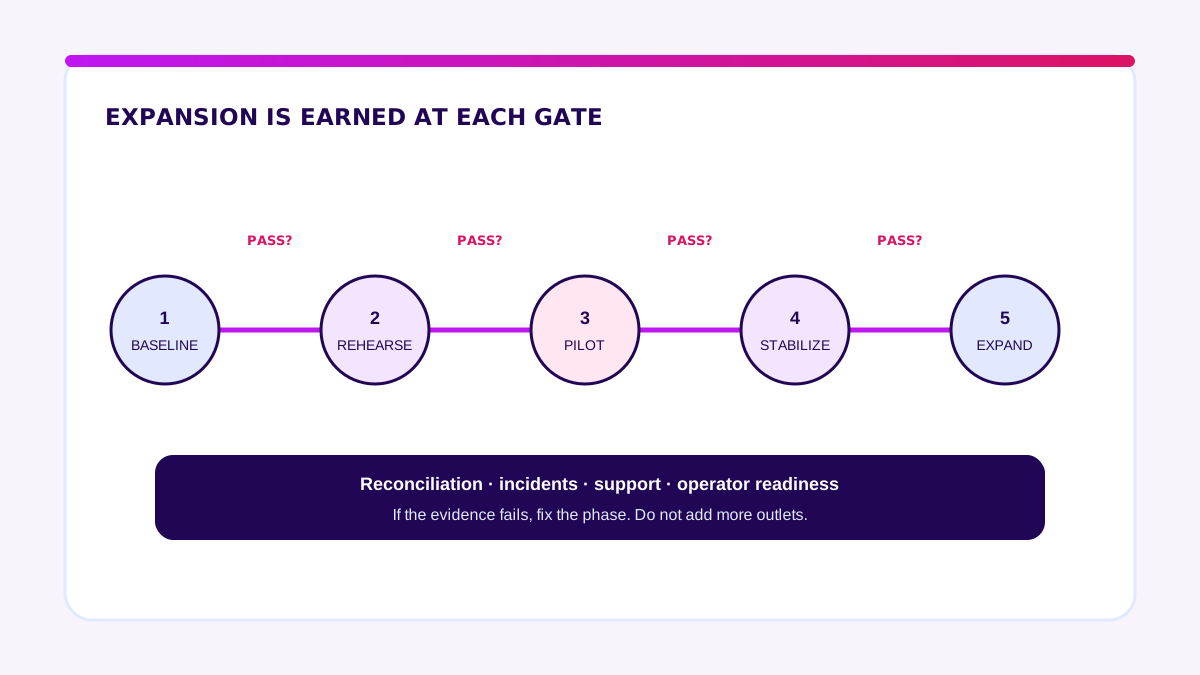
Gate 1: baseline and acceptance criteria
Record current checkout time, mismatch rate, refund handling time, stock variance, and shift-close duration. Turn risky exceptions into pass-or-fail tests.
Gate 2: data rehearsal
Clean products, prices, taxes, users, and opening stock. Run an import rehearsal and reconcile record counts and totals.
Gate 3: controlled pilot
Choose one representative outlet, trained operators, and a limited duration. Keep a documented fallback. Track every exception and owner.
Gate 4: stabilization
Expand when daily reconciliation passes, critical incidents are resolved, support responds, and operators can recover common failures—not because a date arrived.
Gate 5: staged expansion
Roll out in small groups. Compare each group’s results with the baseline. Version configuration changes so fixes do not create inconsistent outlets.
“The best POS decision is not the system with the longest feature list. It is the one your team can prove, reconcile, and operate on a bad day.” — Ganis Atmawarin, Founder of Synetica
My practical advice: shortlist products only after mapping the transaction lifecycle. Demand a pilot with your data. Put reconciliation, data export, and exit terms in writing. If the risky workflow still needs custom development, validate it before committing to a production build.
Frequently Asked Questions
What is a POS application?
A POS application records sales at the point of payment and coordinates payment status, inventory movement, receipts, refunds, staff actions, and reports.
What is the best POS application?
There is no universal best product. The right option passes real transaction scenarios, integrates with required systems, gives you usable data, fits control requirements, and offers dependable support.
How much does a POS application cost?
Cost depends on devices, outlets, subscription tiers, hardware, migration, integrations, training, and support. Calculate first-year total cost and a three-year ownership view.
Can a POS application be custom-built?
Yes. Custom makes sense when a valuable, validated workflow cannot be supported safely by available products. A hybrid approach often keeps standard checkout and payment components while customizing integrations or back-office workflows.
Ready-made or custom POS—which is better?
Ready-made is usually better for standard workflows and faster rollout. Custom is better only when evidence shows that a specific rule, integration, or control creates enough value to justify delivery and maintenance ownership.
What are examples of POS software in Indonesia?
Moka, majoo, and Mekari POS are possible starting points. Loyverse is also available in Indonesian with a free POS and paid add-ons. Compare tiers and run a pilot because fit depends on your outlets, payments, inventory, and integrations.
Related Posts
Two weeks to a real answer
Need help putting this into practice?
Book a Blueprint session and we'll turn the ideas in this article into a tested prototype in front of real users—2 weeks, from $3,000.