Guide
Cashier App: How to Choose and When to Go Custom
The right cashier app keeps transactions moving, stock believable, and sales numbers useful for decisions. It is not simply a calculator replaced by a tablet. The wrong choice moves the queue from the checkout counter to a spreadsheet behind the store.
Across 15+ years of shipping digital systems, the team behind Synetica has seen the same pattern: software rarely fails because a button is not pretty enough. Problems appear when refunds, shifts, stock, payments, and reconciliation are treated as details for later.
This guide helps you decide when an off-the-shelf app is enough, when hybrid makes sense, and when your workflow genuinely needs a custom build. It includes essential capabilities, vendor test scenarios, an illustrative cost model, and a phased rollout.
TL;DR — the whole guide in five lines:
- Buy off the shelf when your workflow is standard and the critical scenarios pass in a trial.
- Choose custom when the operating rules that differentiate your business cannot be configured without recurring manual work.
- Test failed payments, refunds, offline mode, and stock variance, not only a clean demo happy path.
- Count the complete first-year cost: subscription, hardware, setup, migration, integration, training, and support.
- Start with one outlet and one shift, then scale after cash, stock, and payment figures reconcile.

What does a working cashier app look like?
A cashier app works when one sale leaves a consistent trail across payment, stock, shift, and reporting records. Test that trail with real scenarios. Do not begin with a vendor feature list.
The example below is a synthetic acceptance test for a three-outlet retailer with 12 cashiers and 1,200 SKUs. It is not a benchmark result for a particular vendor.
POS-03 — payment status times out. The cashier creates an IDR 187,500 sale. Payment succeeds at the provider, but the cashier app loses its connection before receiving the status. After recovery, the system must find the same payment, avoid a second charge, print one receipt, reduce stock once, and record who resolved the exception.
This test forces a vendor to demonstrate recovery instead of a rehearsed demo. The second important test: sell one SKU while offline for 20 minutes, then prove the sync does not reduce its stock twice.
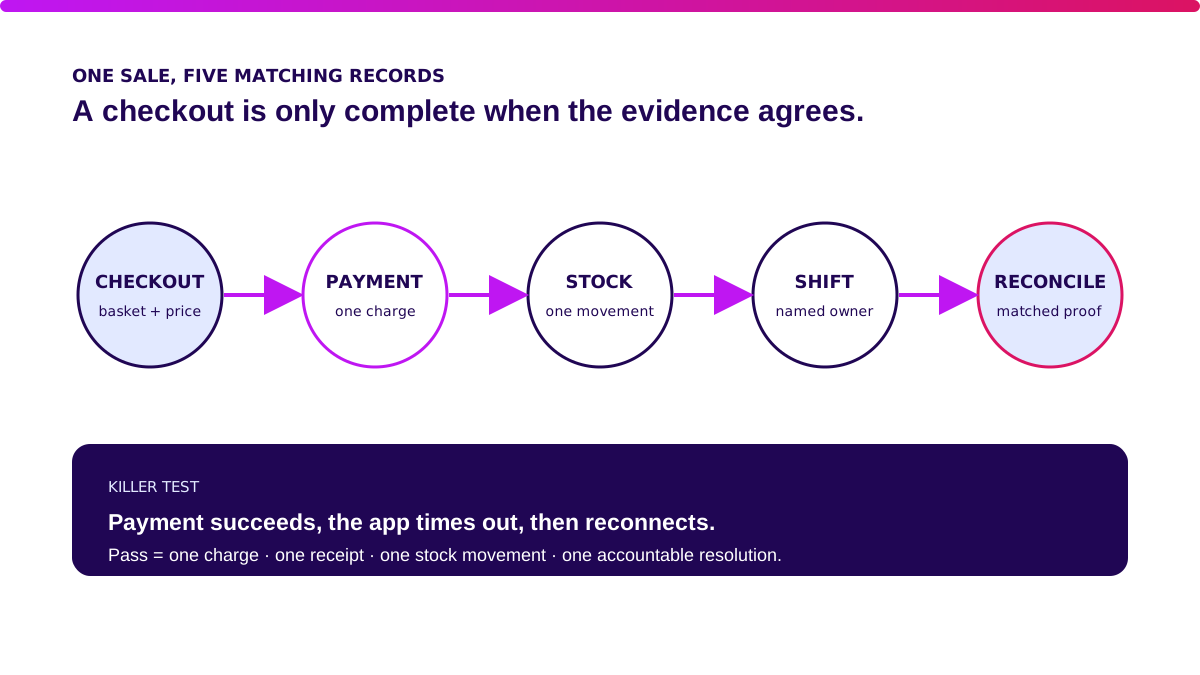
For QR payments, Bank Indonesia defines QRIS as the QR Code payment standard used for transactions in Indonesia. An integration review must therefore cover transaction status, merchant notification, refund or void handling, and reconciliation—not merely the ability to display a QR code.
Bring three failed transactions from last week into the vendor session. They reveal more than 40 ticks in a brochure.
What is a cashier app?
A cashier app is software that records sales, calculates totals and discounts, accepts payment methods, issues receipts, and updates related operating data. In a mature system, the same transaction connects to stock, cashier shifts, customers, accounting, and analytics.
Its core jobs are to:
- Process a transaction and its changing status.
- Apply prices, taxes, discounts, and approvals.
- Record payment without duplication.
- Reduce or return stock consistently.
- Close shifts and reconcile cash.
- Preserve an audit trail for exceptions.
Point of sale is the transaction moment; the cashier app is a tool; the POS system is the complete workflow around it. For a deeper view of architecture and industry variations, read the POS software guide.
Off-the-shelf vs custom cashier apps: which makes sense?
Do not choose by feature count. Choose by the workflow risk that remains unresolved. All three routes below are valid.
| Route | Upfront cost | Time to start | Flexibility | Best fit |
|---|---|---|---|---|
| SaaS / ready-made | Low; subscription + hardware + setup | Days to a few weeks | Within product configuration | 1–5 outlets with common workflows |
| Custom | Discovery, design, build, integration | After scope validation | High within agreed boundaries | Unique workflows or POS as an operating advantage |
| Hybrid | SaaS core plus an integration layer or custom module | Depends on the boundary | High where it matters | Standard core with unique ERP, loyalty, or fulfilment |
SaaS wins when you need transactions, a catalogue, shifts, simple stock, and standard reporting. Custom wins when the cost of repeated workarounds is material or the checkout experience is part of your business differentiation.
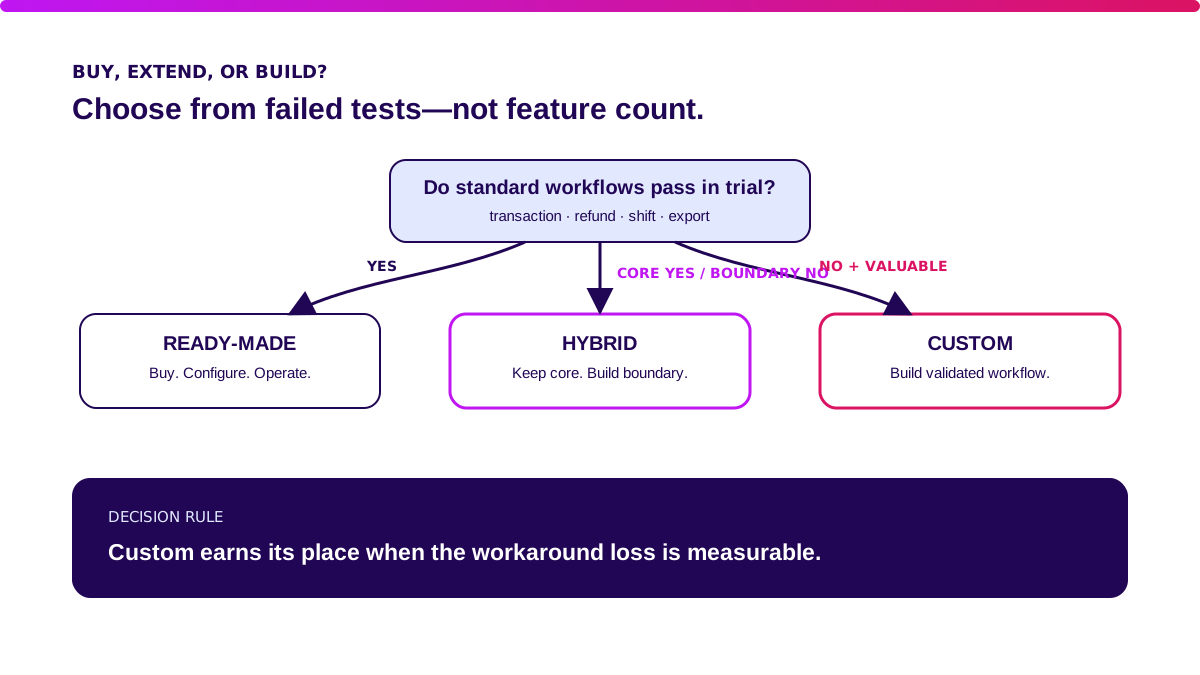
Hybrid is often the most sensible answer. Keep payment acceptance and standard transaction processing in a mature product. Build only the differentiating boundary: stock allocation, loyalty, pricing, franchise settlement, or ERP integration.
Map the boundary before asking for a build estimate. Without one, “custom” can become a project expected to swallow every operating problem at once.
Which cashier app features are essential?
Essential features keep a transaction correct when conditions are not ideal. Use these six capability groups as your baseline.
1. Transaction and catalogue — owner: retail operations
A cashier must find an item and complete the basket without improvising. Test barcodes, variants, modifiers, bundles, outlet-level prices, item cancellation, and receipts.
The system should prove it can:
- Find an SKU by barcode and search.
- Block an unapproved price change.
- Apply discounts without unintended stacking.
- Return an item to its source transaction.
2. Payment and reconciliation — owner: finance
A “paid” status must match evidence from the payment provider. Test cash, QRIS, cards, split payments, timeouts, reversals, and shift closing.
Avoid storing card data unless necessary. PCI DSS provides technical and operational baseline requirements for entities that store, process, or transmit payment account data—including merchants and service providers. Ask a vendor to define its security responsibility, not merely claim it is “PCI ready”.
3. Stock and goods movement — owner: inventory
Every sale should create a traceable inventory movement. Test offline selling, returns, outlet transfers, partial receiving, stock counts, and damaged products.
If one sale triggers five manual corrections, your POS is not integrated. The inventory management guide covers the deeper multi-location requirements.
4. Users, shifts, and approvals — owner: store manager
Every high-risk action needs an identity and an authority limit. Test shift changes, cash in/out, above-threshold discounts, voids, refunds, and drawer opening.
The system should answer three questions: who did what, when, and under whose approval.
5. Offline mode and recovery — owner: IT/operations
Offline mode is not a checkbox; it is a policy for what may happen while the centre is unavailable. Define which transactions can continue, amount limits, available data, sync order, and conflict resolution.
A restored connection does not mean the data is correct. Ask for an exception screen and a recovery procedure that a store supervisor can run.
6. Reporting and integration — owner: finance/data
Useful reports reconcile back to source transactions. Test exports, APIs, daily cut-offs, time zones, account mappings, and consistent definitions for gross sales, net sales, discount, tax, refund, and payment settlement.
“A healthy POS does not hide exceptions. It makes them visible, owned, and resolved before the books close.” — Ganis Atmawarin, Synetica
Use the production build path when a validated integration genuinely needs engineering, observability, and long-term support.
When is off-the-shelf enough—and when do you need custom?
Off-the-shelf is enough when a trial proves your main workflow and costly exceptions without fragile workarounds. A low price is a bonus. Operating evidence is the requirement.
Choose off the shelf when:
- Outlets use reasonably consistent catalogues, prices, and discount rules.
- Standard payment and accounting integrations are available.
- Supervisors can resolve exceptions without an engineer.
- Complete data exports are available if you change systems.
- Three-year subscription cost is lower than the value of the problem solved.
Consider custom or hybrid when:
- You have replaced two systems and the same workaround remains.
- Pricing, bundling, franchise settlement, or fulfilment is genuinely unique.
- Five systems require manual reconciliation every day.
- Multi-outlet operations need distinct availability and allocation rules.
- Checkout, membership, or fulfilment creates a competitive advantage.
The strongest signal is not “we want flexibility”. It is a measurable loss. That might be 18 reconciliation hours per week, IDR 35 million in monthly stock variance, or 3% of orders re-keyed manually. Measure the baseline before requesting proposals.
Validate it in 2 weeks. Before making a major cashier-app investment, bring the riskiest workflow to Blueprint & Prototype. We map its rules, build a working prototype, and collect user signal before defining production scope.
How do you choose a cashier app and test vendors?
Shortlist vendors after your team agrees eight acceptance tests. Run them with synthetic data that resembles your outlets.
- Sell a basket with discounts, tax, and two payment methods.
- Simulate a payment timeout without creating a duplicate charge or receipt.
- Sell and return the same SKU offline, then synchronise.
- Close a shift with a cash variance and have a supervisor resolve it.
- Transfer partial stock between outlets and trace its status.
- Restrict refunds, exports, and price changes by role.
- Export catalogue, transaction, customer, and audit data in open formats.
- Disable one integration endpoint and show the queue, retries, alerts, and recovery.
Score zero when it cannot be demonstrated, one for explanation only, two for a successful happy path, and three when the exception and evidence also pass. A must-have below three blocks the decision, even if a vendor’s total score looks high.
Download the cashier-app evaluation checklist and complete it with cashiers, supervisors, finance, inventory, and IT. Then use the software vendor due-diligence guide to check delivery ownership, contracts, and the exit plan.
How much does a cashier app cost in Indonesia?
Cashier-app cost is more than subscription. Count every piece of work that makes the transaction trustworthy. The example below models three outlets and 12 devices; it is not a market quote or a Synetica proposal.
| First-year component | Example assumption | Cost |
|---|---|---|
| Subscription | 12 devices × IDR 350k × 12 months | IDR 50.4m |
| Hardware | tablets/terminals, printers, scanners, drawers | IDR 72m |
| Setup and migration | catalogue, users, opening stock | IDR 25m |
| Integration | accounting, payment, or e-commerce | IDR 45m |
| Training and rollout | three outlets | IDR 18m |
| Support and contingency | support + change buffer | IDR 24.6m |
| Illustrative total | IDR 235m |
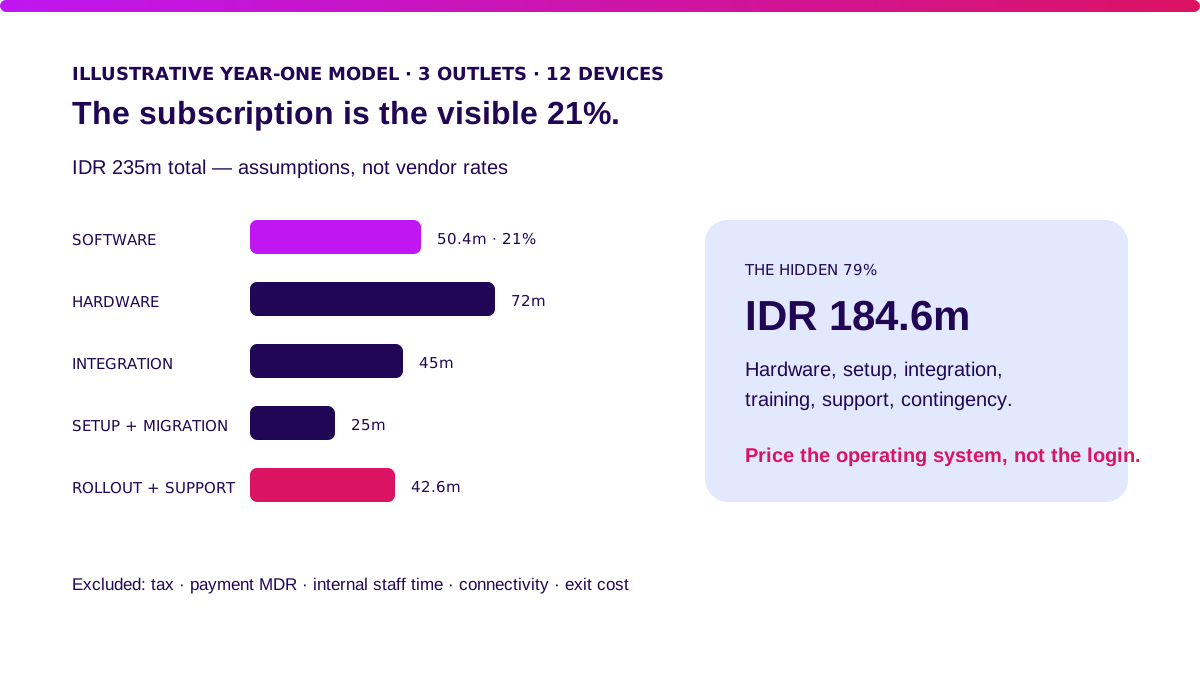
In this model, subscription is only 21% of the first-year total. Hardware, setup, integration, rollout, and support take 79%. Taxes, payment MDR, internal staff time, connectivity, and exit costs are excluded.
For custom work, Synetica lists Blueprint & Prototype from IDR 49 million and Production Grade Software from IDR 200 million. They are separate service starting points, not an all-in cashier-app quote. Scope, hardware, migration, integration, and support determine the actual total.
How do you implement a cashier app without a failed rollout?
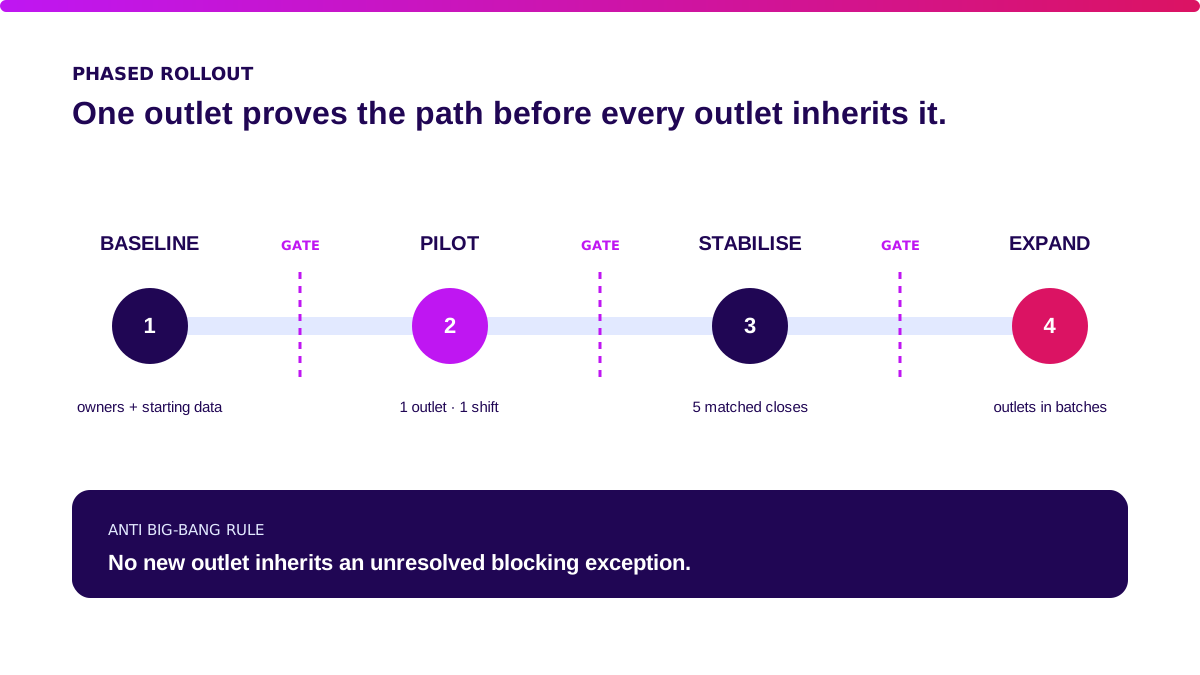
Roll out through one outlet, one shift, and one reconciled dataset. A big bang makes the team discover pricing, stock, user, and payment problems on the same day—usually while a customer is waiting.
| Phase | Work | Gate to proceed |
|---|---|---|
| Baseline | Measure checkout duration, cash variance, stock corrections, and reconciliation hours | Owners and starting figures agreed |
| Pilot | One outlet, synthetic tests, then limited live use | Eight acceptance tests pass |
| Stabilise | Monitor exceptions, training, and support | Shift close and settlement match for five consecutive days |
| Expand | Add outlets in batches | No blocking error lacks an owner |
Synetica runs two weeks of Blueprint & Prototype, then eight weeks of Production Grade Software for validated scope: ten weeks to a production release. Multi-outlet implementation, historical migration, hardware, and operating change can require additional phases. After release, Launch & Grow joins analytics, learning, and iteration in a monthly retainer.
What I would ask your team to do first
Take the three most expensive exceptions from this week’s operations and turn them into acceptance tests. Dreamers with one outlet may be well served by simple SaaS. Growing Businesses should bring finance, inventory, operations, and IT into one decision.
I would choose ready-made software when all eight tests pass and the data can leave cleanly. I would choose hybrid when the transaction core is mature but one or two important boundaries do not work. I would only choose full custom when the workflow creates a real moat and the team is ready to own the system after launch.
One next step: bring the baseline and acceptance tests to Blueprint & Prototype.
FAQ
What is a cashier app?
A cashier app processes transactions, pricing, discounts, payments, receipts, and related updates such as stock and shifts. A POS system includes the wider operating workflow and integrations.
What is the best cashier app?
The best app passes your transaction and exception scenarios at an acceptable total cost. Test a trial with your own data and workflow instead of relying on a generic feature ranking.
How much does a cashier app cost?
Cost includes subscription or build, hardware, setup, migration, integration, training, support, and payment fees. The IDR 235m model in this article is a three-outlet first-year example, not a market range.
Can a cashier app be built custom?
Yes. Custom makes sense when valuable workflows remain unsupported and the loss created by workarounds can be measured. Validate the boundary before production engineering.
Off-the-shelf vs custom cashier apps: which is better?
SaaS is better for standard workflows and a fast start. Custom is better for unique rules that create business value. Hybrid fits a standard core with a specific integration or module that must be built.
Related Posts
Two weeks to a real answer
Need help putting this into practice?
Book a Blueprint session and we'll turn the ideas in this article into a tested prototype in front of real users—2 weeks, from $3,000.