Guide
Inventory, Warehouse & Order Management Software: The Complete Guide
Your operations run on a patchwork of spreadsheets, a legacy system nobody trusts, three disconnected SaaS tools, and a WhatsApp group that’s somehow become mission-critical infrastructure. Sound familiar?
Most growing businesses hit operations chaos between 500 and 5,000 SKUs—or somewhere past 100 orders a day. Below that, spreadsheets barely hold. Above it, they collapse: stockouts, overselling, phantom inventory, pickers walking in circles, and manual errors that compound silently.
The fix isn’t one tool. It’s a stack: inventory management tracks what you have, warehouse management (WMS) controls how it physically moves, order management (OMS) orchestrates the order lifecycle, and supply chain management (SCM) coordinates everything across suppliers and carriers. Get the stack wrong and you’ll either overpay for software you’ve outgrown in 18 months, or burn six figures building something you could’ve bought for $300/month.
This guide covers all four layers—what each one does, when to build vs buy, and what it actually costs.
TL;DR — the whole guide in five lines:
- The operations stack has four layers — inventory (what you have), WMS (how it moves), OMS (the order lifecycle), SCM (beyond your walls) — and the integration architecture matters more than any single tool.
- Spreadsheets collapse between 500–5,000 SKUs or past 100 orders a day; that’s when the stack decision is due, not after the first oversold launch.
- The clearest build signal is the side-spreadsheet your team keeps “because the system can’t do X” — that spreadsheet is your requirements document.
- Buy covers 80% of cases; build when workflows are your competitive edge, you’re a 3PL with client-specific rules, or you process 50,000+ transactions a month.
- Budget 1.5× your estimate plus 15–20% a year for maintenance — the biggest cost is running the wrong operation for another year while you decide.
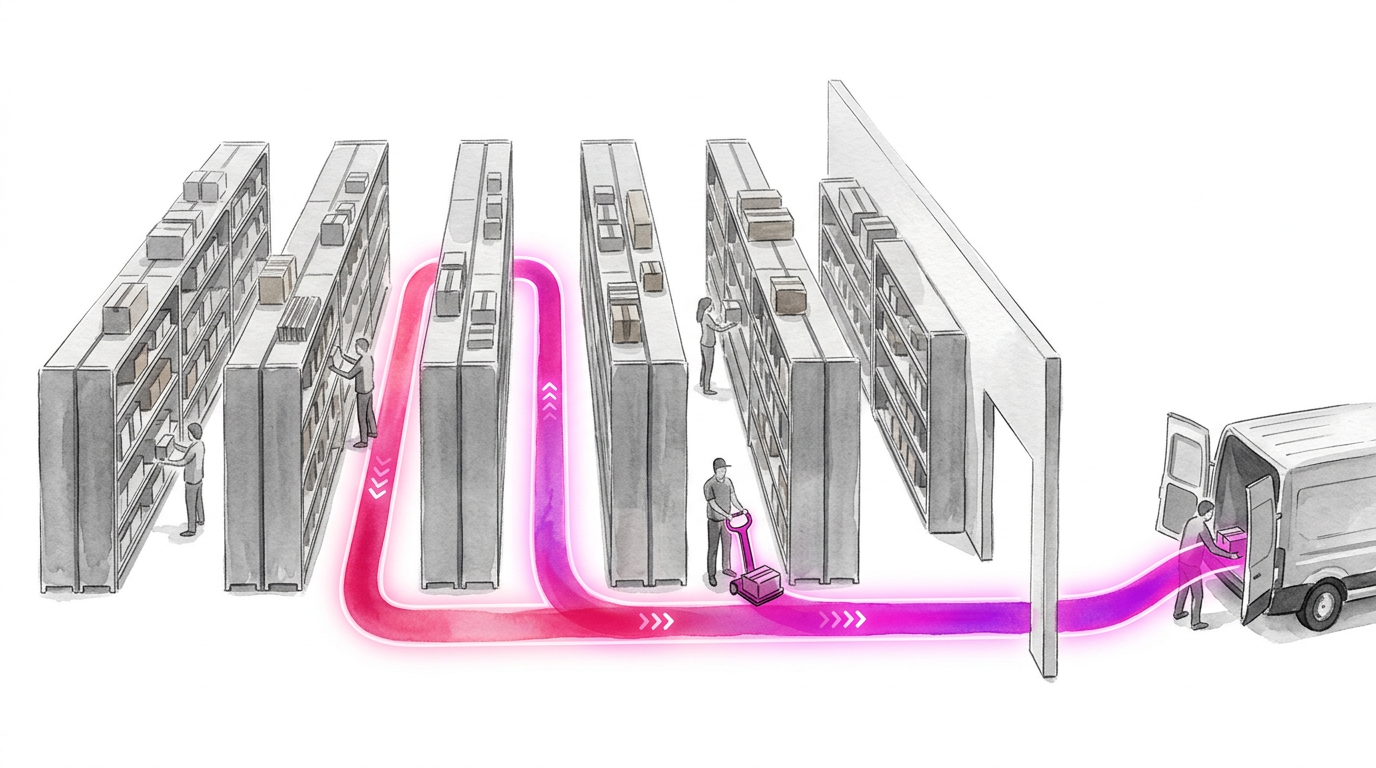
The Operations Stack: Four Systems, One Job
These terms overlap constantly, which creates confusion. Here’s how they relate:
| System | Scope | Focus |
|---|---|---|
| Inventory Management | Stock levels and movements | What you have, where it is, when to reorder |
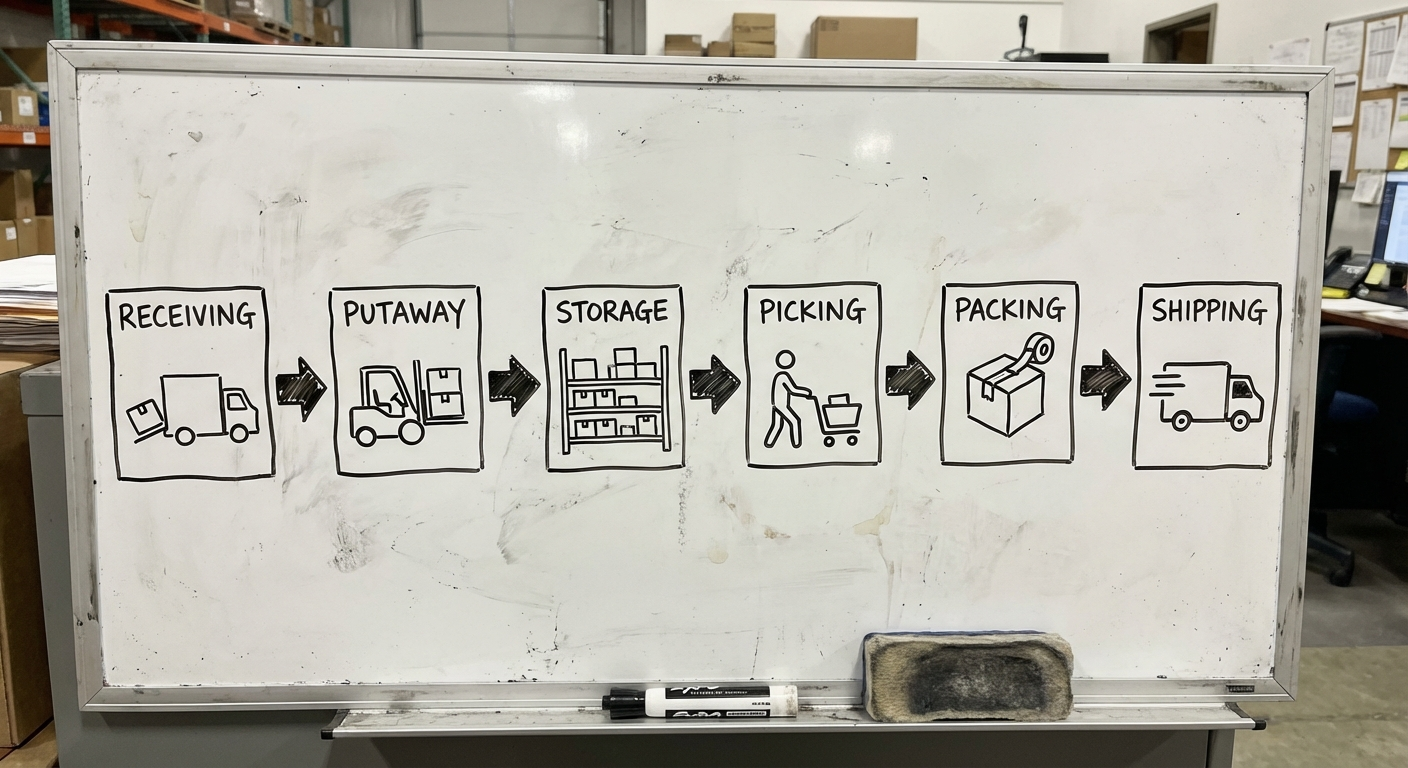
| WMS | Warehouse operations | Receiving, putaway, picking, packing, shipping |
| OMS | Order lifecycle | Capture, allocation, fulfilment routing, returns |
| SCM | End-to-end supply chain | Coordination across suppliers, carriers, and partners |
| ERP | Entire business | Finance, HR, operations (the above are modules or neighbours) |
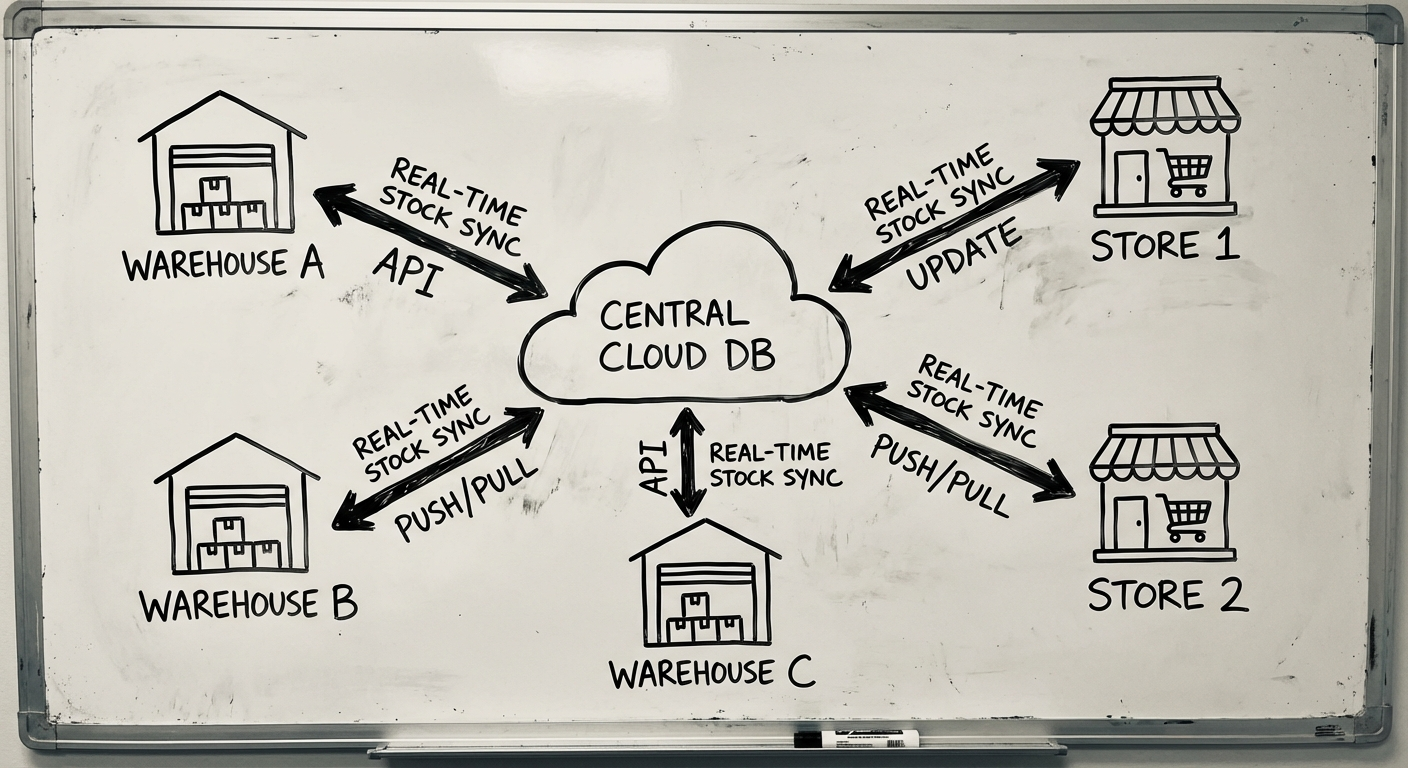
The integration architecture matters more than any single system. A mediocre inventory tool with clean integrations beats a brilliant one that operates in a silo. Whether you buy each layer, build a few, or run a hybrid, the question is the same: does data flow between them in near-real-time, or does someone re-key it?
This is exactly the class of problem we work on daily—see how we approach operations software for the broader picture.
Inventory Management: The Foundation
An inventory management system is software that tracks stock levels, orders, sales, and deliveries across your entire supply chain—giving you real-time visibility into what you have, where it is, and when to reorder.
It replaces manual tracking with automated workflows: purchase orders trigger when stock dips below thresholds, barcodes eliminate counting errors, and dashboards surface problems before they hit your bottom line. One warehouse or ten, the goal is the same: right product, right place, right time, minimum cost.
Six Features That Separate Real Systems from Glorified Spreadsheets
- Real-time stock tracking — Every unit tracked from receipt to sale, updated the moment it moves. Live quantities across channels, movement history, low-stock alerts, multi-unit-of-measure support.
- Automated reorder points — Minimum thresholds that generate purchase orders automatically. Advanced systems factor in lead times, supplier reliability, and seasonality.
- Multi-location management — Per-location visibility, inter-warehouse transfer tracking, location-specific reorder rules, consolidated reporting. If your current system can’t track stock per site in real time, you’re flying blind.
- Barcode & scanning — Scanning is 20x faster than manual entry and drops error rates below 1%. Standard formats (EAN, UPC, Code 128), mobile scanning, batch workflows, label printing.
- Batch & serial tracking — For perishables, regulated goods, and high-value items, traceability isn’t optional—it’s compliance. Batch by production run or expiry, serial by unique ID, instant recall management.
- Demand forecasting — The most undervalued feature. Historical sales + seasonal patterns + trend analysis. Good forecasting reduces carrying costs by 20-30% and virtually eliminates emergency air freight.
Build vs Buy: The Real Comparison
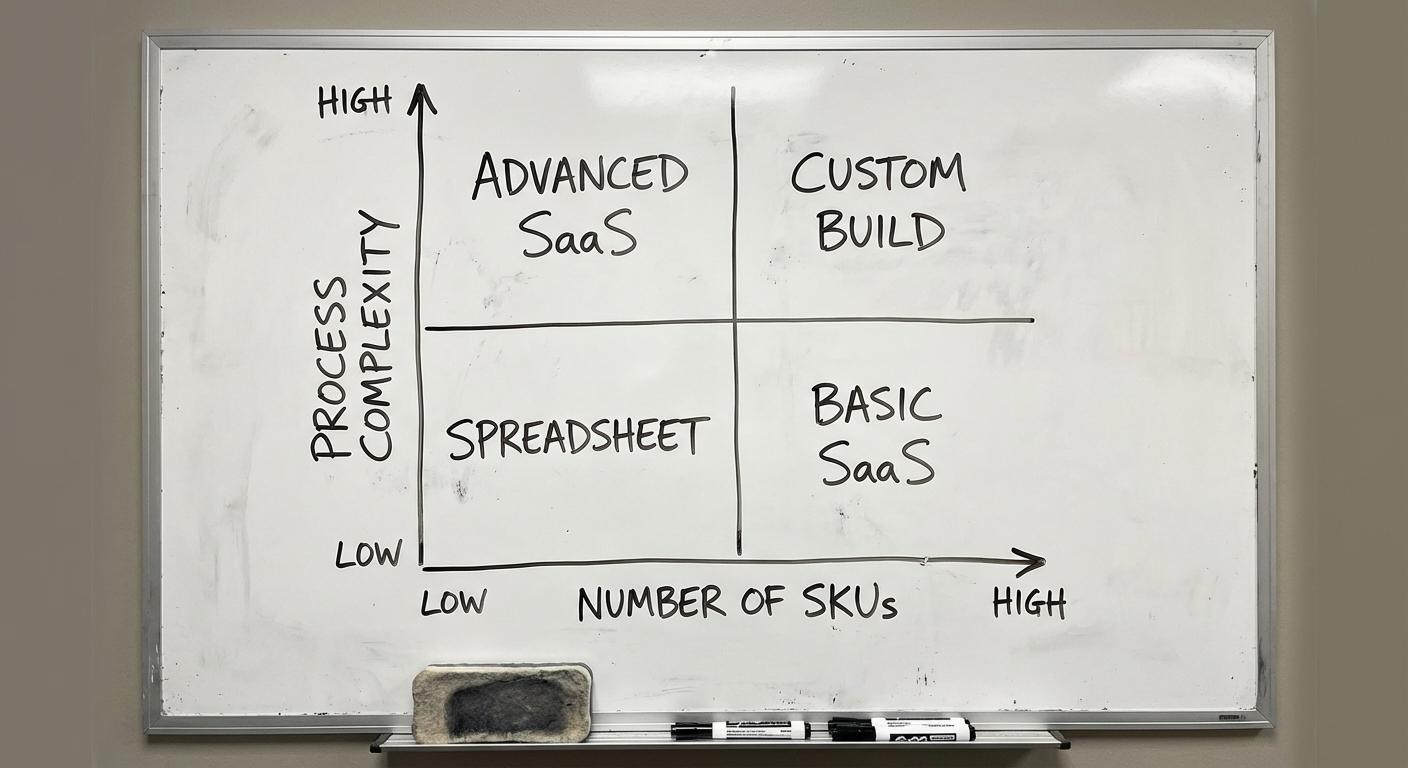
Buying makes sense when your workflows match 80%+ of the software’s default configuration, you have fewer than 10,000 SKUs, standard integrations cover your stack, and you need to be operational within 4-8 weeks. Tools like Cin7 Core ($325-$550 AUD/month) and Cin7 Omni ($399-$999 AUD/month) cover most mid-market wholesale and omnichannel retail use cases.
Building makes sense when your inventory logic is genuinely unique (custom pricing rules, complex BOM, multi-currency multi-entity), you need deep integration with proprietary systems, inventory is a core competitive advantage, or you’re processing 50,000+ transactions/month.
The clearest signal to build: when your team maintains a spreadsheet alongside their inventory system “because the system can’t do X.” That spreadsheet is your requirements document.
| Factor | Buy (SaaS) | Build (Custom) |
|---|---|---|
| Upfront cost | $0-$5K setup | $80K-$250K+ |
| Monthly cost | $325-$999/mo | Hosting + maintenance ($2-5K/mo) |
| Time to launch | 4-8 weeks | 3-6 months (MVP) |
| Customisation | Limited to config options | Unlimited |
| Scaling cost | Jumps at tier thresholds | Linear with usage |
| 5-year TCO | $25K-$75K | $150K-$400K |
| Ownership | Vendor-dependent | You own everything |
The crossover point: custom becomes cost-competitive around the 5-7 year mark—but only if the custom system delivers workflow advantages that translate to measurable revenue or savings. If you’re just replicating Cin7 in custom code, you’ve wasted money.
Validate it in 2 weeks. Before committing to a custom build on any layer of this stack, a Blueprint session maps the workflow where it breaks and tests a prototype slice with your actual operators — see how Blueprint & Prototype works.
Warehouse Management Software: Controlling the Physical Layer
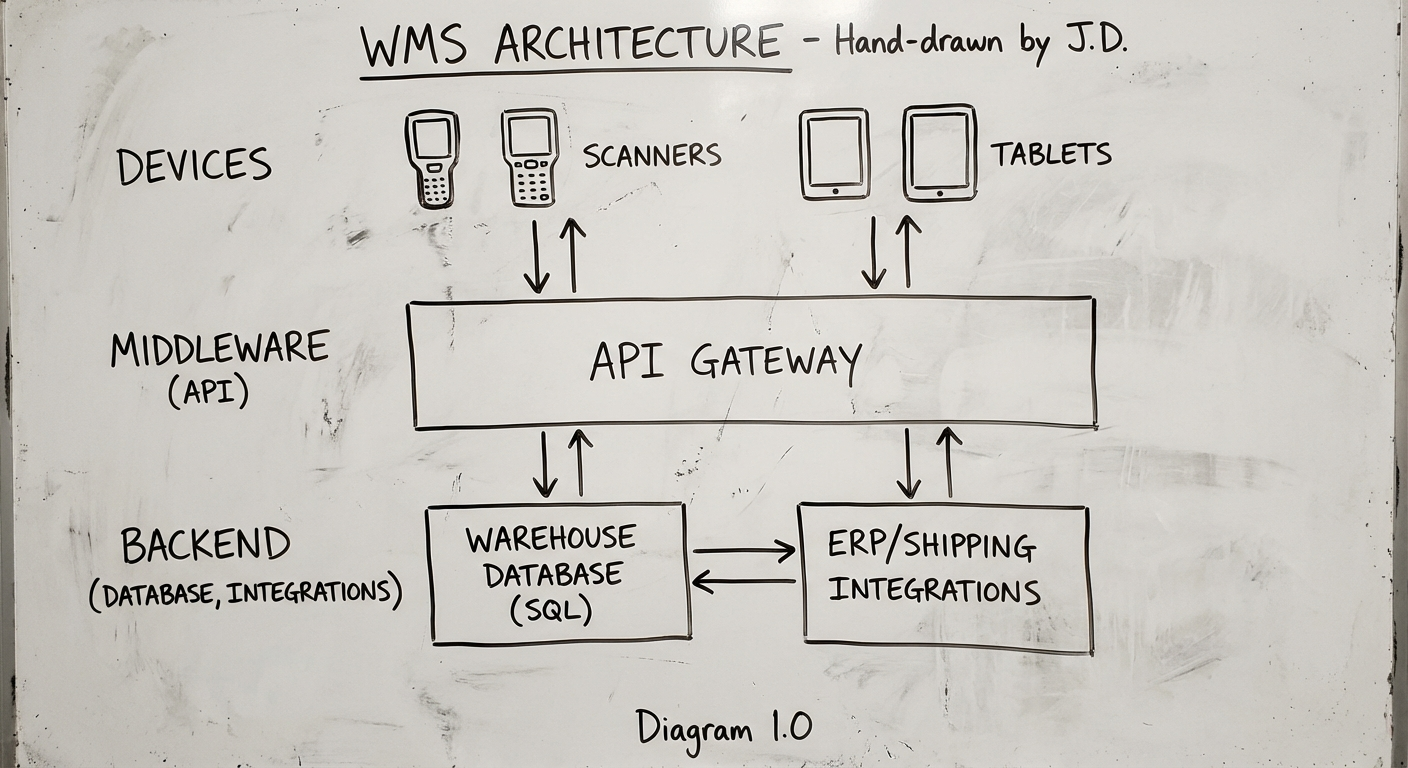
If inventory software answers “what do we have?”, warehouse management software (WMS) answers “where is it, and what needs to happen next?” It sits between your order system (or ERP) and the physical warehouse floor, tracking inventory in real time and directing workers through tasks.
We’ve built warehouse systems for logistics operators, e-commerce brands, and 3PLs. The difference between a warehouse that scales and one that collapses isn’t more staff—it’s better software. See the kinds of operations problems we solve for real examples.
The Modules That Define a Capable WMS
- Receiving & inbound — PO matching on scan, quality inspection workflows, ASN processing, exception handling for short shipments and damaged goods. Good receiving is the foundation of accurate inventory—get this wrong and every downstream process inherits the error.
- Putaway optimisation — Rule-based placement (heavy items low, fast-movers near packing), dynamic slotting, capacity management. Smart putaway reduces travel time by 20-30%, which directly translates to faster picking and lower labour costs.
- Picking — Typically 50-60% of warehouse operating costs. Your WMS should support single-order, batch, wave, and zone picking; the right strategy depends on your order profile.
- Packing & shipping — Pack verification by scan, cartonisation to cut dimensional weight charges, carrier label generation, real-time rate shopping.
- Inventory tracking — Lot/batch and serial tracking, cycle counting that replaces painful annual stocktakes, FEFO expiry management for perishables.
- Barcode & RFID — Barcodes are table stakes. RFID is worth it for high volumes or hands-free operation—fashion retail, cold chain, high-security environments.
- Reporting — Throughput per hour, labour productivity by worker and zone, inventory accuracy variance, OTIF rates, space utilisation.
WMS: Build, Buy, or Hybrid
Off-the-shelf WMS (NetSuite WMS, Fishbowl, Cin7) makes sense when your workflows are standard, you’re under 10,000 SKUs, and budget is under $50K. Build custom when your warehouse workflows are your competitive advantage, integration complexity is high, or you’re a 3PL running multi-tenant warehousing with client-specific rules.
The real question isn’t “build or buy?” It’s “how much of our warehouse operation is truly unique?” If the answer is “most of it,” build. If it’s “just a few things,” buy a core WMS and build custom modules around it, connected via APIs.
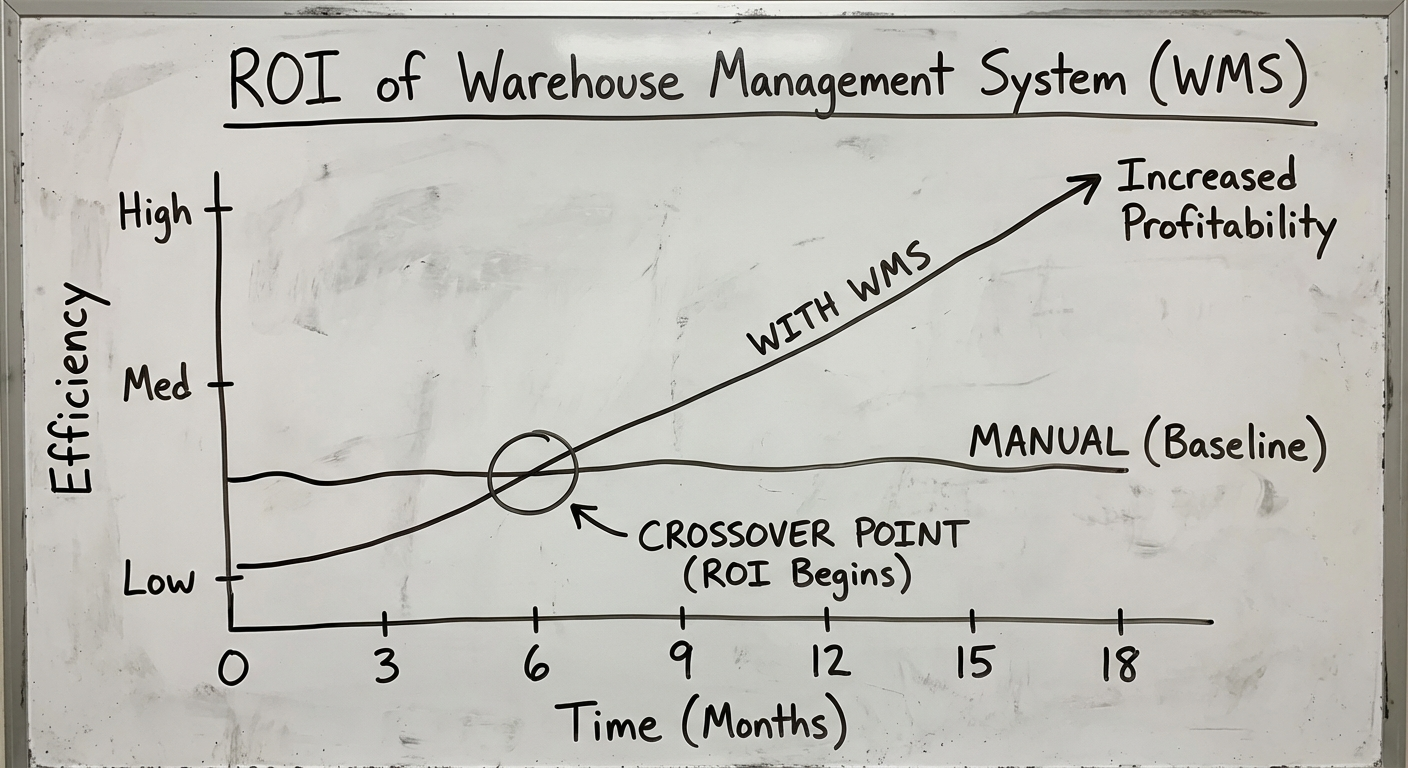
WMS costs at a glance: entry-level SaaS runs $300-$800/month; enterprise platforms (Manhattan, NetSuite WMS) run $5,000-$20,000+/month plus $10K-$100K implementation. A custom MVP runs $80K-$150K over 3-4 months; a full-featured build $150K-$350K over 5-7 months. Custom typically pays for itself within 2-3 years once you factor in licensing savings, productivity gains, and reduced workarounds. Budget for the hidden items: hardware ($500-$3,000 per scanner/printer), data migration, hands-on floor training, and change management.
Order Management Software: Orchestrating the Order Lifecycle
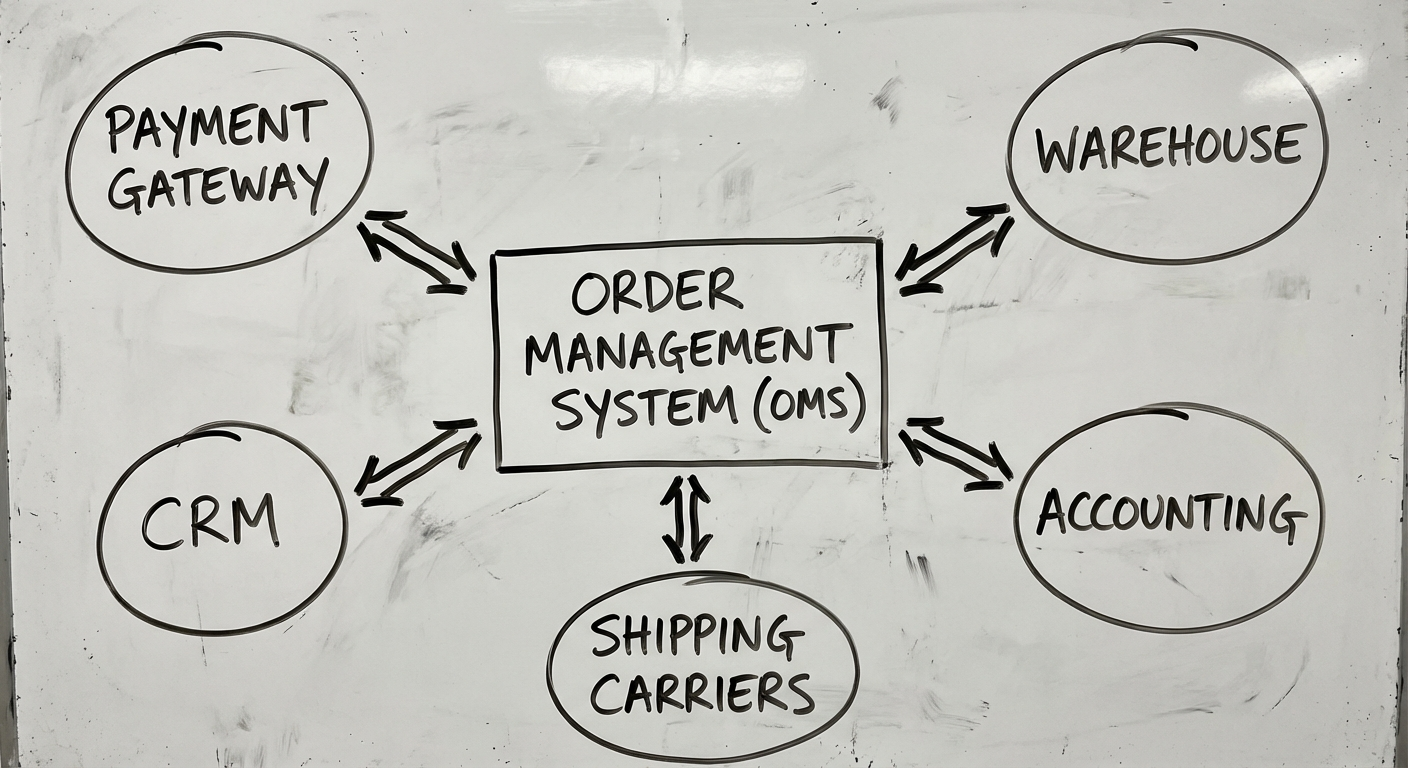
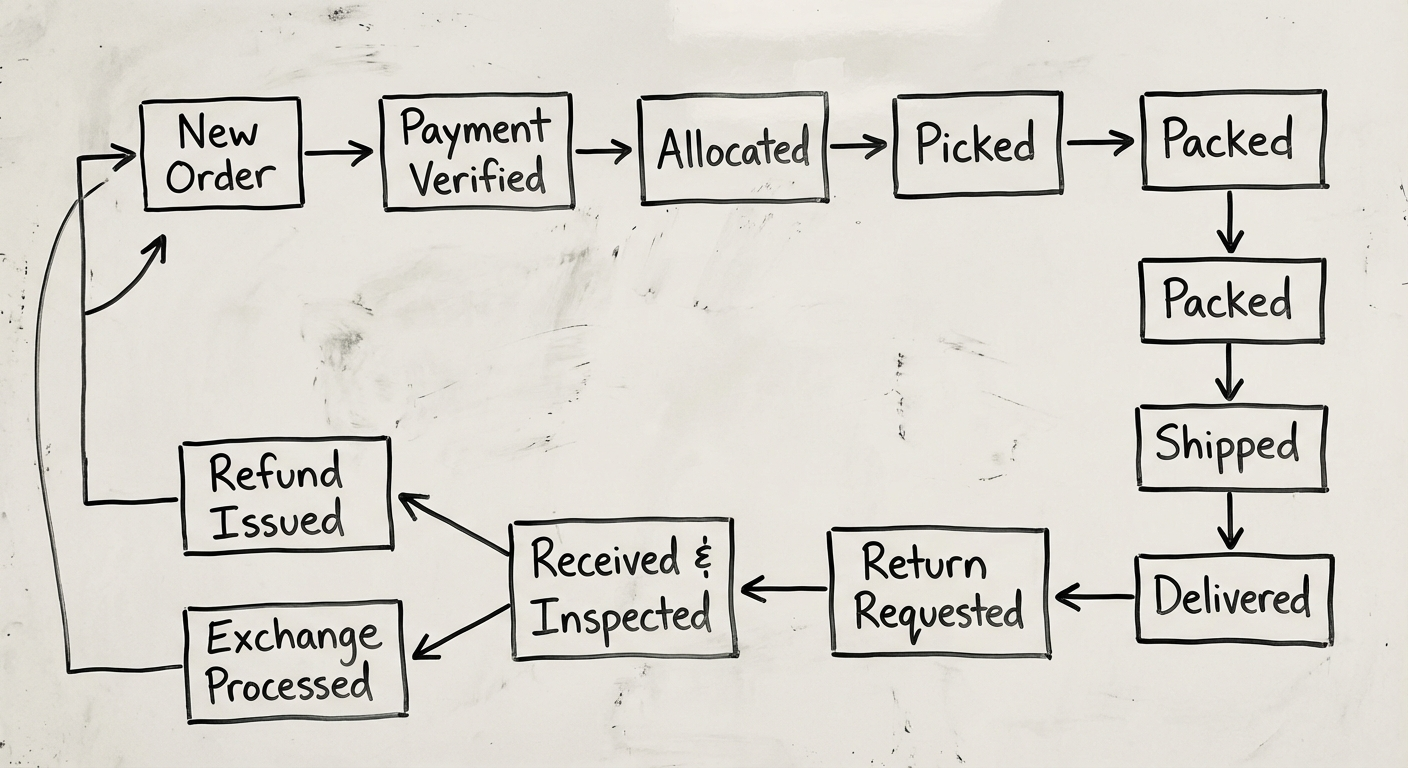
Order management software (OMS) tracks and manages the entire lifecycle of an order—from the moment a customer clicks “buy” to the moment the package lands on their doorstep (and beyond, if they return it). It connects sales channels, inventory, warehouse operations, shipping, and accounting into a single source of truth for every order.
This is the layer most businesses reach for when orders start slipping through cracks and customers email “where’s my stuff?” while your team scrambles across three tabs. If that’s where you are, our operations work starts exactly there.
What a Real OMS Has to Do
- Order processing & workflow engine — Unified ingestion from all channels, validation rules (payment, address, fraud, stock), status management, exception routing. The workflow engine is what differentiates a custom OMS from a basic order tracker. It encodes your business rules—not someone else’s. A well-designed engine lets you change business rules through an admin interface, not developer tickets.
- Multi-channel synchronisation — Website, marketplaces, POS, B2B portals, social commerce. The challenge isn’t connecting channels—it’s keeping them in sync. When stock changes, every channel must reflect it within minutes. Overselling across channels is the fastest way to tank customer trust.
- Inventory allocation & reservation — Real-time visibility across locations, soft reservations, allocation rules (nearest warehouse? cheapest? most stock?), safety-stock buffers per channel, backorder queues. Allocation logic is often the most complex part of an OMS—and the most valuable. Get it right and you reduce shipping costs, delivery times, and stockouts simultaneously.
- Returns & refunds — Return rates run 20-30% in e-commerce; treat returns as a first-class workflow. RMA generation, structured reason capture, full/partial/credit refunds, re-integration into sellable stock, reverse logistics. A return handled well often earns a repeat purchase.
- Shipping & carrier integration — Multi-carrier rate shopping, label generation, tracking events flowing back into order status. Don’t build carrier integrations from scratch—use middleware like Shippit, ShipStation, or EasyPost as an abstraction layer.
- Reporting — Order volume by channel, order-to-ship time, return analytics, margin per order. Build dashboards for operators, not executives—the people running orders daily need real-time, actionable data.
When to Buy, When to Build an OMS
Most businesses follow a progression: spreadsheets (0-50 orders/day) → off-the-shelf OMS (50-1,000 orders/day) → custom (1,000+ orders/day or genuinely complex operations).
The crossover point is usually around 1,000-2,000 orders per day. Below that, SaaS platforms like Linnworks or Brightpearl are likely sufficient. Above it, per-order fees and customisation limits start hurting.
One architecture principle if you build: design your OMS as an event-driven system from day one. Orders generate events; events trigger workflows. This makes the system extensible without rewriting core logic.
Supply Chain Management: Coordinating Beyond Your Walls
Inventory, WMS, and OMS manage what happens inside your business. Supply chain management software coordinates the flow of goods, data, and money across the whole chain—suppliers, production, warehousing, carriers, and last-mile delivery.
The pattern is always the same: companies that treat their supply chain as a software problem outperform those that treat it as an operations problem. When data lives in silos, decisions lag. When decisions lag, money leaks. That’s the core thesis behind our operations practice.
The Capabilities That Matter
- Demand planning & forecasting — Historical analysis, seasonal modelling, safety stock calculation. Accurate demand planning is the difference between 95% and 80% fill rates—and that gap is pure margin.
- Procurement management — Approved vendor lists, automated PO generation, approval workflows, contract and pricing management, spend analytics. Automate the routine so your team focuses on negotiation, not data entry.
- Logistics & transportation — Route optimisation, carrier selection, freight comparison, consolidation, proof of delivery. This is where custom software earns its keep—off-the-shelf tools assume standard workflows, and multi-modal or hub-and-spoke networks aren’t standard.
- Supplier management — Onboarding, performance scorecards, risk monitoring, compliance documents. Supplier management is the most underbuilt feature in most SCM systems—and the one that prevents the most expensive failures.
- Real-time visibility — Live shipment tracking, exception alerts, customer-facing portals. Visibility transforms supply chain management from reactive firefighting into proactive orchestration.
The SCM Build Signal
Buy off-the-shelf (SAP SCM, Oracle SCM Cloud, Blue Yonder for enterprise; Cin7 or Zoho Inventory for SMBs) when your chain is simple and speed matters most. Build when operations are multi-country or multi-modal, when 10+ systems need to talk to each other, or when the supply chain IS your competitive advantage.
If you’re spending more time configuring and working around your SCM software than actually using it, that’s the clearest signal to build custom. And most companies shouldn’t build everything: buy the commodity components, build the differentiating ones. Standard WMS for the warehouse, custom logistics orchestration on top, ERP integration for financials.
Tech Stack for Custom Operations Software
The four systems share a remarkably consistent modern stack. If you build any layer, this is what works in 2026:
| Layer | Recommended | Notes |
|---|---|---|
| Backend | Node.js (NestJS), Python (FastAPI), or Go | High-throughput transaction processing; Python when ML forecasting matters |
| Database | PostgreSQL + Redis | Postgres for relational integrity and complex queries; Redis for real-time stock state |
| Events | RabbitMQ or Apache Kafka | Event-driven architecture is the backbone of OMS and SCM |
| Search | Elasticsearch | Fast SKU/product lookup at scale |
| Web frontend | React or Next.js | Data-heavy operator dashboards with real-time updates (WebSockets) |
| Mobile/scanner | React Native or Flutter | Warehouse floor scanning apps |
| Infrastructure | AWS or GCP, Docker + Kubernetes, CI/CD | Auto-scaling for seasonal peaks |
| Hardware | Zebra/Honeywell scanners, Zebra label printers, RFID readers | $500-$3,000 per unit |
Plan integrations from day one: accounting (Xero, MYOB, QuickBooks), e-commerce platforms and marketplaces, carrier APIs (or middleware), payment gateways, and IoT (GPS trackers, temperature sensors) where the chain demands it.
What It Actually Costs
Realistic ranges, Australian market, based on systems we’ve built and scoped:
| System | SaaS (annual) | Custom build | Custom timeline |
|---|---|---|---|
| Inventory | $2,400-$12,000+ | $100K-$225K | 3-6 months |
| WMS | $3,600-$240,000+ | $80K-$350K | 4-7 months |
| OMS | $2,400-$80,000 (per-order fees compound) | $120K-$300K | 4-6 months |
| SCM (end-to-end) | $50K-$1M+/yr enterprise licensing | $80K-$800K+ | 3-18 months by scope |
Across all of them: ongoing maintenance runs 15-20% of build cost per year, plus hosting ($500-$3,000/month).
Budget rule: multiply your estimated build cost by 1.5x for a realistic total. Every operations project uncovers edge cases—returns processing, partial receipts, inter-warehouse transfers—that weren’t in the original scope.
And the hidden costs nobody mentions: for SaaS, per-user fees that balloon, integration work when the pre-built connector doesn’t fit, and data export fees when you migrate away. For custom, developer availability, knowledge concentration risk, and the temptation to keep adding features instead of shipping.
The biggest cost isn’t building the software—it’s running the wrong operation for another year while you decide.
Making the Decision
Here’s the framework we use with clients, and it works for any layer of the stack:
- List your non-negotiable workflows. Not features—workflows. “When a return arrives, we inspect, grade, restock or dispose, and credit the customer within 2 hours.”
- Demo three SaaS products against those workflows. Track where you’d need workarounds.
- If workarounds exceed 20% of your workflows, get a custom build scoped. The workaround tax compounds.
- Calculate 5-year TCO for both paths, including the cost of your team’s time spent on workarounds.
The best operations system is the one your team actually uses correctly. Complexity kills adoption. Whether you build or buy, ruthlessly cut features your team won’t use daily.
Next Steps
Whether you’re evaluating off-the-shelf tools or scoping a custom build—for inventory, warehouse, orders, or the whole chain—the starting point is the same: map your current workflow and identify where it breaks.
We’ve built operations systems that handle 100,000+ SKUs across multiple warehouses, and we’ve also told companies to just buy Cin7 when that was the smarter move. The same disciplined process behind any custom software development project applies: discovery, blueprint, incremental builds that ship working software every phase.
Want an honest assessment of which path fits your business? Let’s talk.
FAQ
What is the difference between inventory management and warehouse management software? Inventory software answers “what do we have and when do we reorder?” — stock levels across the business. A WMS answers “where is it and what happens next?” — it directs the physical work of receiving, putaway, picking, packing, and shipping on the warehouse floor.
When should I switch from spreadsheets to inventory software? Most businesses hit the wall between 500 and 5,000 SKUs or past 100 orders a day. Earlier warning signs: overselling across channels, phantom stock, and a team member maintaining a side-spreadsheet the “system” can’t replace.
Should I build or buy an order management system? Follow the volume: spreadsheets to 50 orders/day, off-the-shelf OMS (Linnworks, Brightpearl) to ~1,000/day, custom past 1,000–2,000/day or when allocation logic is genuinely yours. If workarounds exceed 20% of your workflows, scope a build.
How much does custom warehouse management software cost? A custom WMS MVP runs AUD $80K–$150K over 3-4 months; full-featured builds $150K–$350K. Entry-level SaaS starts at $300–$800/month — custom typically pays for itself within 2-3 years through licensing savings and productivity gains.
Sources
Related posts: ERP Software Guide · POS Software Guide · Custom Software Development Guide
Two weeks to a real answer
Need help putting this into practice?
Book a Blueprint session and we'll turn the ideas in this article into a tested prototype in front of real users—2 weeks, from $3,000.