Guide
Multi-Branch Retail POS System: Controls That Scale
A multi-branch retail POS system must keep transactions moving at each outlet while keeping central data trustworthy. If either side fails, the business gets two bad choices: stop the queue or accept misleading reports.
Many POS evaluations start with a checkout demo. That is too narrow. One terminal completing a sale does not prove price distribution, stock transfers, permissions, cross-outlet refunds, or recovery after a network outage.
This guide covers multi-branch POS architecture, essential controls, vendor tests, first-year cost, and staged rollout. The focus is not the cashier screen. It is making 12 outlets operate as one system without losing the ability to serve customers locally.
TL;DR — the whole guide in five lines:
- Outlets must sell locally while headquarters owns global rules such as products, prices, roles, and reporting.
- Offline mode means more than recording a transaction—queueing, retry, conflict handling, and reconciliation must work.
- One source of truth per data domain prevents price, stock, and settlement from developing competing versions.
- Hybrid is often the most practical route: use a stable packaged checkout and build only the distinctive operational layer.
- Roll out in gated waves, not by switching every branch on during the same morning.
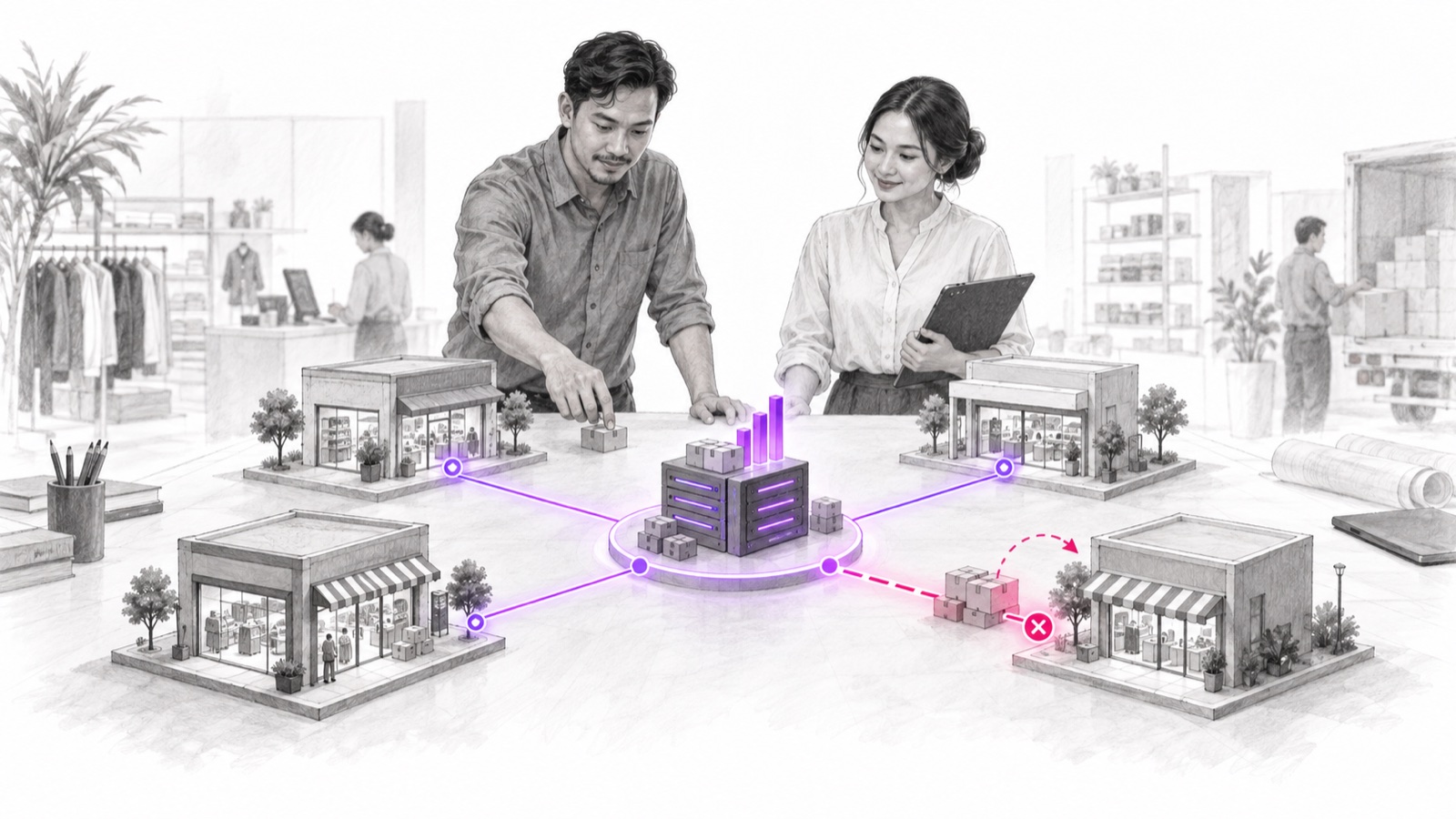
What Is a POS System? A Short Explanation
A POS system is the software, hardware, data, and controls that process a sale at the point of purchase and connect it to inventory, payments, accounting, customers, and reporting. In multi-branch retail, it also defines which data is global and which records belong to an outlet.
Its main components include:
- terminals and peripherals for checkout;
- catalog, pricing, promotion, and tax rules;
- payment integration and settlement;
- inventory by location and inter-outlet transfers;
- roles, approvals, and audit trails;
- central reporting, APIs, and monitoring.
The benefit is not limited to faster checkout. A sound POS keeps one transaction identity consistent when the outlet, payment gateway, warehouse, finance team, and headquarters read it.
How Quickly Does a Small Error Become a Multi-Branch Problem?
Scale turns a small error rate into daily operational work.
Take an illustrative model: 12 outlets process an average of 250 transactions a day. That creates 3,000 transactions. If just 0.3% have a duplicate, missing stock event, or payment mismatch, the team must investigate nine exceptions daily—about 270 cases a month.
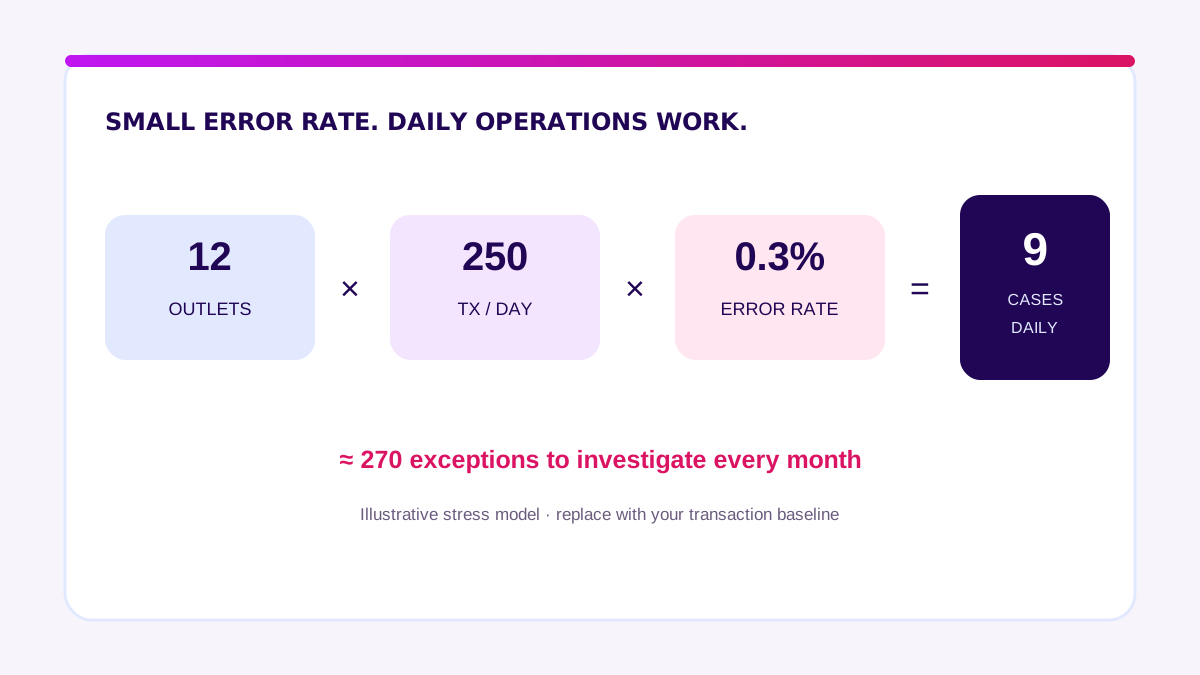
The 0.3% is not an industry benchmark. It is a stress model. Replace the outlet count, volume, and error rate with your data. If the team cannot measure today’s exception baseline, it cannot prove that the new system is better.
That is why idempotent retry, outlet identifiers, event timestamps, and reconciliation reports are operational cost controls—not technical decoration.
Single-Outlet vs Multi-Branch vs Hybrid POS Systems
A system that works for one store may not be safe when rules and data must move across 12 locations.
| Factor | Single-outlet POS | Cloud multi-branch POS | Hybrid or custom layer |
|---|---|---|---|
| Catalog and prices | Managed locally | Headquarters pushes to outlets | Central rules tailored by store cluster |
| Inventory | One location | Stock by outlet and transfers | Connected to ERP, WMS, or allocation engine |
| Offline | Often limited | Standard queue and sync | Custom recovery and conflict rules |
| Reporting | Outlet summary | Central consolidation | Business-specific metrics and ledger |
| Integration | Few systems | Common connectors | APIs and events for distinctive workflows |
| Best fit | One simple store | Many outlets with a uniform model | Different store formats or complex existing systems |
Start with a cloud multi-branch product when workflows are standard. Choose hybrid when checkout is standard but allocation, loyalty, pricing, or finance integrations need deeper control. Full custom is justified only when the core transaction flow is genuinely different and validated.
For the underlying purchasing checklist, read how POS software works. For the SaaS, custom, or hybrid route decision, open the cashier application guide.
How Does a Multi-Branch POS System Work?
A healthy design separates the central control plane from the outlet execution plane. Headquarters defines rules. Outlets execute transactions and preserve service when connectivity degrades.
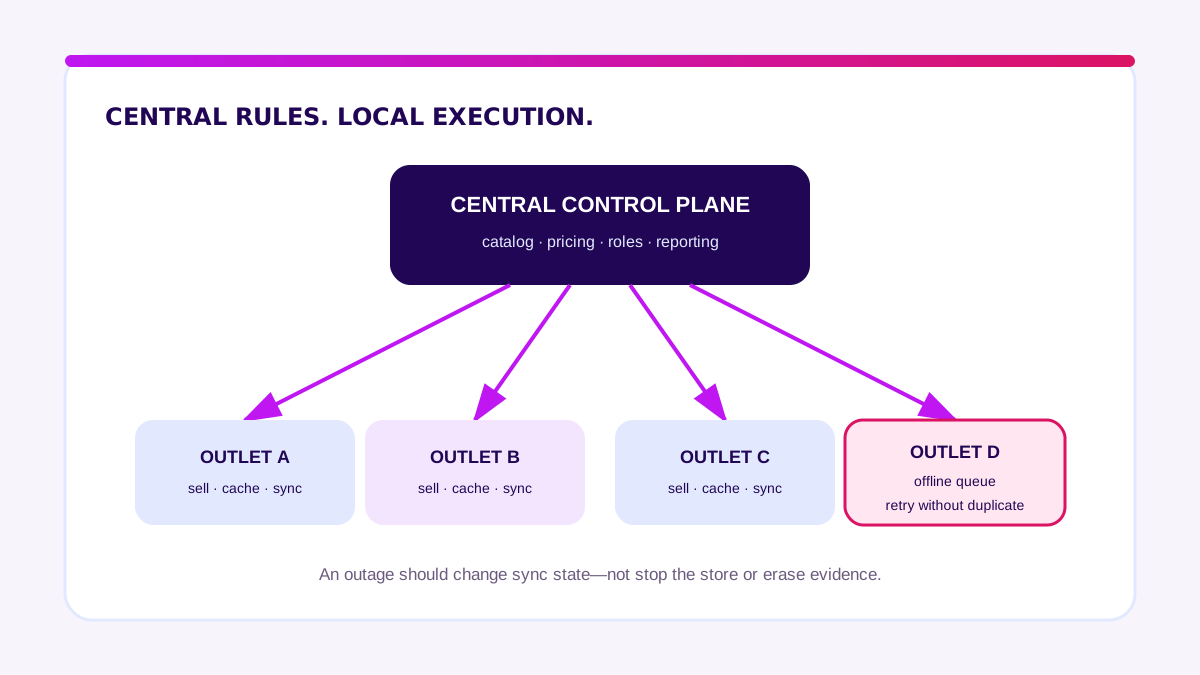
Central control plane
Headquarters manages master products, price books, promotions, tax, roles, outlet configuration, and consolidated reporting. Every change needs a version, effective time, approval, and distribution status. “Saved” does not mean all 12 outlets received it.
Outlet execution plane
The outlet caches the minimum data needed for checkout, identifies its terminal and shift, records transactions, and sends events to the center. During an outage, staff must see whether a transaction is stored locally, waiting to sync, failed, or needs action.
Integration and reconciliation plane
Payment gateways, ERP, e-commerce, loyalty, and warehouse systems exchange data through APIs or events. Reconciliation compares POS orders, payment attempts, settlements, inventory movements, and journal entries using consistent identifiers.
Bank Indonesia describes QRIS as Indonesia’s national QR payment standard and notes that merchants receive transaction notifications. Across many branches, each notification still has to match the right order and outlet before the transaction is considered complete. Read Bank Indonesia’s QRIS overview.
Which Data Should Be the Source of Truth?
Every domain needs one owner. Synchronization does not repair ambiguous ownership.
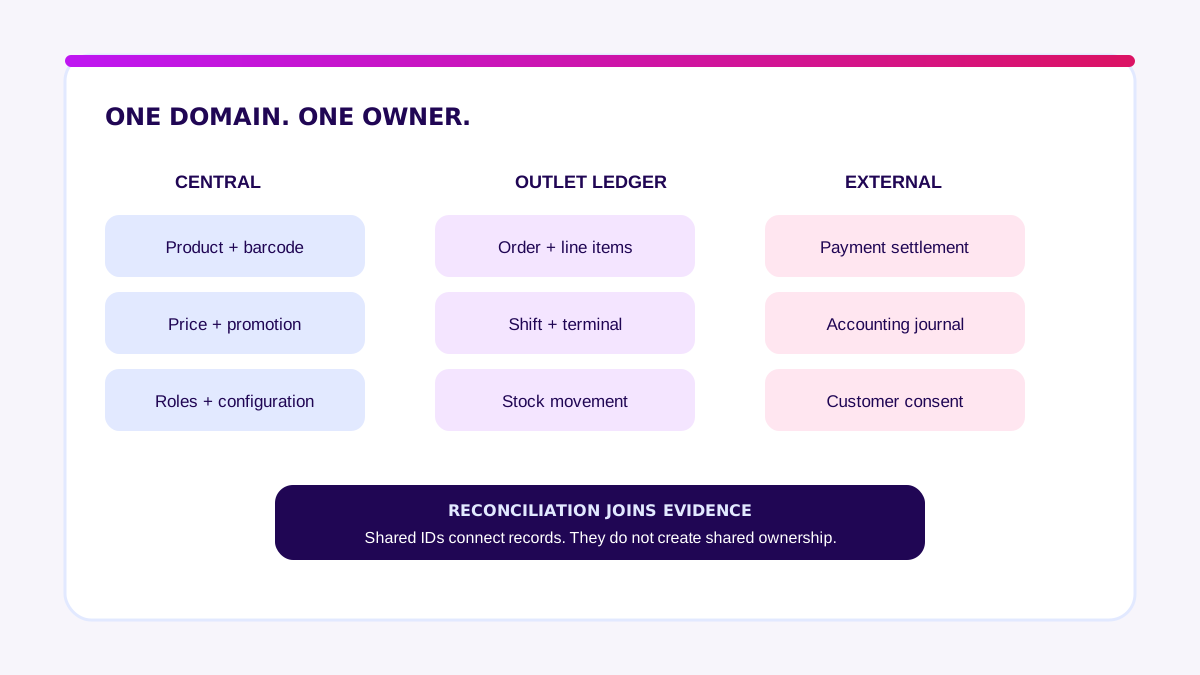
| Data domain | Common source of truth | What cannot be ambiguous |
|---|---|---|
| Product and barcode | Central POS or PIM/ERP | SKU, unit, tax category, active status |
| Price and promotion | Pricing service or central POS | Rule version, period, target outlet, approval |
| Physical stock | Inventory ledger by location | Movement ID, time, reason, source document |
| Order | POS transaction ledger | Order ID, outlet, terminal, shift, line items |
| Payment | Gateway/acquirer for fund status | Attempt ID, final status, settlement reference |
| Customer and loyalty | CRM/loyalty platform | Consent, customer ID, points ledger |
| Journal | Accounting/ERP | Account mapping, posting period, source ID |
Avoid two-way updates without explicit conflict rules. If both the POS and ERP can change the master price, synchronization only spreads bad data faster.
Customer and payment data also need tightly scoped access. If an environment stores, processes, or transmits card-account data, use PCI DSS as the baseline for technical and operational controls.
Which POS System Features and Modules Are Essential?
Judge a feature by the failure it prevents, not its place on a vendor checklist.
1. Central catalog and pricing
Headquarters must be able to version products, barcodes, price books, tax, and promotions; select target outlets; schedule effective times; see distribution status; and roll back a bad change.
2. Inventory by location
The system should record sales, returns, voids, waste, counts, receiving, and transfers as separate movements. Available stock must not be confused with physical or reserved stock.
3. Offline transactions and recovery
Test offline transaction limits, allowed payment methods, local encryption, queue visibility, retry, duplicate prevention, conflict rules, and alert ownership when sync fails.
4. Roles, approval, and audit
Cashiers, supervisors, outlet managers, area managers, and finance need different scopes. Manual discounts, refunds, voids, cash-drawer access, and configuration changes should record the actor, time, reason, and approver.
5. Reconciliation and observability
The dashboard must identify outlets on an old version, stuck queues, transactions without payment matches, and failed stock events. A summary without drill-down is insufficient.
6. APIs and exports
Confirm that APIs cover transactions, payment references, inventory movements, products, outlets, staff, and audit logs. Test webhook signatures, retry policy, rate limits, sandbox access, historical exports, and exit support.
When Is Off-the-Shelf Enough—and When Do You Need Custom?
Buy the commodity core. Build only the layer that creates material control or advantage.
Off-the-shelf is enough when outlets use a uniform checkout model, promotions are configurable, required integrations exist, offline recovery passes, and consolidated reports reconcile.
Hybrid fits when checkout and payment are stable but the business has distinctive allocation rules, B2B prices, loyalty, fulfillment, or finance integrations. The custom layer preserves differentiation without taking ownership of every POS function.
Full custom becomes reasonable only when the core workflow is unique, its impact is measurable, no product passes the acceptance tests, and someone will own security, uptime, support, and the roadmap.
Validate it in two weeks. Before committing a large budget to a POS system, Blueprint & Prototype maps data ownership, simulates failure flows, and produces a decision-ready scope and estimate.
If the Blueprint proves that a custom layer is needed, Production Grade Software builds the validated scope in eight weeks toward a production release. Outlet rollout remains staged afterward.
How to Choose a POS System: 10 Multi-Branch Vendor Tests
Run the same scenarios with your data and devices for every shortlisted vendor.
- Push a scheduled price. Prove the active version at every outlet.
- Disconnect an outlet. Sell, restart the terminal, reconnect, and confirm no duplicates.
- Approve then time out. Simulate an approved gateway response that the POS does not receive.
- Return across outlets. Return an item elsewhere and inspect stock and journal entries.
- Receive a partial transfer. Send 20 units, receive 18, and resolve the variance.
- Test area-manager access. Confirm the user can only view and change assigned outlets.
- Close a mismatched shift. Record the reason, approval, and follow-up without deleting evidence.
- Break an integration. Disable the ERP endpoint and inspect queue, retry, alerts, and replay.
- Export complete data. Retrieve raw orders, payments, stock movements, audits, and configuration history.
- Reconcile a full day. Match orders, tenders, settlements, cash, inventory, and journals.
Download the multi-branch POS test checklist. For contract and delivery capability checks, also use the software vendor due diligence checklist.
How Much Does a POS System Cost in Indonesia?
Compare first-year total cost, not subscription price per device.
The illustrative model below uses 12 outlets and 24 checkout devices. It is a planning model, not a vendor quotation.
| Component | Illustrative first-year cost |
|---|---|
| Subscription | IDR 86.4 million |
| Devices and peripherals | IDR 192 million |
| Network readiness | IDR 36 million |
| Data setup and migration | IDR 45 million |
| Integrations | IDR 80 million |
| Training and rollout | IDR 48 million |
| Support and contingency | IDR 52.6 million |
| Total | IDR 540 million |
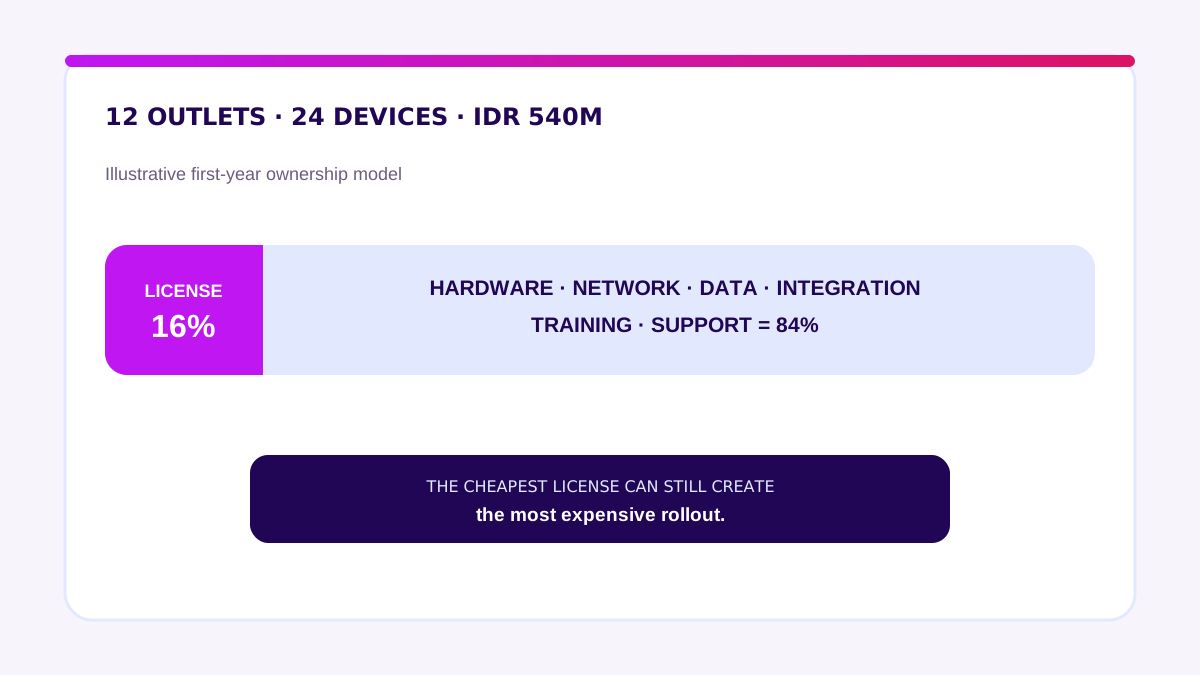
Subscription is only 16% of this model. Hardware, integrations, network readiness, training, and support make up the other 84%. Your result will change with device count, payment integrations, peripherals, data quality, opening hours, and ERP complexity.
For a custom layer, separate discovery, build, cloud, observability, on-call support, security review, and change requests. A custom estimate containing only development is incomplete.
How Do You Implement a POS System Without a Failed Rollout?
Do not use every branch as the test environment.
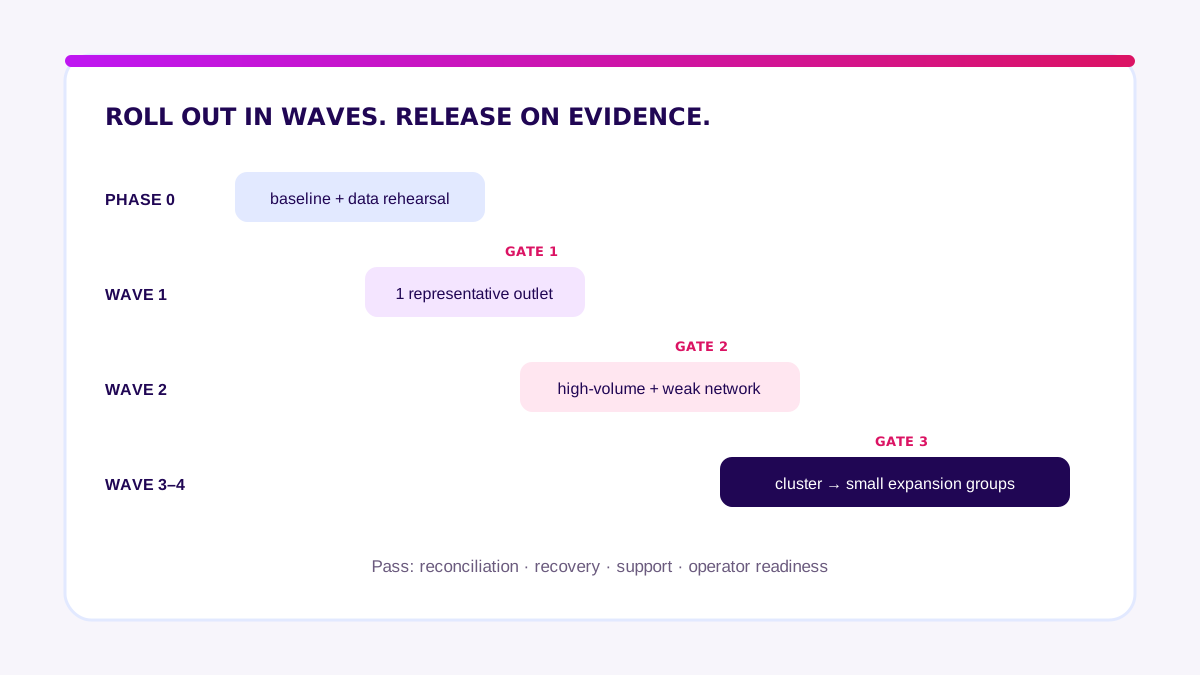
Phase 0: baseline and data rehearsal
Record transaction volume, checkout time, mismatches, stock variance, refund time, and shift-close duration. Clean products, prices, tax, outlets, users, and opening stock. Rehearse the import.
Wave 1: one representative outlet
Choose an outlet that is realistic but easy to support. Run at least one full cycle from opening through settlement. Gate: reconciliation passes, no critical incident remains open, and staff can execute the fallback.
Wave 2: two outlet types
Add one high-volume outlet and one with less reliable connectivity. Gate: queues recover, support targets hold, configuration stays consistent, and central reports stay current.
Wave 3: one cluster
Roll out to a small area with one area manager. Test permissions, stock transfers, regional promotions, monitoring, and escalation.
Wave 4: staged expansion
Add outlets in small groups. Freeze major changes during each wave, compare metrics with the baseline, and run a retrospective before the next group.
“A good multi-branch POS does not make headquarters control every click. It gives outlets room to keep selling, then gives the center evidence that every transaction returned to sync.” — Ganis Atmawarin, Founder of Synetica
My advice: begin with data ownership and failure flows. Do not let a vendor demo define the requirements. Pilot with real transactions, devices, connectivity, and staff. Expand only when reconciliation, recovery, and support gates pass.
Frequently Asked Questions About POS Systems
What is a POS system?
A POS system is the software, hardware, data, and controls that process sales and connect them to payments, inventory, accounting, customers, and reporting.
What is the best POS system?
The best POS system is the one that passes your operating scenarios, including peak hours, offline recovery, cross-outlet returns, stock transfers, permissions, integrations, and reconciliation.
How much does a POS system cost?
Cost depends on outlets, devices, hardware, subscriptions, network readiness, migration, integrations, training, and support. Calculate first-year cost and a three-year ownership view.
Can a POS system be custom-built?
Yes. However, hybrid is often more rational: keep a stable checkout and payment core, then build a custom layer for genuinely distinctive workflows or integrations.
POS system or packaged application—which is better?
A packaged product is better for standard workflows and fast rollout. Hybrid or custom is better when acceptance tests prove a high-value operational gap that configuration cannot close.
Related Posts
Two weeks to a real answer
Need help putting this into practice?
Book a Blueprint session and we'll turn the ideas in this article into a tested prototype in front of real users—2 weeks, from $3,000.