Guide
Restaurant POS System: Complete Development Guide
A restaurant POS system touches every part of your operation—orders, kitchen flow, payments, inventory, reporting. It’s the nervous system of your venue.
And yet, most restaurant operators pick their POS the same way they pick a wine supplier: whoever the last rep was that walked through the door. Then six months in, they’re fighting workarounds, paying for features they don’t use, and missing the ones they actually need.
If you’re a tech founder building for hospitality, or a restaurant group that’s outgrown off-the-shelf options, this guide covers what it actually takes to build a restaurant POS system—from core features to tech stack to realistic costs.
No vendor pitches. Just the engineering and business reality.
What Is a Restaurant POS System?
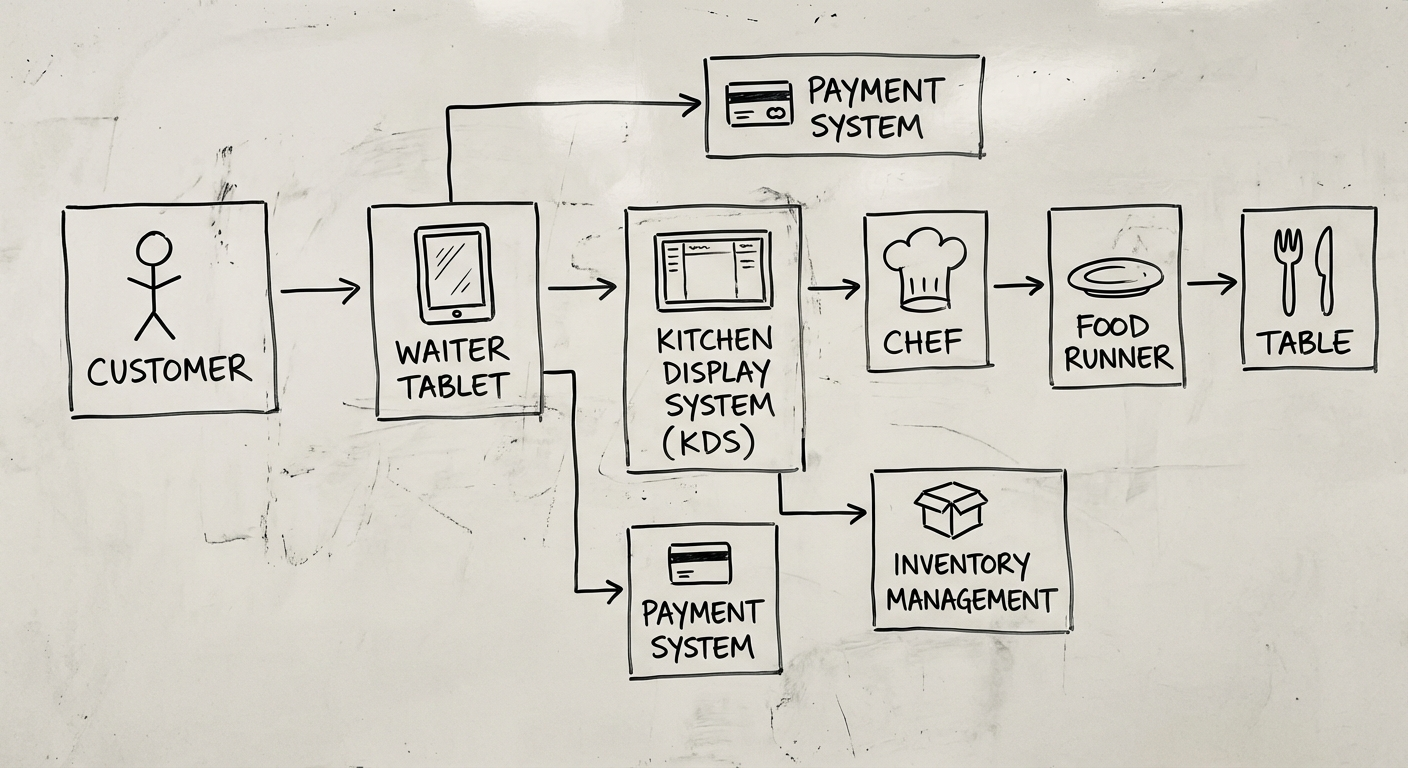
A restaurant POS (point of sale) system is software that manages orders, payments, kitchen communication, and business reporting for food service venues. It replaces the old cash register with a connected system that ties front-of-house to back-of-house in real time.
Modern restaurant POS systems go well beyond taking payments. They handle:
- Table and order management — seating, courses, modifications
- Kitchen communication — routing orders to the right station
- Payment processing — splits, tips, multiple payment methods
- Inventory tracking — ingredient-level stock management
- Business intelligence — sales trends, labour costs, menu performance
A good restaurant POS system is the difference between a venue that runs on instinct and one that runs on data.
Core Features of a Restaurant POS System
Not every POS needs every feature. But if you’re building one—or evaluating what to buy—these are the modules that matter.
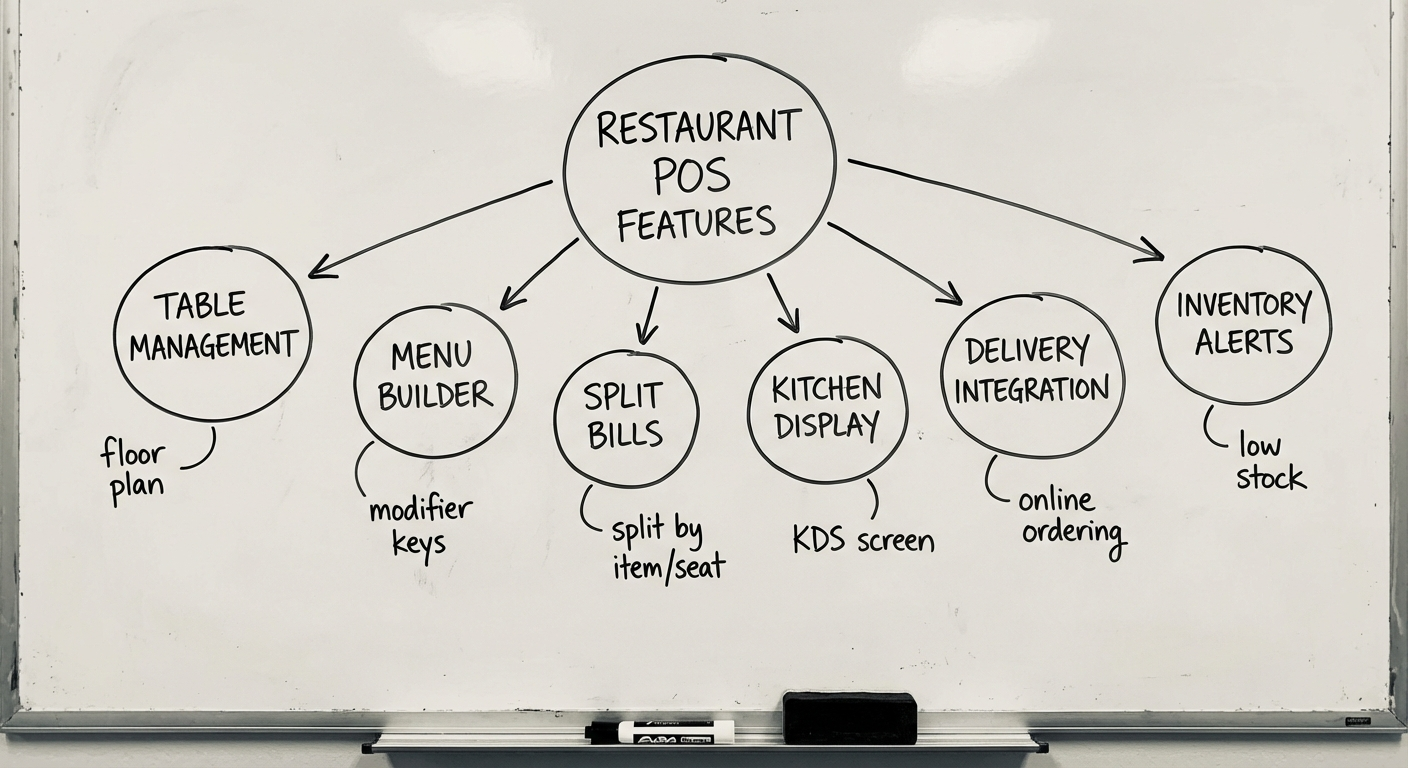
Table Ordering and Floor Management
The floor plan is the UI your staff lives in. A digital floor map that mirrors your actual venue layout lets servers manage tables visually—see what’s occupied, what’s been ordered, and what’s waiting for the bill.
Key capabilities:
- Drag-and-drop table layout editor
- Table status indicators (available, occupied, reserved, dirty)
- Merge and split tables for group bookings
- Course-based ordering (entrée → main → dessert)
- Modifier handling (no onion, extra sauce, allergy flags)
Get this wrong and your floor staff will ignore the system entirely. The floor plan is where adoption lives or dies—if it’s slower than pen and paper, your team won’t use it.
Kitchen Display System (KDS)
The KDS replaces paper dockets with screens in the kitchen. Orders appear in real time, colour-coded by timing and priority.
What a good KDS handles:
- Automatic routing — entrées to cold station, mains to grill, desserts to pastry
- Timing alerts — visual escalation when tickets exceed target prep time
- Course fire control — kitchen marks courses ready; next course fires automatically
- Recall and reprint — because tickets do get lost in a busy service
The KDS is where the POS proves its value during peak service. A three-second delay in order routing compounds across a 200-cover night.
Split Bills and Payment Flexibility
Australians split bills. Constantly. Your POS needs to handle it without making the server do mental arithmetic.
- Split by item, by seat, by equal shares, or by custom amount
- Multiple payment methods on one bill (card + cash + voucher)
- Tip handling with configurable prompts
- Integration with payment terminals (Tyro, Linkly, Square Terminal)
- Surcharge rules (weekend, public holiday, card type)
Inventory and Cost Management
Restaurant margins are thin—typically 3-9%. Inventory management isn’t a nice-to-have, it’s survival.
- Recipe-level tracking — each menu item linked to ingredients with quantities
- Automatic stock deduction — sell a burger, deduct the bun, patty, lettuce
- Low stock alerts — notifications before you run out mid-service
- Waste tracking — log spoilage and comp’d items separately
- Supplier integration — purchase orders generated from stock levels
This is where custom POS systems often differentiate. Off-the-shelf solutions handle basic stock counts, but recipe costing and real-time COGS tracking usually require custom work or expensive add-ons.
Reporting and Analytics
Data without action is just noise. A restaurant POS system should surface the metrics that drive decisions:
- Sales reports — by hour, day, item, category, server
- Labour cost ratio — wages vs revenue by shift
- Menu engineering — identify stars (high profit, high volume) vs dogs (low both)
- Trend analysis — week-over-week, seasonal patterns
- Export and integration — push to Xero, MYOB, or your accounting stack
The best POS reporting answers “what should I change tomorrow?”—not just “what happened yesterday.”
Build vs Buy: When Does Custom Make Sense?
Most restaurants should buy an off-the-shelf POS. Full stop. Toast, Lightspeed, Square for Restaurants, and similar platforms cover 80% of use cases.
Custom development makes sense when:
| Scenario | Why Custom Wins |
|---|---|
| Multi-venue group with unique workflows | One system across all venues, your way |
| POS is your product (SaaS for hospitality) | You’re building the platform, not using one |
| Deep integration with existing systems | ERP, loyalty, supply chain already in place |
| Regulatory or franchise requirements | Specific compliance that off-the-shelf can’t flex to |
| Competitive differentiation through tech | Your operations ARE your moat |
When off-the-shelf is the right call:
- Single venue or small group (< 5 locations)
- Standard service model (table service, counter service, takeaway)
- No existing tech ecosystem to integrate with
- Budget under $50K for the POS component
Build custom when the POS is a strategic asset. Buy off-the-shelf when it’s a utility. For a deeper framework, see our custom software development guide.
Tech Stack for a Modern Restaurant POS
If you’re building, here’s what the architecture typically looks like.
Frontend
- Tablet/iPad app — React Native or Flutter for cross-platform, or native Swift/Kotlin for performance
- KDS screens — Web app (React or Vue) on dedicated displays
- Admin dashboard — Web app for managers and owners
Offline-first is non-negotiable. Restaurants lose internet. Your POS cannot stop taking orders because the WiFi dropped. Use local-first architecture with sync when connectivity returns.
Backend
- API layer — Node.js (Express/Fastify) or Python (FastAPI) for rapid development; Go or Rust for high-throughput scenarios
- Database — PostgreSQL for relational data; Redis for real-time order state and caching
- Message queue — RabbitMQ or Redis Streams for order routing to kitchen stations
- WebSockets — Real-time updates between POS terminals, KDS, and admin
Infrastructure
- Cloud hosting — AWS, GCP, or Azure with regional deployment (ap-southeast-2 for Australia)
- Local server — Optional on-premise backup for offline resilience
- Payment gateway — Tyro, Linkly, Stripe Terminal, or Square
- Printing — ESC/POS protocol for receipt and kitchen printers (Epson, Star Micronics)
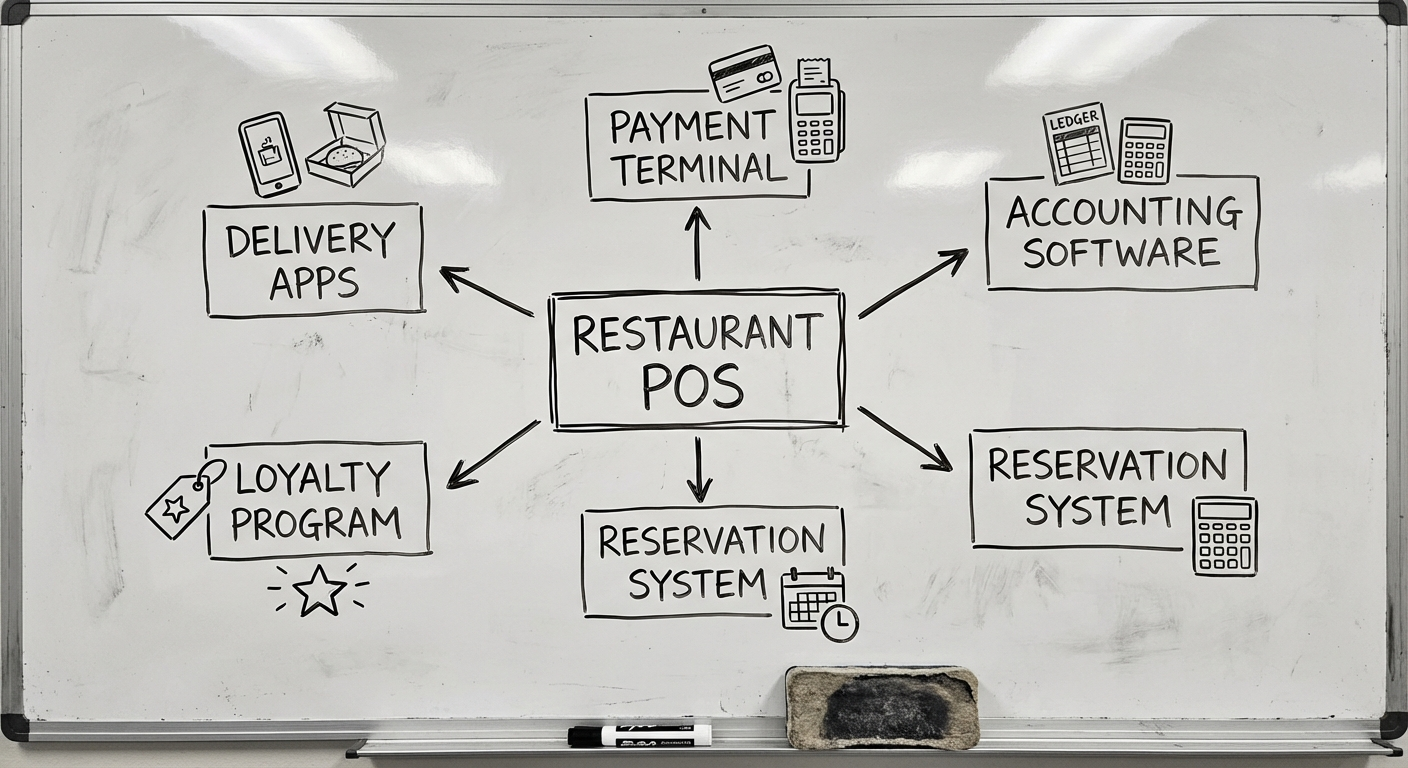
Integrations
- Accounting — Xero, MYOB, QuickBooks
- Delivery platforms — Uber Eats, DoorDash, Menulog (via aggregator APIs)
- Reservations — OpenTable, Resy, SevenRooms
- Loyalty — Custom or third-party (Marsello, Lightspeed Loyalty)
For more on POS architecture patterns, see our POS software guide.
Development Process: How to Build a Restaurant POS
Phase 1: Discovery and Scoping (2-4 weeks)
- Shadow actual restaurant service (lunch AND dinner)
- Map current workflows—every handoff, every pain point
- Define the MVP feature set (resist the urge to build everything)
- Create wireframes and get feedback from floor staff, not just owners
Phase 2: MVP Build (8-12 weeks)
Start with the core loop: take order → send to kitchen → process payment.
- Sprint-based development (2-week cycles)
- Pilot in one venue or one section of the floor
- Real kitchen testing—not just demo data, actual service conditions
Phase 3: Iterate and Expand (Ongoing)
- Add modules based on priority (inventory, reporting, delivery integration)
- Optimise for speed—every tap counts during service
- Gather feedback continuously from the people using it every shift
Phase 4: Scale
- Multi-venue deployment with centralised management
- Performance optimisation for high-volume periods
- Staff training and change management (often underestimated)
Total timeline from discovery to production-ready MVP: 3-5 months. Full-featured platform with all integrations: 6-12 months.
How Much Does It Cost to Build a Restaurant POS System?
Straight talk on numbers. These are based on Australian development rates and our experience with similar projects.
| Component | Estimated Cost (AUD) |
|---|---|
| Discovery & UX design | $15,000 - $30,000 |
| MVP (order, kitchen, payment) | $80,000 - $150,000 |
| Inventory & reporting modules | $30,000 - $60,000 |
| Integrations (accounting, delivery) | $20,000 - $40,000 |
| Total MVP to production | $150,000 - $280,000 |
Ongoing costs:
- Maintenance and updates: 15-20% of build cost per year
- Hosting and infrastructure: $500 - $2,000/month
- Payment processing fees: 1.5-2.5% per transaction (passed to venue)
A custom restaurant POS system typically costs $150K-$280K AUD for an MVP. That’s a significant investment—justified only when the POS is core to your business strategy, not just an operational tool.
For comparison, off-the-shelf POS subscriptions run $80-$300/month per terminal plus transaction fees. At 10 terminals, that’s $10K-$36K per year—cheaper in year one, but you’re renting, not owning.
Common Mistakes When Building a Restaurant POS
Building for the demo, not the dinner rush. A POS that looks great in a boardroom presentation but crumbles under 150 simultaneous orders is worthless. Test under real load.
Ignoring offline mode. Internet outages happen. Payment terminal disconnections happen. If your system can’t function offline, you’ll lose revenue on your busiest nights.
Over-engineering the MVP. You don’t need AI-powered menu recommendations in version one. You need reliable order-taking, kitchen routing, and payments. Everything else is phase two.
Forgetting the hardware. Software is half the equation. Receipt printers, kitchen display mounts, tablet stands, card terminals—plan the hardware stack early.
Next Steps
Building a restaurant POS system is a serious engineering effort. It touches hardware, real-time systems, payment compliance, and the chaotic reality of a commercial kitchen.
If you’re evaluating whether to build or buy—or you’ve already decided to build and need a team that’s done it before—we’d like to hear about your project.
Need help putting this into practice?
Book a Blueprint session and we'll turn the ideas in this article into your next validated release.
Book a Discovery Call