Guide
Property Management System: Complete Guide
Managing five rental properties with spreadsheets is annoying. Managing fifty is a disaster. Missed rent payments slip through the cracks, maintenance requests vanish into email threads, and lease renewals catch you off guard two weeks late.
That’s not a people problem. It’s a systems problem.
A property management system replaces the chaos with structure—automating the repetitive work, centralising data, and giving landlords, property managers, and tenants a single source of truth. Whether you manage a boutique portfolio or hundreds of units across multiple cities, the right system changes the game.
This guide covers what a property management system actually does, the core features that matter, and how to decide whether to build one yourself or buy off the shelf.
TL;DR — the whole guide in five lines:
- A property management system is an operations backbone, not just a tenant database.
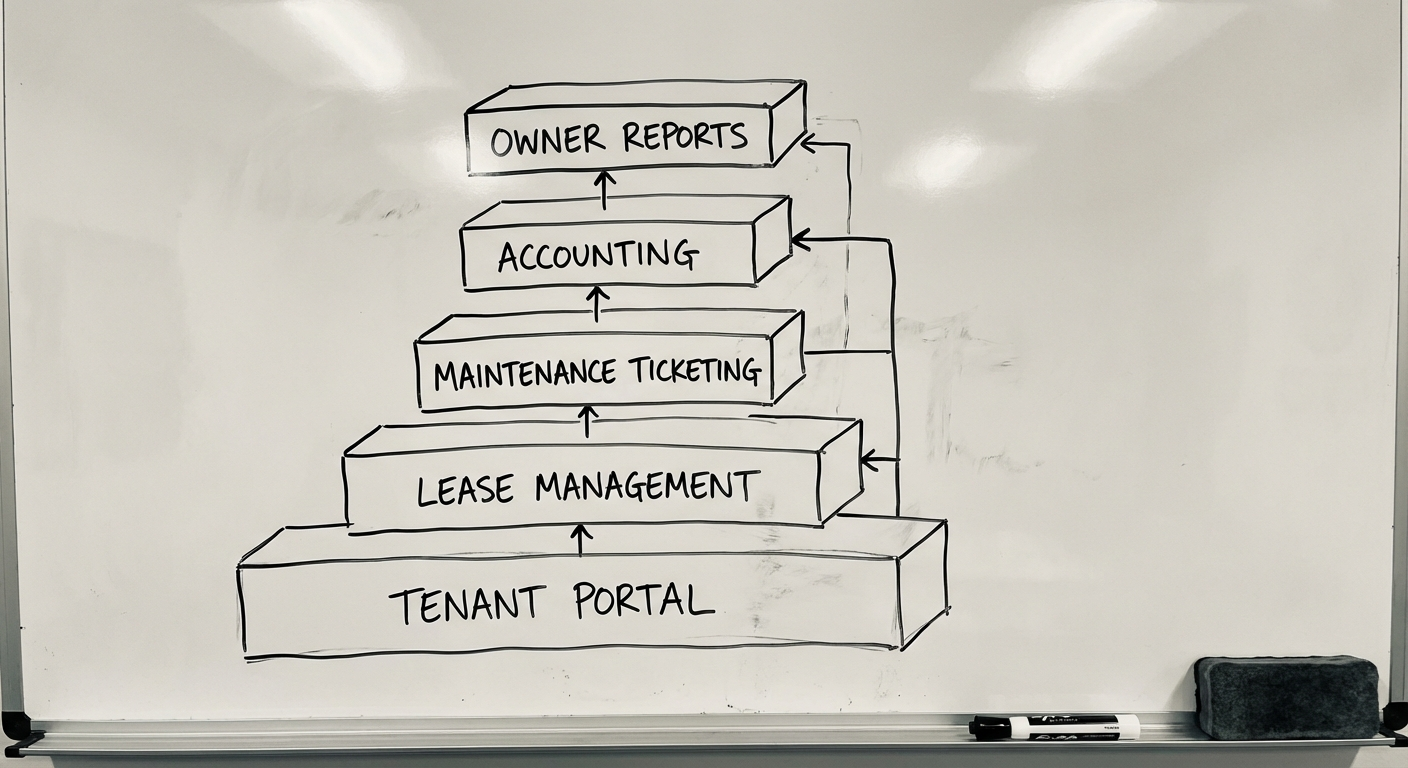
- Core modules must connect leases, rent, maintenance, documents, and reporting into one workflow.
- Build vs buy depends on portfolio scale, local integrations, and compliance reality.
- Indonesian operators need local payment, WhatsApp, and tax workflows that many global SaaS tools ignore.
- Validate the workflow before building so the system reflects how property teams actually work.
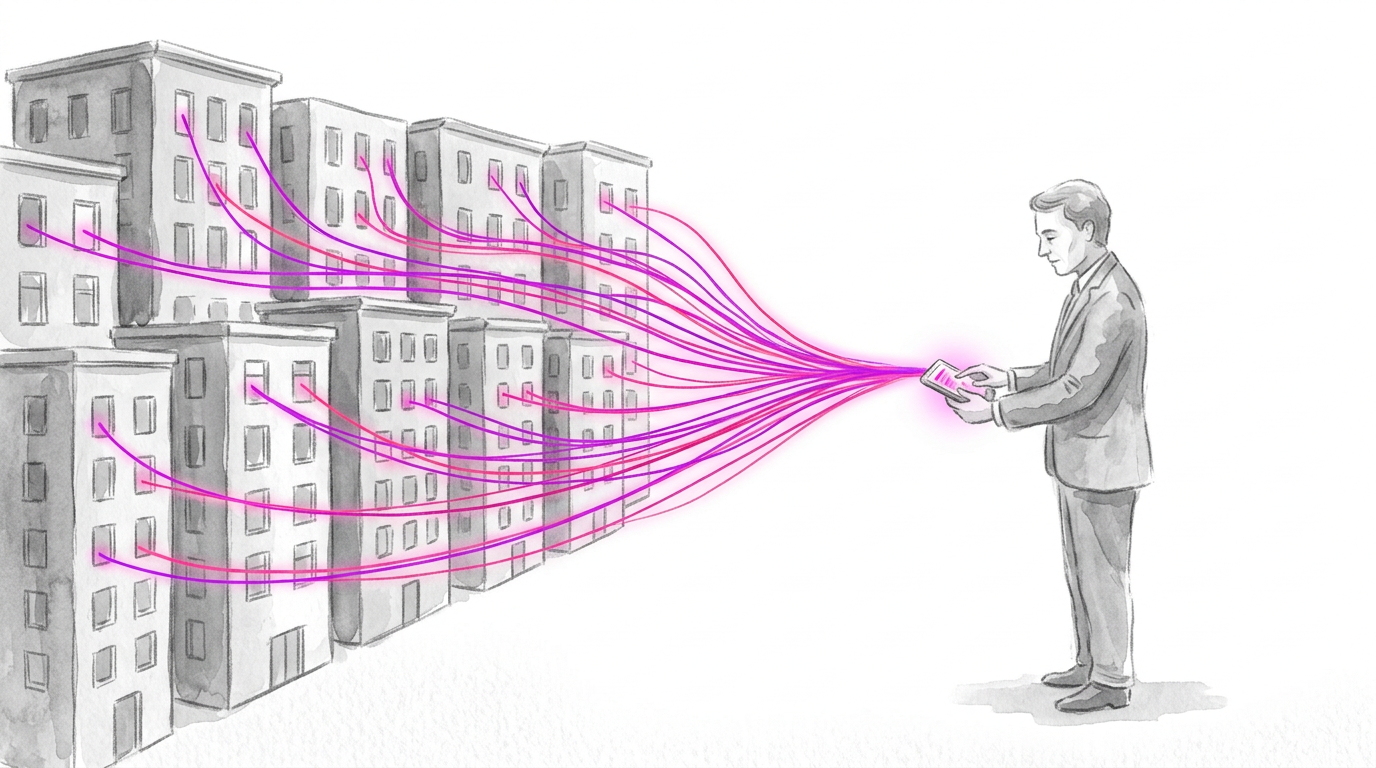
Validate it in 2 weeks. Before building a property platform, a Blueprint session maps the rent, maintenance, and reporting workflow with real users so v1 reflects operations, not assumptions — see how Blueprint & Prototype works.
What Is a Property Management System?
A property management system (PMS) is software that handles the day-to-day operations of managing rental properties. It covers the full lifecycle: listing vacancies, screening tenants, signing leases, collecting rent, tracking maintenance, running financials, and reporting to property owners.
Think of it as the operating system for a rental business.
At its simplest, a PMS replaces the combination of spreadsheets, email chains, paper forms, and WhatsApp groups that most small-to-mid property managers cobble together. At scale, it becomes the central nervous system that connects tenants, owners, maintenance teams, and accountants into a single workflow.
Who Needs One?
- Property managers handling 20+ units
- Real estate agencies managing properties on behalf of owners
- Landlords with growing portfolios who’ve outgrown spreadsheets
- Build-to-rent developers who need integrated leasing and ops
- Short-term rental operators juggling multiple booking channels
If you’re spending more time on admin than on growing your portfolio, you need a system.
Core Features of a Property Management System
Not all property management software is equal. But certain features are non-negotiable. Here’s what a solid PMS must include—and why each matters.
1. Tenant Management
The foundation of any PMS. This module stores tenant profiles, contact details, lease history, payment records, and communication logs in one place.
Key capabilities:
- Tenant onboarding and screening (identity verification, credit checks, references)
- Centralised tenant database with search and filtering
- Communication tracking (emails, SMS, in-app messages)
- Document storage (IDs, signed agreements, bond receipts)
Without centralised tenant management, you’re flying blind. Every other feature depends on knowing who lives where, what they’ve signed, and what they owe.
2. Lease Tracking
Leases are the revenue contracts of a property business. A PMS should track every lease from draft to expiry—and alert you before renewals sneak up.
Key capabilities:
- Lease creation with customisable templates
- Start/end date tracking with automated renewal reminders
- Rent escalation schedules (CPI-linked or fixed percentage)
- Lease variation tracking (amendments, addendums)
- Digital signatures for paperless execution
A single missed lease renewal can cost thousands in vacancy losses or lock you into unfavourable terms. Automated tracking pays for itself fast.
3. Maintenance Requests
Maintenance is where tenant satisfaction lives or dies. A good PMS turns maintenance from a chaotic email thread into a structured workflow.
Key capabilities:
- Tenant-submitted requests via portal or mobile app
- Photo and video attachments for issue documentation
- Priority categorisation (urgent, routine, planned)
- Work order assignment to contractors or internal teams
- Status tracking with tenant notifications
- Maintenance history per property for asset management
The best systems let tenants submit requests at 2 AM without anyone losing sleep—the workflow handles triage automatically.
4. Rent Collection
This is where the money comes in. Literally. Automating rent collection reduces late payments by 25-40% compared to manual invoicing, based on industry benchmarks.
Key capabilities:
- Automated invoice generation on rent due dates
- Multiple payment methods (direct debit, bank transfer, credit card, BPAY)
- Payment reminders (pre-due, on-due, overdue sequences)
- Receipt generation and reconciliation
- Arrears tracking with escalation workflows
- Split payments for shared tenancies
The goal: tenants pay on time with zero manual chasing. When they don’t, the system escalates automatically.
5. Accounting & Financial Reporting
Property management is a financial business. Your PMS needs to handle the numbers—or integrate cleanly with software that does.
Key capabilities:
- Income and expense tracking per property
- Trust account management (critical in Australia for compliance)
- GST/BAS reporting
- Owner disbursement calculations
- Budget vs actual reporting
- Export to Xero, MYOB, or QuickBooks
Trust accounting compliance is non-negotiable in Australia. Every state has specific regulations about how rental funds are held and disbursed. Your PMS must handle this correctly or you risk losing your licence.
6. Owner Portals
Property owners want visibility without micromanagement. An owner portal gives them self-service access to the data that matters.
Key capabilities:
- Real-time financial statements and income summaries
- Maintenance request visibility and approval workflows
- Vacancy and occupancy reporting
- Document access (leases, inspection reports, invoices)
- Tax-time reporting (annual income statements, depreciation schedules)
A good owner portal reduces “how’s my property going?” calls by 60-70%. That’s time your team gets back for actual work.
Build vs Buy: The Critical Decision
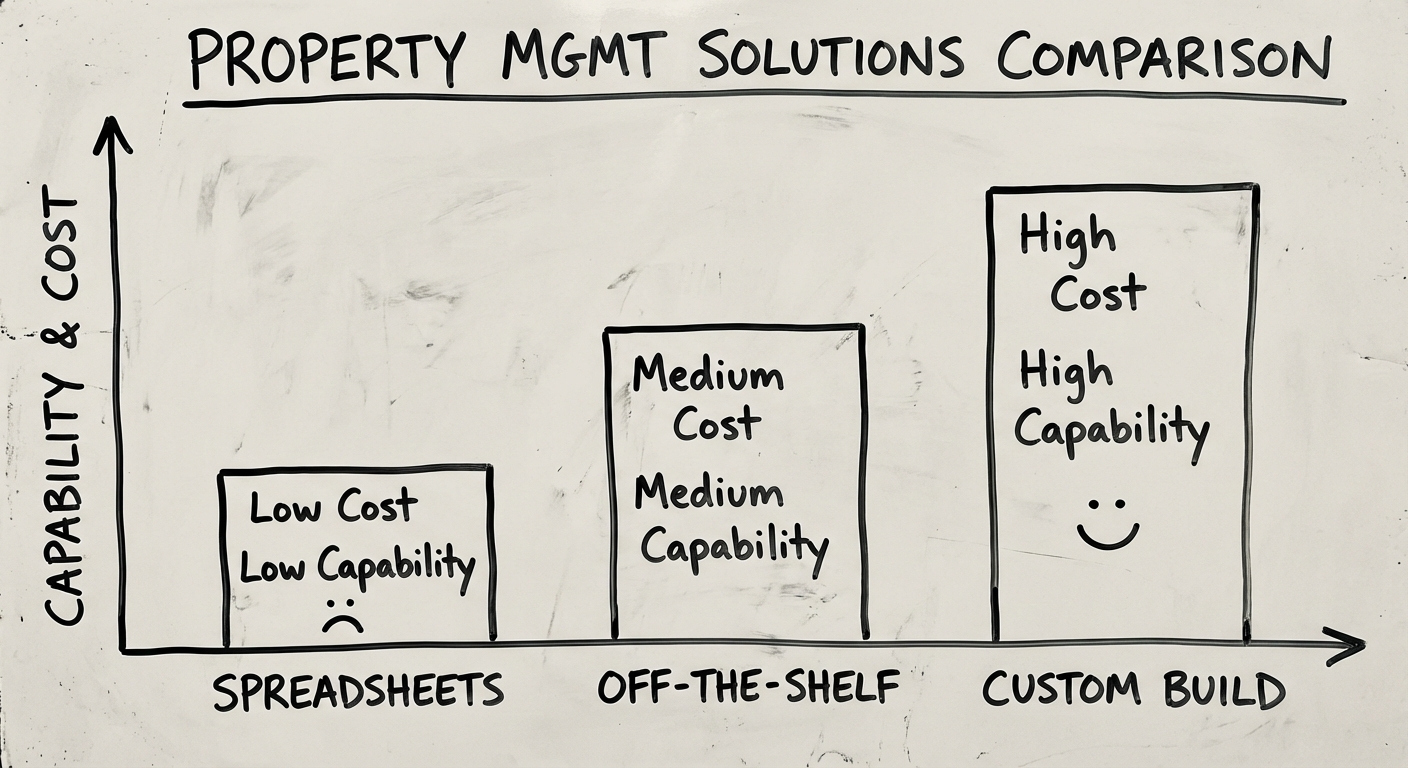
This is the question that trips up most property businesses. Should you buy an existing property management system or build a custom one?
When to Buy (Off-the-Shelf)
Buy when:
- You manage fewer than 200 units
- Your workflows are fairly standard
- You don’t need deep integrations with other internal systems
- Speed to deploy matters more than perfect fit
- Budget is under $50K
Popular options in Australia include PropertyMe, MRI Software, Console Cloud, and Re-Leased. These tools cover 80% of standard property management needs out of the box.
The downside: you adapt your processes to the software, not the other way around. As you grow, those compromises compound.
When to Build (Custom)
Build when:
- You manage 500+ units or have complex portfolio structures
- You need deep integration with your CRM, accounting, or other proprietary systems
- Your business model doesn’t fit standard workflows (co-living, build-to-rent, short-stay hybrid)
- Competitive differentiation comes from operational efficiency
- You’re a proptech startup building a platform
The build-vs-buy threshold has dropped significantly. With modern frameworks and APIs, a custom PMS that would have cost $500K five years ago can be built for $150-250K today.
For a deeper dive into this decision framework, read our custom software development guide.
Tech Stack for a Modern Property Management System
If you’re building custom, technology choices matter. Here’s what a modern PMS tech stack looks like in 2026.
Frontend
- React or Next.js — For the web dashboard (admin, owner portals)
- React Native or Flutter — For tenant and manager mobile apps
- Tailwind CSS — Utility-first styling for rapid UI development
Backend
- Node.js (NestJS) or Python (Django/FastAPI) — API layer
- PostgreSQL — Primary database (relational data suits property management perfectly)
- Redis — Caching and real-time notifications
- Elasticsearch — Property and tenant search at scale
Infrastructure
- AWS or Google Cloud — Hosting and scaling
- Docker + Kubernetes — Containerised deployment
- Terraform — Infrastructure as code
Integrations
- Payment gateways — Stripe, PayTo (Australia’s new real-time payment rail)
- Accounting — Xero API, MYOB API
- Identity verification — Equifax, Illion
- Communication — Twilio (SMS), SendGrid (email)
- Document signing — DocuSign or Annature (Australian)
The key architectural decision: monolith or microservices? For most property management systems under 1,000 units, a well-structured monolith is simpler, cheaper, and easier to maintain. Microservices make sense when you need independent scaling of specific functions (e.g., payment processing or search).
Development Process
Building a property management system follows the same disciplined process as any custom software project—but with domain-specific considerations.
Phase 1: Discovery & Requirements (2-4 weeks)
- Map current workflows (manual and digital)
- Interview property managers, tenants, and owners
- Define compliance requirements (trust accounting, privacy, tenancy law)
- Identify integrations (accounting, payment, communication)
- Produce a functional specification and system architecture
Phase 2: Design & Prototyping (3-4 weeks)
- UX research and information architecture
- Wireframes for all user roles (admin, tenant, owner, maintenance)
- Interactive prototype for stakeholder validation
- Design system and component library
Phase 3: Core Development (8-12 weeks)
- Backend API and database schema
- Tenant management and lease tracking modules
- Rent collection and payment integration
- Maintenance request workflow
- Authentication, roles, and permissions
Phase 4: Advanced Features (4-6 weeks)
- Owner portal and reporting
- Accounting integration and trust account management
- Notification engine (email, SMS, push)
- Document management and e-signatures
- Mobile app development
Phase 5: Testing & Launch (3-4 weeks)
- End-to-end testing across all user roles
- Security audit and penetration testing
- Data migration from existing systems
- Staff training and documentation
- Staged rollout (pilot properties → full portfolio)
Total timeline: 5-7 months for a full-featured system. An MVP with core features (tenant management, leases, rent collection, basic maintenance) can launch in 3-4 months.
How Much Does a Property Management System Cost?
Costs depend on scope, complexity, and whether you build or buy.
Off-the-Shelf Costs
| Tier | Monthly Cost | Typical Use |
|---|---|---|
| Basic | $1-2 per unit/month | Small landlords, <50 units |
| Professional | $2-4 per unit/month | Agencies, 50-500 units |
| Enterprise | Custom pricing | Large portfolios, 500+ units |
Annual cost for 200 units on a professional plan: $4,800-$9,600/year. Over five years, that’s $24,000-$48,000—and you still don’t own the software.
Custom Build Costs
| Component | Cost Range (AUD) |
|---|---|
| Discovery & Design | $15,000-$30,000 |
| Core Platform (MVP) | $80,000-$150,000 |
| Advanced Features | $40,000-$80,000 |
| Mobile Apps | $30,000-$60,000 |
| Total | $150,000-$300,000 |
Ongoing maintenance: 15-20% of build cost annually ($22,500-$60,000/year).
The crossover point: if you manage 300+ units and plan to grow, custom build typically becomes cheaper than SaaS within 3-4 years—while giving you a system that fits perfectly.
Hidden Costs to Watch
- Data migration from legacy systems (often underestimated)
- Training for staff across multiple roles
- Compliance updates as tenancy laws change
- Integration maintenance when third-party APIs update
In the Indonesian Market
Most property management software is priced and designed for Western markets. For Indonesian property businesses — kos networks, serviced apartments, commercial portfolios — the build-vs-buy math shifts.
A custom property management system typically costs IDR 200-500 juta to build, on an 8-12 week timeline once the workflow is validated. Compare that against per-unit SaaS pricing in USD that compounds every month as your portfolio grows.
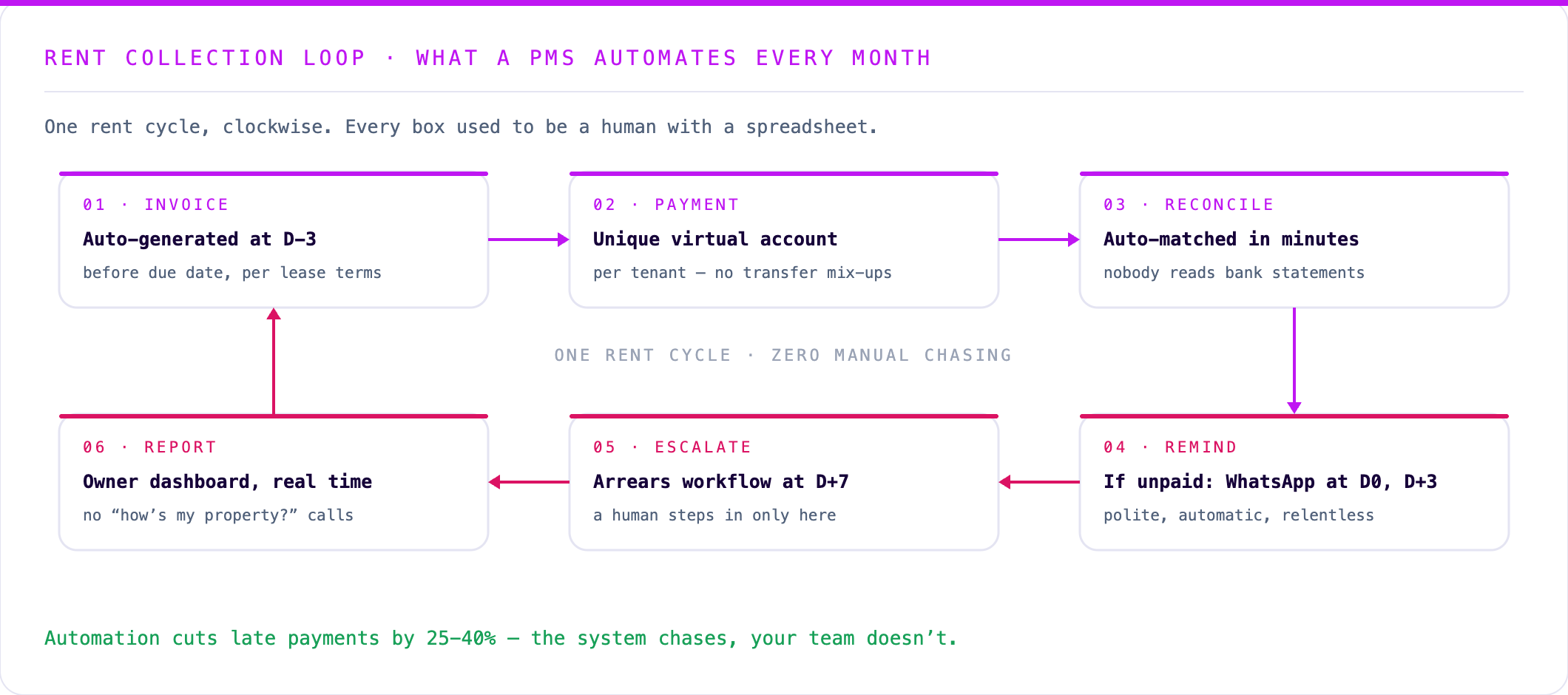
The local integrations are where custom really earns its keep:
- Rent collection: Midtrans or Xendit virtual accounts give every tenant a unique payment number, so reconciliation happens automatically instead of someone matching bank mutations by hand
- Tenant communication: WhatsApp Business API for payment reminders, lease renewals, and maintenance updates — it’s where your tenants actually are
- Tax handling: final income tax (PPh) on rental revenue and proper invoice documentation, tracked per property rather than reconstructed at year-end
If your portfolio runs on Indonesian banks, Indonesian tenants, and Indonesian tax rules, a system built for that reality pays for itself quickly. That’s the scope our Production Grade Software build is designed for.
What Makes a Property Management System Succeed or Fail
After building systems across real estate and other industries, the patterns are clear:
Systems succeed when:
- They’re designed around actual workflows, not imagined ones
- Tenant and owner adoption is treated as a first-class concern
- Compliance is baked in from day one, not bolted on later
- The system integrates with existing tools rather than replacing everything
Systems fail when:
- They try to do everything at once (build incrementally)
- User experience is an afterthought (property managers will revert to spreadsheets)
- Trust accounting is handled incorrectly (regulatory risk)
- There’s no plan for ongoing maintenance and evolution
The single biggest predictor of success: user adoption. Build the most sophisticated system in the world, and it’s worthless if your team uses it for a week then goes back to email.
The best property systems are boring in the right way: rent gets reconciled, maintenance gets assigned, owners get reports, and nobody has to ask where the spreadsheet lives.
Next Steps
If you’re evaluating whether to build a custom property management system, start here:
- Audit your current workflow. Where are the bottlenecks, manual steps, and data gaps?
- Calculate your real cost of status quo. Include staff time, errors, missed renewals, and slow rent collection.
- Define your must-haves vs nice-to-haves. Not everything needs to be in v1.
- Talk to someone who’s built one before.
We’ve helped property businesses across Australia design and build systems that actually get used. No pitch decks—just a conversation about what you need and whether custom makes sense for your situation.
Let’s talk about your property management system →
FAQ
What is a property management system? A property management system is software that manages rental operations: tenant records, leases, rent collection, maintenance, documents, accounting, and owner reporting.
How much does a property management system cost? Off-the-shelf tools are usually priced per unit per month. A custom system can cost roughly IDR 200-500 juta depending on modules, integrations, and launch scope.
Should property managers build or buy software? Buy when your workflow is standard and the SaaS tool fits. Build when local payment, tax, reporting, or tenant communication workflows create too many workarounds.
What features matter most in property management software? Tenant management, lease tracking, rent collection, maintenance workflows, document management, reporting, and integrations with accounting and payment systems.
Sources
Related Posts
Two weeks to a real answer
Need help putting this into practice?
Book a Blueprint session and we'll turn the ideas in this article into a tested prototype in front of real users—2 weeks, from $3,000.