Guide
Stock Management App: How to Choose and When to Go Custom
A stock management app should tell you what is available, where it sits, why it changed, and whether the number can be trusted. A prettier stock table is not enough.
We have spent more than 15 years delivering business systems. The recurring failure is rarely a missing dashboard. It is a broken movement trail: purchases live in one file, sales in another, transfers in chat, and adjustments appear without evidence.
This guide explains the controls that matter, SaaS vs hybrid vs custom decisions, a concrete stock-ledger test, first-year cost bands, ten vendor acceptance tests, and a phased rollout. It stays narrower than our broader inventory, WMS, OMS, and supply-chain guide: this one is about choosing the stock-control layer correctly.
TL;DR — the whole guide in five lines:
- Choose a stock management app by testing movements, not by counting dashboard widgets.
- Every quantity needs a reason code and source document; otherwise “real-time stock” is just a fast guess.
- Packaged SaaS wins for standard buying, selling, transfers, and counts.
- Hybrid or custom earns its place when allocation, units, batches, production, or approvals create measurable workarounds.
- Pilot one location and a controlled SKU set first; never migrate chaos at network scale.

What Is a Stock Management App?
A stock management app records every increase, decrease, reservation, and movement of goods so a business can see quantity, location, status, and history for each item.
Its core jobs are to:
- Identify products, variants, units, batches, serials, and locations consistently.
- Record receipts, sales, returns, transfers, production, damage, and adjustments.
- Separate on-hand, available, reserved, incoming, damaged, and quarantined stock.
- Control who can create, approve, reverse, or backdate a movement.
- Trigger replenishment using lead time, demand, safety stock, and minimum order rules.
- Reconcile system quantity to physical counts and the inventory value in accounting.
Inventory software is not automatically a warehouse management system. The stock app owns quantity and movement truth. A WMS adds directed receiving, putaway, picking, packing, and shipping work on the warehouse floor. An ERP connects that stock truth to purchasing, sales, manufacturing, and finance.
Stock Management App: SaaS vs Hybrid vs Custom
Buy the commodity controls. Build only the workflow that changes margin, speed, or risk.
| Factor | Packaged SaaS | Hybrid | Custom |
|---|---|---|---|
| Upfront cost | Lowest | Medium | Highest |
| Go-live | Days to weeks | Weeks to months | Months |
| Workflow fit | Vendor configuration | SaaS core + custom edge | Validated operating model |
| Integration | Available connectors | API or middleware | Designed end to end |
| Ownership | Vendor owns core | Shared | You own lifecycle |
| Best for | Standard retail or distribution | Unique channel, allocation, or approval rules | High-value operating model |
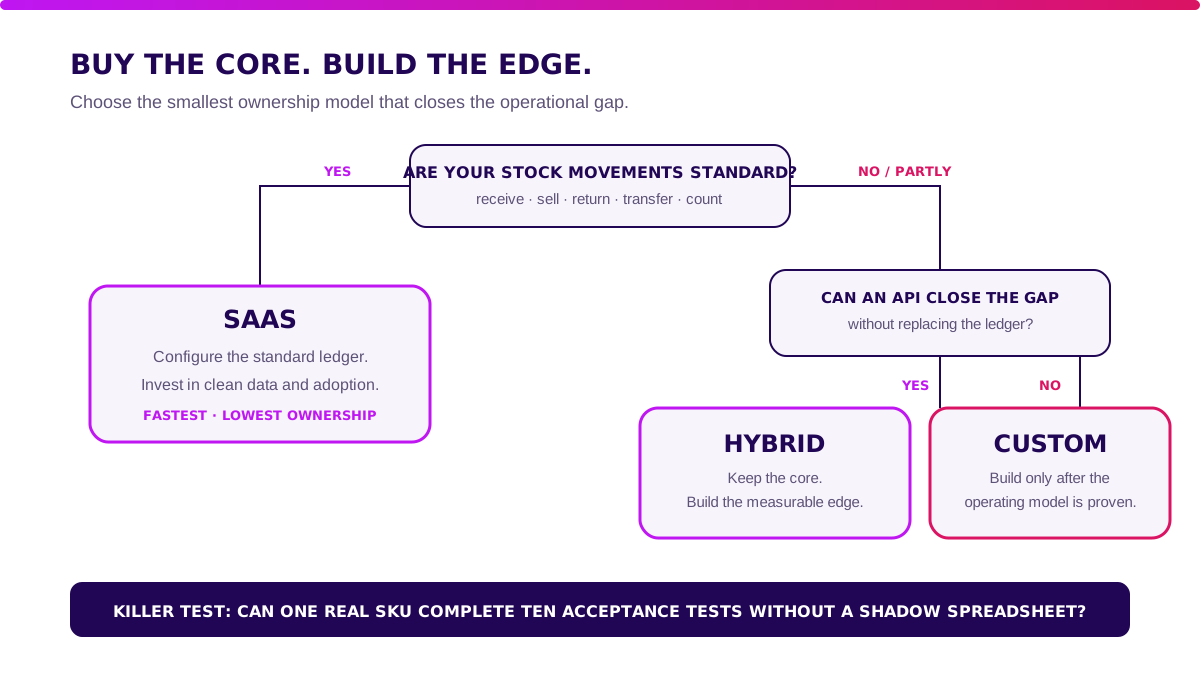
Packaged SaaS wins when your work follows common patterns: purchase, receive, sell, return, transfer, count, and reorder. It is faster, cheaper, and usually more reliable than rebuilding basic stock control.
Hybrid wins when the core ledger is adequate but one operating edge is not. Examples include marketplace allocation, dealer stock, central-kitchen replenishment, unusual units of measure, or a proprietary approval flow. Keep the standard engine. Extend the part that earns money or removes risk.
Custom wins less often. It may be justified for multi-entity ownership, complex consignment, regulated traceability, production with variable yield, or allocation logic that directly determines service level and margin.
How Should a Stock Ledger Work?
A reliable quantity is the result of signed movements, not a number someone can overwrite.
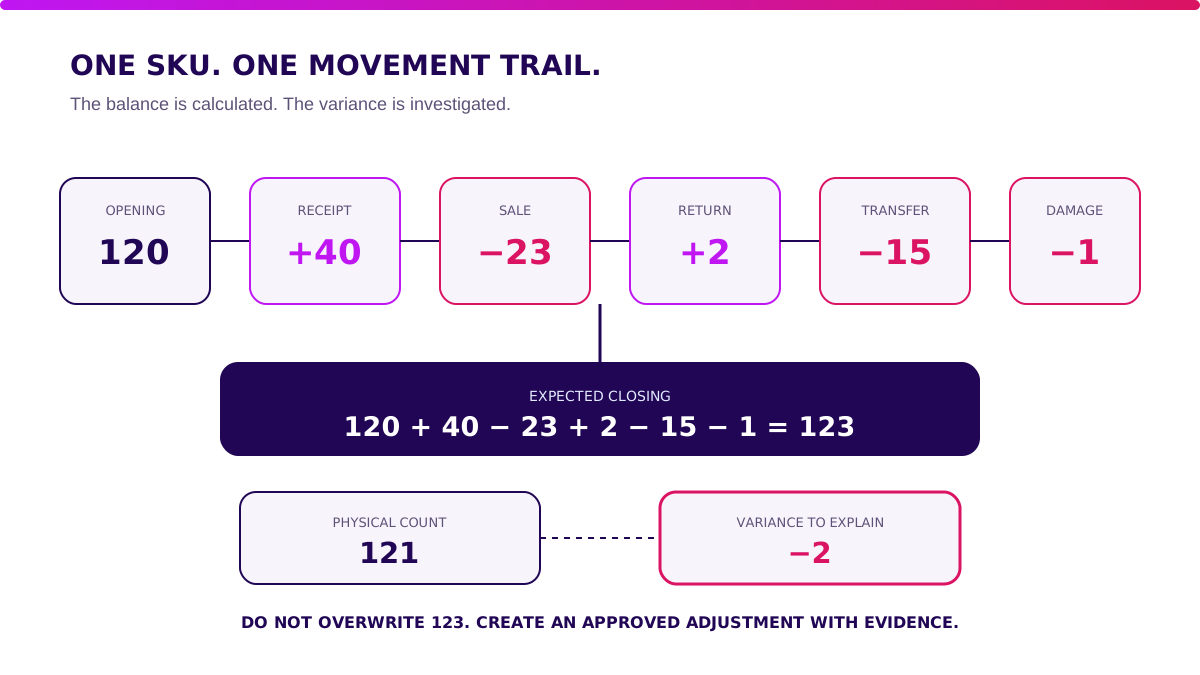
Use a simple test. One SKU starts with 120 units. During the day, the business receives 40, sells 23, accepts a customer return of 2, transfers 15 to another branch, and writes off 1 damaged unit.
The expected closing quantity is:
120 + 40 − 23 + 2 − 15 − 1 = 123 units.
If the physical count is 121, the system should show a variance of −2 and require an adjustment reason, approver, timestamp, and count reference. It should not silently change 123 into 121.
Each movement needs at least:
- a unique movement ID;
- SKU and variant ID;
- source and destination location;
- quantity and unit of measure;
- movement type and reason;
- source document such as PO, order, transfer, or count;
- actor, timestamp, and approval state;
- reversal link when a mistake is corrected.
“A stock number without a movement history is not inventory data. It is an opinion with two decimal places.” — Ganis Atmawarin, Founder of Synetica
Which Stock Management App Features Are Essential?
Essential features are controls your team can prove under pressure.
1. Product and unit master data
The system needs one product identity across purchasing, sales, storage, and accounting. Support variants, pack sizes, conversion rules, suppliers, and inactive SKUs without deleting history.
For open supply chains, GS1 defines the GTIN as a unique identifier for trade items, while barcodes can also carry batch, serial, and date attributes. That makes standards-based identification more than a label-printing detail. It is how two systems agree that they mean the same item. See GS1 barcode standards.
2. Movement ledger and audit controls
Receipts, sales, returns, transfers, damage, samples, production consumption, and count adjustments need distinct movement types. Backdating, negative stock, deletion, and reversal need explicit policy.
3. Multi-location availability
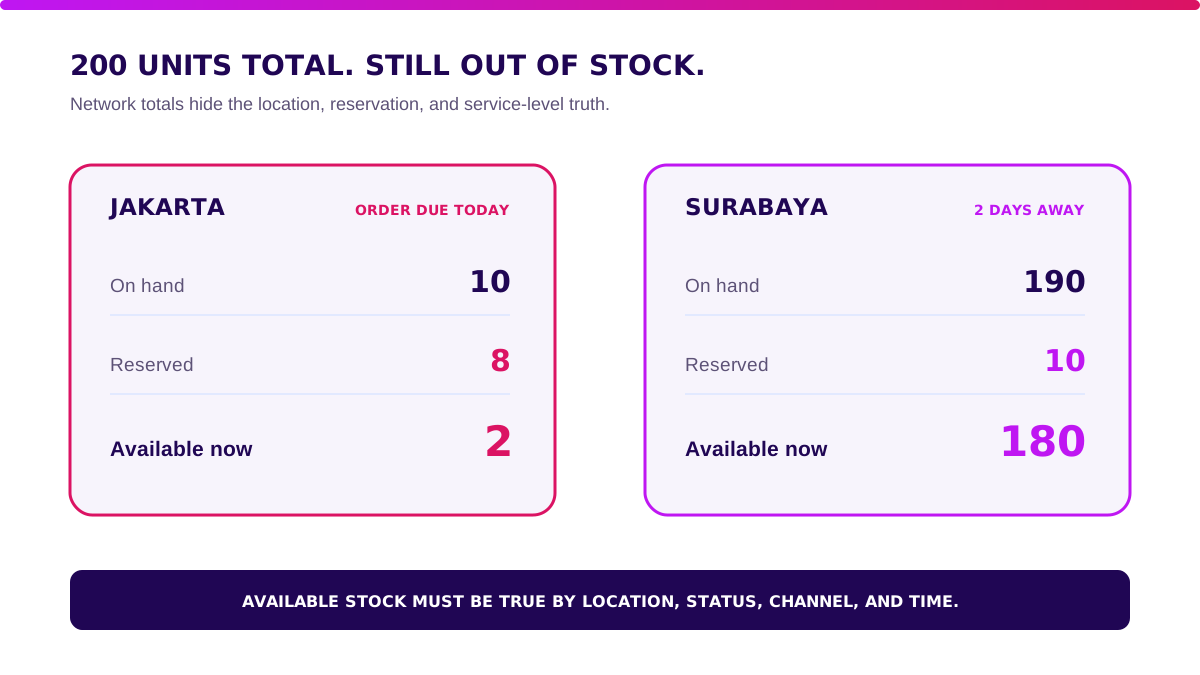
Show on-hand, reserved, available, incoming, and unavailable quantities per location. A total of 200 units is useless if 190 sit in Surabaya while the order must ship today from Jakarta.
4. Batch, serial, and expiry tracking
Food, healthcare, electronics, and high-value goods may need lot, serial, manufacture date, expiry, or warranty. The system should trace forward to customers and backward to suppliers.
5. Counting and variance workflow
Support blind counts, recount thresholds, cycle-count schedules, freeze rules, variance approval, and count history. A count is a control event, not an annual ritual followed by a mysterious adjustment.
6. Valuation and accounting handoff
Define FIFO, weighted average, landed cost, write-downs, and account mapping before go-live. IAS 2 requires inventory to be measured at the lower of cost and net realisable value and describes cost formulas including FIFO and weighted average. Your operational ledger and finance policy need to reconcile. Read the IAS 2 overview.
How Should Reorder Points Work?
A low-stock alert without lead time and safety stock is a notification, not replenishment logic.
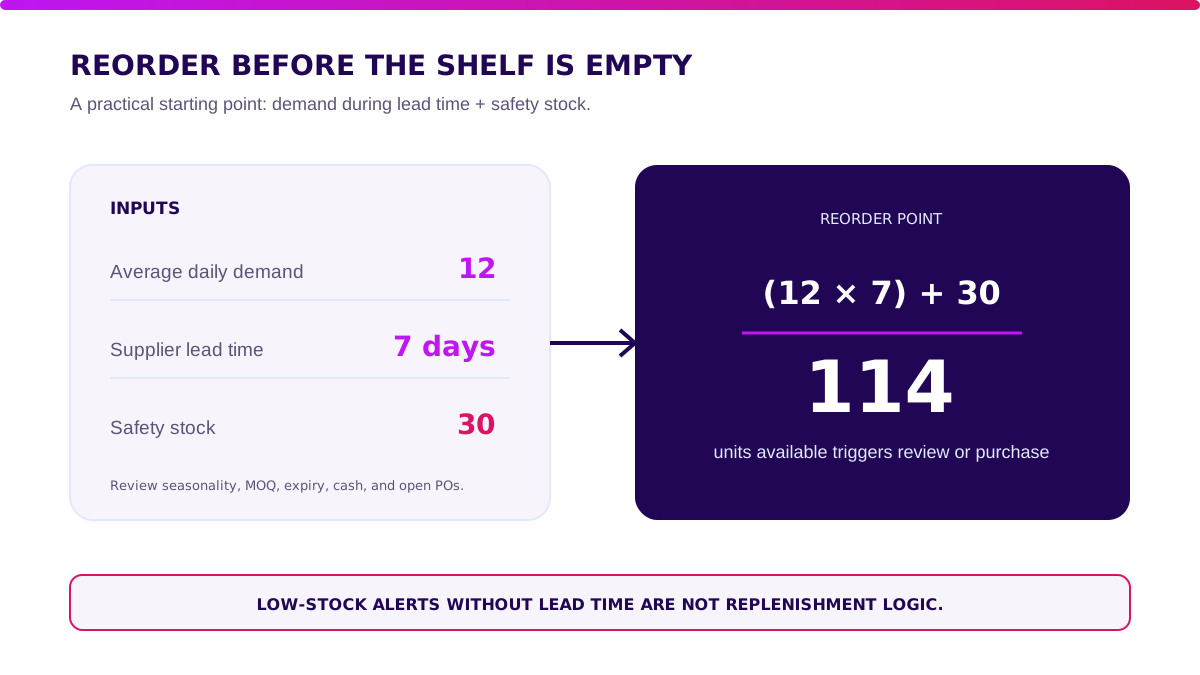
A useful starting formula is:
Reorder point = average demand during lead time + safety stock.
If an item sells 12 units per day, supplier lead time is 7 days, and safety stock is 30 units, the reorder point is 114 units. When available stock reaches 114, the team reviews or creates the next purchase order.
Do not automate purchasing from one average alone. Check seasonality, promotions, supplier reliability, minimum order quantities, shelf life, cash limits, and open purchase orders. Fast-moving stock can still be a bad buy when it expires before sale.
When Is a Packaged Stock Management App Enough?
Stay with SaaS while standard controls work without recurring side systems.
Packaged software is usually enough when:
- one or several locations use the same product and movement rules;
- SKU, unit, batch, and location structures are conventional;
- sales and purchasing systems have supported connectors or clean exports;
- transfer and approval rules are simple;
- replenishment uses common min/max or reorder-point logic;
- accounting accepts the valuation and journal output;
- operators can complete daily work without maintaining a shadow spreadsheet.
Do not commission custom software because the form has three extra fields. Configuration pain is not automatically a business case.
When Do You Need Hybrid or Custom Inventory Software?
Build when a repeated, measured workflow gap affects revenue, working capital, or control.
Signals worth calculating include:
- operators re-key movements between POS, marketplaces, purchasing, and accounting;
- the same SKU has complex pack, weight, or yield conversions;
- stock ownership differs from physical location through consignment or third-party fulfilment;
- allocation must consider channel commitments, margin, expiry, or service level;
- production consumes variable inputs and produces co-products or waste;
- regulated traceability cannot be reproduced from vendor exports;
- month-end reconciliation needs several private spreadsheets;
- fees grow with users, locations, or transactions faster than the value received.
Measure cases per week, minutes per case, error rate, stockout cost, excess-stock value, and audit exposure for two to four weeks. If the workaround costs IDR 15 million each month and a controlled hybrid project costs IDR 150 million, there is a case to test. If the exception happens quarterly, keep the manual control.
Validate it in two weeks. Before committing serious budget to a stock management app, Blueprint & Prototype maps the ledger, prototypes the riskiest workflow, and produces a build, adjust, wait, or stop recommendation.
How Much Does a Stock Management App Cost in Indonesia?
First-year cost includes software or build, devices, setup, migration, integration, training, support, and contingency.
The ranges below are an illustrative decision model, not vendor quotations:
| First-year component | SaaS | Hybrid | Custom |
|---|---|---|---|
| Software / build | IDR 3–18m | IDR 40–140m | IDR 180–500m |
| Scanners, printers, devices | IDR 4–15m | IDR 8–25m | IDR 8–30m |
| Setup + migration | IDR 2–8m | IDR 10–30m | IDR 20–60m |
| Integration | IDR 0–12m | IDR 20–60m | IDR 30–100m |
| Training, support, contingency | IDR 2–8m | IDR 10–30m | IDR 20–60m |
| Illustrative range | IDR 11–61m | IDR 88–285m | IDR 258–750m |
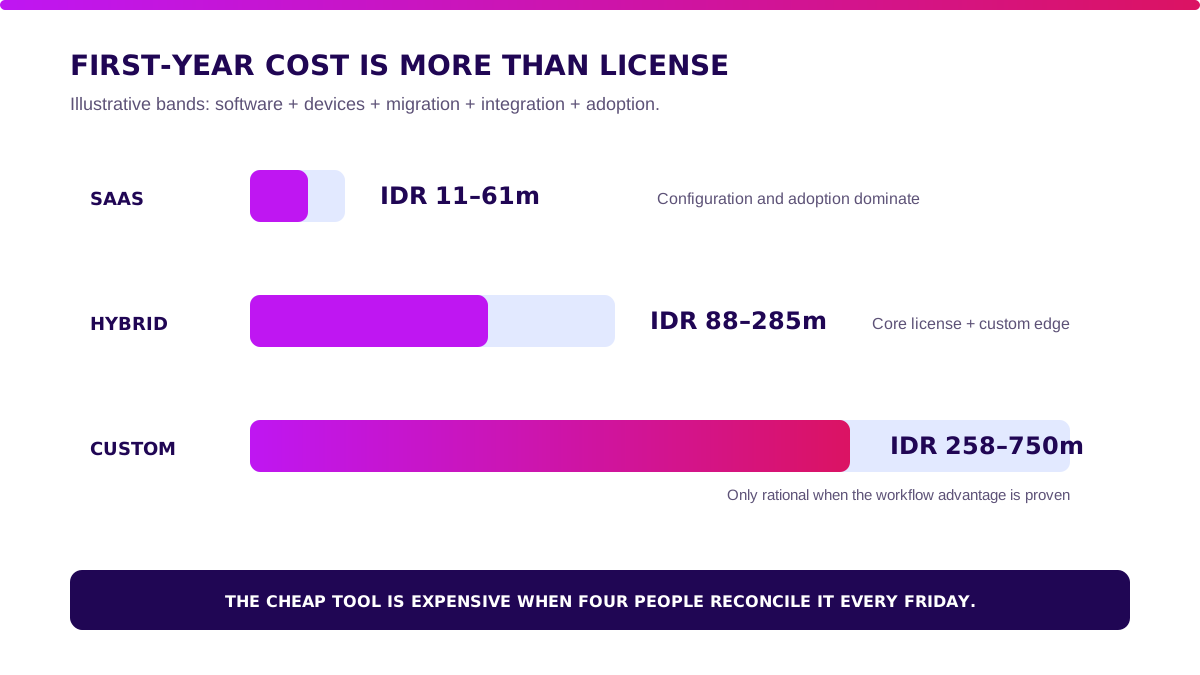
Replace these bands with actual locations, users, SKUs, transaction volume, integrations, migration quality, device count, support hours, and internal staff time. A cheap subscription becomes expensive quickly if four people reconcile it every Friday.
How to Choose a Stock Management App: 10 Acceptance Tests
A vendor demo proves the screen works. Acceptance tests prove your operation survives.
- Create two variants and three units of measure; reject an invalid conversion.
- Receive 40 units against a PO with one damaged unit and one short shipment.
- Sell an item, return it to quarantine, inspect it, then release it to available stock.
- Transfer stock between two locations and show in-transit quantity separately.
- Reserve stock for one channel and confirm another channel cannot oversell it.
- Run a blind cycle count, trigger a recount, and approve a variance.
- Reverse a mistaken receipt without deleting the original movement.
- Trace one batch backward to its supplier and forward to customer orders.
- Disconnect a scanning device, capture movements, reconnect, and reject duplicates.
- Export products, movements, balances, batches, users, and references with relational IDs.
If a vendor passes the workflow, continue with software vendor due diligence for contracts, SLAs, security, data ownership, and exit planning.
How to Implement a Stock Management App Without a Big-Bang Failure
A safe rollout expands verified stock, not just user accounts.
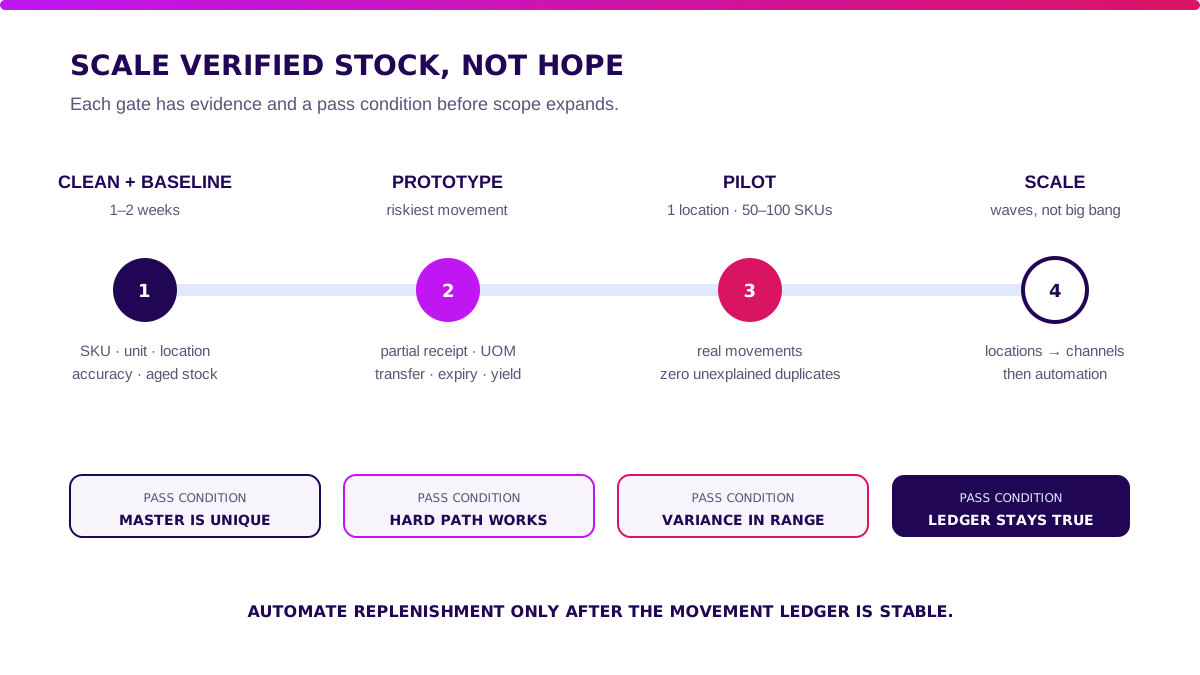
Gate 1 — clean the master and baseline for one to two weeks
Deduplicate SKUs. Define units, locations, movement reasons, and ownership. Measure stock accuracy, adjustment value, stockouts, aged stock, and closing time.
Gate 2 — prototype the riskiest movement
Test the hard path: partial receipt, unit conversion, inter-branch transfer, batch expiry, return grading, or production yield. Prototype decisions before migrating every SKU.
Gate 3 — pilot one location and 50–100 SKUs
Run real receipts, sales, transfers, returns, and counts. Set pass conditions: no unexplained movement, no duplicate sync, traceable adjustments, and agreed variance thresholds.
Gate 4 — scale locations, channels, then automation
Add locations and integrations in waves. Automate replenishment only after the ledger stays accurate. When the custom edge is proven, Production Grade Software can turn it into a secure, observable, maintainable system.
What I Would Do Before Choosing a Stock Management App
- For standard retail or distribution, buy SaaS. Spend the saved budget on master-data cleanup, scanning discipline, and training.
- When the ledger works but one edge leaks, choose hybrid. Keep the commodity core and build the valuable workflow.
- Before custom, measure the workaround. Bring frequency, minutes, errors, working-capital impact, and risk.
- If movements cannot be exported, do not sign. Your stock history is operational evidence, not vendor decoration.
- If one-location accuracy is unstable, do not scale. More locations multiply bad truth.
Take one working day and run the ten acceptance tests with real SKUs. Choose the simplest system that keeps quantity, value, and movement evidence in one chain.
FAQ About Stock Management Apps
What is a stock management app?
A stock management app records product quantities and movements across locations. It tracks receipts, sales, returns, transfers, reservations, counts, and adjustments with an auditable history.
What is the best stock management app?
There is no universal best product. Choose the app that passes your real SKU, unit, location, batch, reservation, offline, export, and reconciliation scenarios.
How much does a stock management app cost?
This article’s illustrative first-year model places SaaS at IDR 11–61 million, hybrid at IDR 88–285 million, and custom at IDR 258–750 million. Actual cost depends on devices, users, locations, integrations, migration, and support.
Can a stock management app be custom-built?
Yes. Custom is justified when a repeated, high-value workflow cannot be handled by configuration or packaged integrations. Validate the ledger and business case before building.
Is a stock management app the same as a WMS?
No. A stock app manages quantity, movement, and availability. A WMS also directs physical receiving, putaway, picking, packing, and shipping work inside a warehouse.
Related Posts
Two weeks to a real answer
Need help putting this into practice?
Book a Blueprint session and we'll turn the ideas in this article into a tested prototype in front of real users—2 weeks, from $3,000.