Guide
Inventory Management System: Build vs Buy
Your warehouse runs on a patchwork of spreadsheets, a legacy system nobody trusts, and someone’s personal memory of where the safety stock lives. Sound familiar?
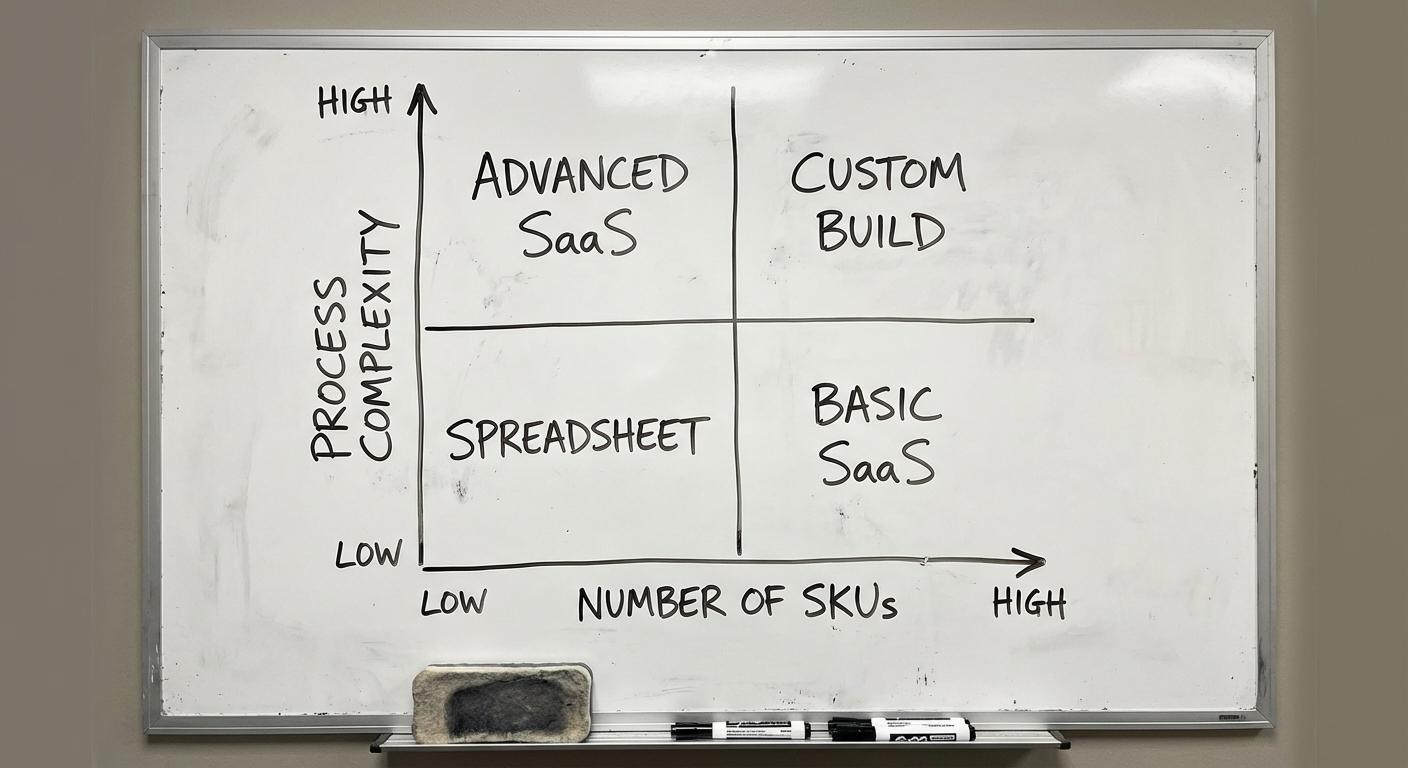
Most growing businesses hit inventory chaos between 500 and 5,000 SKUs. Below that, spreadsheets barely hold. Above it, they collapse—and you start losing money through stockouts, overstocking, and manual errors that compound silently.
The question isn’t whether you need inventory software. It’s whether you should build it or buy it. That decision depends on your SKU complexity, integration needs, and how much of your competitive advantage lives inside your supply chain. Get this wrong and you’ll either overpay for software you’ve outgrown in 18 months, or burn six figures building something you could’ve bought for $300/month.
This guide breaks down both paths with real numbers.
What is an Inventory Management System?
An inventory management system is software that tracks stock levels, orders, sales, and deliveries across your entire supply chain—giving you real-time visibility into what you have, where it is, and when to reorder.
It replaces manual tracking with automated workflows: purchase orders trigger when stock dips below thresholds, barcodes eliminate counting errors, and dashboards surface problems before they hit your bottom line.
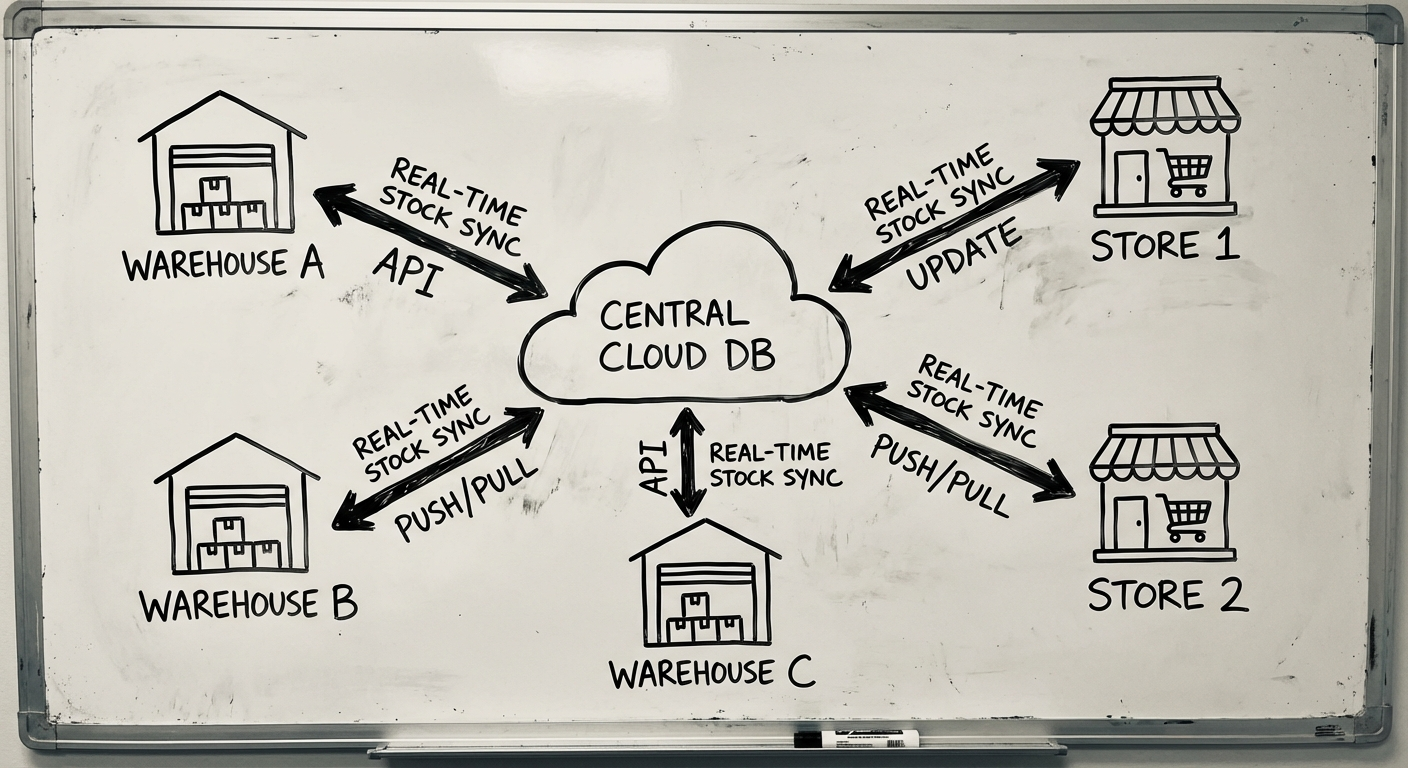
Modern inventory software connects your warehouse, sales channels, accounting, and suppliers into a single source of truth. Whether you’re running one warehouse or ten, the goal is the same: right product, right place, right time, minimum cost.
Core Features of Inventory Software
Not all inventory systems are equal. But the best ones share six capabilities that separate real solutions from glorified spreadsheets.
1. Real-Time Stock Tracking
The foundation. Every unit tracked from receipt to sale, updated the moment it moves. No more “let me check the warehouse” delays. Your team, your sales channels, and your customers all see the same number.
What to look for:
- Live quantity updates across all channels
- Stock movement history (audit trail)
- Low-stock and out-of-stock alerts
- Multi-unit-of-measure support (pallets, cases, eaches)
2. Automated Reorder Points
Manual reordering is a bottleneck that scales terribly. Good inventory software lets you set minimum stock thresholds that automatically generate purchase orders when inventory dips below them.
Advanced systems factor in lead times, supplier reliability, and seasonal patterns. The result: fewer stockouts, less dead stock, and purchasing decisions backed by data instead of gut feel.
3. Multi-Location Management
Once you operate from more than one warehouse—or sell through multiple channels—inventory gets exponentially harder. Multi-location management gives you:
- Per-location stock visibility (warehouse A has 200 units, warehouse B has 50)
- Inter-warehouse transfer tracking
- Location-specific reorder rules
- Consolidated reporting across all sites
If you’re running multi-location operations and your current system can’t track stock per site in real time, you’re flying blind.
4. Barcode & Scanning Integration
Barcodes eliminate the human-error layer. Scanning is 20x faster than manual entry and drops error rates below 1%. Every pick, pack, receive, and count becomes a scanned event.
Your system should support:
- Standard barcode formats (EAN, UPC, Code 128)
- Mobile scanning (smartphone or dedicated device)
- Batch receiving and picking workflows
- Label printing integration
5. Batch & Serial Number Tracking
If you sell perishables, regulated goods, or high-value items, batch and serial tracking isn’t optional—it’s compliance.
- Batch tracking — trace groups of products by production run, expiry date, or supplier lot
- Serial tracking — trace individual units by unique identifier
- Recall management — instantly identify affected stock across all locations
Industries like food, pharmaceuticals, and electronics live or die by traceability. Your inventory software needs to track provenance from supplier to customer.
6. Demand Forecasting
The most undervalued feature. Historical sales data + seasonal patterns + trend analysis = forecasting that tells you what to order before you need it.
Basic forecasting uses moving averages. Advanced systems apply machine learning to detect patterns humans miss—like a 15% sales spike every third Thursday, or a correlation between weather and product demand.
Good forecasting reduces carrying costs by 20-30% and virtually eliminates emergency air freight (the $8,000-per-pallet kind).
Build vs Buy: The Real Comparison
This is where most guides get vague. Let’s get specific.
The Buy Path: Off-the-Shelf Inventory Software
The major players in the Australian market:
DEAR Systems (now Cin7 Core)
- Best for: Mid-market manufacturers and wholesalers
- Pricing: $325-$550 AUD/month
- Strengths: Manufacturing module, BOM management, multi-currency
- Limitations: UI feels dated, complex setup, limited customisation
Cin7 (Omni)
- Best for: Omnichannel retailers with 3PL needs
- Pricing: $399-$999 AUD/month (enterprise pricing on request)
- Strengths: EDI integration, 3PL management, 700+ integrations
- Limitations: Steep learning curve, can be over-engineered for simple use cases
TradeGecko (now QuickBooks Commerce)
- Best for: Small e-commerce businesses
- Pricing: Absorbed into QuickBooks ecosystem
- Strengths: Simple UI, Shopify integration
- Limitations: Limited manufacturing features, reduced standalone functionality since Intuit acquisition
When buying makes sense:
- Your workflows match 80%+ of the software’s default configuration
- You have fewer than 10,000 SKUs
- Standard integrations cover your tech stack
- You need to be operational within 4-8 weeks
- You don’t compete on supply chain speed or precision
The Build Path: Custom Inventory Software
Building custom inventory software means designing a system around your exact workflow—not adapting your workflow to someone else’s software.
When building makes sense:
- Your inventory logic is genuinely unique (custom pricing rules, complex BOM, multi-currency multi-entity)
- Off-the-shelf solutions require so many workarounds that your team has created shadow spreadsheets
- You need deep integration with proprietary systems (custom ERP, IoT sensors, legacy databases)
- Inventory management is a core competitive advantage
- You’re processing 50,000+ transactions/month and need performance guarantees
The clearest signal to build: when your team maintains a spreadsheet alongside their inventory system “because the system can’t do X.” That spreadsheet is your requirements document.
Head-to-Head Comparison
| Factor | Buy (SaaS) | Build (Custom) |
|---|---|---|
| Upfront cost | $0-$5K setup | $80K-$250K+ |
| Monthly cost | $325-$999/mo | Hosting + maintenance ($2-5K/mo) |
| Time to launch | 4-8 weeks | 3-6 months (MVP) |
| Customisation | Limited to config options | Unlimited |
| Integrations | Pre-built connectors | Built to your exact stack |
| Scaling cost | Jumps at tier thresholds | Linear with usage |
| 3-year TCO | $15K-$45K | $130K-$350K |
| 5-year TCO | $25K-$75K | $150K-$400K (cost growth slows) |
| Ownership | Vendor-dependent | You own everything |
| Exit risk | Vendor sunset/acquisition | Team dependency |
The crossover point: For most businesses, custom becomes cost-competitive around the 5-7 year mark—but only if the custom system delivers workflow advantages that translate to measurable revenue or cost savings. If you’re just replicating Cin7 in custom code, you’ve wasted money.
Tech Stack for Custom Inventory Software
If you decide to build, technology choices matter. Here’s what we recommend for inventory systems in 2026:
Frontend
- React or Next.js — Component-based UI with fast rendering for data-heavy dashboards
- Tailwind CSS — Consistent, responsive design without fighting CSS
- Mobile: React Native or Flutter for warehouse floor scanning apps
Backend
- Node.js (NestJS) or Python (FastAPI) — Both handle high-throughput transaction processing well
- PostgreSQL — Relational database with excellent support for complex queries, inventory calculations, and ACID compliance
- Redis — Caching layer for real-time stock levels and session management
Infrastructure
- AWS or Google Cloud — Auto-scaling, managed databases, global availability
- Docker + Kubernetes — Containerised deployment for predictable scaling
- CI/CD pipeline — Automated testing and deployment (GitHub Actions or similar)
Key Integrations
- Accounting: Xero, MYOB, or QuickBooks API
- E-commerce: Shopify, WooCommerce, Magento webhooks
- Shipping: Australia Post, Sendle, StarTrack APIs
- Barcode: ZEBRA SDK or browser-based scanning via camera API
For a deeper look at how warehouse systems integrate with inventory, see our warehouse management software guide.
Development Process
Building inventory software follows the same disciplined process as any custom software development project—but with inventory-specific milestones.
Phase 1: Discovery & Requirements (2-4 weeks)
- Map current inventory workflows (receiving, putaway, picking, packing, shipping)
- Document integration requirements (what talks to what)
- Identify data migration scope (how much historical data moves over)
- Define success metrics (error rate reduction, processing speed, stock accuracy)
Phase 2: MVP Build (8-12 weeks)
The minimum viable inventory system typically includes:
- Product catalogue and stock tracking
- Purchase order management
- Basic receiving and dispatch workflows
- Single-location support
- Core reporting dashboard
- One accounting integration (usually Xero)
Phase 3: Feature Expansion (4-8 weeks)
- Multi-location support
- Barcode scanning (mobile app)
- Automated reorder points
- Batch/serial tracking
- Advanced reporting and forecasting
- Additional integrations
Phase 4: Optimisation & Scale (Ongoing)
- Performance tuning for transaction volume
- ML-based demand forecasting
- IoT integration (smart shelves, RFID)
- API marketplace for third-party extensions
Each phase ships working software. No six-month disappearing acts. Your team starts using the system from Phase 2, and every subsequent phase builds on real usage feedback.
Costs: What to Actually Budget
Let’s cut through the vague “it depends” and give you real numbers.
Off-the-Shelf (Annual)
| Tier | Monthly | Annual | Best For |
|---|---|---|---|
| Entry | $200-350 | $2,400-$4,200 | <1,000 SKUs, single location |
| Mid | $400-700 | $4,800-$8,400 | 1,000-10,000 SKUs, multi-location |
| Enterprise | $1,000+ | $12,000+ | 10,000+ SKUs, complex ops |
Plus: implementation ($2-10K), training ($1-5K), and integration development for anything non-standard ($5-20K).
Custom Build
| Component | Cost Range (AUD) |
|---|---|
| Discovery & design | $10,000-$25,000 |
| MVP development | $60,000-$120,000 |
| Feature expansion | $30,000-$80,000 |
| Total build | $100,000-$225,000 |
| Annual maintenance | $15,000-$40,000 (15-20% of build cost) |
| Hosting | $3,600-$12,000/year |
Budget rule: multiply your estimated build cost by 1.5x for a realistic total. Every inventory project uncovers edge cases—returns processing, partial receipts, inter-warehouse transfers—that weren’t in the original scope.
The Hidden Costs Nobody Mentions
For SaaS: Per-user fees that balloon as your team grows. Integration costs when the pre-built connector doesn’t handle your edge case. Data export fees when you eventually migrate away.
For custom: Developer availability (good inventory developers aren’t cheap). Knowledge concentration risk (what happens when your lead dev leaves). The temptation to keep adding features instead of shipping.
How This Connects to Your Broader Tech Stack
Inventory software doesn’t exist in isolation. It’s one layer of your operational technology stack:
- ERP systems sit above inventory, orchestrating finance, HR, and operations
- Warehouse management sits alongside inventory, optimising physical operations
- Order management feeds into inventory, triggering stock movements
- Accounting syncs with inventory for COGS, valuation, and tax reporting
The integration architecture matters more than any single system. A mediocre inventory tool with clean integrations beats a brilliant one that operates in a silo.
Making the Decision
Here’s the framework we use with clients:
-
List your non-negotiable workflows. Not features—workflows. “When a return arrives, we need to inspect, grade, restock or dispose, and credit the customer within 2 hours.”
-
Demo three SaaS products against those workflows. Track where you’d need workarounds.
-
If workarounds exceed 20% of your workflows, get a custom build scoped. The workaround tax compounds over time.
-
Calculate 5-year TCO for both paths, including the cost of your team’s time spent on workarounds.
The best inventory system is the one your team actually uses correctly. Complexity kills adoption. Whether you build or buy, ruthlessly cut features your team won’t use daily.
Next Steps
Whether you’re evaluating off-the-shelf inventory software or scoping a custom build, the starting point is the same: map your current workflow and identify where it breaks.
We’ve helped Australian businesses build custom inventory systems that handle 100,000+ SKUs across multiple warehouses—and we’ve also told companies to just buy Cin7 when that was the smarter move.
Want an honest assessment of which path fits your business? Let’s talk.
Need help putting this into practice?
Book a Blueprint session and we'll turn the ideas in this article into your next validated release.
Book a Discovery Call