Guide
HR Software: Core Features from Attendance to Payroll
HR software should run the HR department’s working day: hiring, onboarding, attendance, leave, payroll inputs, reviews, and exits, all from one employee record. If your HR team still answers “how much leave do I have?” on WhatsApp, the software is a filing cabinet, not an operating system.
We have spent more than 15 years delivering business systems for Indonesian companies. A pattern we see often in HR: a company buys every module on day one and actively uses only a few. The rest waits for data nobody cleaned.
This guide maps HR software features across the employee lifecycle, audits HR admin time for an illustrative 150-person company, and shows which features to switch on first at 30, 150, and 500+ employees, plus vendor tests, costs, and rollout. If you are still choosing between systems, start with our HRIS application guide.
TL;DR — the whole guide in five lines:
- HR software is a lifecycle system, not a payroll calculator. Errors hide in the handoffs between stages.
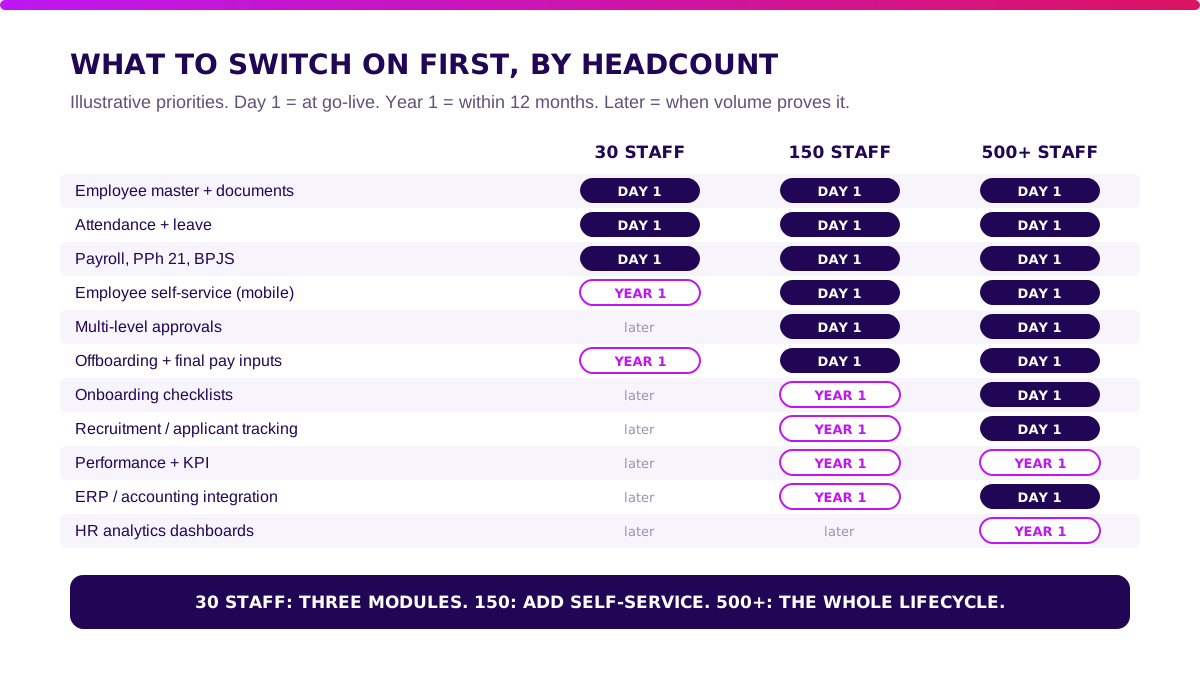
- Adopt by headcount. At 30 staff you need three modules. At 150, add self-service. At 500+, add the rest.
- Self-service buys capacity, not headcount cuts. In our illustrative model, it frees 46 of 66 HR admin hours a month.
- Packaged is enough for most companies. Build only a measured edge, such as field attendance or ERP posting.
- Roll out one module per step, and don’t move on until its gate passes.
What Is HR Software?
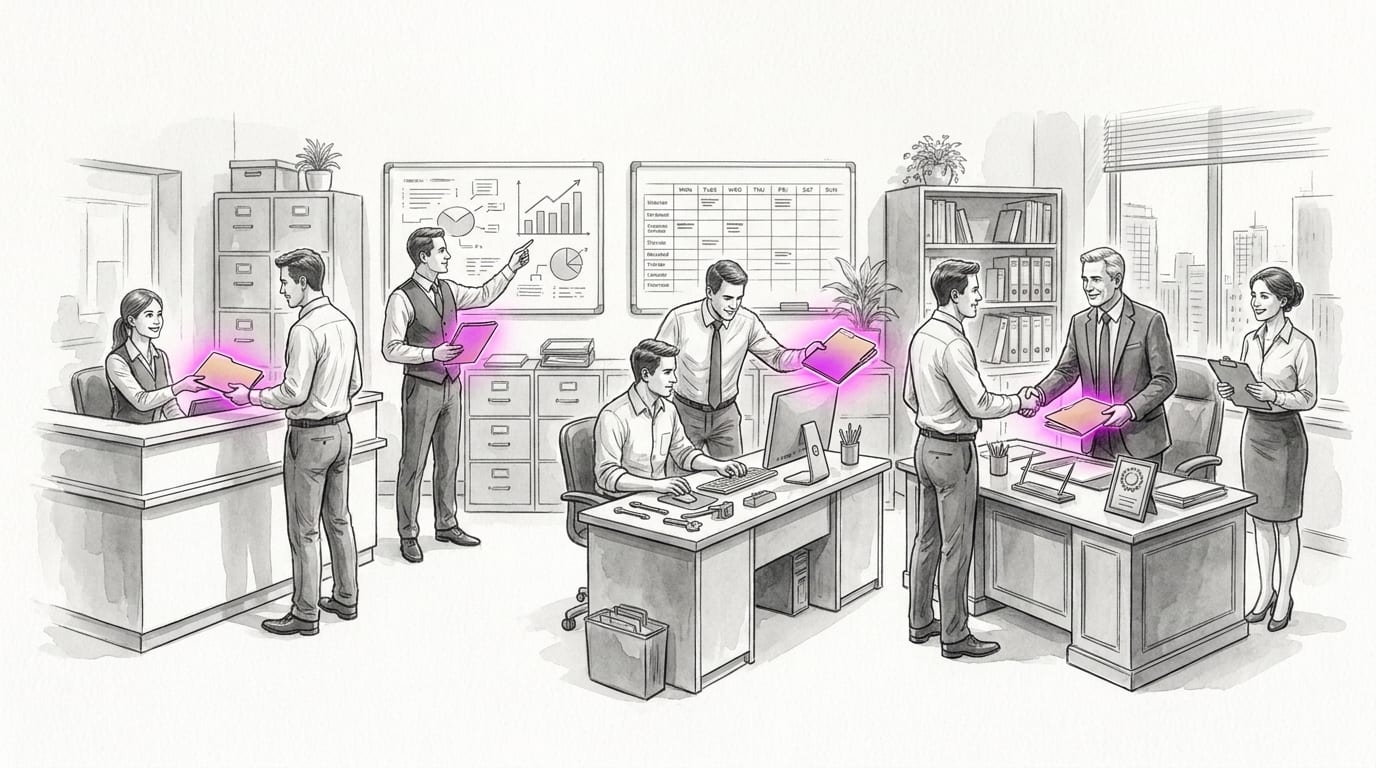
HR software is the system that runs every HR process tied to an employee, from the job offer to the exit letter, on one shared record. In Indonesia it is often called software HRD, after the HR department it serves.
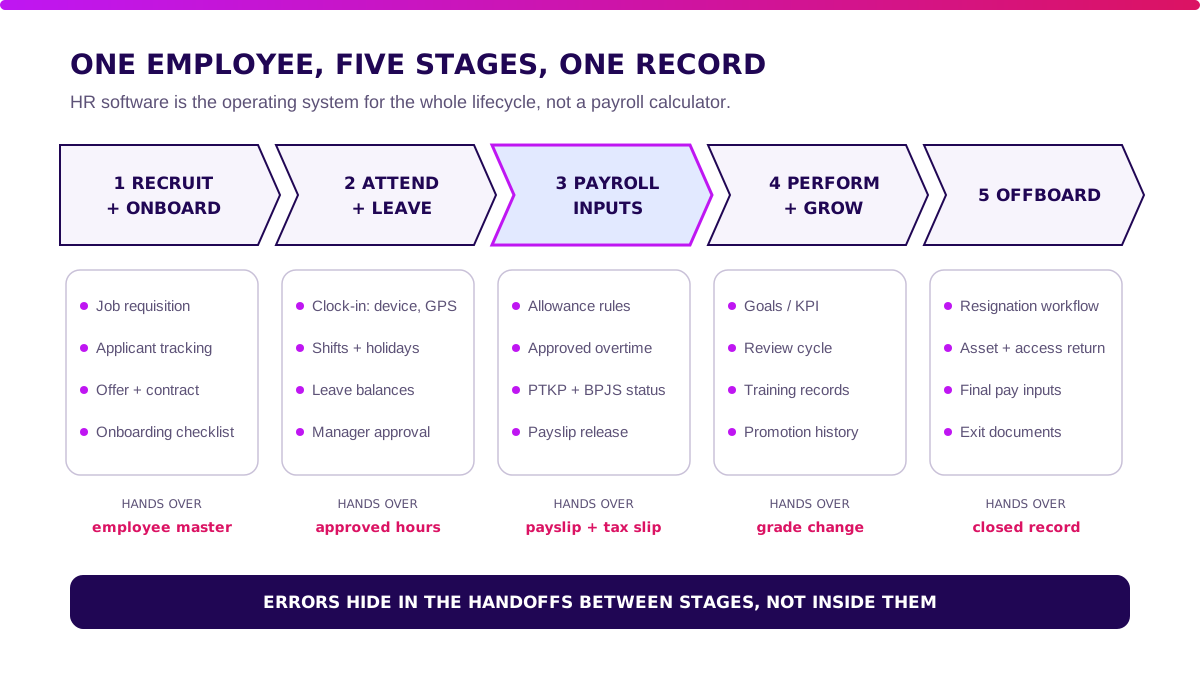
A complete HR software setup covers five lifecycle stages:
- Recruit and onboard: requisitions, applicants, offers, contracts, and first-week checklists.
- Attendance and leave: clock-in, shifts, holidays, leave balances, and approvals.
- Payroll inputs: allowances, approved overtime, tax and BPJS status, and payslip release.
- Performance and growth: goals, review cycles, training, and promotions.
- Offboarding: resignations, asset and access return, final pay inputs, and exit documents.
Each stage hands something to the next: onboarding creates the employee master, attendance creates approved hours, payroll turns them into a payslip. When one handoff breaks, the next stage inherits the error.
Next: HR Software: Packaged vs Hybrid vs Custom.
HR Software: Packaged vs Hybrid vs Custom
For most growing businesses, packaged HR software covers the lifecycle well enough. Spend your effort on adoption, not on building.
| Factor | Packaged (SaaS) | Hybrid | Custom |
|---|---|---|---|
| First-year cost (150 staff) | IDR 75–190m | IDR 200–550m | IDR 800m–2.5bn |
| Time to go-live | 1–3 months | 3–5 months | 6–12 months |
| Flexibility | Vendor settings | Packaged core + one custom module | Fully yours |
| Best for | Standard office, retail, and service policies | Field teams, multi-site shifts, ERP links | HR logic is the product (staffing, outsourcing) |
Packaged wins when your policies are written down and fit standard settings. The vendor maintains tax and BPJS rules.
Hybrid wins when one edge does not fit, such as a field sales force clocking in at customer sites.
Custom wins only when you run HR for other companies’ workers. Disliking a vendor’s screens is not a reason to build.
Next: Where Does HR Admin Time Actually Go?.
Where Does HR Admin Time Actually Go?
Before you pick features, count requests. The feature that removes the most minutes goes first.
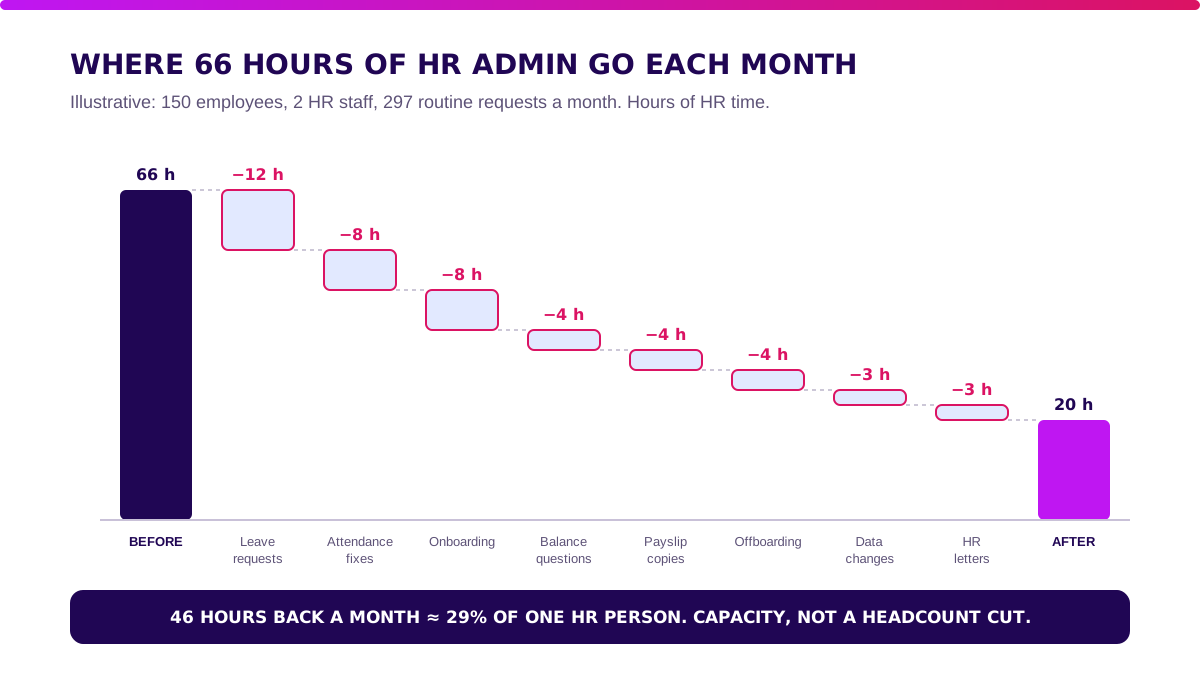
The model below is illustrative, not client data. It assumes 150 employees, a 2-person HR team, and requests arriving by WhatsApp, email, and paper forms.
| Request type (monthly) | Requests | Min each | HR min, before | Still reach HR | Min each, after | HR min, after |
|---|---|---|---|---|---|---|
| Leave requests | 90 | 10 | 900 | 90 | 2 | 180 |
| Leave balance questions | 60 | 5 | 300 | 12 | 5 | 60 |
| Attendance corrections | 60 | 12 | 720 | 60 | 4 | 240 |
| Payslip and tax slip copies | 45 | 8 | 360 | 15 | 8 | 120 |
| Personal data changes | 20 | 15 | 300 | 20 | 6 | 120 |
| HR letters | 15 | 20 | 300 | 15 | 8 | 120 |
| Onboarding | 4 | 180 | 720 | 4 | 60 | 240 |
| Offboarding | 3 | 120 | 360 | 3 | 40 | 120 |
| Total | 297 | 3,960 (66 h) | 219 | 1,200 (20 h) |
Check the arithmetic: 900 + 300 + 720 + 360 + 300 + 300 + 720 + 360 = 3,960 minutes, or 66 hours. After: 180 + 60 + 240 + 120 + 120 + 120 + 240 + 120 = 1,200 minutes, or 20 hours.
What removes the admin work?
Three things drive the drop:
- Self-service removes requests. Only 12 balance questions and 15 payslip requests still reach HR.
- In-app approvals remove chasing. Managers approve leave and corrections. HR reviews exceptions.
- Templates and checklists remove rework in letters, onboarding, and offboarding.
That returns 46 hours a month. Two HR staff at 160 hours each have 320 hours.
Routine admin falls from 21% of team time to about 6%. At an illustrative loaded cost of IDR 90,000 per hour, 46 hours is IDR 4.14 million a month, or about IDR 50 million a year.
Read that number honestly. IDR 50 million a year covers part of a packaged subscription at this size. It does not justify a custom build. The rest of the case comes from payroll accuracy, which our HRIS guide models separately.
Builder’s note: I ask HR teams to forward me one week of WhatsApp requests before any demo. The pile tells you which feature to switch on first better than any vendor slide.
Which HR Software Features Are Required?
Every feature should shorten a handoff between two lifecycle stages. If it doesn’t, it can wait.
1. Recruitment and onboarding
Track requisitions and applicants in one pipeline. Generate the offer and contract from a template.
Turn a signed offer into an employee record with NIK, PTKP status, bank account, and BPJS numbers, without retyping. Assign a first-week checklist to HR, IT, and the manager.
2. Attendance, shifts, and leave
Capture clock-in from devices or mobile, map shifts and holidays, and hold leave balances. Route approvals to the manager and a substitute.
Our employee attendance app guide covers GPS, selfie, and anti-fraud methods in depth.
3. Payroll inputs
HR software should hand payroll clean inputs: approved hours, allowances, deductions, and joiner or leaver dates. Since 1 January 2024, PMK 168/2023 sets monthly PPh 21 withholding with average effective rates, so status fields must be right before the run.
For the calculation itself, read our payroll software guide.
4. Performance and growth
Set goals, run review cycles, and log training. Store promotion history with effective dates, so a grade change flows into next month’s pay without an email.
5. Offboarding
Start from a resignation request. Collect assets, revoke system access, and pass final pay inputs, including remaining leave, to payroll.
Issue the exit letter from a template and close the record.
6. Self-service and access control
Give employees a mobile view of leave, payslips, and their own data. Restrict everything else by role.
Indonesia’s Personal Data Protection Law, UU 27/2022, treats health and biometric data as specific personal data. That covers sick-leave notes and fingerprint templates.
Log who views salary and health records.
Which HR Software Features Should You Adopt First?
Adopt by headcount, not by brochure. Each size has a different bottleneck.
- 30 employees: employee master, attendance and leave, and payroll. One HR generalist handles the rest by hand.
- 150 employees: add self-service, multi-level approvals, and structured offboarding on day one. Volume, not complexity, is the problem at this size.
- 500+ employees: switch on the whole lifecycle, including applicant tracking and ERP integration. Analytics come once a year of clean data exists.
A dashboard on dirty records only shows the mess faster.
Next: When Is Off-the-Shelf HR Software Enough — and When Do You Need Custom?.
When Is Off-the-Shelf HR Software Enough — and When Do You Need Custom?
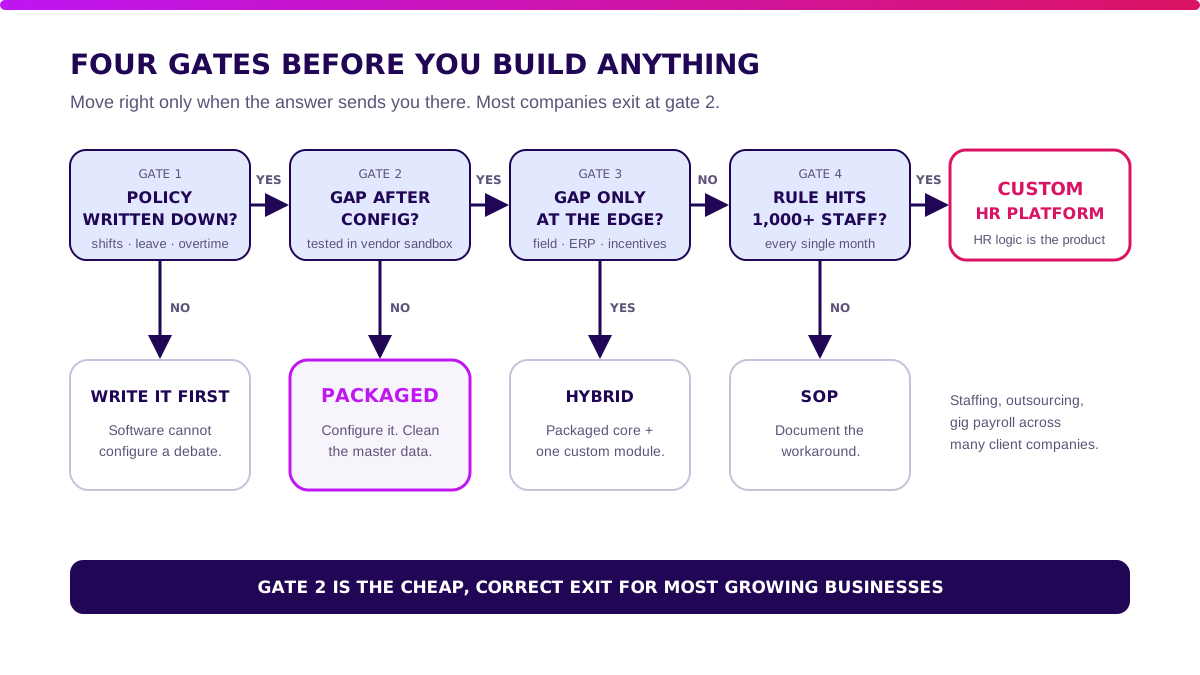
Stay off-the-shelf when your policies are written down and a sandbox test shows no real gap. Most companies exit here, and that is the cheap, correct answer.
Packaged is usually enough when:
- leave, shift, and overtime rules follow a few standard patterns;
- employees clock in at an office, store, or with a standard mobile app;
- one or a few legal entities run payroll;
- payroll data can move to accounting as an export file.
Build a custom edge when:
- field staff clock in at customer sites and attendance fraud is a measured cost;
- each site or project runs different shift and allowance rules;
- incentives depend on sales or production data from another system;
- you run HR for workers placed at many client companies.
Count it before you build it. A rule that touches 1,000 workers every month is worth modelling.
A rule that fires twice a year needs an SOP.
Validate it in 2 weeks. Before you commit budget to HR software, Blueprint & Prototype maps your HR workflows, prototypes the riskiest one with real employees, and gives you real cost numbers plus a build, buy, or wait recommendation.
How to Choose HR Software: 10 Vendor Tests
A demo follows one perfect employee. These tests follow your real ones through the lifecycle.
- Convert a signed offer into an employee record without retyping any field.
- Assign an onboarding checklist to HR, IT, and the manager, and show who is late.
- Submit leave from a phone, approve it as a substitute manager, and show the updated balance.
- Correct a missed clock-in with manager approval and show the audit trail.
- Download a payslip and tax slip as an employee without contacting HR.
- Change an employee’s bank account and require HR verification before payroll uses it.
- Run a review cycle for one team and push a promotion into next month’s payroll inputs.
- Process a resignation with asset return, access removal, and final pay inputs.
- Show who viewed one employee’s salary and sick-leave notes in the last 90 days.
- Export every employee, leave record, and document with stable IDs.
Then run the commercial checks in software vendor due diligence: hosting, SLA, pricing, and exit terms.
How Much Does HR Software Cost in Indonesia?
First-year cost is subscription plus setup, integration, and support. Subscription scales with headcount. Setup scales with messy data.
These are illustrative first-year ranges for packaged HR software, not vendor quotes:
| First-year component | 30 staff | 150 staff | 500 staff |
|---|---|---|---|
| Subscription | IDR 11–22m | IDR 54–108m | IDR 180–360m |
| Data and policy setup | IDR 5–15m | IDR 10–35m | IDR 30–90m |
| Integration | IDR 0–5m | IDR 5–25m | IDR 30–100m |
| Support and contingency | IDR 2–8m | IDR 6–22m | IDR 20–50m |
| Illustrative total | IDR 18–50m | IDR 75–190m | IDR 260–600m |
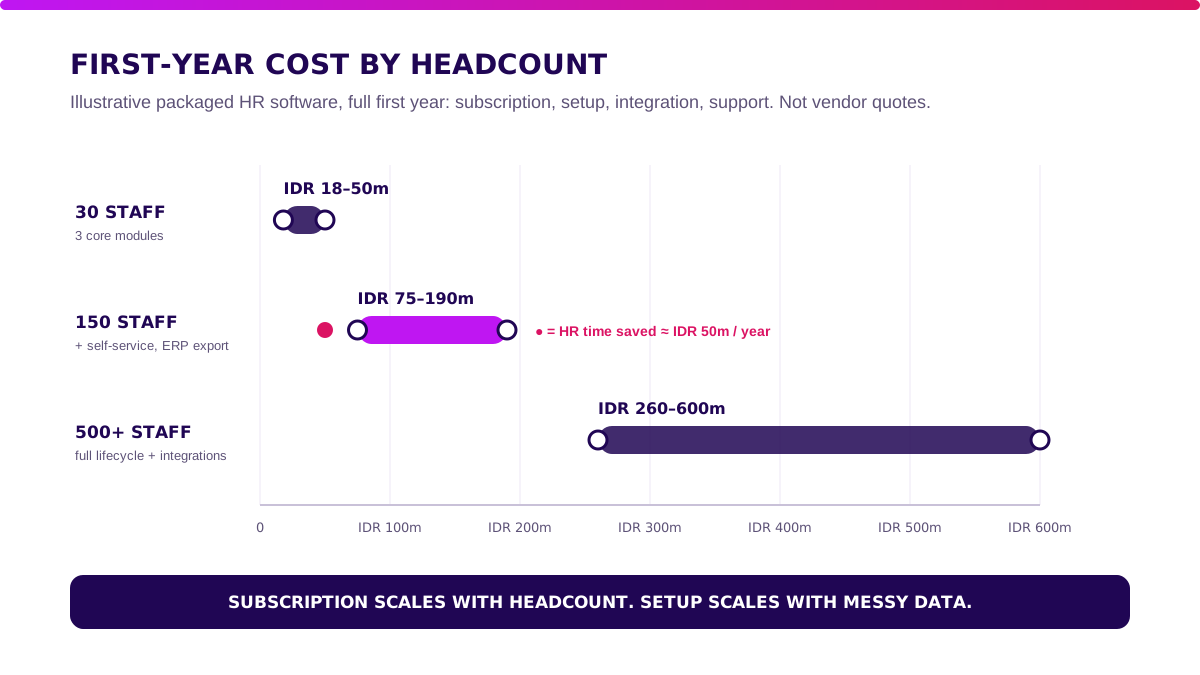
Replace these bands with your own headcount, sites, and data quality. Compare them with your measured request volume, not a vendor’s savings calculator.
Next: How to Roll Out HR Software in Phases.
How to Roll Out HR Software in Phases
Switch on one module per step. Climb only after the gate passes.
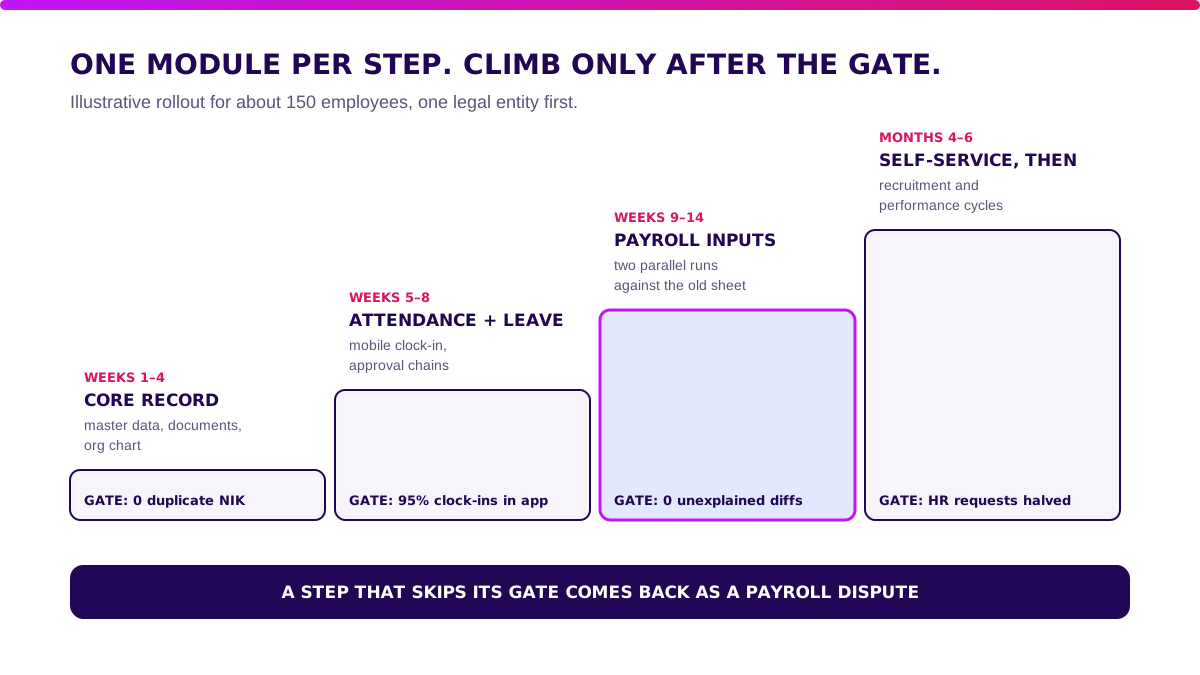
- Weeks 1–4, core record. Clean the employee master, documents, and org chart. Gate: zero duplicate NIK.
- Weeks 5–8, attendance and leave. Move clock-in and approvals into the app. Gate: 95% of clock-ins recorded in the app.
- Weeks 9–14, payroll inputs. Run two payrolls in parallel with the old sheet. Gate: zero unexplained differences.
- Months 4–6, self-service, then recruitment and performance. Open self-service to all staff first. Gate: routine HR requests halved against your baseline.
If you validated a custom edge, Production Grade Software turns it into secure, observable, maintainable software that plugs into the packaged core.
What I Would Do Before Buying HR Software
- Count one month of requests. Volume by type tells you which feature pays first.
- Write the policies down. Leave, overtime, and approval rules must exist on paper before a vendor can configure them.
- Buy for your headcount. Pay for three modules at 30 staff, not twelve.
- Test the handoffs. Offer to employee record, promotion to payroll, resignation to final pay.
- Measure again at month six. If routine requests have not halved, fix adoption before adding modules.
Forward one week of HR WhatsApp messages into a spreadsheet, tag each by type, and bring that list to your first vendor demo.
Next: FAQ About HR Software.
FAQ About HR Software
What is HR software?
HR software runs HR processes across the employee lifecycle, from recruitment to attendance, leave, payroll inputs, performance, and offboarding, on one employee record.
What is the best HR software in Indonesia?
The one that passes your own lifecycle tests. Run a real joiner, leave approval, promotion, and resignation through each vendor’s sandbox and compare.
How much does HR software cost?
In this article’s illustrative model, packaged HR software costs about IDR 18–50 million in year one for 30 staff, IDR 75–190 million for 150, and IDR 260–600 million for 500.
Can HR software be custom-built?
Yes. It makes sense when HR logic is part of your business, as in staffing or outsourcing firms.
Most companies do better with a packaged core and one custom module.
Is custom HR software better than an off-the-shelf app?
Not by default. Off-the-shelf wins when policies are standard, because the vendor maintains tax and BPJS rules.
Custom wins only when a measured rule creates value configuration cannot.
Related Posts
Two weeks to a real answer
Need help putting this into practice?
Book a Blueprint session and we'll turn the ideas in this article into a tested prototype in front of real users—2 weeks, from $3,000.