Guide
Restaurant Software: Integrated POS, Kitchen, and Inventory
The right restaurant software does not stop when the cashier prints a receipt. It connects orders, kitchen production, payments, ingredients, delivery channels, and management reporting in one auditable data trail.
We have delivered business systems for more than 15 years. The pattern is consistent: restaurants rarely lack apps. They lack one operating flow that makes the cashier total, kitchen ticket, and ingredient stock tell the same story.
This guide covers how restaurant software works, its essential modules, SaaS vs hybrid vs custom decisions, a first-year cost model, acceptance tests, and a phased rollout. It is not another “best software” list pretending one product fits every restaurant.
TL;DR — the whole guide in five lines:
- Choose restaurant software by following an order into stock, not by counting features.
- SaaS wins for standard operations; there is no prize for rebuilding login and checkout.
- Hybrid works when the POS core is sound but your integrations or operating edge are unique.
- Custom earns its place only when the workflow gap is worth more than ownership cost.
- Roll out to one station and one outlet first; never distribute a bug across the network.
What Is Restaurant Software?
Restaurant software is a system that records and connects the order lifecycle from guest and checkout through kitchen production, payment, ingredient usage, and reporting. POS is the entry point. Restaurant operations are the complete system.
The core jobs are to:
- Capture dine-in, takeaway, QR, and delivery orders without duplication.
- Route items and modifiers to the correct kitchen station.
- Consume ingredient stock through recipes, not only finished-item counts.
- Reconcile cash, cards, QRIS, refunds, voids, and settlements.
- Control prices, promotions, roles, shifts, and approvals across outlets.
- Measure ticket time, food cost, waste, stock variance, and menu margin.
A Kitchen Display System is more than a paper-ticket replacement. When connected to POS, it routes orders directly to stations, retains modifiers, and measures fulfilment time. Toast’s operational explanation also highlights real-time routing and the removal of manual re-entry for online orders. See how a KDS works.
Restaurant Software: SaaS vs Hybrid vs Custom
Buy the standard core. Build only the operating edge that creates measurable value.
| Factor | Packaged SaaS | Hybrid | Custom |
|---|---|---|---|
| Upfront cost | Lowest | Medium | Highest |
| Go-live | Days to weeks | Weeks to months | Months |
| Flexibility | Vendor configuration | Vendor core + extensions | Validated workflow |
| Integration | Available connectors | Custom API/middleware | Designed end to end |
| Ownership | Vendor runs the core | Shared | You own the lifecycle |
| Best for | Standard outlet operations | Unique channels or selected workflows | High-value operating model |
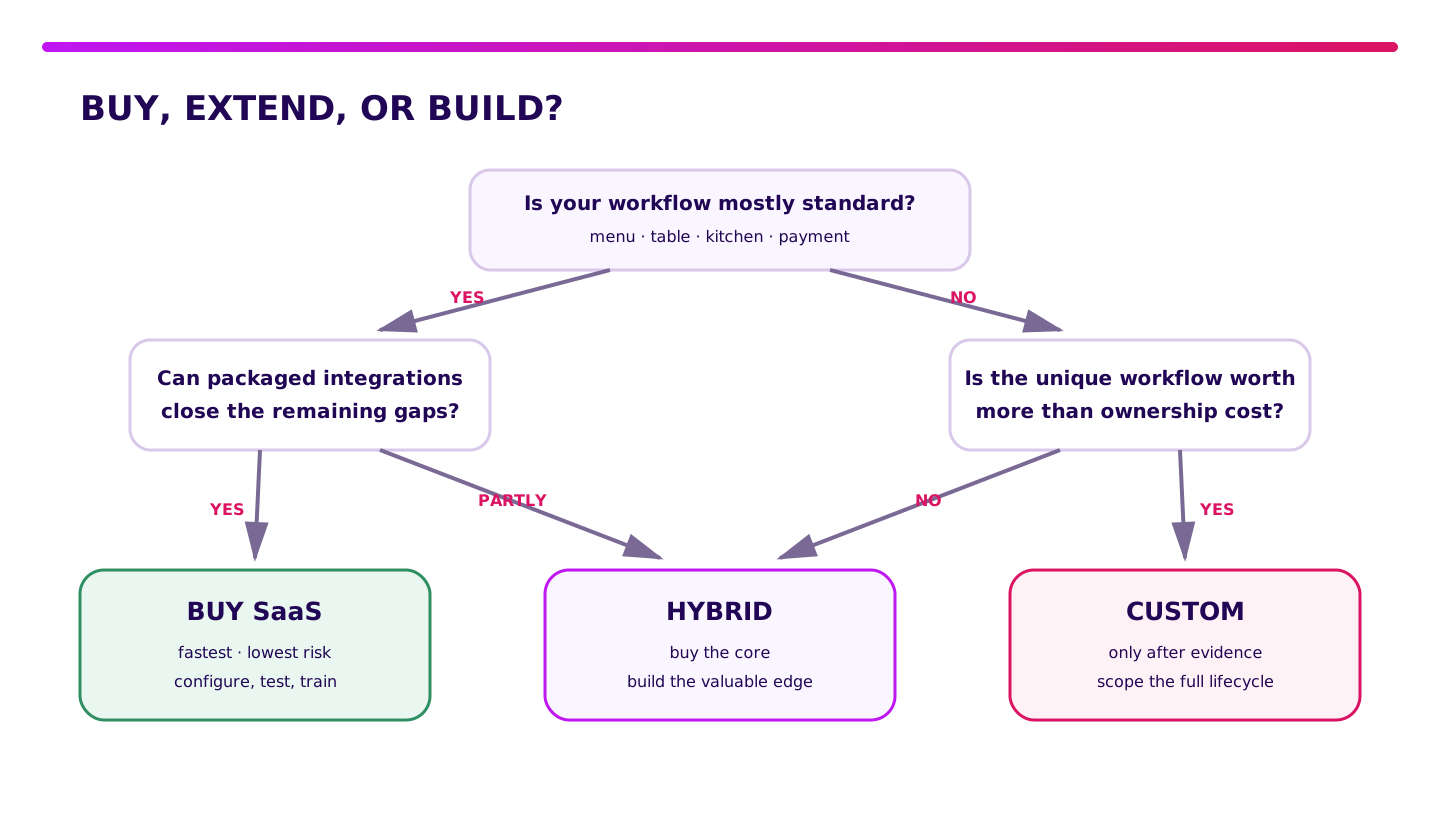
SaaS wins when your needs are familiar: table management, menu, modifiers, kitchen tickets, payments, shifts, and outlet reporting. It is faster to implement and carries less technical risk.
Hybrid wins when you can keep a packaged POS but need middleware for delivery, loyalty, a central kitchen, accounting, or replenishment. This is often the rational middle: do not rebuild checkout, but do not force a valuable operating process into spreadsheets forever.
Custom wins less often. It may fit complex franchise rules, commissary-to-outlet planning, dynamic pricing, meal subscriptions, or cross-channel reconciliation that configuration and vendor APIs cannot handle.
How Does Restaurant Software Connect POS, Kitchen, and Inventory?
One order should create one chain of evidence: what was ordered, who handled it, how it was paid, and which ingredients it consumed.
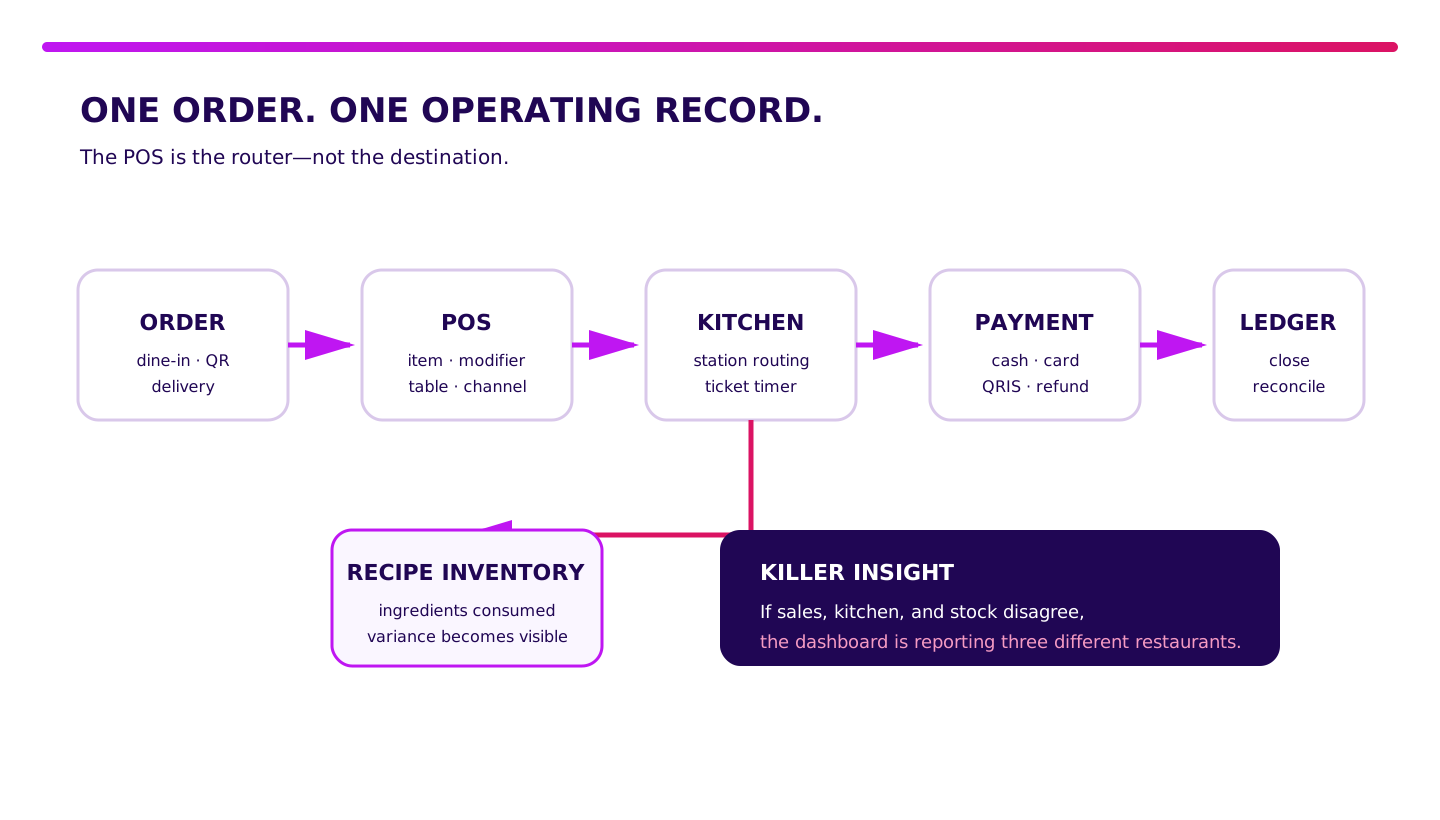
Imagine a guest orders two fried rice dishes: one without egg and one with extra chicken. A healthy system does this:
- POS stores the line items, modifiers, table, channel, operator, and timestamp.
- KDS routes each item to the right station without retyping.
- Kitchen staff move the ticket through accepted, preparing, and ready.
- Payment records tender, fees, refunds, and settlement references.
- Recipe inventory consumes rice, chicken, seasoning, oil, and packaging from the relevant recipe version.
- Closing compares orders, payments, cash drawer, waste, and stock movements.
When one stage creates unrelated IDs, the audit trail breaks. Sales may rise while stock variance also grows, but the owner cannot explain why. The dashboard looks polished. The operation still leaks.
“A restaurant does not need five dashboards that are each correct in their own universe. It needs one order ID that can be traced from table to ingredient.” — Ganis Atmawarin, Founder of Synetica
Which Restaurant Software Features Are Essential?
An essential feature is a control you can test, not a checkbox on a pricing page.
1. Order and menu control
Support dine-in, takeaway, delivery, split bills, open items, mandatory modifiers, combos, promotions, service charges, and tax. Test a menu update while outlets are online and offline. An old price must not return after sync.
2. Kitchen routing and ticket timing
Grill items go to grill. Drinks go to bar. Desserts go to pastry. Modifiers remain prominent. Managers can inspect ticket age and recall completed tickets. A KDS that shows every order in one queue merely moves the chaos from paper to a screen.
3. Recipe inventory and purchasing
Restaurant stock is not just “12 servings of fried rice.” You need ingredient units, conversions, yield, recipe versions, transfers, waste, stock counts, purchasing, receiving, and supplier prices. The system should distinguish theoretical usage from actual usage.
4. Payment and reconciliation
Cash, cards, QRIS, vouchers, split tenders, refunds, voids, and delivery payouts must reconcile. Bank Indonesia sets QRIS merchant discount rates by merchant category and transaction value; payment cost sits outside the software subscription. Check the official QRIS pricing scheme.
5. Multi-outlet governance
Head office controls the menu master, price book, promotions, roles, recipes, suppliers, and chart of accounts. Outlets transact, receive, count, and close. Define what can change locally and what requires central approval.
6. Data export, security, and recovery
Exports should include raw transactions, line items, modifiers, payments, tax, users, stock movements, and reference IDs. Test permissions and audit logs. Disconnect the internet, restart the device, and inspect the queue, duplicate prevention, and conflict resolution.
When Is Packaged Restaurant Software Enough?
Stay with SaaS while standard workflows deliver enough control without recurring workarounds.
SaaS is usually enough when:
- you have one or several outlets with similar menus;
- most orders arrive through checkout, tables, or standard delivery connectors;
- recipes, purchasing, transfers, and stock counts follow common patterns;
- accounting can use an available export or connector;
- promotions and loyalty need no proprietary rule engine;
- vendor reporting answers the owner’s daily decisions.
Do not commission custom software because a button colour feels wrong. Do not commission it before the team has tested vendor configuration. Cosmetic customisation that changes no business decision is an expensive way to feel special.
When Does a Restaurant Need Hybrid or Custom Software?
Build when a process gap is repeated, measurable, and cannot be closed by configuration or standard integration.
Signals worth measuring include:
- staff retype delivery or catering orders into POS;
- a commissary plans production in spreadsheets every night;
- recipe and yield vary by outlet but the system forces one version;
- aggregator payouts cannot reconcile to orders and promotions;
- franchise royalty, transfer pricing, or approval rules are specialised;
- outages stop service because no local-first flow exists;
- owners combine three or more exports to see margin by menu item.
Measure frequency, minutes per case, error rate, gross-margin impact, and audit risk for two to four weeks. If the workaround costs IDR 12 million each month and a controlled hybrid project costs IDR 120 million, there may be a business case. If the issue appears twice a year, there may not be one yet.
Validate it in two weeks. Before committing serious budget to restaurant software, Blueprint & Prototype maps the specification, prototypes the workflow, tests failure paths, and gives a build, adjust, wait, or stop recommendation.
How Much Does Restaurant Software Cost in Indonesia?
Restaurant software cost includes subscription or build, hardware, implementation, integration, payment fees, support, and operational time.
This is an illustrative model, not a vendor quotation:
| First-year component | SaaS | Hybrid | Custom |
|---|---|---|---|
| Software / build | IDR 6–24m | IDR 40–120m | IDR 140–400m |
| Outlet hardware | IDR 5–12m | IDR 8–20m | IDR 8–25m |
| Setup + migration | IDR 2–5m | IDR 10–25m | IDR 20–50m |
| Integration | IDR 2–4m | IDR 15–35m | IDR 15–60m |
| Training + rollout | IDR 1–3m | IDR 5–12m | IDR 10–25m |
| Support + contingency | IDR 2–5m | IDR 8–20m | IDR 15–40m |
| Illustrative range | IDR 18–53m | IDR 86–232m | IDR 208–600m |
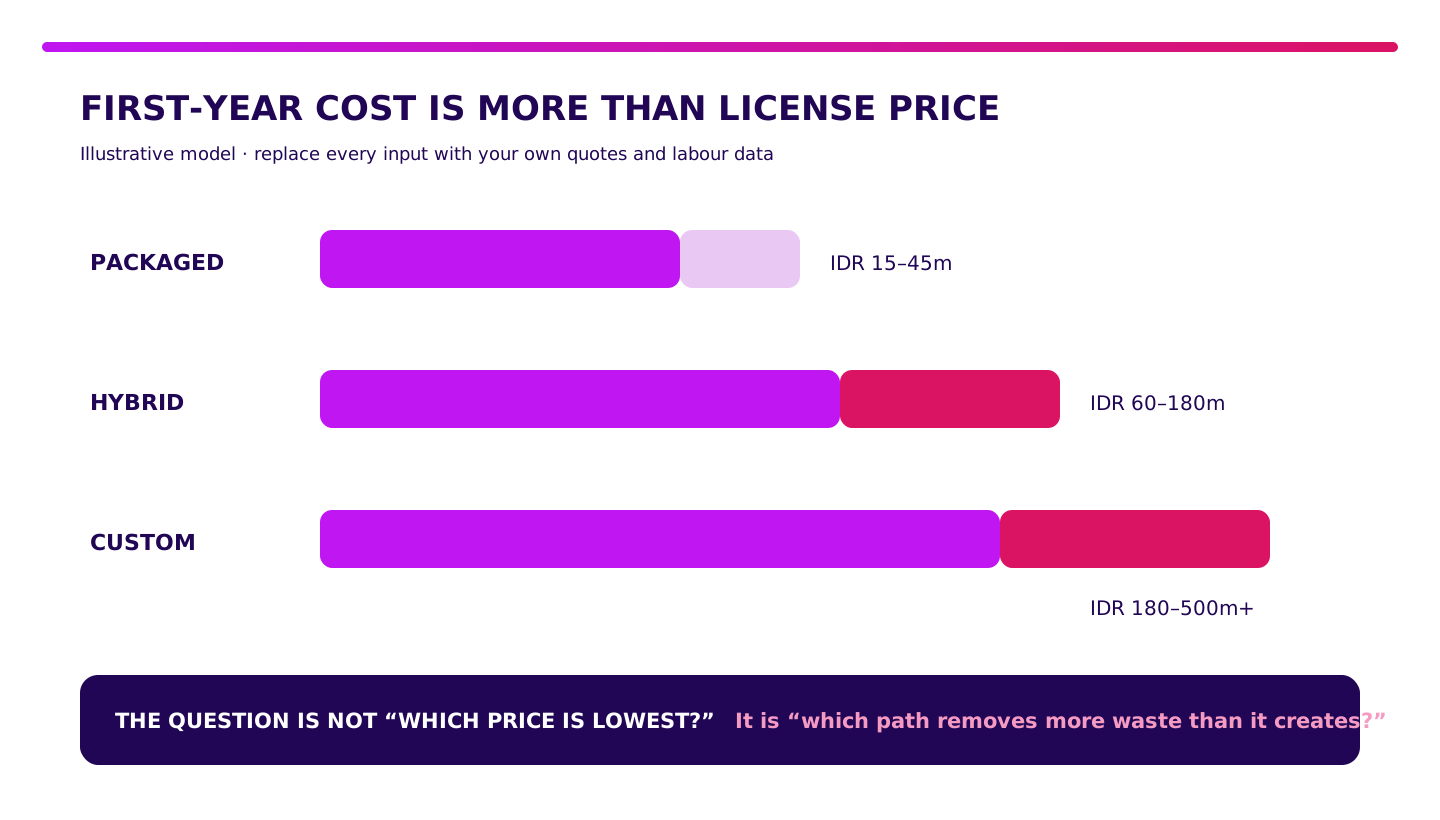
The chart intentionally rounds those figures into decision bands. Replace them with current quotations, outlet count, devices, integrations, training days, and the value of staff time. Add payment MDR and marketplace commissions separately. Do not hide them inside “software cost.”
How to Choose Restaurant Software: 10 Acceptance Tests
A vendor demo shows the happy path. An acceptance test shows whether the system survives a busy service.
- Create an order with a required modifier, allergen note, split item, and promotion.
- Route food to two stations and drinks to bar; amend an item after acceptance.
- Void one line with manager approval without deleting history.
- Pay by cash plus QRIS, then partially refund to the original tender.
- Disconnect the internet, create five orders, restart, and sync without duplicates.
- Change a recipe version and confirm older transactions retain the older recipe.
- Receive ingredients in kilograms, consume them in grams, then run a stock count.
- Close a shift with cash variance and match orders to settlements.
- Export orders, modifiers, payments, stock movements, and users with relational IDs.
- Simulate a vendor or delivery API outage and run the manual fallback.
Once a vendor passes operating scenarios, use our software vendor due-diligence guide to inspect contracts, SLAs, security, data ownership, and exit planning.
How to Implement Restaurant Software Without a Big-Bang Failure
A healthy rollout expands evidence. It does not expand hope.
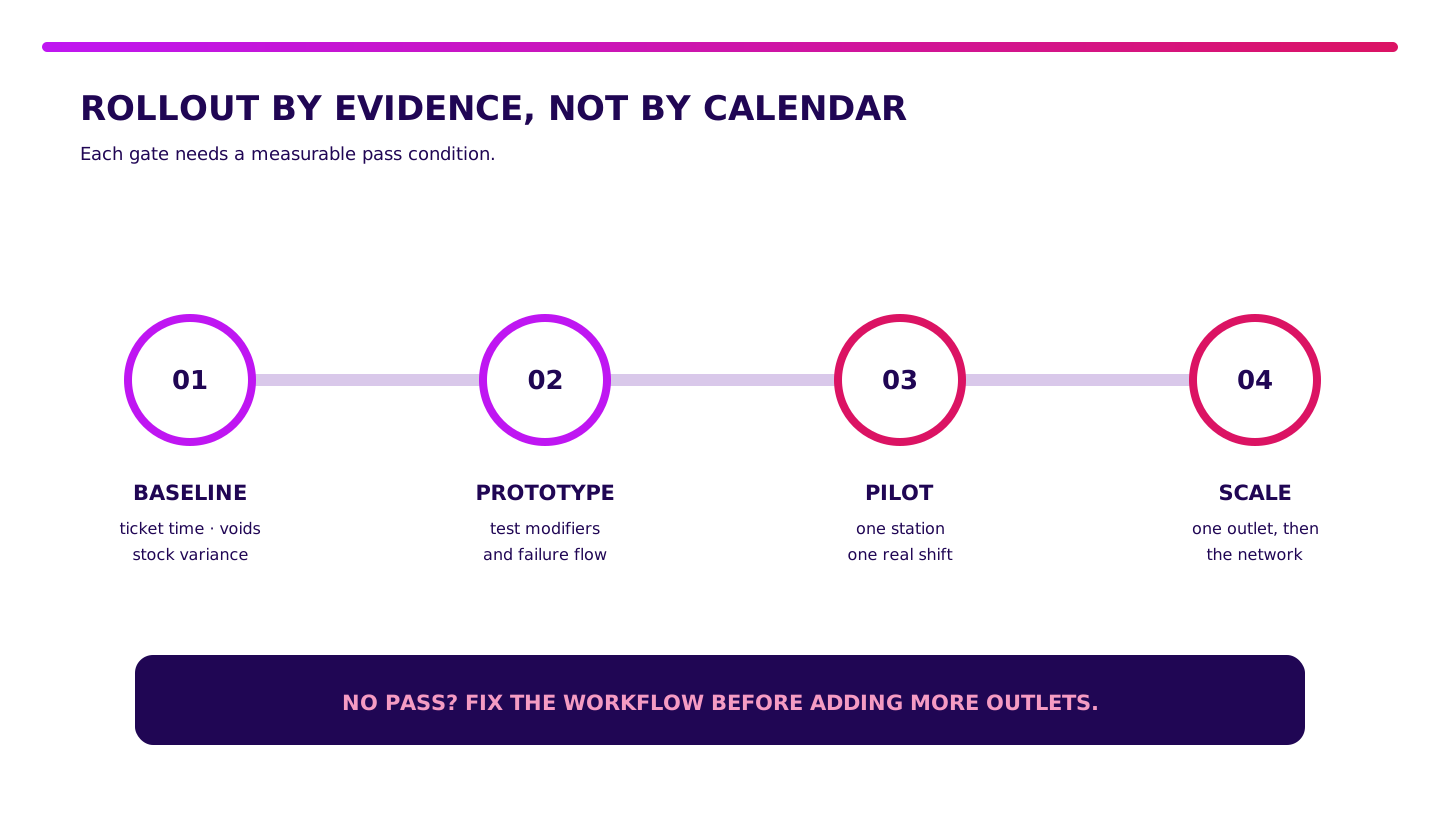
Gate 1 — baseline for one to two weeks
Record order volume, average ticket time, void and refund rates, cash variance, stock variance, waste, and closing time. Without a baseline, the team can only say the new system “feels faster.”
Gate 2 — prototype the failure flow
Test modifiers, sold-out items, printer or KDS failure, network loss, partial refunds, recipe changes, and delivery mismatch. A prototype is not a showroom screen. It reveals decisions that are still unclear.
Gate 3 — pilot one station and one outlet
Run a real shift. Set pass conditions: no lost orders, zero duplicates, traceable refunds, and closing completed within target. Keep a manual fallback.
Gate 4 — scale in waves
Add stations, channels, outlets, then integrations. Do not enable everything on one day. Once the core is stable, Production Grade Software can turn a custom edge or integration into a secure, observable, maintainable system.
What I Would Do Before Choosing Restaurant Software
- For one outlet and a standard workflow, buy SaaS. Spend the saved budget on training and data discipline.
- When the core fits but integrations leak, choose hybrid. Keep commodity components and build the valuable edge.
- Before custom, bring numbers. Frequency, minutes, errors, margin, and risk should be visible before scope exists.
- If exports and offline flow cannot be tested, do not sign. Attractive features do not rescue a locked operation.
- If the pilot is unstable, do not scale. Ten outlets only make one problem ten times more expensive.
Take one real trading day. Run the ten acceptance tests. Choose the simplest path that keeps orders, money, and stock inside one chain of evidence.
FAQ About Restaurant Software
What is restaurant software?
Restaurant software connects orders, POS, kitchen workflow, payments, recipe inventory, and reporting. Its job is not only faster checkout; it maintains one data trail from guest to ingredient.
What is the best restaurant software?
There is no single best product for every restaurant. Choose the system that passes your real order, modifier, KDS, payment, inventory, offline recovery, export, and multi-outlet scenarios.
How much does restaurant software cost?
This article’s illustrative first-year model places SaaS around IDR 18–53 million, hybrid at IDR 86–232 million, and custom at IDR 208–600 million. Actual cost depends on outlets, devices, integrations, migration, training, and support.
Can restaurant software be custom-built?
Yes. Custom is justified when a unique, high-value workflow cannot be handled by configuration or packaged integrations. Validate the business case and failure paths before development.
Is packaged or custom restaurant software better?
Packaged software is better for standard workflows, fast implementation, and low upfront cost. Custom is better for a proven, valuable operating model. Hybrid is often the most rational compromise.
Related Posts
Two weeks to a real answer
Need help putting this into practice?
Book a Blueprint session and we'll turn the ideas in this article into a tested prototype in front of real users—2 weeks, from $3,000.