Guide
Accounting Application: Must-Have Features and ERP Integration
An accounting application is only as good as the data that reaches it. If your sales, purchasing, stock, and payroll still get re-typed into the ledger by hand, you do not have an integrated system. You have a very expensive spreadsheet.
We have spent more than 15 years delivering business systems for Indonesian companies. The accounting feature list is the easy part; the hard part is how the ledger connects to everything around it. That is where month-end days, and wrong entries, quietly pile up.
This guide covers what an accounting application is, the features that are non-negotiable, how it plugs into an ERP, an illustrative cost model, ten vendor tests, first-year costs, and rollout. For the buy-versus-build decision on the ledger itself, read accounting software: build vs buy.
TL;DR — the whole guide in five lines:
- Features are table stakes; posting rules are the product. Every vendor has invoices and reports. Ask how a sales invoice, a stock movement, and a payroll run each reach the ledger.
- Decide the boundary before you shop. Standalone app with connectors, ERP accounting module, or ledger plus a custom integration layer. Each fits a different company.
- In our illustrative 120-staff model, manual feeds burn 113.5 finance hours a month. Connected posting removes 93 of them, about IDR 61 million a year, and the biggest slice is rework of wrong entries.
- First-year cost: IDR 30–100 million for an app with connectors, IDR 120–450 million for an ERP module, IDR 100–300 million for a custom integration layer. The ERP module must earn its keep beyond accounting alone.
- Roll out in stages. One feed at a time, a parallel close, then cut-over. Never switch five feeds on the same day.

What Is an Accounting Application?
An accounting application records every financial transaction in a ledger, reconciles it against bank and sub-ledgers, and produces the reports and tax data a business needs. It is the system of record for money.
A good one does five jobs:
- Records transactions against a chart of accounts, with cost centres or entities.
- Posts automatically from sales, purchasing, stock, and payroll, instead of waiting for someone to retype them.
- Reconciles bank lines, receivables, and payables.
- Reports profit and loss, balance sheet, and cash flow by entity, branch, or project.
- Controls who can post, approve, and close a period, and logs every change.
“Accounting application” and “accounting software” mean the same thing in daily use. This article focuses on a narrower question: which features matter, and how the ledger sits inside a wider ERP.
If ERP is new to you, start with ERP: what it is, modules, and examples.
Accounting Application Options: Standalone, ERP Module, or Custom Integration
Choose the option that fits where your transactions are born.
| Factor | Standalone app + connectors | ERP accounting module | Ledger + custom integration layer |
|---|---|---|---|
| First-year cost (120 staff, 5 finance users) | IDR 30–100m | IDR 120–450m | IDR 100–300m |
| Time to live | 1–3 months | 4–9 months | 3–6 months |
| Integration depth | Prebuilt connectors, limited rules | Native: one database, one posting engine | Your rules, your systems |
| Best for | Simple operations, 1–2 feeds | Stock, manufacturing, or multi-entity operations on one system | Existing systems you cannot replace |
A standalone app wins when you have one or two feeds and the vendor already publishes connectors for them. An ERP module wins when stock, purchasing, and finance must move as one transaction. A custom integration layer wins when you keep legacy systems and need them to post to a standard ledger without retyping.
If your ERP decision is still open, our ERP build-vs-buy guide covers it end to end.
Which Accounting Application Features Are Must-Haves?
A feature is a must-have if it removes re-keying or protects the numbers. Eight pass that test.
1. Automatic posting rules
Define once how a sales invoice, a goods receipt, or a payroll run maps to accounts. The ledger posts without a human.
This is the feature that decides how well it integrates.
2. Chart of accounts with dimensions
Tag every line by entity, branch, project, or cost centre, so one posting serves finance, operations, and the owner.
3. Bank reconciliation that matches itself
Import statement lines, auto-match by amount and reference, and queue only the exceptions.
4. Receivables and payables in the same ledger
Issue invoices, record vendor bills, and age both. No second spreadsheet for “what we really owe”.
5. Tax-ready data
Keep VAT and withholding fields on every transaction and export in the formats your filing needs. Formats change; confirm the current ones with your tax adviser.
6. Multi-entity and multi-currency
Post to the right company, convert at the right rate, and consolidate without copy-paste.
7. Approvals, period lock, and audit trail
Require approval above an amount you set, lock a closed period, and log every change by user and time.
8. Open API and exports
Read and write through an API, and export every record in an open format. This is your integration path today and your exit path tomorrow.
Next: How Does an Accounting Application Connect to ERP?.
How Does an Accounting Application Connect to ERP?
Every integration is a posting event: something happens in another module, and the ledger records it.
A sale creates a receivable and revenue. A goods receipt creates stock and a payable accrual.
A stock issue creates cost of goods sold. A payroll run creates salary expense, BPJS, and tax liabilities.
Bank lines settle all of them.
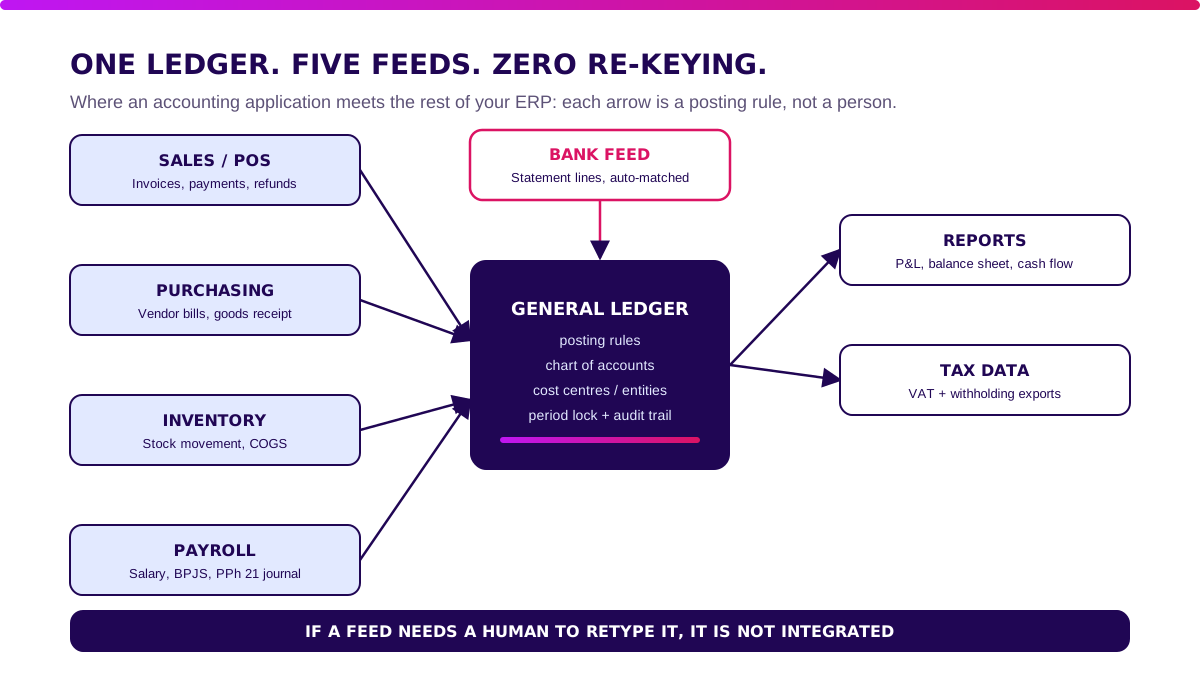
Three integration styles exist:
- Native (ERP module). One database, one posting engine. No sync, no duplicate master data.
- Connector. The vendor ships a ready link to a POS, marketplace, or payroll tool. Fast, but you inherit its field mapping.
- Custom layer. You write the mapping and the error queue. Slower, but it reaches systems nobody sells a connector for.
The detail that breaks most projects is not the connection. It is the error queue: what happens when a posting fails because an account is missing or a period is locked.
Ask every vendor to show one.
For the stock side of this story, see inventory application integration with accounting and POS.
How Much Do Manual Feeds Cost Your Finance Team?
The business case is hours of re-keying and rework, not licence fees.
This model is illustrative, not client data. Replace each input with your own month.
Imagine a 120-person company with 5 finance users and a blended finance cost of IDR 55,000 an hour. Four systems feed the ledger by hand:
- Sales invoices. 600 a month × 3 minutes = 30 hours.
- Vendor bills. 450 a month × 4 minutes = 30 hours.
- Stock and COGS journals. 300 lines × 2 minutes = 10 hours.
- Payroll and BPJS journal. 1 journal × 3 hours = 3 hours.
- Rework. 2% of 1,350 manual entries = 27 wrong entries × 1.5 hours = 40.5 hours.
Total: 113.5 hours a month = IDR 6.24 million.
With connected posting, exceptions take about 10 hours and wrong entries fall to roughly 7 a month (10.5 hours). New total: 20.5 hours = IDR 1.13 million.
That avoids 93 hours a month, or about IDR 61 million a year.
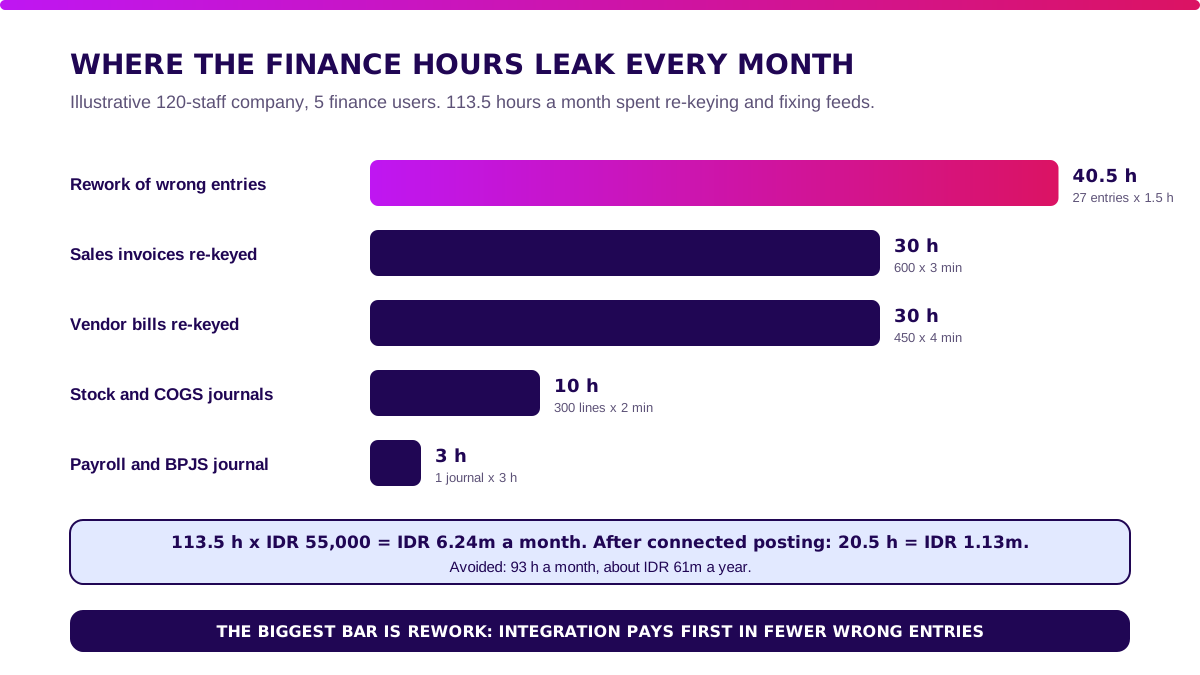
Builder’s note: The biggest bar is never typing. It is fixing what was typed wrong. I judge an integration by how many entries finance still touches, not by how many logos are on the vendor’s connector page.
Next: When Is a Standalone Accounting Application Enough?.
When Is a Standalone Accounting Application Enough?
Stay standalone when your feeds are few and the connectors exist. One POS, one bank, and payroll exported once a month is configuration, not a project.
Move to an ERP module when stock, purchasing, and finance have to agree in real time, for example a distributor valuing inventory at every movement. Choose a custom layer when you keep systems you cannot replace and need them to post to a standard ledger.
Be honest about the maths: at IDR 61 million a year from integration alone, an ERP module costing IDR 120–450 million pays back in roughly 2–7 years. It is justified by what else it does for operations, not by accounting alone.
Validate it in 2 weeks. Before you commit to an accounting application or an ERP module, Blueprint & Prototype maps your feeds, prototypes the riskiest posting flow, and returns real cost numbers plus a buy, hybrid, or build recommendation.
How to Choose an Accounting Application: 10 Vendor Tests
Demo data always posts cleanly. These tests use your feeds.
- Post one real sales invoice, one vendor bill, and one stock movement, and see exactly which accounts they hit.
- Break a posting on purpose (closed period, missing account) and ask to see the error queue.
- Import three months of bank statements and check the auto-match rate.
- Run your real chart of accounts and cost centres, not the default.
- Issue an invoice and a credit note with your tax fields, then export the data.
- Close a period, then try to edit it as a normal user.
- Require approval on an entry above an amount you choose.
- Run a consolidated report across two entities.
- Read and write through the API with your own test credentials.
- Export every record in an open format, and trace one entry in the audit log.
If the vendor passes, continue with software vendor due diligence for hosting, security, SLA, and exit terms.
How Much Does an Accounting Application Cost in Indonesia?
First-year cost includes licence or build, migration, integration, and support. The per-user fee is one line.
These are illustrative ranges for 120 staff and 5 finance users, not vendor quotes:
| First-year component | App + connectors | ERP module | Custom integration layer |
|---|---|---|---|
| Licence or subscription | IDR 12–40m | IDR 50–180m | IDR 12–40m |
| Setup and data migration | IDR 8–30m | IDR 30–100m | IDR 15–40m |
| Integration | IDR 5–20m | IDR 20–100m | IDR 55–180m |
| Support and contingency | IDR 5–10m | IDR 20–70m | IDR 18–40m |
| Illustrative total | IDR 30–100m | IDR 120–450m | IDR 100–300m |
At IDR 61 million a year of avoided integration cost, an app with connectors pays back in about 6–20 months and a custom layer in 1.6–4.9 years. The ERP module needs the wider operational case.
Next: How to Roll Out an Accounting Application Without a Big-Bang Failure.
How to Roll Out an Accounting Application Without a Big-Bang Failure
Connect one feed at a time, run one parallel close, then cut over.
Step 1 — map feeds and posting rules (weeks 1–2)
List every system that creates a financial event. Write each posting rule on one page.
Gate: finance signs the map.
Step 2 — migrate and connect the first feed (weeks 3–6)
Load opening balances and open items for one entity. Connect the highest-volume feed, usually sales.
Gate: trial balance matches the old books.
Step 3 — add feeds and run a parallel close (weeks 7–10)
Connect purchasing, stock, and payroll one by one. Close one month in both systems.
Gate: every difference explained.
Step 4 — cut over (weeks 11–14)
Switch off the old books per entity and lock old periods. If you validated a custom integration layer, Production Grade Software turns it into secure, observable, maintainable software.
What I Would Do Before Buying an Accounting Application
- Draw your feeds. Name every system that creates a financial event.
- Pick the boundary first: standalone, ERP module, or custom layer.
- Test posting, not features. Ten tests, one afternoon each.
- Insist on an error queue. Silent failures are where the days go.
- Never big-bang. One feed at a time.
Draw the feed map this week. If it has two arrows, buy a standalone app and stop.
If it has six, talk about the ERP.
Which accounting posting tests should pass?
Reproducible test brief — illustrative inputs, not observed client results.
| Fixture | Expected evidence | Reject when |
|---|---|---|
| One sales invoice | Balanced journal with source invoice ID | A retry creates a second journal |
| One purchase return | Stock and payable reverse against the same document | Finance must retype the correction |
| One closed period | An authorised correction leaves an audit trail | A user silently edits the old balance |
What belongs in the accounting application estimate?
Reproducible test brief — illustrative inputs, not observed client results.
| Cost item | Scope to price | Acceptance evidence |
|---|---|---|
| Migration | Opening balances and reconciled sub-ledgers | Finance signs off totals |
| Connectors | Retries, mapping, monitoring and ownership | Failed events are visible and replayable |
| Operating support | Close support, upgrades and recovery | Named owner and tested restore |
Next: FAQ About Accounting Applications.
Sources and limits
The IFRS Foundation’s IAS 1 overview describes financial statement presentation; it does not certify a software product or the savings in our model. Use your applicable Indonesian reporting requirements with your accountant.
For software acquisition, NIST’s Secure Software Development Framework provides practices for discussing development and vulnerability risk with suppliers. Ask vendors for evidence of access controls, testing, and remediation rather than assuming a connector makes the ledger safe.
The hours and first-year budgets above are explicit planning scenarios. They are not market averages or observed client results.
FAQ About Accounting Applications
What is an accounting application?
An accounting application records financial transactions in a ledger, reconciles them against the bank, and produces reports and tax data, replacing spreadsheets and paper vouchers.
What is the best accounting application in Indonesia?
The one that posts your real feeds correctly: your sales, bills, stock, and payroll. Test two with your own data before deciding.
How much does an accounting application cost?
In this article’s illustrative model for 120 staff and 5 finance users: IDR 30–100 million for an app with connectors, IDR 120–450 million for an ERP accounting module, and IDR 100–300 million for a custom integration layer in the first year.
Can an accounting application be custom-built?
Yes, but rarely the whole ledger. Keep a standard ledger and build the integration layer when you need legacy systems to post to it.
Accounting application vs ready-made ERP: which is better?
A standalone app wins with few feeds. An ERP module wins when stock, purchasing, and finance must move as one transaction.
Count your feeds before you choose.
Related Posts
Two weeks to a real answer
Need help putting this into practice?
Book a Blueprint session and we'll turn the ideas in this article into a tested prototype in front of real users—2 weeks, from $3,000.