Guide
Inventory Application Integration: Connect POS, Stock, and Accounting
An inventory application should make one sale appear consistently in the POS, stock ledger, and accounting system. If those three records disagree, the software is only moving reconciliation work from one spreadsheet to another.
We have spent more than 15 years delivering business systems across retail, distribution, finance, and operations. The difficult part is rarely the API connection. It is deciding which system owns each fact, when a transaction becomes final, and how the operation recovers when one step fails.
This guide covers the integration model, an illustrative mismatch business case, packaged vs hybrid vs custom choices, six required capabilities, ten vendor tests, first-year cost ranges, and a phased rollout. For the broader operations stack, read our inventory, warehouse, and order management guide.
TL;DR — the whole guide in five lines:
- One transaction needs one identity across POS, inventory, payment, and accounting.
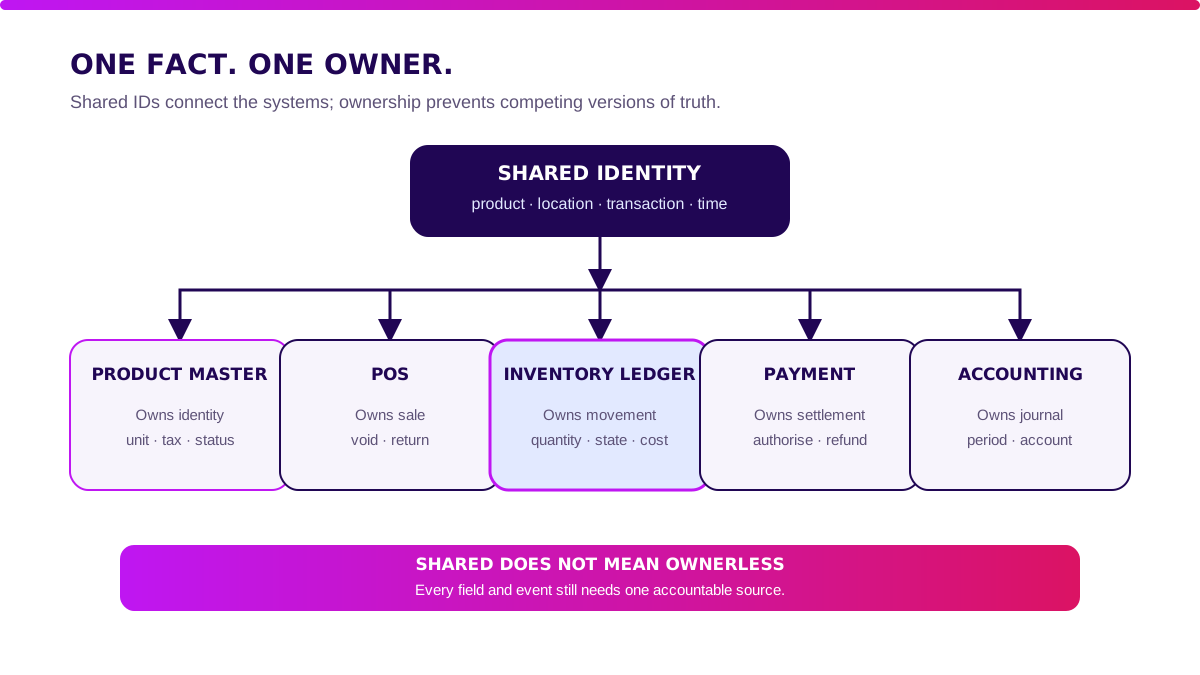
- Each fact needs one owner: POS owns the sale, the inventory ledger owns movement, and accounting owns the journal.
- Integration must survive failure, not only a clean demo. Duplicate events, delays, refunds, and offline outlets are the real test.
- Buy standard workflows; build the bridge only when channel, costing, or reconciliation rules create measurable advantage.
- Pilot one outlet and one product family before connecting every branch and every account.

What Is an Inventory Application?
An inventory application records stock on hand, reservations, receipts, transfers, sales, returns, adjustments, and their value by item and location. Its job is not merely to show a number. It must explain why the number changed.
A useful system answers four questions without asking someone to open a second file:
- What quantity is physically available, reserved, damaged, or in transit?
- Which transaction created every movement?
- What unit cost and valuation rule applies?
- Has the commercial event been posted and reconciled in accounting?
Product identity comes first. GS1 describes the Global Trade Item Number as a way to uniquely identify trade items that may be priced, ordered, or invoiced.
A consistent product key prevents the same item becoming “SKU-01” in POS, “BRG001” in stock, and “Item A” in accounting. Read the GS1 GTIN standard.
Inventory Application: Packaged vs Hybrid vs Custom
Choose the smallest architecture that keeps transactions traceable and reconciliation boring. Boring reconciliation is a compliment.
| Factor | Packaged suite | Hybrid integration | Custom platform |
|---|---|---|---|
| First-year cost | Lowest to medium | Medium | Highest |
| Go-live | 1–3 months | 2–6 months | 6–12 months |
| Process fit | Vendor workflow | Standard core + custom bridge | Validated operating model |
| Integration control | Vendor connectors | You own mappings and orchestration | You own the full lifecycle |
| Best for | Common retail or distribution flows | Multiple proven tools with special rules | Inventory logic is a business advantage |
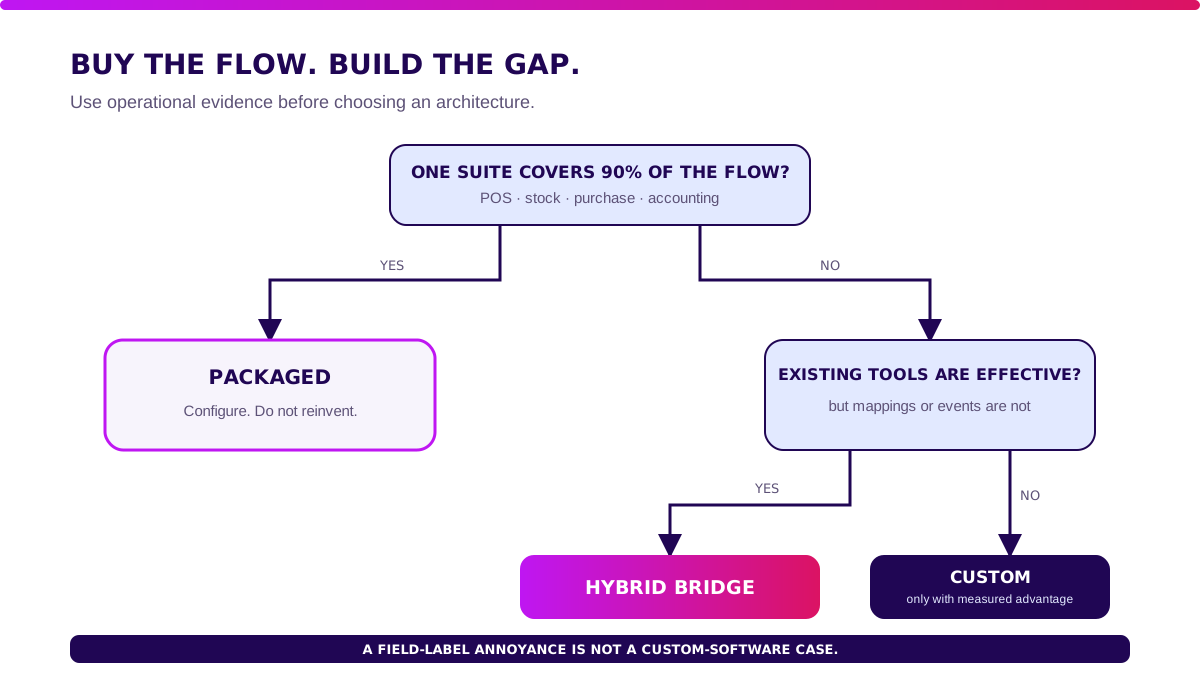
Packaged wins when one vendor already covers POS, inventory, purchasing, and accounting with acceptable controls. Do not build an integration because a field label is mildly annoying.
Hybrid wins when your POS, marketplace, warehouse, or accounting tools are already effective but do not agree on product IDs, transaction states, cost, or posting rules. Keep the applications. Build or configure one integration layer.
Custom wins when allocation, bundles, consignment, multi-principal ownership, regulated traceability, or high-volume reconciliation is part of how the business competes. Complexity alone is not a custom-software case. Measurable advantage is.
Next: How Should POS, Inventory, and Accounting Integrate?.
How Should POS, Inventory, and Accounting Integrate?
Integrate business events, not screenshots and daily totals. A sale is a sequence with identity, state, owner, and reversal rules.
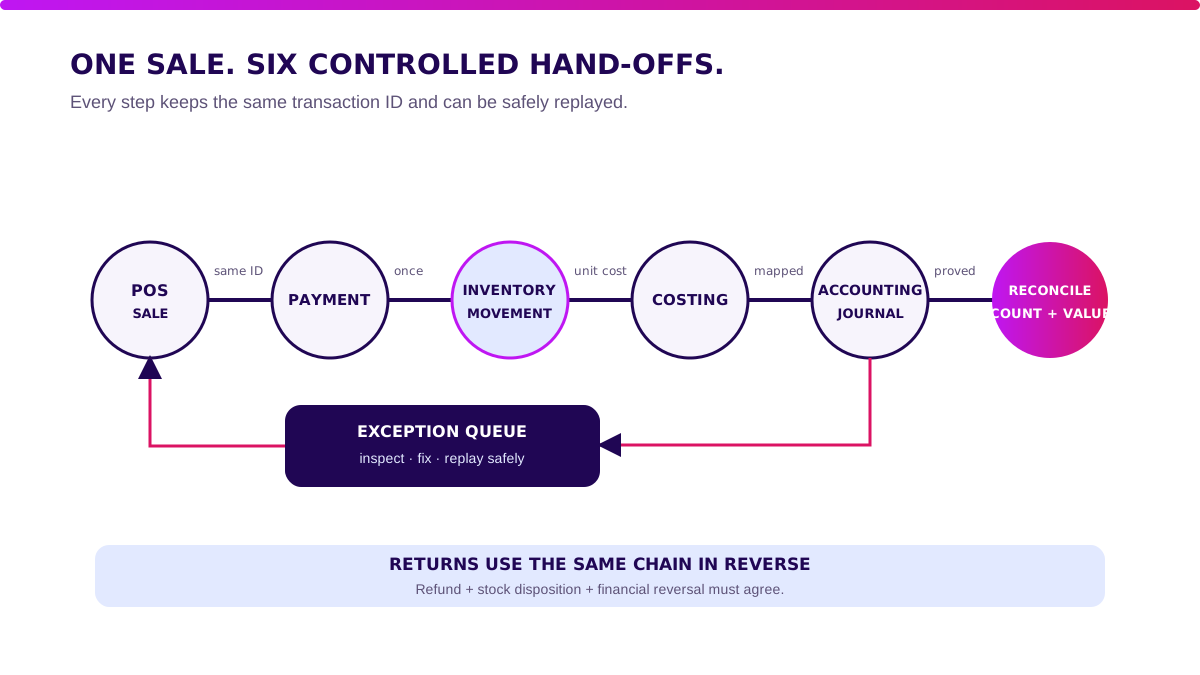
For a straightforward retail sale, the flow should be:
- POS accepts the order and gives it a unique transaction ID.
- Payment is authorised or marked with an explicit pending state.
- Inventory converts the reservation into a sale movement at the correct location.
- The costing service calculates the cost of goods sold using the approved method.
- Accounting receives the sales, tax, payment, inventory, and cost journal references.
- Reconciliation confirms that all systems processed the same transaction once.
Returns must travel through the same chain in reverse. A refund without a stock disposition creates phantom inventory.
A stock return without a financial reversal creates phantom profit.
The accounting timing matters. IAS 2 says that when inventory is sold, its carrying amount is recognised as an expense in the period when the related revenue is recognised.
That is why the sale, inventory relief, and cost-of-goods entry need a shared transaction reference and posting date. See the IFRS IAS 2 overview.
Builder’s note: I do not approve an integration until one sale, one return, and one failed event can be traced end to end without querying three people.
When Does Inventory Integration Pay Back?
The business case is usually fewer mismatches, faster closing, and less stock leakage—not “real-time visibility” in the abstract.
Use real baselines before buying software. The following example is illustrative, not client data.
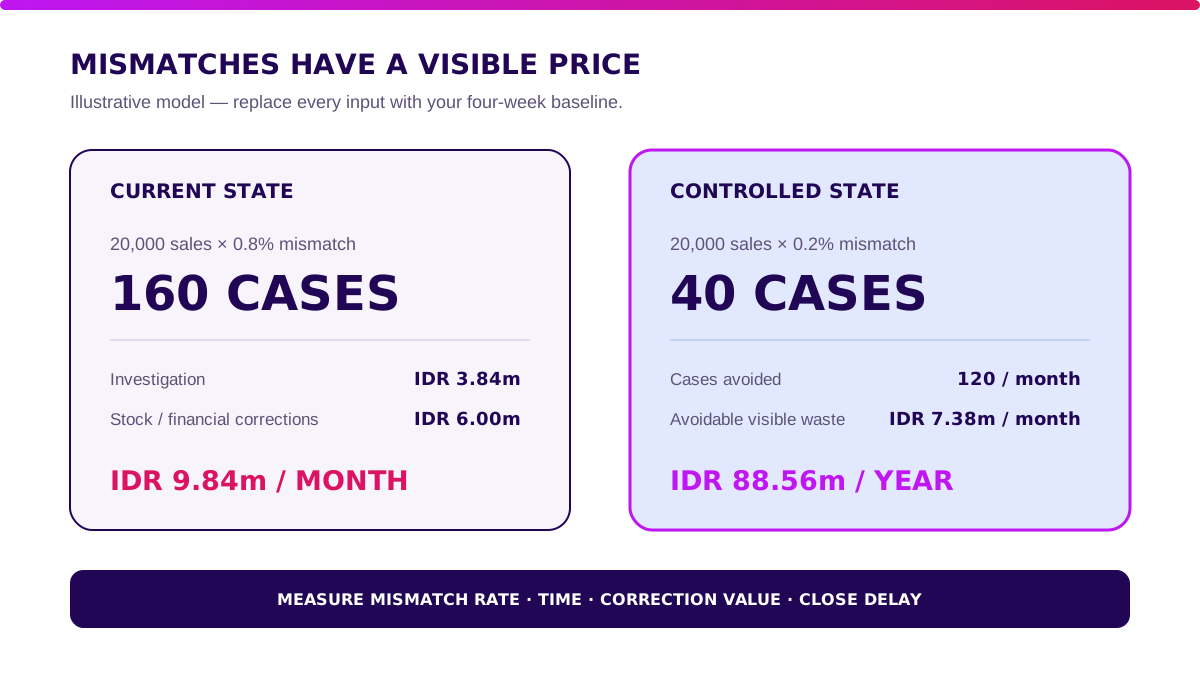
Imagine a retailer processing 20,000 sales per month. POS, stock, and accounting disagree on 0.8% of transactions: 160 mismatches.
Each case takes 18 minutes to investigate. Loaded operations cost is IDR 80,000 per hour.
Forty cases also need a stock or financial correction averaging IDR 150,000.
- Investigation: 160 × 18 minutes ÷ 60 × IDR 80,000 = IDR 3.84 million/month.
- Corrections: 40 × IDR 150,000 = IDR 6 million/month.
- Visible mismatch cost: IDR 9.84 million/month, before delayed closing or customer impact.
If a better integration reduces the mismatch rate from 0.8% to 0.2%, it prevents 120 cases. Under the same assumptions, that saves roughly IDR 7.38 million/month or IDR 88.56 million/year.
Do not turn this into a heroic ROI slide. Measure mismatch rate, investigation time, adjustment value, closing delay, oversell cancellations, and unposted events for four weeks.
Use only the benefits you can reconcile.
Next: Which Inventory Application Features Are Required?.
Which Inventory Application Features Are Required?
Features matter only when they close the loop from a commercial event to physical stock and financial truth. Six capabilities do most of the work.
1. Shared product and location master
Map SKU, GTIN, unit of measure, pack conversion, tax class, account, location, channel listing, and status. Assign one owner for each field.
Integrations fail quietly when a carton is “12 units” in one system and “1 item” in another.
2. Transaction and event identity
Every sale, receipt, transfer, return, and adjustment needs a unique ID, timestamp, source, location, and version. Retries must not create a second movement or journal.
Store the original payload and processing result for audit.
3. Inventory ledger by state
Track on-hand, available, reserved, damaged, in-transit, consigned, and quarantine quantities separately. A dashboard total without movement history is a decorative number.
4. Costing and accounting bridge
Define whether costing uses weighted average, FIFO, or specific identification where appropriate. Map revenue, discount, tax, payment, inventory asset, cost of goods sold, write-off, and return entries.
Finance owns journal policy; engineering owns reliable delivery.
5. Reconciliation and period controls
Compare transaction count and value across POS, payment, inventory, and general ledger. Show missing, duplicate, late, and value-mismatch buckets.
Respect locked accounting periods: do not silently post yesterday’s correction into a closed month.
6. Exception queue and audit trail
Every failure needs an owner, severity, retry policy, due time, and resolution note. Give operators a safe replay action.
Do not make them ask a developer to rerun a database script at 11 p.m.
Next: When Is Off-the-Shelf Inventory Software Enough?.
When Is Off-the-Shelf Inventory Software Enough?
Stay off-the-shelf when your process fits standard product, sale, purchase, stock, and journal objects. Configuration is cheaper than owning code.
Packaged software is usually enough when:
- one product ID and unit structure works across channels;
- sales are deducted from one known location;
- bundles, promotions, and returns follow supported rules;
- tax and journal mappings are standard;
- the vendor provides supported POS and accounting connectors;
- daily reconciliation can explain every difference;
- exports include stable relational IDs, not only formatted reports.
Before building anything, clean the product master and run a full month-end close in a sandbox. Bad master data can make a good connector look broken.
Next: When Do You Need Hybrid or Custom Inventory Integration?.
When Do You Need Hybrid or Custom Inventory Integration?
Build when a repeated rule changes margin, stock accuracy, or closing speed at meaningful volume.
Strong signals include:
- one sale can fulfil from multiple locations or owners;
- bundles need component-level stock and revenue treatment;
- marketplaces, stores, and B2B channels use different reservation rules;
- consignment stock changes ownership at a specific event;
- returns need inspection before stock and accounting disposition;
- finance rebuilds cost or journal mappings outside the system every month;
- offline outlets can create transactions that arrive late or out of order;
- the same mismatch is investigated hundreds of times per month.
Track the exception volume and financial exposure. If a rule touches 30,000 transactions and removes five minutes of manual work per 1,000 transactions, calculate it.
If it happens twice a year, write a controlled procedure.
Validate it in 2 weeks. Before committing to an inventory application integration, Blueprint & Prototype maps ownership, prototypes the riskiest transaction, and gives you a build, adjust, wait, or stop recommendation.
How to Choose an Inventory Application: 10 Vendor Tests
A demo shows the happy path. These tests show whether your books and shelves survive Monday morning.
Use your own products, accounts, branches, and transaction samples:
- Create one product with unit, carton, tax, account, and channel mappings; reject an invalid duplicate.
- Sell the item at outlet A and prove that only outlet A stock changes.
- Retry the same sale event three times and prove it posts once.
- Lose the accounting connection, queue ten sales, reconnect, and replay them in order.
- Sell a bundle and show component stock, discount allocation, revenue, and cost entries.
- Process a partial return with damaged disposition and a different refund method.
- Receive stock at a new cost and explain the valuation impact under the chosen method.
- Close the accounting period, send a late event, and show the controlled correction path.
- Reconcile POS, payments, stock movements, and journals by count and value.
- Export products, locations, transactions, movements, costs, journals, and audit history with stable IDs.
If the vendor passes the workflow, continue with software vendor due diligence for security, architecture, SLA, pricing risk, data ownership, and exit terms.
How Much Does an Inventory Application Cost in Indonesia?
First-year cost includes software, data cleanup, integration, testing, training, support, and the internal team—not just the subscription.
These are illustrative decision ranges, not vendor quotations:
| First-year component | Packaged suite | Hybrid | Custom platform |
|---|---|---|---|
| Software or build | IDR 72–240m | IDR 180–600m | IDR 900m–2.5bn |
| Data and process setup | IDR 20–80m | IDR 60–200m | IDR 150–500m |
| Integration and testing | IDR 10–40m | IDR 60–240m | IDR 200–700m |
| Support and contingency | IDR 10–40m | IDR 40–120m | IDR 100–300m |
| Illustrative total | IDR 112–400m | IDR 340m–1.16bn | IDR 1.35–4bn |
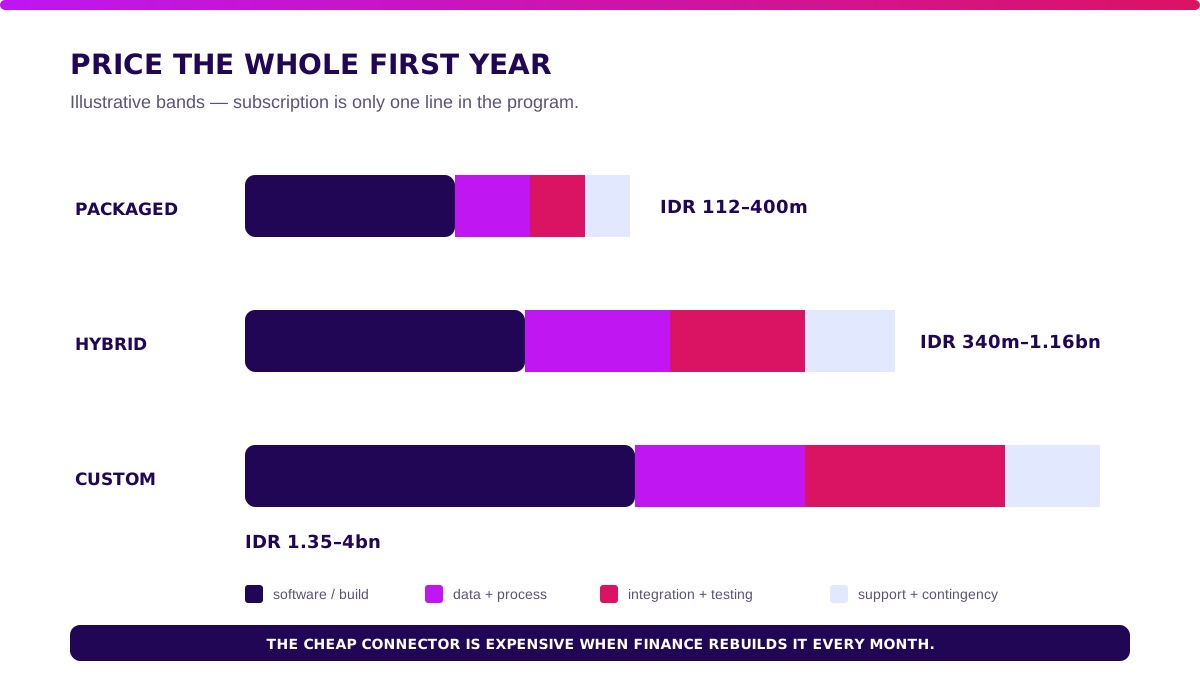
Replace these bands with outlet count, SKU count, transaction volume, integrations, data quality, costing rules, offline needs, support hours, and internal ownership. Compare the result with measured mismatch cost and operational risk.
Next: How to Implement an Inventory Application Without a Big-Bang Failure.
How to Implement an Inventory Application Without a Big-Bang Failure
Roll out one complete transaction loop at a time. A half-connected national rollout multiplies ambiguity.
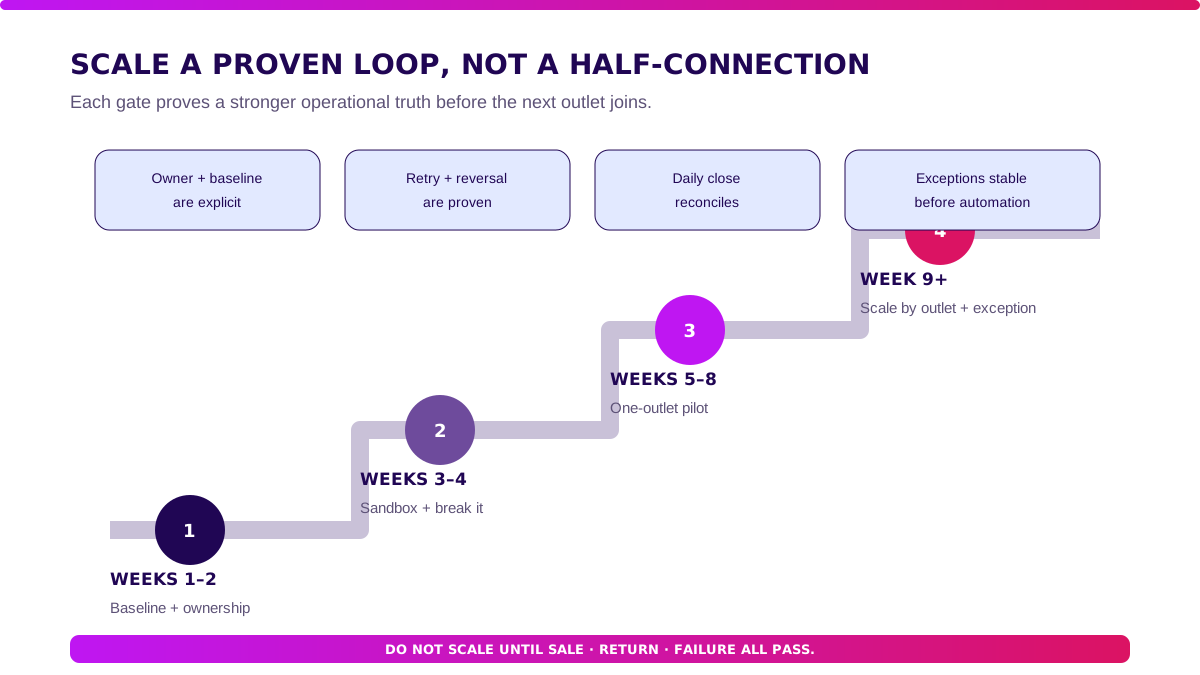
Phase 1 — baseline and ownership (weeks 1–2)
Select one outlet and one product family. Measure mismatch rate, adjustment value, closing time, and unposted events.
Name the owner of every master field and transaction state.
Phase 2 — sandbox and failure tests (weeks 3–4)
Load real product and account mappings. Run sale, void, refund, bundle, receipt, transfer, and adjustment scenarios.
Break each connection deliberately. Prove retry and reconciliation.
Phase 3 — one-outlet pilot (weeks 5–8)
Run live transactions for one outlet with daily reconciliation. Pass conditions should cover posting completeness, no duplicates, stock accuracy, journal accuracy, exception response, and close timing.
Phase 4 — scale by outlet and exception (week 9 onward)
Add outlets in waves. Expand automation only after exception patterns stabilise.
If the custom bridge proves valuable, Production Grade Software turns it into secure, observable, maintainable infrastructure.
What I Would Do Before Connecting Inventory, POS, and Accounting
- Name each source of truth. A field cannot have three owners.
- Start with the reversal. Sale flows are easy; returns expose the real policy.
- Test duplicate and late events. Clean demos hide integration debt.
- Reconcile count and value. Matching totals can still hide missing individual transactions.
- Keep a manual control. Automation should make recovery safer, not remove the last way to close the books.
Take one week of real transactions and run the ten tests. Choose the smallest system that can explain every stock and financial movement without a side spreadsheet.
Next: FAQ About Inventory Applications.
FAQ About Inventory Applications
What is an inventory application?
An inventory application records stock quantities, states, movements, costs, and transaction references by item and location. A good one explains every change, not only the current total.
What is the difference between inventory software and POS software?
POS records the commercial sale at checkout. Inventory software controls stock availability and movement.
They should share transaction and product IDs, but each retains a different responsibility.
How do you integrate inventory software with accounting?
Define product, account, tax, costing, and location mappings; send transaction-level events with stable IDs; post journals once; then reconcile count and value across both systems.
How much does an inventory application cost?
This article’s illustrative first-year ranges are IDR 112–400 million for packaged, IDR 340 million–1.16 billion for hybrid, and IDR 1.35–4 billion for custom. Actual cost depends on data, outlets, transaction volume, integrations, and rules.
Can an inventory application be custom-built?
Yes. Custom is justified when repeated allocation, ownership, costing, bundle, return, or reconciliation rules create measurable value that packaged configuration cannot support.
Related Posts
Two weeks to a real answer
Need help putting this into practice?
Book a Blueprint session and we'll turn the ideas in this article into a tested prototype in front of real users—2 weeks, from $3,000.