Guide
Manufacturing Software: MRP, Production & Cost Control
Manufacturing software should tell you whether an order can be produced on time, which materials are missing, and what the finished units actually cost. If those answers still require three spreadsheets and a walk to the shopfloor, a new dashboard alone will not solve the problem.
At Synetica, we start with a decision and the workflow behind it. I would test one production order from demand to accepted output before accepting a vendor’s feature list. The calculations in this guide are reproducible planning examples, not client results or vendor performance claims.
You will get a material-planning test, a clear definition, a buy-versus-build comparison, six essential controls, ten vendor checks, an illustrative first-year budget, and rollout gates. Use them to align your production planner, warehouse team, finance lead, and software partner.
TL;DR — the whole guide in five lines
- Start with one production order: prove the path from demand to materials, capacity, output, and cost.
- MRP needs trustworthy inputs: a wrong BOM or unavailable stock creates a wrong purchasing recommendation.
- Material availability does not prove capacity: check the constrained machine and operator schedule separately.
- Buy standard controls first: build a verified shopfloor or integration gap around a reliable core.
- Expand after reconciliation: accepted quantities, stock movements, and production costs must agree before rollout.
How do you test MRP with one production order?
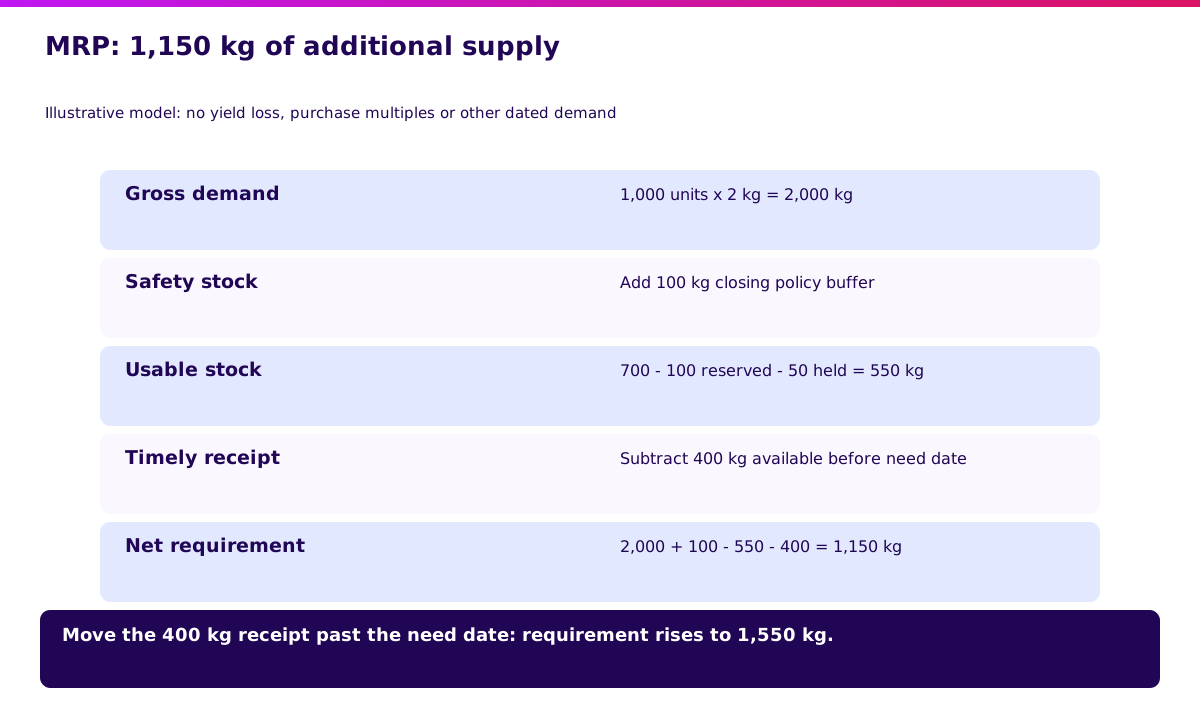
Give the vendor a small order with enough exceptions to expose its planning logic. Here is my starting test: 1,000 finished units, each requiring 2 kg of material. Assume zero expected material loss for this first test, then introduce yield loss separately.
The warehouse records 700 kg. Of that, 100 kg is reserved for another order and 50 kg is on quality hold. A confirmed 400 kg receipt will arrive before this order needs the material. You want 100 kg left as safety stock after production.
| Planning input | Quantity | Evidence to inspect |
|---|---|---|
| Gross requirement: 1,000 × 2 kg | 2,000 kg | Approved BOM revision |
| Recorded stock | 700 kg | Physical count and ledger |
| Reserved for other orders | −100 kg | Reservation records |
| Quality hold | −50 kg | QC disposition |
| Usable stock for this order | 550 kg | 700 − 100 − 50 |
| Receipt available before need date | +400 kg | Confirmed supplier delivery |
| Required closing safety stock | 100 kg | Approved planning policy |
| Additional supply needed | 1,150 kg | 2,000 + 100 − 550 − 400 |
This simplified calculation assumes the reservations are not already excluded from the starting stock figure. Do not subtract them twice. It also ignores minimum order quantities, purchase multiples, other dated demand, and supplier calendars; add those in the next test.
What happens when a supplier receipt is late?
Move the 400 kg receipt beyond the material need date. Additional supply now becomes 1,550 kg. A recommendation that stays at 1,150 kg has ignored time, even if the quantity looks tidy.
Microsoft’s master-planning documentation describes planning as balancing future material and capacity needs and generating planned orders. Our figures above are an independent teaching example, not a Microsoft benchmark.
Ask the vendor to open the source records behind its recommendation. Map the order and its exceptions in a Blueprint before committing to implementation.
What is manufacturing software?
Manufacturing software connects material planning, production execution, inventory, quality, and costing so your team can turn demand into traceable finished output. It may be a manufacturing ERP module, a dedicated production tool, or a combination of systems.
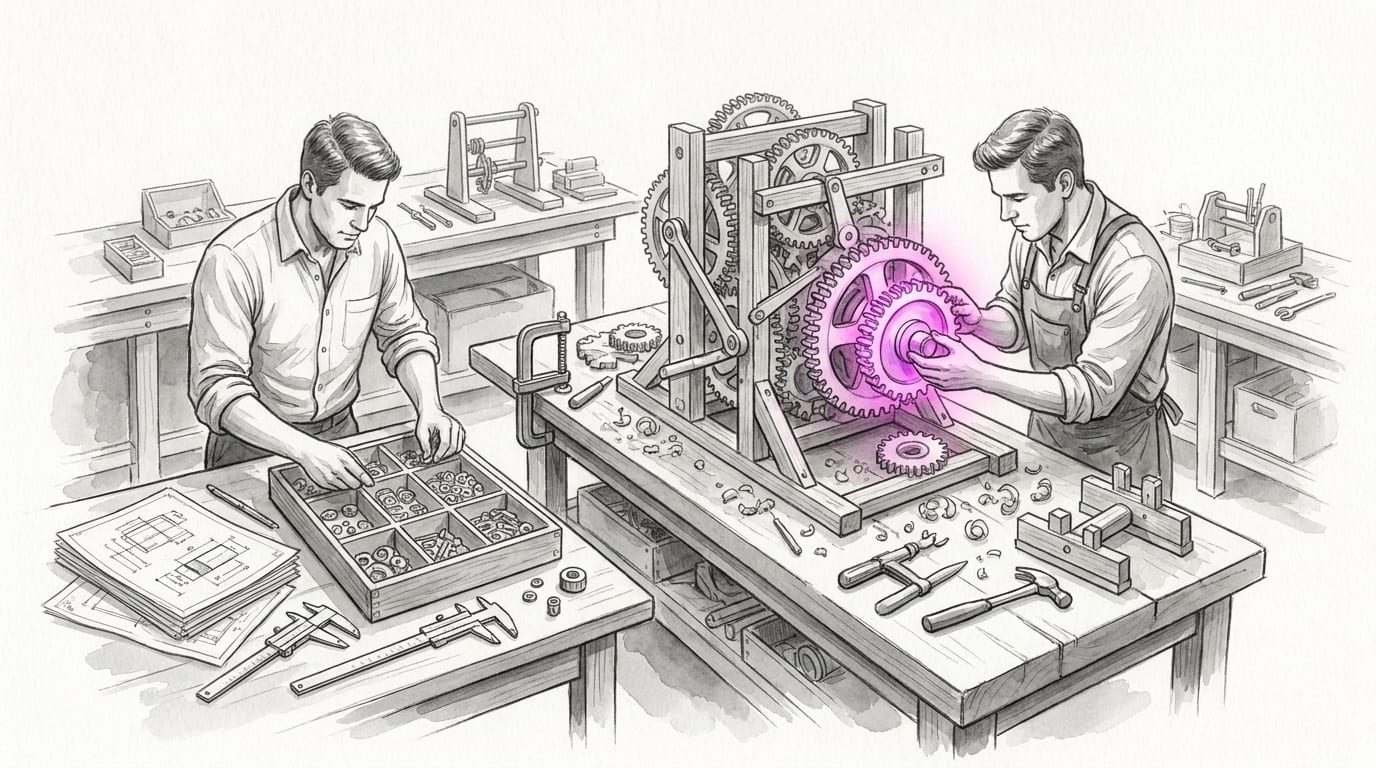
Think of a workshop mechanism: every cog needs the correct fit and timing. More gauges cannot fix a missing connection.
- Translate demand into component requirements.
- Release production orders against approved product definitions.
- Schedule operations around available resources.
- Record consumption, accepted output, scrap, and rework.
- Reconcile production records with stock and finance.
MRP focuses on material requirements. MES focuses on execution on the shopfloor. ERP connects wider business records, such as purchasing, inventory, sales, and accounting. Product names overlap; test the workflow rather than assuming the label guarantees coverage.
If disconnected business systems are your main constraint, start with the ERP integration guide. This guide goes deeper into the production order itself.
Manufacturing software: SaaS, hybrid, or custom?
Choose the smallest approach that can pass your production tests. A familiar workflow with standard materials and routings often fits a packaged manufacturing module. A specific machine interface does not automatically justify replacing the entire ERP.
| Option | Initial work | Timing driver | Flexibility | Best fit |
|---|---|---|---|---|
| Packaged software / SaaS | Data cleanup, configuration, training | Master-data readiness and module fit | Within supported workflows | Standard orders, BOMs, routings, stock controls |
| Hybrid | Packaged core plus bounded integration | Interface access and reconciliation | Custom edge around shared records | Special shopfloor capture or machine events |
| Custom | Discovery, engineering, testing, operating setup | Workflow complexity and acceptance scope | High, with continuing maintenance | A critical workflow that fails packaged tests |
A subscription price is only one cost component. Compare implementation, migration, training, support, interfaces, and exit effort. Request a written scope for every option; an apparently cheaper package can need substantial configuration.
Keep product definitions and authoritative stock records in a clear system of record. Give every production event a stable identifier. Otherwise, a custom interface can create two competing accounts of the same batch.
Use the ERP build-versus-buy guide to decide which business core to retain before designing a custom edge.
Which manufacturing software modules are essential?
A useful module must change an operating decision and leave evidence. The owners below are recommended evaluation roles, not quoted interview subjects. Each control uses the same test structure: purpose, actions, example, design reason, and next step.
1. BOM and routing control — owned by engineering
An approved BOM is the parts list that prevents yesterday’s recipe from slipping into today’s order.
What it helps you do:
- Version component quantities and product variants.
- Define operation sequence and work centres.
- Convert purchase units into consumption units.
- Approve changes before releasing new orders.
Walkthrough: change material use from 2.0 to 2.1 kg per unit. A new 1,000-unit order needs 2,100 kg before losses; an already released order should retain its approved revision unless an authorised change is recorded.
Odoo’s BOM documentation describes component definitions and operations; version management depends on its PLM app. Treat that as an example of a dependency to verify, not a feature promised by every package.
Why this design: production needs reproducibility when engineering changes a product. Write the revision acceptance test before loading every SKU.
2. Material planning — owned by the planner
MRP is your purchasing shortlist with a clock attached.
What it helps you do:
- Calculate dated net material requirements.
- Exclude unavailable or reserved stock.
- Include receipts only when they arrive in time.
- Apply purchase multiples and supplier lead times.
Walkthrough: repeat the 1,150 kg example, then set a 200 kg purchase multiple. The proposed order becomes 1,200 kg under that rule, leaving 50 kg above the simplified requirement. Ask the planner to explain why the extra quantity is acceptable.
Why this design: a planning recommendation must expose policy choices, not hide them in a total. Check the inventory integration boundary so usable stock means the same thing everywhere.
3. Capacity and scheduling — owned by production
The bottleneck machine is the narrow doorway every promised order must pass through.
What it helps you do:
- Record setup and run time separately.
- Reserve machine and operator availability.
- Respect maintenance and shift calendars.
- Replan when another urgent order enters the queue.
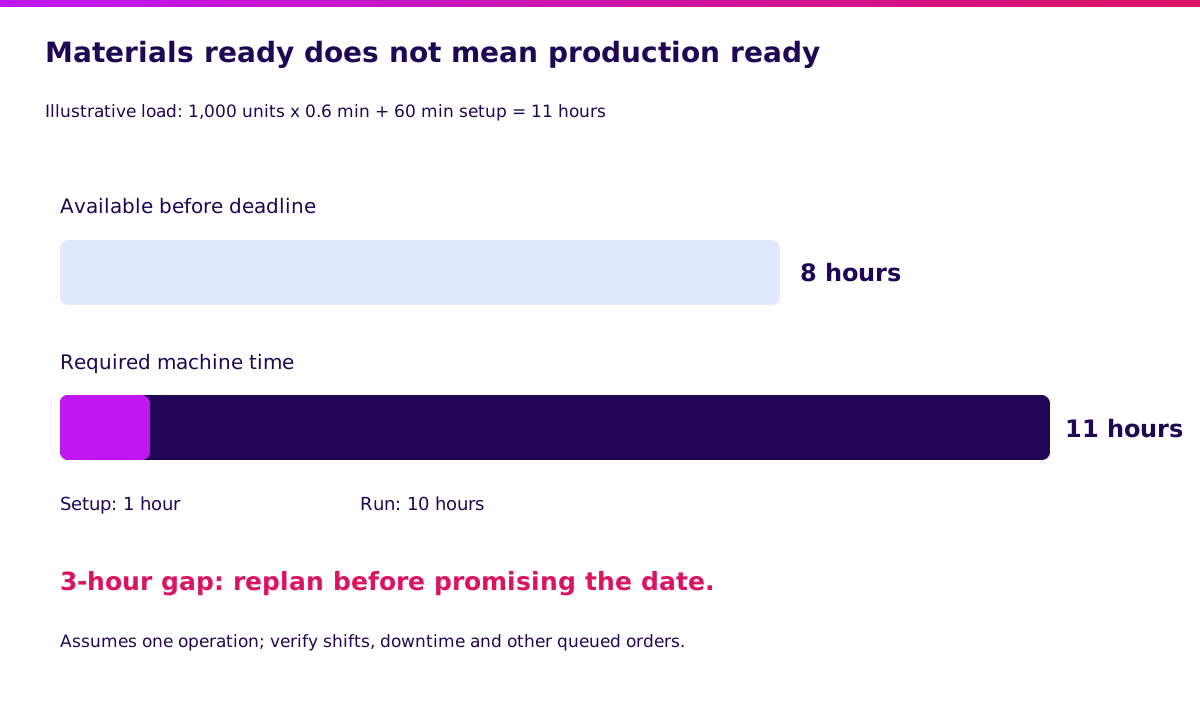
Walkthrough: one operation needs 0.6 minutes per unit plus 60 minutes setup. For 1,000 units, the load is 660 minutes, or 11 hours. If only 8 hours are available before the deadline, you have a 3-hour gap even with every material ready.
Do not label a material plan a feasible production schedule unless the package actually checks finite capacity. Why this design: your sales promise depends on the constraint, not average utilisation. Validate the scheduling gap with the production supervisor.
4. Shopfloor reporting — owned by the supervisor
A production order needs a receipt from the floor, not a guess at the end of the week.
What it helps you do:
- Capture actual component issues and returns.
- Record accepted output, scrap, and rework separately.
- Identify operator, shift, machine, and batch.
- Recover delayed uploads without duplicate events.
Walkthrough: issue 2,040 kg, accept 980 units, and record 20 rejected units. Return 40 kg of unused material if that is what physically happened. Replay an upload and confirm that the issued quantity stays unchanged.
Why this design: poor connectivity must not inflate stock movements. A rejected piece may enter rework rather than scrap; your workflow must make that choice explicit. Review event-level inventory controls before automating capture.
5. Quality and traceability — owned by QC
A quality hold is a locked gate between production and dispatch.
What it helps you do:
- Link incoming material lots to finished batches.
- Record inspection results and disposition.
- Prevent held output from becoming available stock.
- Trace affected orders when a component lot fails.
Walkthrough: produce 980 units, but put 80 on hold. Only 900 units are released for dispatch. Have the vendor trace those 80 units to their input lot and prevent an unauthorised release.
Why this design: physical completion and permission to ship are different events. Define the release gate with QC, warehouse, and sales together.
6. Production costing — owned by finance
Costing is the scorecard that turns production exceptions into margin decisions.
What it helps you do:
- Compare planned and actual material consumption.
- Capture direct labour and assigned overhead.
- Explain scrap and rework treatment.
- Reconcile batch values to inventory and accounting.
Walkthrough: assume 2,000 kg net material consumed at IDR 20,000/kg, IDR 3m labour, and IDR 2m allocated overhead. Total batch cost is IDR 45m. If 980 units are accepted, the illustrative cost is IDR 45m / 980 = about IDR 45,918 per accepted unit.
Against a planned IDR 45,000 per unit for 1,000 good units, that is about 2.04% higher. Why this design: the denominator matters. This simplified model assigns all costs to good output and assumes no recoverable scrap value; finance must approve your actual costing policy. Connect the posting rules to accounting.
“I would ask the team to explain one late order and one expensive batch before adding another dashboard.” — Ganis Atmawarin, editorial recommendation for this guide.
Validate the workflow in 2 weeks. Synetica’s Blueprint & Prototype maps the production decision, tests a working prototype with users, and records the evidence for build, adjust, wait, or stop. Scope your Blueprint.
When should you build custom manufacturing software?
Build the gap that survives a realistic packaged-software test. Start by documenting the exact failure: an unsupported production method, a constrained scheduling rule, or a shopfloor interface that cannot preserve batch identity.
Try configuration first. Then inspect supported integrations. A custom capture screen around a packaged inventory ledger may solve the problem with less maintenance than a replacement ERP.
Write down who owns BOM revisions, stock quantities, quality disposition, and cost postings. A machine message should not silently override a QC hold. A replayed event should not consume components twice.
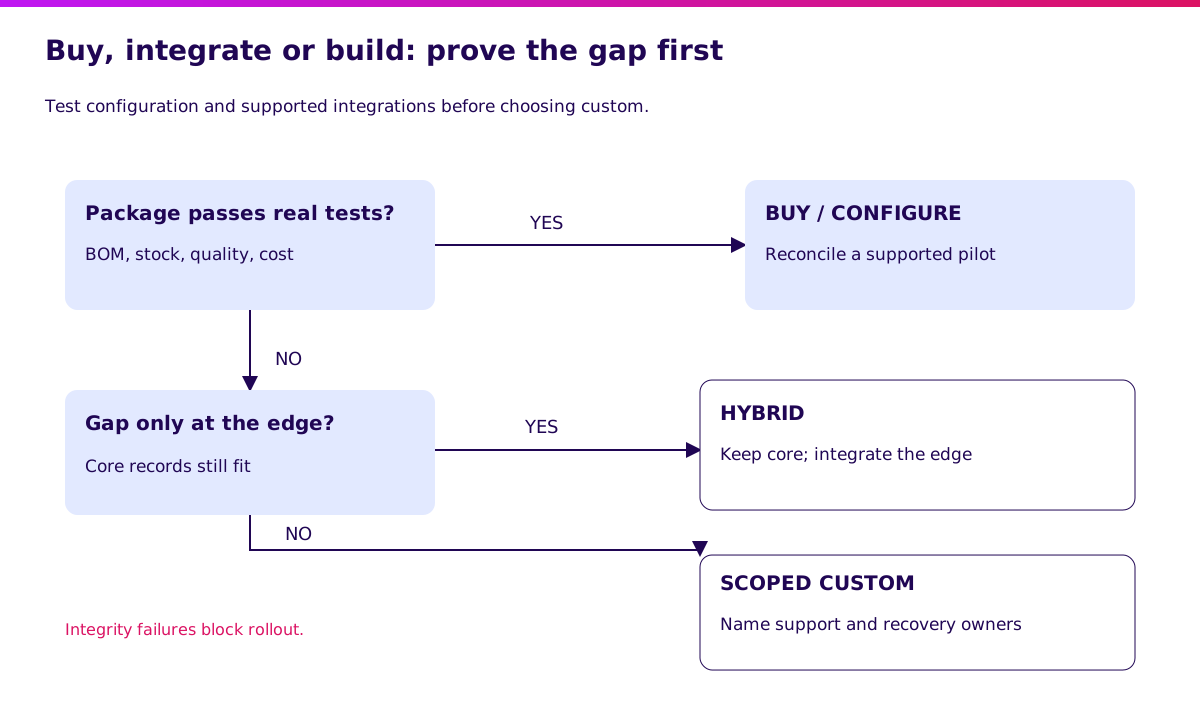
Custom is more credible when the gap affects an important operating decision repeatedly and a named team will fund support. It is less credible when the justification is a preferred screen layout or an untested claim that operators dislike the package.
Discuss validated production scope after you have evidence of the gap and an operating owner.
How do you evaluate a manufacturing software vendor?
Run these tests with your own order, not the vendor’s clean sample data. Keep expected results, screenshots or exports, observed failures, and an owner for each unresolved issue.
| Test | Expected evidence |
|---|---|
| BOM change after release | Old order retains its approved revision; new order uses the new one |
| Stock reservation and QC hold | Neither is counted as usable supply for another order |
| Supplier receipt slips | Shortage date and recommendation change |
| Purchase multiple applies | Rounded quantity and policy are visible |
| Machine has only 8 hours | 11-hour load exposes a 3-hour gap |
| Output is partial | Accepted, rejected, and open quantities remain distinguishable |
| Shopfloor event is replayed | Consumption and output are posted once |
| QC blocks a batch | Dispatch cannot bypass the release authority |
| Batch cost is reconciled | Material, labour, overhead, and output denominator are inspectable |
| Data is exported and restored | Order, BOM revision, lot relationships, and audit history remain usable |
A score of nine passes does not compensate for a failed duplicate-posting control. Treat data integrity and unauthorised release as gates. Ask for the implementation team, response commitments, upgrade responsibilities, and exit costs in writing.
For a wider contract and operating review, use the software vendor due-diligence guide.
How much does manufacturing software cost in Indonesia?
Budget for the accepted workflow and its operation, not just the licence. The table below contains illustrative first-year planning assumptions in IDR millions. These are not market price ranges, Synetica quotes, or offers from a vendor.
Assume one plant, one product family, existing accounting retained, and no specialised machine-control development. Tax, hardware, and internal team time are excluded and must be estimated separately. A quote can sit well outside these assumptions.
| Cost component, IDR million | Packaged | Hybrid | Custom |
|---|---|---|---|
| Licence / base platform | 36 | 36 | 0 |
| Configuration / engineering | 35 | 95 | 220 |
| Data cleanup and migration | 15 | 20 | 25 |
| Training and pilot | 12 | 18 | 25 |
| Infrastructure and support | 12 | 24 | 45 |
| Contingency | 15 | 27 | 45 |
| First-year total | 125 | 220 | 360 |
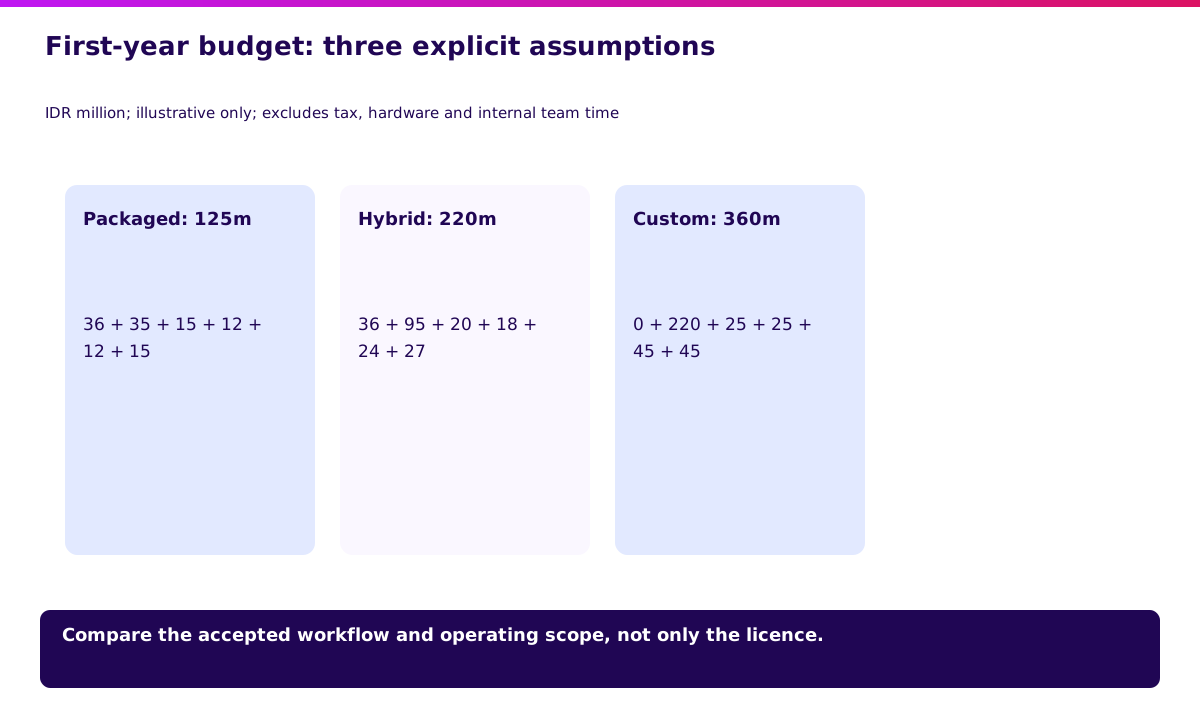
Replace each assumption with a scoped quote. Add users, plants, product variants, subcontracting, traceability requirements, and integration dependencies. Ask which costs recur and what happens when the package changes its API or module version.
For a business case, separate capacity value from cash savings. Reducing planner administration from 50 to 20 hours a month, valued at IDR 100,000/hour, creates IDR 36m/year of capacity value. It does not automatically reduce payroll or pay for a IDR 125m first-year project.
If you claim lower scrap or fewer late shipments, collect a baseline and measure the pilot before putting those benefits into the investment case. Validate the economic assumptions alongside the workflow.
How do you implement manufacturing software in stages?
Open the next rollout gate only when the current records reconcile. Start with one product family and one shift. Keep a recovery process for operators when the system or connection is unavailable.
Gate 1: establish reliable inputs
Count stock, remove duplicate item codes, approve BOMs, confirm unit conversions, and assign owners for lead times. Record known exceptions rather than silently cleaning away inconvenient history.
The gate is an approved opening stock position and a reproducible BOM. A date on the project plan cannot substitute for either.
Gate 2: replay one complete production order
Run the material and capacity examples, including late receipt, partial output, quality hold, and duplicate event. Confirm which records finance needs and when postings should occur.
The gate is matching quantities and an agreed explanation of every exception. Save the evidence for operator training.
Gate 3: run a supported pilot
Have real operators capture one order on one shift. Compare system records with physical output and the existing approved process. Do not maintain two conflicting official stock ledgers; nominate one and reconcile the pilot copy.
The gate is owner sign-off on stock, quality status, and batch costing, plus a tested recovery path.
Gate 4: expand and measure
Add the next product family after the previous one is stable. Track late-order causes, accepted yield, posting delay, and unresolved reconciliation issues. Define each metric before comparing periods.
For Synetica engagements, Blueprint & Prototype takes 2 weeks to validate direction. Approved scope moves into 8 weeks of Production Grade Software, then Launch & Grow through an ongoing monthly retainer. A plant-wide rollout with machinery and migration dependencies needs its own plan; the 10-week framework is not a blanket factory migration guarantee.
Plan the first production release around those dependencies and explicit acceptance gates.
What would I tell a factory owner choosing software?
Choose the system your operators can explain when an order goes wrong. I would bring the planner, production supervisor, warehouse lead, QC owner, and finance lead into one test. Each should point to the same order and explain their part without rebuilding the story in a private spreadsheet.
Start small enough that a failed assumption can change the plan. Spend on data ownership and a supported pilot before adding advanced dashboards. Dreamers preparing a first production operation may need a disciplined order-and-stock process before a manufacturing suite; Growing Businesses with recurring exceptions should measure those exceptions first.
Your next step is to scope one production workflow with Synetica, a tech-based business consultancy that connects strategy and execution.
FAQ — manufacturing software
What is manufacturing software?
Manufacturing software connects material requirements, production orders, execution, quality, inventory, and costing. Evaluate the connection between these records rather than counting modules.
What is the best manufacturing software?
The best fit is the system that passes your actual BOM, timing, capacity, quality, and reconciliation tests with acceptable support and total cost. A general ranking cannot establish your workflow fit.
How much does manufacturing software cost?
Cost depends on implementation scope, users, plants, data cleanup, integrations, hardware, and ongoing support. The IDR 125m, 220m, and 360m examples above are planning assumptions, not verified vendor prices.
Can manufacturing software be built custom?
Yes. Define the workflow gap, authoritative records, acceptance tests, and maintenance owner first. Consider a bounded hybrid interface before replacing the entire business core.
What is the difference between MRP and ERP?
MRP calculates material needs for production. ERP connects broader business functions such as purchasing, sales, inventory, and accounting. Some ERP products include manufacturing and MRP; finite-capacity scheduling still needs a separate capability check.
Related Posts
Two weeks to a real answer
Need help putting this into practice?
Book a Blueprint session and we'll turn the ideas in this article into a tested prototype in front of real users—2 weeks, from $3,000.