Clinic App: Medical Records, Queue & BPJS Guide 2026
Clinic app guide for owners: which features a small clinic needs, how to check BPJS and SATUSEHAT readiness, and a simulated budget before you pick a vendor.
 By Aditya S October 18, 2026 Updated November 11, 2026 10 min read
A clinic app (in Indonesian, aplikasi klinik) is software that runs a clinic’s daily flow in one place: registration, queue, medical records, pharmacy, and the cashier. This guide is for owners of small and mid-size clinics who must decide which features matter, what to verify for BPJS and SATUSEHAT, and what a realistic budget looks like.
I’m Aditya S, Business Development Manager at Synetica, a tech-based business consultancy. I am not a clinician or a regulator, and Synetica does not claim a clinic client in this article. The numbers below are planning simulations, not measurements. For legal duties, treat this as a question list and confirm with Kemenkes and your legal adviser.
You’ll get a definition, the problems a clinic app solves, essential features by size, a compliance checklist, a buy-or-build decision, cost and timing, and a demo script. If you run a larger facility, read the hospital information system guide as well.
TL;DR — the whole guide in five lines
- A clinic app is one patient record and one queue, not five tools that cannot see each other.
- Start with registration, queue, and the medical record; add pharmacy, billing, and integrations in later waves.
- Prove BPJS and SATUSEHAT readiness in a live demo, not from a feature list.
- Most small clinics should buy ready-made; build custom only where your workflow is your edge.
- Budget for year one, not only the build: in our simulation IDR 92m becomes IDR 143m.
What evidence should a clinic owner use before a demo?
The record must follow the patient through the visit; a queue screen alone cannot demonstrate that. Kemenkes’ SATUSEHAT RME announcement describes the individual as the organising point for connected records.
This data is stored not based on facilities, but based on individuals.
— Budi Gunadi Sadikin, translated excerpt of remarks reported by Kemenkes.
For a clinic buyer, I would test one synthetic returning patient before judging the interface. The table is my suggested evaluation, not a clinical study or client result.
| Check | Passing evidence | Failure to investigate |
|---|---|---|
| Booking to arrival | Existing record opens once | A duplicate patient is created |
| Consultation to pharmacy | Prescription reaches the same visit | Staff retype the order |
| Services to payment | Bill matches recorded services | Cashier reconstructs the bill |
Keep the result against the version tested and repeat the failed step after a fix. Use the SIMRS guide for the wider hospital architecture; this article focuses on the smaller clinic journey.
What is a clinic app?
A clinic app is software that records each patient visit, from registration to payment, and keeps the record usable by the doctor, pharmacy, and cashier. It can run on a front-desk computer, a tablet, or in the browser, and often adds a patient-facing queue or booking page.
A simple example: a patient books, arrives, is called by number, sees the doctor, collects medicine, and pays. In a good clinic app, each step adds to the same record, so nobody retypes a name or a diagnosis.
Compare the surrounding workflow before expanding scope.
What problems does a clinic app solve?
It removes waiting that comes from paper hand-offs and gives the clinic one clean record to report from. These are the pain points that usually justify the purchase:
- The queue is invisible, so patients crowd the waiting room and staff answer the same question all day.
- Records live on paper or in folders, so a returning patient’s history takes minutes to find.
- Pharmacy stock is guessed, which leads to stock-outs of common medicine and expired stock nobody noticed.
- The cashier re-enters services the doctor already ordered, and mistakes appear on the bill.
- Monthly reports are rebuilt by hand for the owner, BPJS, and the health office.
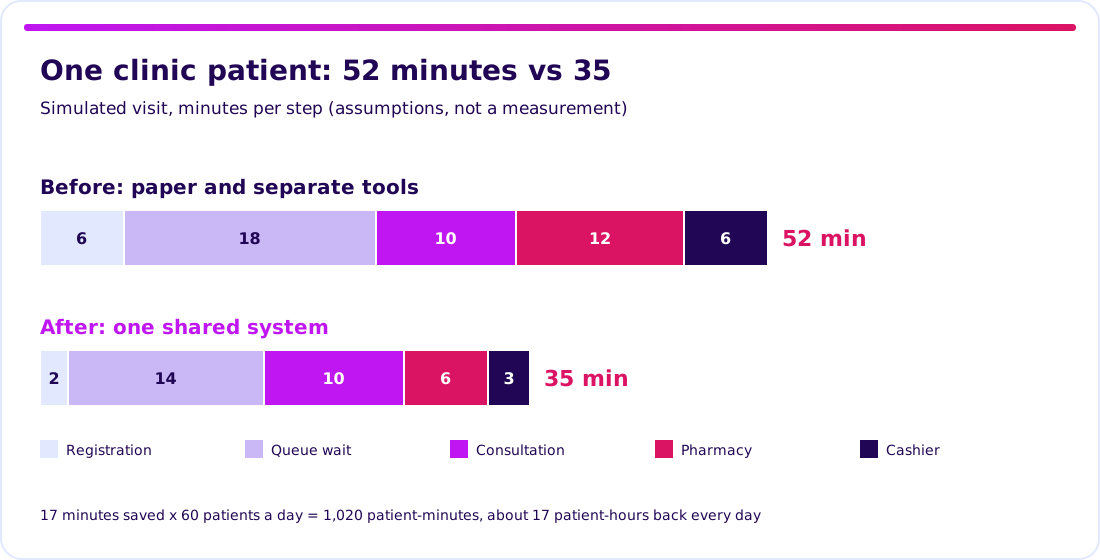
Take a simple simulation for one patient: 6 minutes at registration, 18 in the queue, 10 with the doctor, 12 at the pharmacy, 6 at the cashier is 52 minutes. With a shared system the same visit might be 2, 14, 10, 6, and 3, or 35 minutes. At 60 patients a day, 17 minutes saved is 1,020 patient-minutes, about 17 patient-hours back every day. Every figure is an assumption; time your own clinic for a week and replace them.
Compare the surrounding workflow before expanding scope.
Which clinic app features are essential?
Match features to your size, then add only what your team will use in the first six months. This table is a planning aid, not a standard.
| Feature | Small clinic (1-3 doctors) | Mid-size clinic | Multi-branch group |
|---|---|---|---|
| Registration and online queue | Core | Core | Core, shared patient ID |
| Electronic medical record | Core | Core | Core, templates per branch |
| Pharmacy and stock | Basic | Core | Core, central purchasing |
| Billing and cashier | Core | Core | Consolidated |
| Lab and referral orders | Optional | Core | Core |
| BPJS bridging | If serving JKN | If serving JKN | If serving JKN |
| SATUSEHAT integration | Verify | Verify | Verify |
| Owner dashboard and reports | Basic | Core | Consolidated |
Do not buy every row on day one. A small clinic can run well on the first four rows and add the rest when staff ask for them. Verbs matter more than modules: can a doctor find history in one click, can the desk call the next number, can the cashier close the day without a spreadsheet?
Compare the surrounding workflow before expanding scope.
How do you check BPJS, SATUSEHAT, and clinic compliance?
A clinic needs evidence for its own facility and workflow, not a hospital-sized compliance claim. A demo can test implementation; it cannot replace the clinic’s policies or licensing review.
The official Permenkes 24/2022 text includes clinics in Article 3 and sets the electronic-record deadline in Article 45. Ask the clinic’s medical-record owner to document responsibility for the record, access, and handling of corrections. Keep clinic licensing as a separate management workstream; choosing an app does not grant a clinic licence.
The SATUSEHAT facility onboarding guide directs clinics using vendor RME to ensure the system is verified and update their facility data through DFO. Self-developed RME also needs system registration. Buying a subscription does not complete the clinic’s onboarding automatically.
| Check | Evidence I would ask for | Clinic owner |
|---|---|---|
| Facility onboarding | Correct facility and selected RME system | Clinic manager |
| Patient record access | Doctor, nurse, front-desk role tests | Clinical lead |
| Integration | Synthetic visit, response, and repair log | IT/vendor contact |
| JKN workflow, if applicable | Service list confirmed with BPJS | BPJS liaison |
Confirm BPJS coverage, test access, and service acceptance with the clinic’s BPJS contact. Do not infer it from a hospital demo or a SATUSEHAT logo. Use the record-level checklist when comparing RME modules.
Ready-made vs custom clinic app: which fits you?
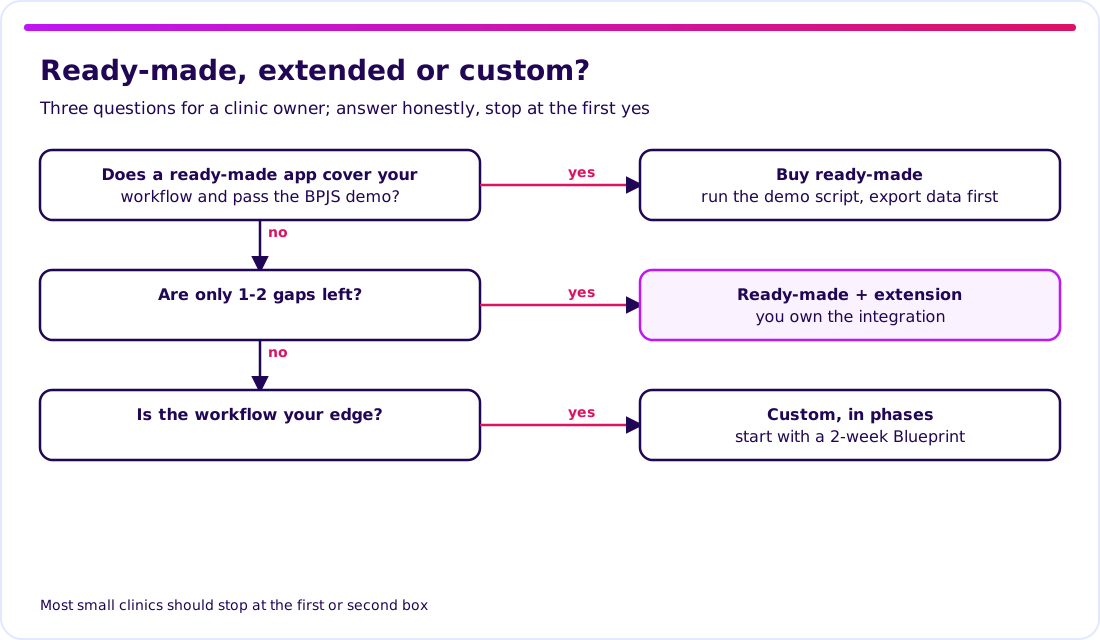
Buy ready-made if it covers your workflow and passes the demo; build custom only where your process is genuinely different. For most small clinics, ready-made is the right answer, and we will say so.
| Option | Strength | Risk to check | Best for |
|---|---|---|---|
| Ready-made (subscription) | Fast start, proven modules | Fixed workflows, data lock-in | Standard general clinics |
| Ready-made + extension | Keeps the proven core | Who owns the integration, upgrade conflicts | One or two real gaps |
| Custom, in phases | Fits a unique workflow | Larger scope, needs a decision owner | Specialty or multi-branch models |
For the wider logic, read the build vs buy guide and run the vendor due diligence checklist on every shortlist.
Validate it in 2 weeks. Before you commit a clinic app budget, we test the riskiest patient journey through Blueprint & Prototype: a specification, a prototype your front desk and doctors can try, and cost numbers from the real scope.
How much does a clinic app cost, and how long does it take?
Cost depends on scope, the number of integrations, and how much old data you migrate, so there is no single price. The chart shows one illustrative scenario for a small clinic. It is a planning example, not a market average and not a Synetica quote.
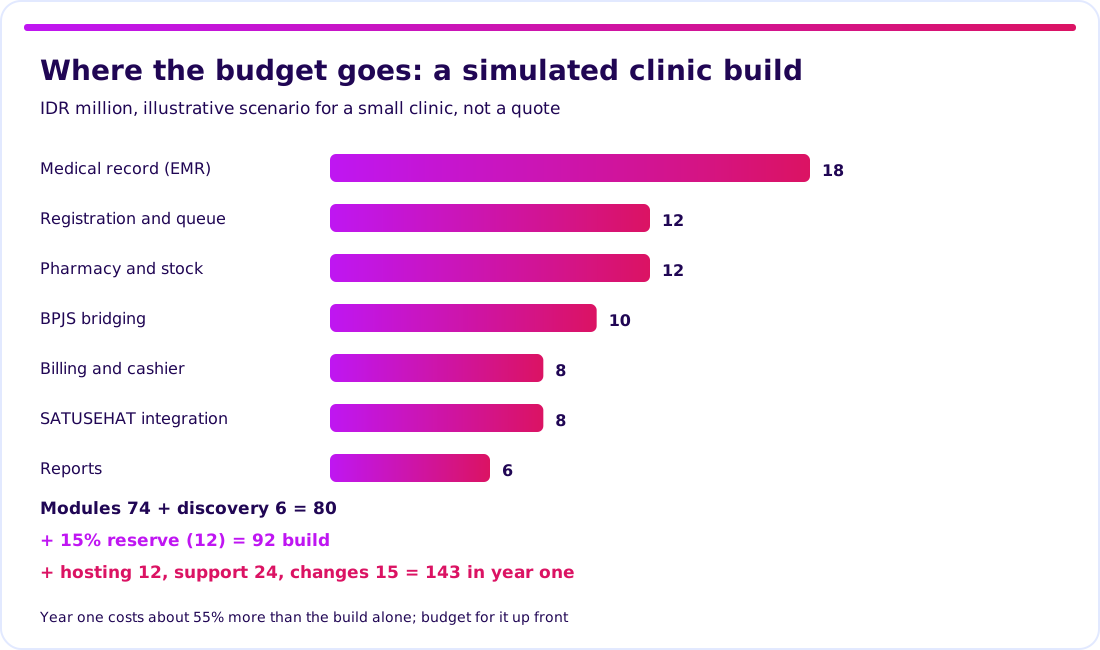
The arithmetic: modules 74 + discovery 6 = 80; a 15% reserve adds 12, so the build is IDR 92m. Hosting 12, support 24, and post-release changes 15 bring year one to IDR 143m, about 55% above the build alone. Discovery is only 6.5% of the build, and it is the cheapest place to find a wrong assumption.
Synetica’s path is a two-week Blueprint & Prototype, eight weeks of Production Grade Software for validated scope, then monthly Launch & Grow. Integrations can stretch the schedule, so ship the front desk first. See also the app development cost breakdown and how the production phase works.
What should a clinic app demo prove?
A demo is useful only if it follows one synthetic patient from booking to payment, with your own staff watching. Send the vendor this script a week ahead and score each step pass or fail:
- Book and call a patient, and show the queue number appearing for the desk and the doctor.
- Open a returning patient and show history without retyping.
- Record a consultation and a prescription, then show the pharmacy reading the same order.
- Produce the bill from recorded services and correct one wrong line, with the change visible in the audit log.
- Send test data to SATUSEHAT and, if you serve JKN patients, run a BPJS check, including one deliberate error.
- Export the data in a readable format, to prove you can leave.
Treat any step the vendor cannot show live as unproven. Two failures in steps 1 to 4 mean the core workflow is not ready, and integrations will not fix that.
Use the vendor checklist to record acceptance evidence.
What I’d do before choosing
I would time one ordinary clinic day, then test one patient journey end to end with two vendors. That yields a better comparison than a feature checklist.
For Growing Businesses running a clinic or a small group, prioritise compliance proof, data handover, and year-one cost. For Dreamers planning a health product, first check whether an existing app already solves the problem.
Next step: bring your riskiest patient journey to Blueprint & Prototype.
FAQ — clinic app
What is a clinic app?
Software that handles registration, queue, medical records, pharmacy, and billing in one system, so a patient’s visit is recorded once and used by every step.
What features does a clinic app have?
Usually registration and queue, an electronic medical record, pharmacy and stock, billing, reporting, SATUSEHAT integration, and BPJS bridging when serving JKN patients. The right set depends on size.
How much does a clinic app cost?
It depends on scope and integrations. Our simulation for a small clinic is IDR 92m to build and IDR 143m in year one; it is a scenario, not a market price or a quote.
Is there a free clinic app?
There are free and open-source options. Check support, security updates, BPJS and SATUSEHAT readiness, and who maintains any customisation.
Can a clinic app be customised?
Yes, but customise only where your workflow differs from standard. Validate that workflow with staff first, then build in phases.
Related Posts
Aditya S
Business Development Manager, Synetica.
Put it into practice
Need help putting this into practice?
We turn the ideas in this article into a prototype tested with real users in 2 weeks (from Rp49jt)—or production-grade software in 8 weeks (from Rp100jt).