Guide
Free vs Paid POS Apps: Which One Is Actually Worth It?
A free POS app is worth using when you run one outlet, have one or two operators, keep a simple catalog, and can still inspect every transaction yourself. It stops being worth it when its limits cost you control over staff, stock, data, or operating hours.
We have delivered business software for more than 15 years. The pattern is consistent: the subscription is rarely the biggest cost. Reconciliation time, locked data, untraceable transactions, and rushed migrations cost more.
This guide compares free, paid, and custom POS paths without pretending one is always best. You will get official price examples checked on 17 September 2026, a one-year cost model, ten acceptance tests, and measurable upgrade triggers.
TL;DR — the whole guide in five lines:
- Stay free while the operation remains simple and auditable. Do not upgrade because a vendor put a “Pro” badge on a plan.
- Judge limits, not feature counts: users, outlets, history, exports, inventory, permissions, and support.
- Calculate total cost of ownership. Devices, printers, training, payment fees, and admin time still exist when software costs zero.
- Upgrade when monthly risk exceeds the plan price. Use exception data, not vague discomfort.
- Custom is not the tier after paid. It is a different path for valuable workflows that packaged products cannot handle.
What Is a Free POS App?
A free POS app is point-of-sale software that provides core transaction functions without an initial subscription fee. “Free” may mean a permanent limited plan, a free core product with paid add-ons, or a time-limited trial. Those models are not interchangeable.
The usual core functions include:
- recording sales and payment methods;
- storing products, prices, and basic stock;
- printing or sending receipts;
- showing a sales summary;
- storing customers and simple discounts;
- running checkout from a phone or tablet.
Do not confuse a free trial with a free plan. A trial is an evaluation window. A free plan is an operating model you can keep using as long as you accept its limits.
Free vs Paid vs Custom POS Apps
Choose the simplest path that still gives you enough control for your business risk.
| Factor | Free | Paid | Hybrid or custom |
|---|---|---|---|
| Software cost | Zero for the core | Monthly or annual | Discovery, build, cloud, support |
| Setup | Fast | Fast to moderate | Moderate to long |
| Staff control | Basic or limited | Roles, shifts, approvals | Matches the organisation |
| Inventory | Basic stock count | Purchasing, counts, valuation | Custom replenishment rules |
| Reporting | Summary or limited history | Detail, export, multi-outlet | Custom metrics and ledgers |
| Integrations | Few or paid add-ons | Connectors/API by plan | End-to-end workflow |
| Support | Self-service | Priority by plan | SLA and dedicated ownership |
| Best for | Small, simple outlet | Operating business with formal controls | Valuable, unique process |
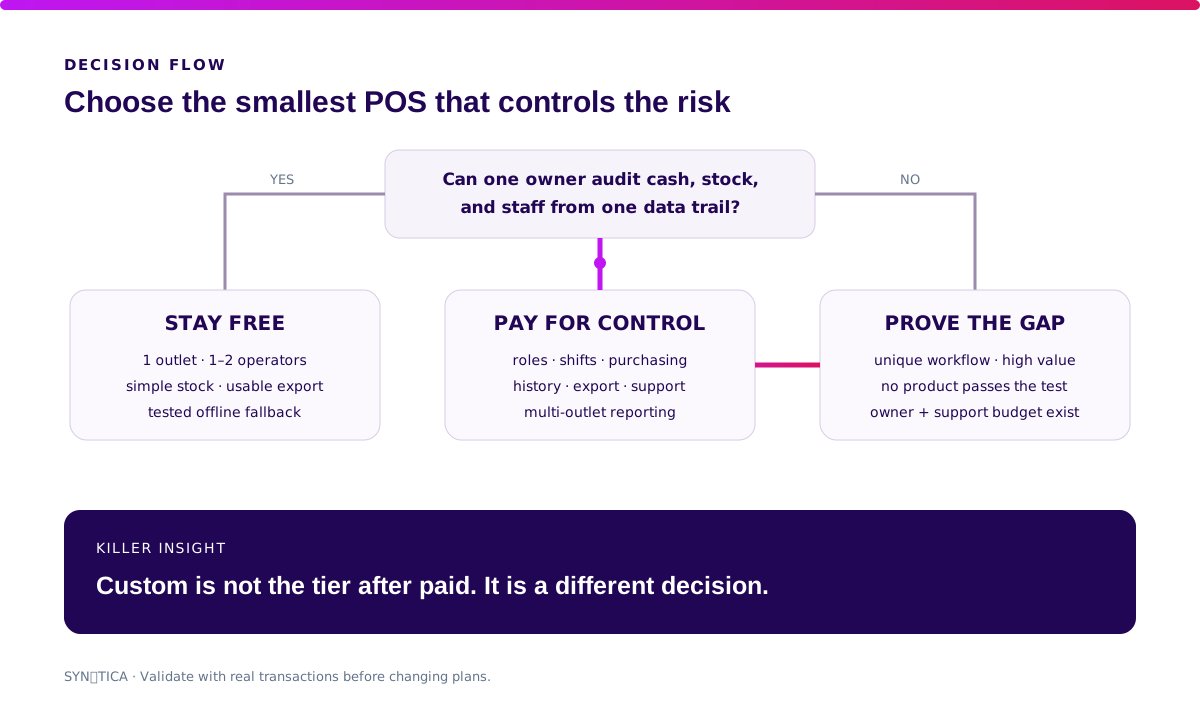
Start free while proving demand or running low volume. Pay when you need standard controls a vendor already provides. Consider hybrid or custom only when the workflow gap is measurable and configuration cannot close it.
Are Free POS Apps Really Free?
The software price can be zero. The operating cost never is.
Kasir Pintar officially separates Free and Pro. Its help page lists Pro at IDR 55,500 per month, a database capacity of up to 10,000 records versus 1,000 on Free, five staff accounts, then IDR 11,100 per additional staff member. Supplier management, debt, discounts/taxes/fees, detailed reports, shifts, purchasing, stock counts, and product logs are also assigned to Pro. We checked these figures on 17 September 2026; verify them again before buying. See Kasir Pintar’s official comparison.
Loyverse uses another model. POS, Dashboard, Kitchen Display, and Customer Display are listed as free. Optional add-ons cost US$9 per store per month for unlimited sales history, US$5 per employee per month for employee management, and US$25 per store per month for advanced inventory, excluding tax. See Loyverse’s official pricing.
Majoo did not show a permanent free plan on the pricing page we checked. Its official page offered a trial and paid packages starting at IDR 249,000 per outlet per month. See majoo’s official pricing.
This is not a ranking or hands-on product review. It proves that the word “free” can hide very different cost architectures.
| Vendor model | Transaction core | Limits to inspect | Displayed starting price |
|---|---|---|---|
| Kasir Pintar Free | Permanent free plan | data, staff, reports, purchasing | IDR 0 |
| Kasir Pintar Pro | Paid plan | extra staff and plugins | IDR 55,500/month |
| Loyverse | Free core and apps | history, staff, advanced inventory | US$0 + add-ons |
| majoo | Trial then paid | features and outlets by plan | IDR 249,000/outlet/month |
The POS plan is not the only variable. QRIS payments also have a Merchant Discount Rate paid by the merchant. Bank Indonesia lists 0% for micro-enterprise transactions up to IDR 500,000, 0.3% above that amount, and 0.7% for small, medium, and large enterprises. The scheme became effective on 15 March 2025 and sits outside the POS subscription. Read Bank Indonesia’s QRIS MDR guidance.
Which Free POS Features Should You Test?
Five features that work are worth more than fifty features that only appear on a pricing page.
1. Transactions and refunds
Run cash, QRIS, split payment, discount, void, and refund scenarios. Every change should retain the actor, time, reason, and before/after value.
2. Catalog and stock
Import 100 SKUs, change a price, count stock, sell at zero stock, and correct an older transaction. Confirm that every movement traces back to a source document.
3. Staff, shifts, and permissions
A cashier should not change prices, see margins, or delete history without approval. If every employee shares one PIN, “free” is being paid for with lost accountability.
4. Reports and exports
Reconcile orders, tenders, refunds, cash drawer, and settlements. Export raw data—not only a PDF—and confirm transaction IDs, timestamps, line items, tax, payment references, and users are included.
5. Offline recovery
Disconnect the internet, make a sale, restart the device, reconnect, and inspect duplicates and sync status. Offline mode without queue visibility hides the problem until the connection returns.
“A free plan is viable while the owner can still prove cash, stock, and staff actions from one data trail. Once those three split, you are no longer saving a subscription. You are moving cost into operations.” — Ganis Atmawarin, Founder of Synetica
When Is a Free POS App Good Enough?
Stay free while the limits do not change decisions or create repeated manual work.
A free plan remains rational when:
- you operate one outlet and one primary device;
- no more than two people run checkout;
- the catalog is small and requires no purchasing workflow;
- the owner checks closing daily;
- a usable export is available when needed;
- downtime has a practical manual fallback;
- QRIS, printer, and receipt flows pass your tests.
There is no shame in using free software. Paying too early is waste too. The goal is not to own the most expensive stack. It is to gain user signal and operational control at a sensible cost.
When Should You Upgrade to a Paid POS App?
Upgrade when one limit starts producing a measurable cost or risk.
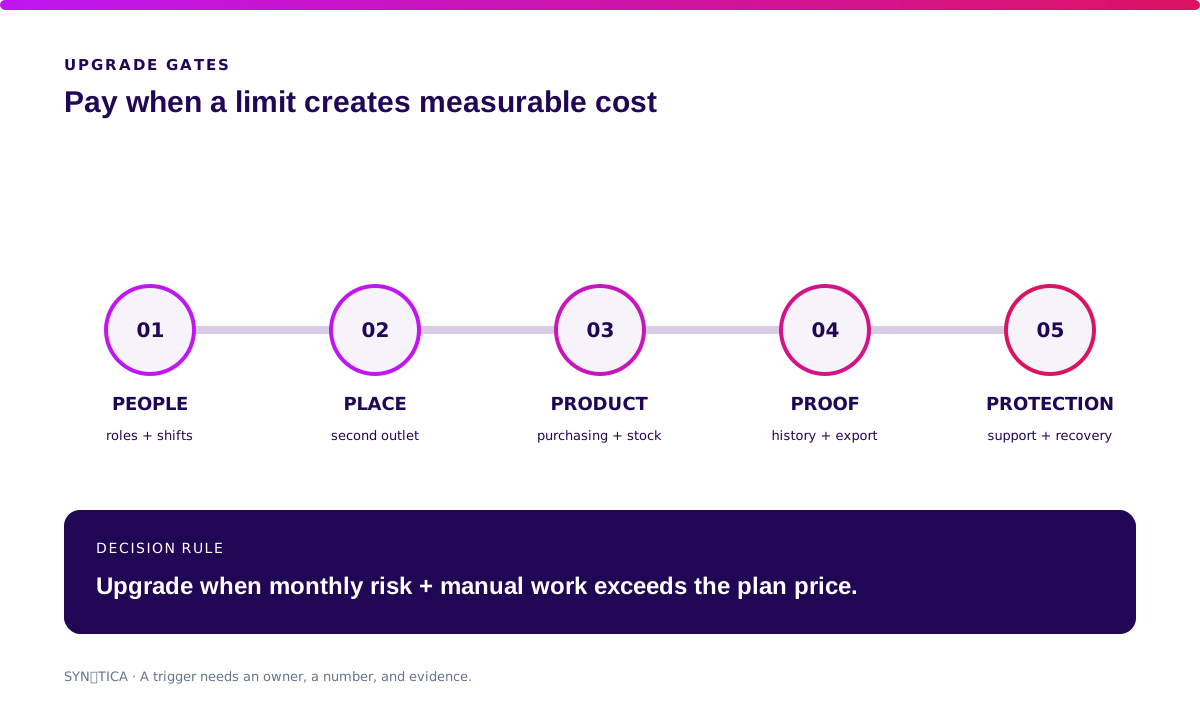
Use these five triggers:
- People: more than two operators need roles, shifts, approvals, or sales attribution.
- Place: a second outlet requires consolidated price, stock, and reporting.
- Product: SKU volume, suppliers, purchasing, batch data, or stock counts exceed the free plan.
- Proof: short history or incomplete exports block audit and decision-making.
- Protection: support, backup, recovery, and permissions become daily operating needs.
Consider an owner spending 45 minutes per day merging reports and correcting stock. At IDR 60,000 per hour, that manual work costs about IDR 1.35 million per month. A plan costing IDR 249,000 that removes most of the work is not expensive. It is cheaper than the workaround.
Validate it in two weeks. If the gap spans multiple outlets, integrations, or a specialised workflow, Blueprint & Prototype tests failure paths and produces a decision-ready scope and estimate before you build.
What Is the Real Cost of a Free POS App?
Compare one-year scenarios. Do not stop at the subscription column.
This illustrative model covers one outlet and two staff. It is not a vendor quotation.
| First-year component | Free | Paid |
|---|---|---|
| Subscription | IDR 0 | IDR 2,988,000 |
| Dedicated tablet/phone | IDR 3,000,000 | IDR 3,000,000 |
| Printer + cash drawer | IDR 2,200,000 | IDR 2,200,000 |
| Setup and training | IDR 1,000,000 | IDR 1,500,000 |
| Manual admin time | IDR 16,200,000 | IDR 4,050,000 |
| Contingency/support | IDR 2,000,000 | IDR 1,000,000 |
| Illustrative total | IDR 24,400,000 | IDR 14,738,000 |
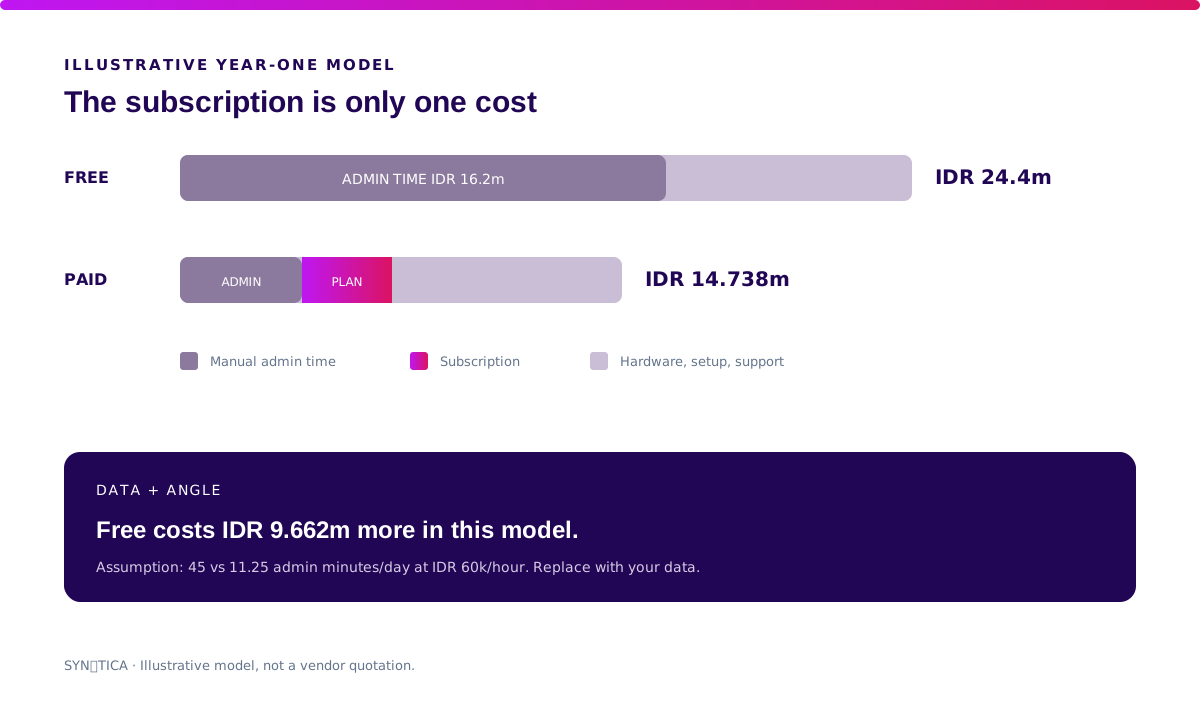
Assumptions: a paid plan at IDR 249,000 per month; 45 minutes of daily administration on free versus 11.25 minutes on paid; 30 days; time valued at IDR 60,000 per hour. Replace every input with your own data. The takeaway is not “paid is always cheaper.” It is: labour belongs in the model.
How to Choose a Free POS App: 10 Tests
One hour of acceptance testing beats one week of vendor demos.
- Import 100 SKUs, then export them again.
- Sell an item with discount, tax, and two payment methods.
- Refund one line from an older order without deleting history.
- Open and close a shift with a cash variance.
- Sign in as staff and try to access cost price and owner reports.
- Disconnect the internet, transact, restart, and sync.
- Match a QRIS order to its notification and settlement reference.
- Change a price and confirm when it becomes active on the device.
- Export every transaction, customer, product, and stock movement.
- Ask how to retrieve data and operate if the account is blocked or the vendor closes.
Download the free POS evaluation checklist. Once a vendor passes the scenarios, use our software vendor due-diligence guide to inspect contracts, security, support, and exit planning.
What I Would Do Before Choosing Free or Paid
- If you are starting, use free. Record transaction volume, closing time, and stock variance from day one.
- When staff and outlets grow, pay for control. Permissions, audit trails, reconciliation, and support are not cosmetic.
- If your process is unique, do not jump to custom. First prove that the gap is worth more than ownership costs.
- If data export fails, walk away. A discounted subscription is not worth locked data.
Run the checklist against one real trading day. Choose the cheapest plan that passes every mandatory scenario—not the one with the longest feature list.
FAQ About Free POS Apps
What is the best free POS app?
The best free POS app is the one that passes your transaction, refund, stock, staff access, offline recovery, reporting, and export scenarios. A vendor name cannot replace acceptance testing.
Are free POS apps safe?
They can be, but you must inspect permissions, backups, encryption, audit trails, privacy terms, vendor status, and recovery. A zero price proves neither safety nor risk.
Can a free POS app work offline?
Some can. Test a transaction during an outage, restart, queue visibility, synchronisation, conflict handling, and duplicate prevention. The word “offline” alone is not evidence.
When should I upgrade from a free POS?
Upgrade when limits on users, outlets, inventory, history, exports, permissions, or support create more manual cost and risk than the paid plan.
How much does paid POS software cost in Indonesia?
On official pages checked 17 September 2026, examples started at IDR 55,500 per month for Kasir Pintar Pro and IDR 249,000 per outlet per month for majoo. Prices and features change, so verify the official source before buying.
Related Posts
Two weeks to a real answer
Need help putting this into practice?
Book a Blueprint session and we'll turn the ideas in this article into a tested prototype in front of real users—2 weeks, from $3,000.