What Is a Database? Plain-English Guide for App Decisions
What is a database, how it works and which type fits your app? Follow one order through tables, transactions and a labeled first-year cost model.
 By Aditya S October 31, 2026 Updated November 11, 2026 14 min read
A database is an organized place where an application stores facts so it can find, change and protect them reliably. If you are asking “what is a database?” because you are about to commission an app, this guide skips the textbook and shows how the idea affects your budget, your data and your risk.
I’m Aditya S, Business Development Manager at Synetica, a tech-based business consultancy combining strategy and execution for Dreamers and Growing Businesses. Every example below is a fictional fixture you can replay with a developer or vendor. I am not citing Synetica client results, ranking database products, or giving security or legal advice.
You’ll see one order move through a database, learn the difference between a database and the terms people confuse it with, compare the main types, and meet the mistakes that cost founders money. Then we’ll compare three ways to run a database on one first-year scope.
TL;DR — the whole guide in five lines
- A database stores each fact once and lets every screen point to it: copied data drifts apart; referenced data stays consistent.
- A database is not the app, the spreadsheet or the server: it is the layer that keeps records correct while many people use them.
- Transactions are the feature you are really buying: related changes are saved together or not at all.
- Pick the type from your questions, not from fashion: most business apps start well on a relational database.
- Plan for backups, access and exit on day one: a database you cannot restore or export is a liability.
What is a database? A short definition
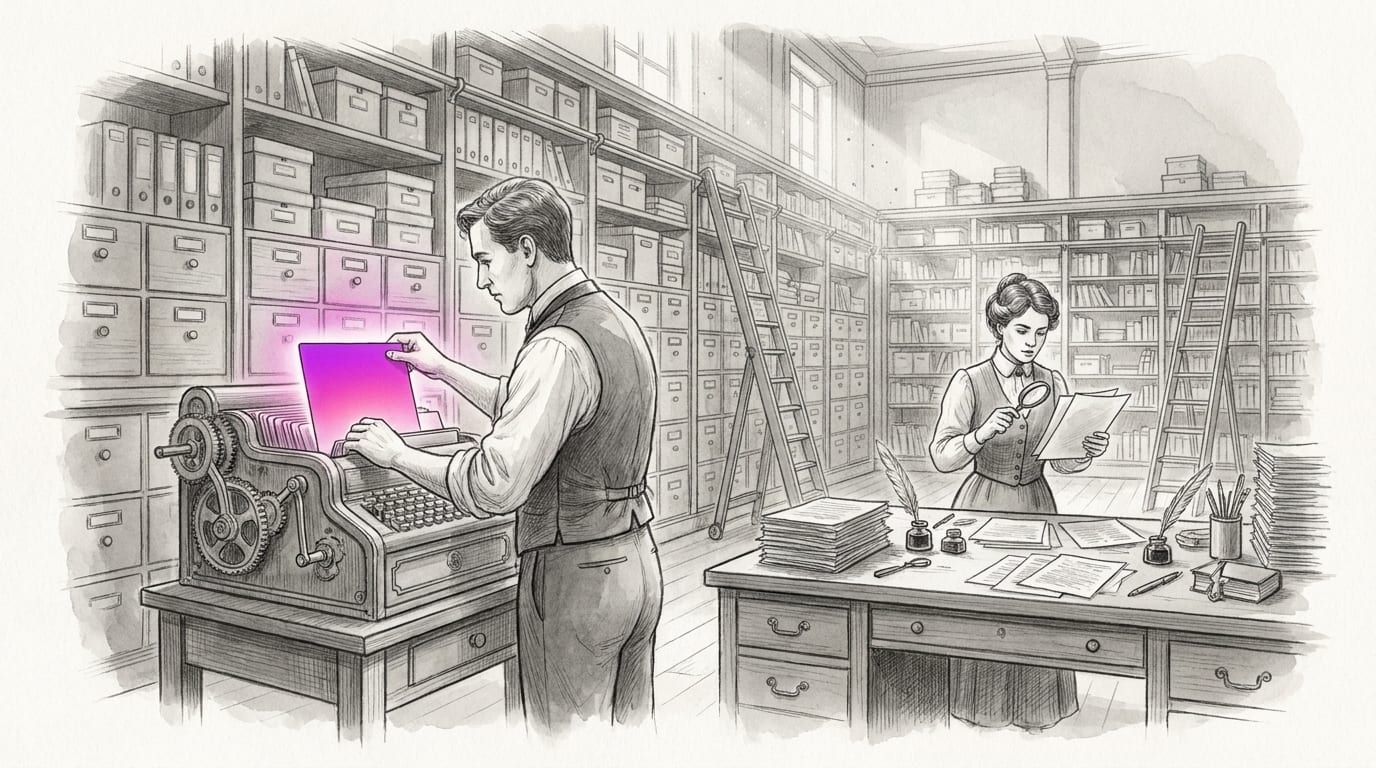
A database is structured, durable storage with rules that let an application read and change records safely. Think of a filing room with a strict clerk. The clerk keeps one folder per customer, refuses a form with missing fields, and enforces the configured rules for concurrent changes.
Three parts do the work. The data is the stored records. The schema is the agreed shape: which tables exist and what each column may hold. The database engine is the software that enforces the shape, answers requests and protects the data when something fails.
For relational business apps, SQL is a standard language for questions such as “show every unpaid invoice older than 14 days”. Data lives in related tables of rows and columns. The database needs deliberately configured constraints and transactions to enforce the rules your application relies on.
Map where these records sit in your business system.
Why does a database matter for your business?
A database matters because wrong records quietly turn into wrong decisions. A shop that quotes a stale price, ships stock it does not have or loses a payment does not see a “database problem”. It sees an angry customer.
Here is the fixture. A fictional shop sells item A at an assumed IDR 120,000 and item B at IDR 90,000. Prices were copied into three sheets used to look up the current price. The owner raises A to IDR 125,000 and updates only one sheet. Two of three sheets now disagree, and nobody knows which current quote is right.
A well-designed database keeps the current price in a products table. Screens preparing a new order look it up using the product ID, so they read the same active price. Accepted orders preserve the agreed price on their own lines; that deliberate historical snapshot must survive later catalog changes.
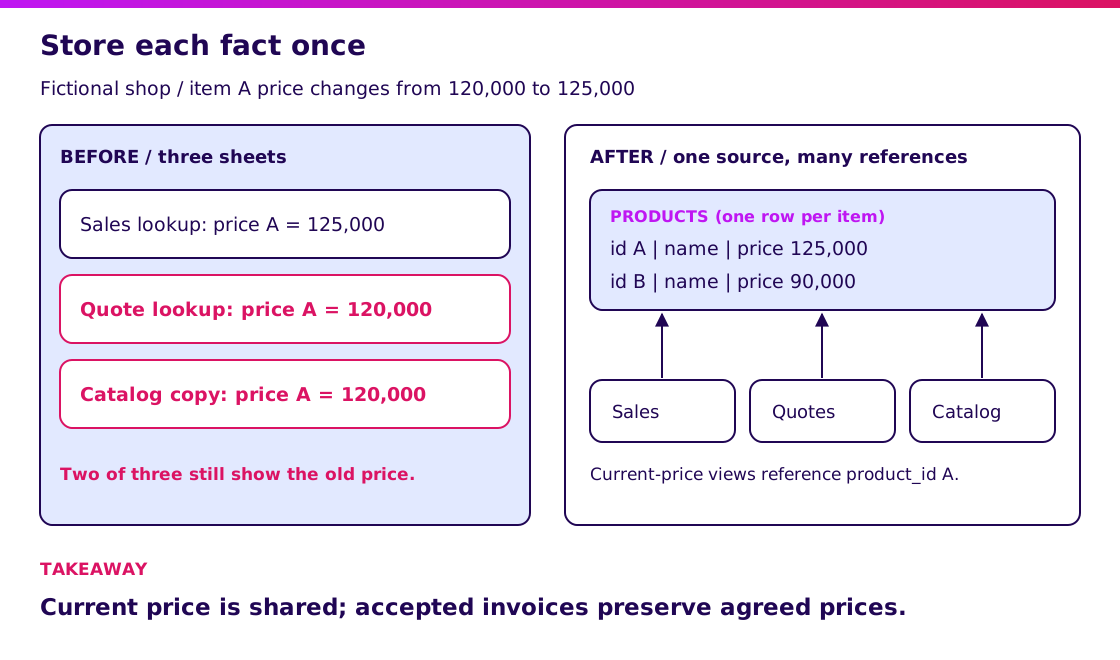
Open the single-source diagram at full size.
Preserve agreed historical prices on accepted orders and issued invoices. A product price change should update future price lookups, not silently rewrite an existing contract or bill. This requires deliberate schema and application rules. Include a price-change test in your scope.
How is a database different from similar terms?
Most confusion comes from five words that sound alike but do different jobs. Getting them straight stops you buying the wrong thing.
| Term | What it is | What it does | Example |
|---|---|---|---|
| Database | Organized, durable storage with rules | Keeps records correct and queryable | Tables of customers, orders, payments |
| Spreadsheet | A grid a person edits | Quick analysis and small lists | A monthly sales sheet |
| Database engine (DBMS) | The software that runs a database | Enforces rules, answers queries, recovers from failure | PostgreSQL, MySQL, SQL Server |
| Information system | People, process, software and data together | Supports a business activity end to end | An order-to-cash system |
| Application | The screens and logic users touch | Turns clicks into requests to the database | A sales order form |
A database is one component inside an information system. The app talks to it; it does not replace the app. Our ERP guide shows how many such components share one data model.
Spreadsheets are not bad. They are a fine tool for analysis and for a handful of users. They struggle when several people edit at once, when records must relate to each other, and when an error must be traceable.
How does a database work, with an example?
A database works by accepting a request, checking rules, and changing related records together. Follow one fictional shipment.
SO-701 ordered 20 cartons of B at IDR 90,000. The warehouse holds 20 and ships 15, leaving a backorder of 5. The app sends a request: reduce stock of B by 15 and create an invoice for 15 × 90,000 = IDR 1,350,000.
If the developer wraps both changes in one database transaction, a commit saves stock of 5 and the invoice together. If the transaction aborts before commit, rollback leaves stock at 20 and no invoice. If the commit reply is lost, the client must check the outcome before retrying; a dropped connection does not itself prove rollback. This guarantee applies inside the correctly configured transaction, not automatically across databases or external services.
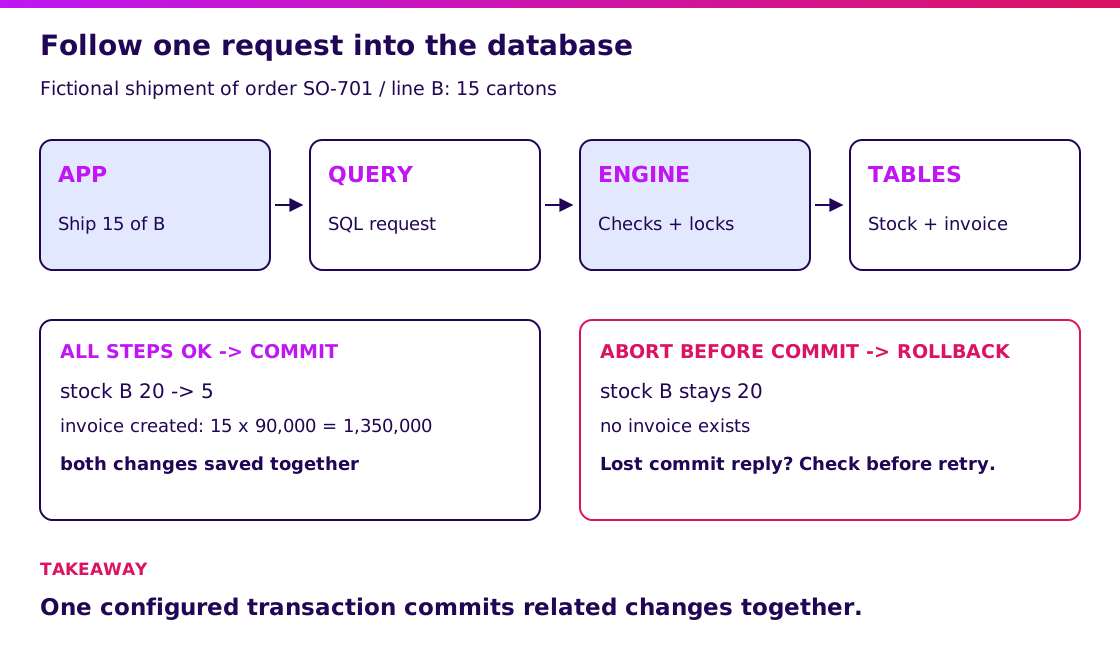
Open the transaction diagram at full size.
PostgreSQL’s transaction tutorial explains this all-or-nothing grouping. It is the single most useful guarantee a database gives a business app, and spreadsheets cannot give it. Demo question for any vendor: what happens to the stock and the invoice if the connection drops halfway through a shipment?
I recommend asking this because it separates a real data layer from a fancy form. Map your riskiest records in Blueprint & Prototype before choosing technology.
Validate it in 2 weeks. Blueprint & Prototype maps which records your product depends on and tests a working prototype with relevant users before you approve production scope. Bring the one record you cannot afford to lose.
What types of databases are there?
Choose the type from the questions your app must answer, not from what is fashionable. The main families differ in how they shape data and what they make easy.
| Type | Shape of data | Strong at | Watch out for |
|---|---|---|---|
| Relational (SQL) | Tables linked by IDs | Orders, invoices, stock, reports with joins | Schema changes need planning |
| Document | Flexible JSON-like records | Content, profiles, varied attributes | Check cross-record transaction support and limits |
| Key-value | Simple lookups by key | Sessions, caching, counters | Not built for ad hoc questions |
| Search engine | Indexed text | Fast text search and filtering | Usually a copy, not the source of truth |
| Time-series or analytics | Measurements over time | Sensor data, dashboards, large reports | Poor fit for everyday transactions |
For a typical Indonesian business app with customers, orders, stock and payments, a relational database is a safe default because those records relate to each other and need transactions. Add a second type only when a measured need appears, such as fast product search.
“We might need to scale” is not a measured need. A well-chosen relational database comfortably serves many small and mid-size businesses. Revisit the choice when you can name the query that is too slow and its cost.
Compare these choices against your actual build scope.
What are the parts of a database?
Relational databases share several common parts, each with a business meaning. Knowing them lets you read a proposal.
- Table: one kind of thing, such as customers or orders.
- Row: one record, such as one customer.
- Column: one attribute, such as phone number, with a defined type.
- Primary key: a unique ID for each row, such as an order number.
- Foreign key: a column that points at another table’s key, such as the customer on an order.
- Index: a lookup structure that makes frequent searches fast, at a small cost when writing.
- Constraint: a rule the engine enforces, such as “quantity cannot be negative”.
Ask your developer which constraints protect the money: unique invoice numbers, non-negative stock where your business requires it, and payments that must reference an invoice. A rule enforced by the database holds even when a screen forgets to check it.
Write the required records and rules into the Blueprint.
What are real-world examples of databases?
Real examples are easier to judge when you name the records, the owner and the failure that would hurt. These are generic patterns, not Synetica client case studies.
- A retail shop: products, customers, orders, payments and stock movements. The hurt: an oversold item. Our stock management guide covers the movement side.
- A clinic or service business: appointments, customer records and invoices. The hurt: exposed personal data, so access control and logging matter.
- A distributor: orders, stock by warehouse, invoices and receivables. The hurt: an unreconciled balance. See the distributor software guide.
In each case the database holds the same fixture shape: a few related tables, a handful of rules and a trail of who changed what. If you cannot describe your own version of that on one page, you are not ready to choose a product.
What common database mistakes cost money?
The expensive mistakes are about habits, not products. I recommend checking these before you pay for anything.
- Copying data instead of referencing it. The stale-price example above. Fix it by storing each fact once.
- No backup you have ever restored. A backup that has never been tested is a hope. Restore one to a test machine and time it.
- One shared login for everyone. You cannot trace a change or remove one person’s access. Give each person an account and the least access they need.
- Choosing the engine first. Decide the records, rules and questions first; the engine follows.
- Treating the database as a spreadsheet with a login. If staff export, edit and re-import, the rules no longer protect anything.
- No exit plan. Ask how you would export every table and who owns the data if the supplier changes terms.
Security and privacy duties depend on your data and sector. Confirm them with your own security and legal advisers against current official sources; I assert no specific regulation here.
Turn these failure cases into supplier acceptance tests.
How much does running a database cost in the first year?
Compare the same scope over twelve months, including the people time. The model below is fictional planning arithmetic, not vendor prices, a market survey or a Synetica offer. Scope: one shop, five staff users, customers, orders, stock and invoices.
| Assumed cost, IDR million | Spreadsheet | Managed database | Self-managed database |
|---|---|---|---|
| Setup and design | 0 | 6 | 12 |
| Twelve-month subscription or hosting | 0 | 18 | 12 |
| Backup and monitoring | 0 | 3 | 3 |
| Training | 0 | 3 | 0 |
| Administration time | 0 | 0 | 24 |
| Rework from copied data | 4.2 | 0 | 0 |
| Planned first-year spend | 4.2 | 30 | 51 |
| Separate 15% reserve | 0.63 | 4.5 | 7.65 |
| Funding envelope | 4.83 | 34.5 | 58.65 |
The spreadsheet column counts only rework: an assumed 10 hours a month at an assumed IDR 35,000 per hour, so 10 × 35,000 × 12 = IDR 4,200,000. It excludes the cost of a wrong invoice or a lost record, which is why the cheapest column is not automatically the cheapest decision. The managed subscription is an assumed IDR 1,500,000 a month, or IDR 18 million a year. Self-managed administration is an assumed 24 million of staff or contractor time.
The reserve is held funding, not an invoice. The model excludes taxes, application development, data migration and future growth.
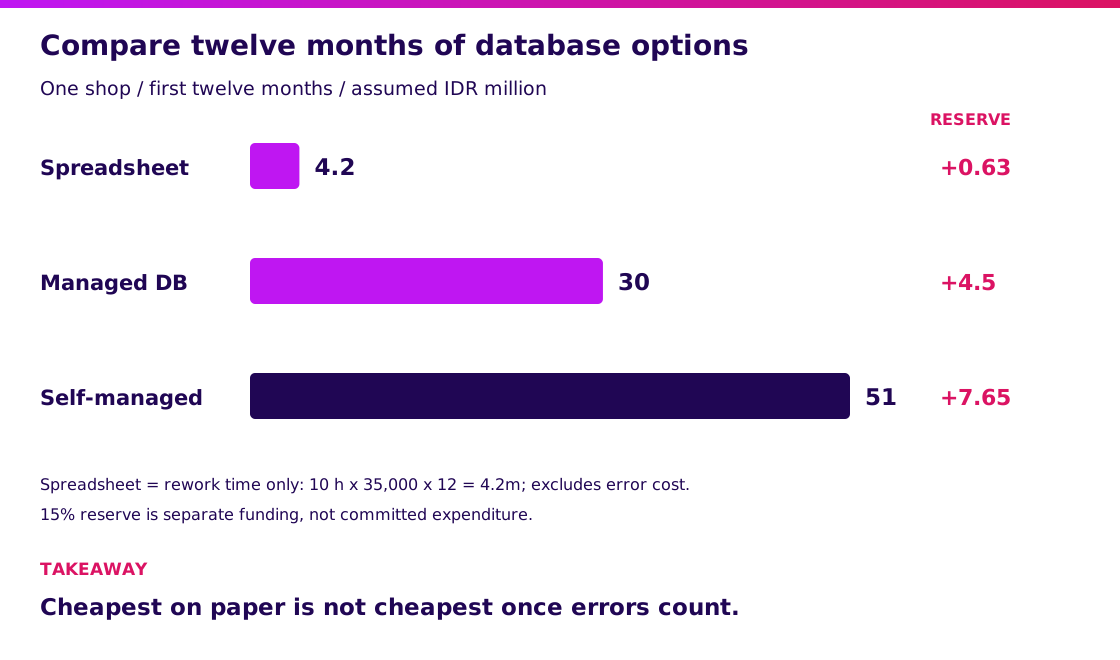
Open the cost diagram at full size.
Do not read this as “managed always wins”. A team with strong in-house skills and a privacy reason to hold data itself can choose self-managed on purpose. Count the administration time honestly either way. Compare the wider application cost drivers before you set a budget.
How do you choose a database for your app?
Write down your records, rules and questions, then test a prototype against them. Technology choice is the last step, not the first.
Use four gates, and do not skip one because a supplier says it is handled.
| Gate | What you produce | Evidence that it passed |
|---|---|---|
| 1. Records and rules | List of things stored, owners and rules that must never break | One page the business owner has signed off |
| 2. Questions | The ten questions the business asks most, such as “who owes us money and since when?” | Each answered from saved records |
| 3. Prototype | The riskiest flow, including the dropped connection | Replayed failure leaves no half-finished record |
| 4. Recovery | Backup, restore and export | A timed restore on a test machine |
For agreed custom scope, Synetica’s 2B2G path is Blueprint & Prototype in 2 weeks, then Production Grade Software in 8 weeks, then Launch & Grow on an ongoing monthly retainer. That is ten weeks through prototype validation and production build. Not every database decision needs custom work; a ready-made tool is the right answer when it passes your tests. Plan the production work after the prototype fixes scope.
If you are weighing an off-the-shelf tool against a custom one, our build-versus-buy framework walks through the trade-offs.
Why should you test recovery as well as saving?
A database needs a demonstrated recovery path, not merely a backup checkbox. One lesson in Werner Vogels’s 2016 engineering retrospective is:
“Expect the unexpected.” — Werner Vogels.
This is an engineering perspective, not a database benchmark. I apply it by asking a supplier to restore a backup into a separate environment and show the recovered orders. Name the acceptable recovery point and time for your workflow, then test them. Include recovery evidence in the implementation scope.
What would I advise before you commission a database?
Bring one record you cannot afford to lose and ask how it is protected. If a supplier cannot answer in plain words, the rest of the proposal is decoration.
- For a first product: start relational, keep the schema small and prove the riskiest flow with real users.
- For a spreadsheet you have outgrown: move the records that need rules first, and keep the spreadsheet for analysis.
- For an existing system: audit backups, access and export before adding features.
My next step would be to book a scoping conversation with your riskiest record and your top ten questions written down.
To see how consistent records turn into a purchasing decision, read our management information systems guide.
FAQ — Understanding databases
What is a database in simple words?
A database is organized storage where an app keeps records so it can find and change them reliably. It enforces rules, such as unique IDs, and protects data when something fails.
What is the difference between a database and a spreadsheet?
A spreadsheet is a grid a person edits; a database enforces rules and relations among records for many users at once. Spreadsheets suit analysis and small lists. Databases suit records that must stay consistent.
What are examples of a database?
Common relational engines include PostgreSQL, MySQL and SQL Server. In an app, the database holds tables such as customers, orders, products, invoices and payments.
Why is a database important for an application?
It keeps one trusted copy of each fact, saves related changes together through transactions and lets you ask questions across records. Without it, the same data drifts across files and errors become hard to trace.
Is a database the same as an information system?
No. A database stores and protects records. An information system combines people, process, software and data to support a business activity, and a database is one component inside it.
Related Posts
Aditya S
Business Development Manager, Synetica.
Put it into practice
Need help putting this into practice?
We turn the ideas in this article into a prototype tested with real users in 2 weeks (from Rp49jt)—or production-grade software in 8 weeks (from Rp100jt).