What Is POS (Point of Sale)? How It Works and the Main Types
What is POS? Learn how a point of sale system works, its parts and four types, what it saves your team each day, and where a plain cash register is enough.
 By Aditya S November 9, 2026 Updated November 11, 2026 11 min read

What is POS? POS stands for point of sale: the moment and place where a customer pays for something, and by extension the system that records that sale. A POS system combines a cashier screen, payment handling and a record of what was sold, so each sale also updates your stock and sales reports. A plain cash register only takes the money.
I’m Aditya S, Business Development Manager at Synetica, a tech-based business consultancy combining strategy and execution for Dreamers and Growing Businesses. This guide explains POS through a fictional single-outlet coffee shop, so you can check the arithmetic yourself. The numbers are teaching assumptions, not Synetica client results or industry benchmarks.
You’ll learn what POS means, how one sale moves through the system, what the parts and types are, what it saves in a typical day, and the mistakes that make owners regret the purchase.
TL;DR — the whole guide in five lines
- POS is a cash register that also keeps the books: every sale updates stock and sales records automatically.
- It has two halves: hardware at the counter (screen, printer, scanner, cash drawer) and software behind it (catalog, payments, stock, reports).
- There are four common types: countertop, mobile, self-service and cloud-based, and they can be combined.
- The first payback is closing time: in our example, daily closing drops from 45 to 10 minutes.
- A POS is only as good as your item list: wrong prices and unmaintained stock turn clean reports into confident nonsense.
What is POS (point of sale)?
POS, or point of sale, is the place where a sale is completed, and a POS system is the hardware and software that records that sale. In everyday Indonesian speech, “POS” usually means the whole cashier system: the screen the cashier taps, the receipt that prints and the data behind it.
Think of a notebook-and-calculator shop versus one with a connected till. In the first, the cashier’s work ends when the customer walks away, and someone must later turn paper into numbers. In the second, the number already exists when the receipt prints.
If you are deciding what to buy, our POS software guide compares options and prices. This article is the step before: what the thing is and whether you need one.
How is POS different from a cash register, a cashier app and an ERP?
The terms overlap, so people use them loosely. The table separates them by what each one does after the sale.
| Term | What it is | Typical use |
|---|---|---|
| Cash register | Takes payment and prints a receipt, with little or no memory of what was sold | A stall with a handful of fixed-price items |
| POS system | Cashier hardware plus software that records every sale item by item | A cafe or shop that wants stock and sales reports |
| Cashier app | The software part of a POS, often on a phone or tablet | A small business starting without a dedicated terminal |
| Inventory system | Tracks stock levels, purchases and transfers | A warehouse or multi-branch retailer |
| ERP | Connects sales, stock, accounting and HR in one system | A larger company running many departments |
A cashier app and a POS are close relatives: the app is what a business uses when the “terminal” is a phone. Our cashier app guide covers choosing one in detail. An ERP sits above all of them and is rarely the right first purchase for a small outlet.
Why does POS matter for your business?
POS matters because it turns every sale into usable data without extra typing. That saves time at closing, reduces mistakes in stock counts and lets you see which items sell and when.
Here is the fictional example. A single-outlet coffee shop sells around 150 cups a day. Every evening the owner counts the cash, matches the notebook to the receipts, updates the stock sheet and writes a daily summary. That takes 45 minutes: 15, 15, 10 and 5 minutes for the four steps.
With a POS, the system already knows the expected cash, so counting takes 8 minutes. Matching drops to a 2-minute check of an exceptions report, and the stock sheet and summary update themselves. Closing takes 10 minutes. Over 30 days, that is 22.5 hours versus 5 hours: 17.5 hours saved a month, from the same shop and the same sales.
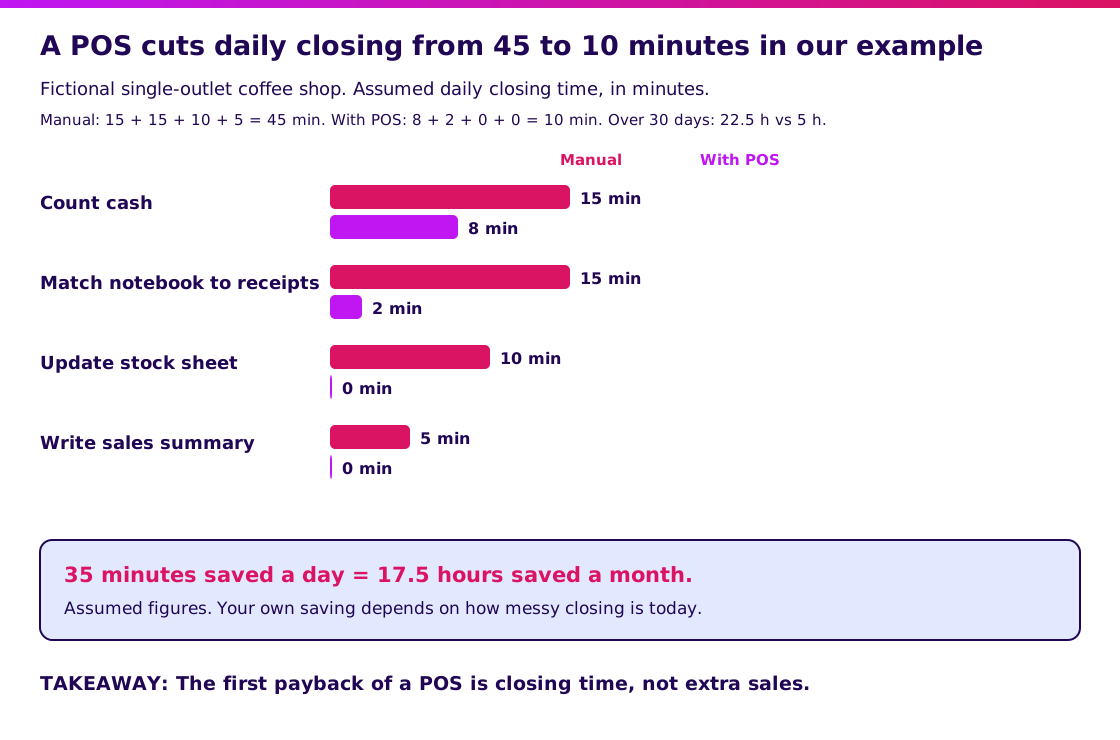
These are assumed figures for teaching. Your saving depends on how messy closing is today. A shop with ten items and one cashier will save less; a shop with 300 items and three shifts will save more.
Bring your closing routine to a scoping conversation.
How does a POS system work?
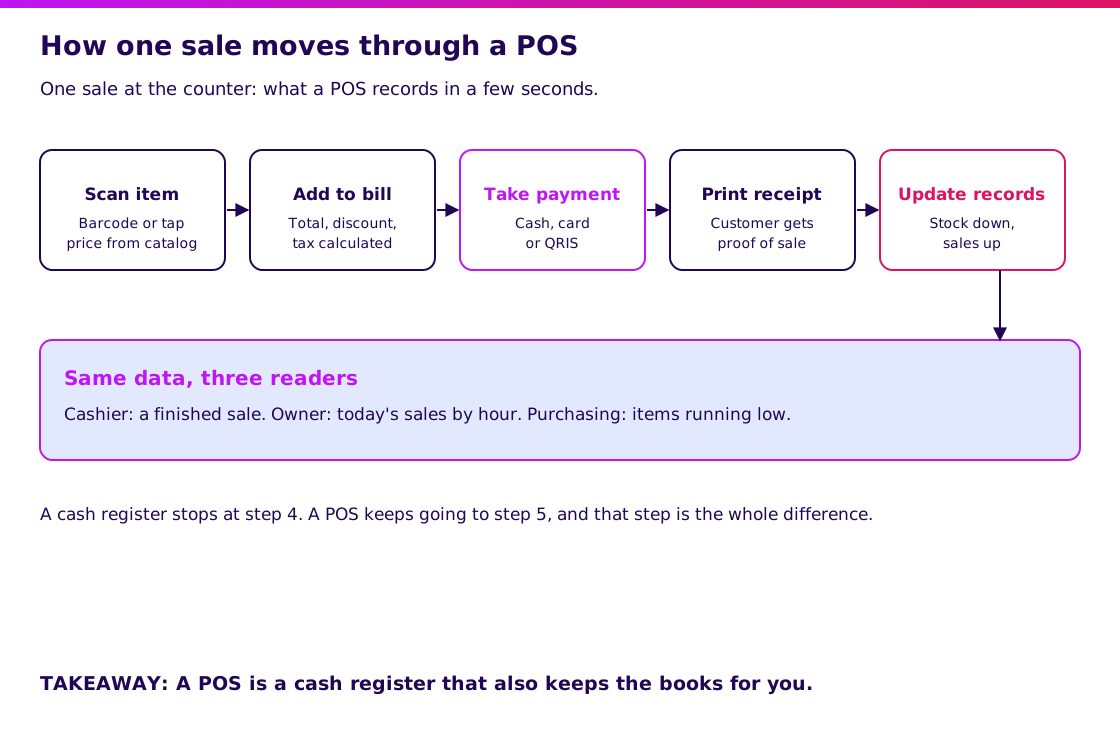
A POS works in five steps: scan or pick an item, add it to the bill, take payment, print a receipt and update the records. The first four are what the customer sees. The fifth is the one that separates a POS from a cash register.
- Scan or pick the item. The cashier scans a barcode or taps the item. Prices come from the product catalog, not from the cashier’s memory.
- Add it to the bill. The system totals the items and applies any discount or tax rule.
- Take payment. Cash, card or QR code. In Indonesia, QRIS is the national QR payment standard set by Bank Indonesia, so a POS that accepts it covers most e-wallets with one code.
- Print or send a receipt. The customer gets proof; you get a matching record.
- Update stock and sales. The item count goes down and the sales total goes up, immediately.
In the coffee shop, step 5 is why the 10-minute closing works: the expected cash for the day already exists, and stock for milk and beans is already reduced by the recipe or the item sold.
See how Synetica builds the production stage in 8 weeks.
What are the parts of a POS system?
A POS has a hardware half and a software half, and you can start with less hardware than vendors suggest.
| Part | What it does | Do you need it? |
|---|---|---|
| Cashier screen | Where the cashier enters or taps the sale | Yes: a screen, tablet or phone |
| Receipt printer | Prints proof of sale | Usually, though many setups send digital receipts |
| Barcode scanner | Speeds up item entry | Worth it above a few dozen items |
| Cash drawer | Holds cash, opens on a cash sale | Only if you take cash |
| Payment terminal or QRIS | Takes card or QR payments | Yes, in most Indonesian retail |
| Product catalog | Items, prices, variants | Yes: everything else depends on it |
| Stock module | Tracks quantities | Strongly recommended |
| Reports | Sales by item, hour, cashier | Yes: this is the reason to buy |
Start from the software half. A good catalog and reports on cheap hardware beat expensive hardware with a poor catalog.
What are the types of POS?
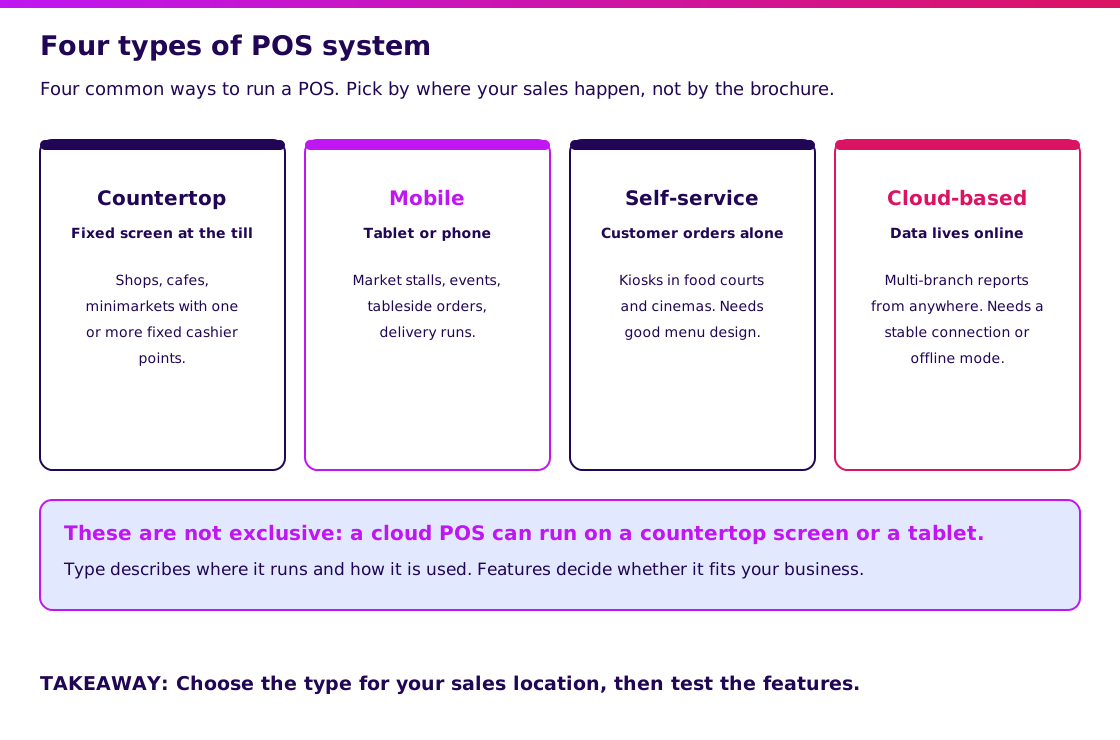
There are four common types: countertop, mobile, self-service and cloud-based. They describe where the POS runs and how it is used, and they are not mutually exclusive.
| Type | Where it runs | Best for | Watch out for |
|---|---|---|---|
| Countertop | A fixed screen at the till | Shops, cafes, minimarkets | Fixed position; extra hardware cost |
| Mobile | A tablet or phone | Stalls, events, tableside ordering | Battery and connection at the point of sale |
| Self-service | A kiosk where the customer orders | Food courts, cinemas, high-traffic counters | Needs careful menu and payment design |
| Cloud-based | Data stored online, usable on any device | Multi-branch owners who want reports remotely | Needs a stable connection or a good offline mode |
Most small businesses start with a mobile or countertop setup on a cloud-based system. Offline behavior deserves a direct test: ask a vendor to switch off the Wi-Fi and complete three sales.
What does a POS look like in a real business?
A working POS is visible in the morning report, not on the shelf. Using the coffee shop example, here is what you would notice after the first month.
| After | What the owner sees | What changes |
|---|---|---|
| Week 1 | Daily sales matching the cash drawer | The notebook is retired |
| Week 2 | Items that sell out early, with times | Opening stock for milk is raised |
| Week 4 | A slow item on the menu with near-zero sales | The item is removed or promoted |
This is a generic illustration, not a Synetica client result. The value is not that the POS “increases sales.” It is that decisions about stock and menu now rest on counts instead of memory.
Validate it in 2 weeks. If a standard POS cannot handle your workflow, Blueprint & Prototype puts a working prototype in front of real users and turns what you learn into agreed scope and a cost estimate. The two-week promise covers prototype validation; it does not guarantee a production launch.
At Synetica, Blueprint & Prototype takes 2 weeks, Production Grade Software takes 8 weeks, and Launch & Grow runs as an ongoing monthly retainer.
When is a plain cash register enough?
A cash register is enough when you sell a few fixed-price items, run one till and do not need stock or sales history.
| Situation | Better choice | Why |
|---|---|---|
| A stall with 5 fixed-price items | Cash register or notebook | Closing is already two minutes |
| A cafe with 40 items and daily stock-outs | POS | Item-level data changes ordering |
| Three branches with shared menu and pricing | Cloud POS | One catalog, one set of reports |
| Unusual workflow, such as rentals or custom orders | Custom or hybrid | Standard POS flows will not fit |
Be honest about this decision. A POS you do not use fully is a monthly fee for a fancier calculator.
What mistakes do owners make with POS?
The most common mistake is buying hardware before fixing the product list. The system only reports what you feed it.
- Wrong or missing prices in the catalog. Reports look precise and are wrong. Check the top 20 items before go-live.
- Not testing offline mode. The connection drops at the busiest hour and the queue stops.
- Letting cashiers share one login. You lose track of who made which sale or void.
- Ignoring voids and discounts. These are where most leakage hides. Review them weekly.
- Never counting stock. The system’s number and the shelf drift apart. Do a spot count monthly.
- Buying a bigger system than the business needs. Compare free and paid cashier apps before you sign a long contract.
What would I tell an owner deciding on a POS?
Start with your closing routine and your item list. If closing takes more than 20 minutes or you cannot say which three items sell best, a POS will likely repay itself. If neither is true, wait.
For a Growing Business with several branches, test the reports and offline mode first, and hardware last. For a Dreamer opening a first shop, begin with a phone or tablet and a cashier app, and upgrade only when volume demands it.
My next step would be to book a scoping conversation with your item count, your branch count and the part of closing that annoys you most.
FAQ — Understanding POS
What is POS in simple terms?
POS means point of sale, the place and moment where a customer pays. A POS system is the hardware and software that records the sale and updates your stock and reports.
What is the difference between a POS and a cash register?
A cash register takes payment and prints a receipt. A POS also records every item sold, so stock and sales reports update on their own. If you need those reports, you need a POS.
What are the types of POS?
The four common types are countertop, mobile, self-service and cloud-based. They can be combined: a cloud-based POS often runs on a countertop screen or a tablet.
Do I need special hardware for a POS?
Not always. Many small businesses start with a phone or tablet and a cashier app, then add a receipt printer or barcode scanner as volume grows. Software quality matters more than expensive hardware.
How much does a POS cost in Indonesia?
It ranges from free or low-cost cashier apps to monthly subscriptions and custom builds. Prices change, so check vendors’ current pages; our POS software guide includes a first-year cost model you can adapt.
Related Posts
Aditya S
Business Development Manager, Synetica.
Put it into practice
Need help putting this into practice?
We turn the ideas in this article into a prototype tested with real users in 2 weeks (from Rp49jt)—or production-grade software in 8 weeks (from Rp100jt).