
Academic Information System: Schools & Universities
Sistem informasi akademik explained for schools and campuses: what it does, features by size, ready-made vs custom, cost and a 12-week rollout.
 By Aditya S October 21, 2026 Updated November 11, 2026 9 min read

A sistem informasi akademik (academic information system, or SIAKAD) is the software a school or campus uses to run students, classes, grades, attendance, and tuition from one record. This guide is for principals, school foundations, and campus administrators who are tired of collecting grades in spreadsheets and retyping them into report cards.
I’m Aditya S, Business Development Manager at Synetica, a tech-based business consultancy. We have not run a school and this article does not claim an education client. The figures below are planning simulations built on stated assumptions, not measurements and not a quote. Replace them with your own numbers.
You’ll get a definition, the problems an academic system solves, features by institution size, a ready-made versus custom decision, cost and timing, and a rollout plan. If you are still deciding whether to buy or build at all, start with our build vs buy guide.
TL;DR — the whole guide in five lines
- An academic system is one student record that grades, attendance, and billing all read from, not another spreadsheet per teacher.
- Report-card season is the real test: if grades still need manual fixing at the end of the term, the system is not doing its job.
- Ready-made is usually right for a standard curriculum; go custom only where your academic rules are genuinely different.
- Pilot with one grade level first, then move the other classes.
- Budget for year one: in our simulation IDR 115m to build becomes IDR 170m.
What is an academic information system (sistem informasi akademik)?
An academic information system is software that keeps one live record of students, classes, grades, attendance, and fees, and shows each person only what their role needs. The student record is the core; the timetable, report cards, and billing hang off it.
A simple example: a teacher enters attendance and a quiz score on a phone, the homeroom teacher sees the class pattern, the guardian sees the result in a portal, and the report card pulls the grade without anyone retyping it. The same record feeds the reports your institution owes to outside bodies.
What problems does an academic information system solve?
It removes the retyping between teachers, admin staff, and guardians, and it makes grading rules consistent. These are the pain points that usually justify the project:
- Grades scattered across files, because every teacher keeps a personal spreadsheet with a different layout.
- Report cards compiled by hand, so one changed score means re-checking a whole class.
- Attendance recaps that arrive late, so absences are noticed after the pattern is already a problem.
- Tuition (SPP) tracked in a separate sheet, so the front office cannot answer “who has paid?” in one search.
- Official reporting done as a last-minute rush at term end.
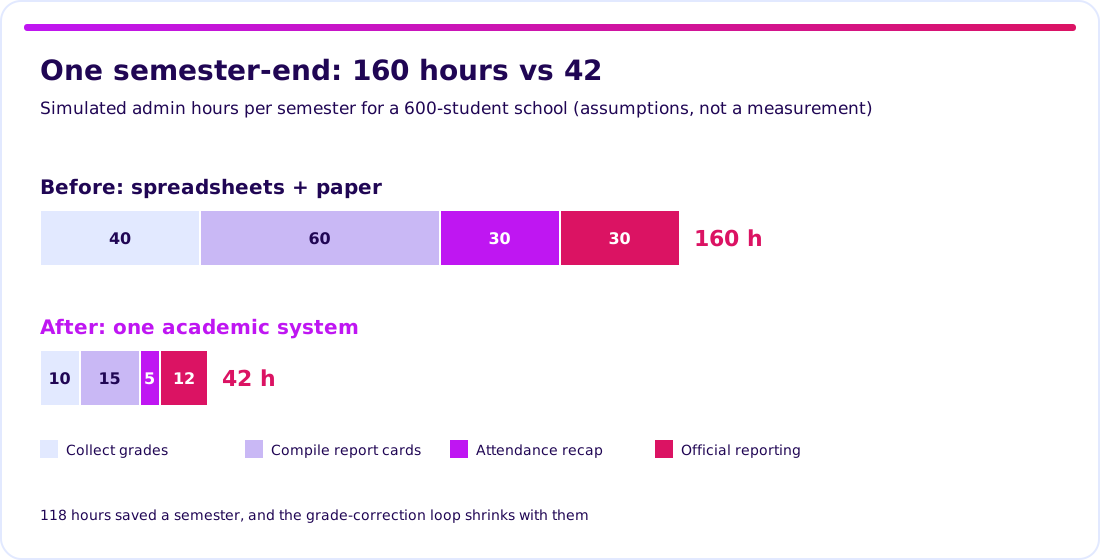
Take a simulation for a 600-student school. Collecting grades takes 40 hours a semester, compiling report cards 60, attendance recap 30, and official reporting 30, which is 160 hours of admin. With one system the same semester might be 10, 15, 5, and 12, or 42 hours. The saving is 118 hours, about three working weeks of one person. Every figure is an assumption; time your own last semester-end and replace them.
Start the build-or-buy decision from the build vs buy guide.
Which academic information system features are essential?
Start with student records, grades and report cards, and attendance; add the portal and finance in later waves. This table is a planning aid, not a standard.
| Feature | Small school (under 300 students) | Larger school or foundation (300 to 1,500) | Campus or multi-campus group |
|---|---|---|---|
| Student and guardian records | Core | Core | Core, shared across campuses |
| Class schedule and attendance | Basic | Core | Core, per faculty or campus |
| Grades and report cards | Core | Core, with grading rules | Core, with credit and GPA logic |
| Tuition billing and payment status | Basic | Core | Core, with installment plans |
| Guardian or student portal | Optional | Core | Core |
| Official reporting exports | Verify | Core | Core |
| Role-based access | Basic | Core | Core, with audit trail |
Do not buy every row on day one. Verbs matter more than modules: can a teacher enter grades from a phone, can the office find a student’s full history in one search, can you export your data in a readable file?
Run the vendor checks before you shortlist.
Online classes and course materials usually live in a separate learning management system that syncs students from this one. See our LMS buyer’s guide.
Is a ready-made or custom academic information system better?
Buy ready-made if it covers your curriculum and grading rules; build custom only where your academic model is genuinely different. For most schools with a standard curriculum, ready-made is the right answer, and we will say so.
| Option | Strength | Risk to check | Best for |
|---|---|---|---|
| Ready-made (subscription) | Fast start, tested report formats | Fixed grading logic, data lock-in, per-student pricing as you grow | Standard school or small campus |
| Ready-made + extension | Keeps the proven core | Who owns the integration, upgrade conflicts | One or two real gaps |
| Custom, in phases | Fits a unique model | Larger scope, you own maintenance and security | Multi-campus group, mixed curricula, or a product plan |
A free academic system can be enough for a very small school, but check who maintains it, how security updates reach you, and whether student data can leave. Student records are personal data, often of minors, so confirm your obligations under the personal data protection law before you upload anything.
Validate it in 2 weeks. Before you commit an academic system budget, we test your riskiest workflow through Blueprint & Prototype: a specification, a prototype your teachers and admin staff can try, and cost numbers from the real scope.
What should you verify before you trust an academic information system?
Specify grading rules, data ownership, and reporting separately from the screens. A smooth demo is one piece of evidence, not proof that your real semester-end will work.
| Check | Acceptance exercise | Evidence to keep |
|---|---|---|
| Grading rules | Load one class with your real weighting and rounding, then generate its report cards | Matches the hand-calculated result |
| Role access | Log in as teacher, guardian, and admin and try to open another class | Each role sees only its own data |
| Official reporting | Produce the export your institution must submit | Accepted format, confirmed against current requirements |
| Exit | Export a full term of students, grades, and fees | Readable file and field definitions |
Current reporting requirements for schools and higher education change, so confirm the data fields and formats your institution must submit with the responsible agency or your education office; this article does not state them. Keep real student data out of demos and screenshots.
How much does an academic information system cost, and how long does it take?
Cost depends on scope, the number of grading rules, and how much history you import, so there is no single price. The chart shows one illustrative scenario for one 600-student school. It is a planning example, not a market average and not a Synetica quote.
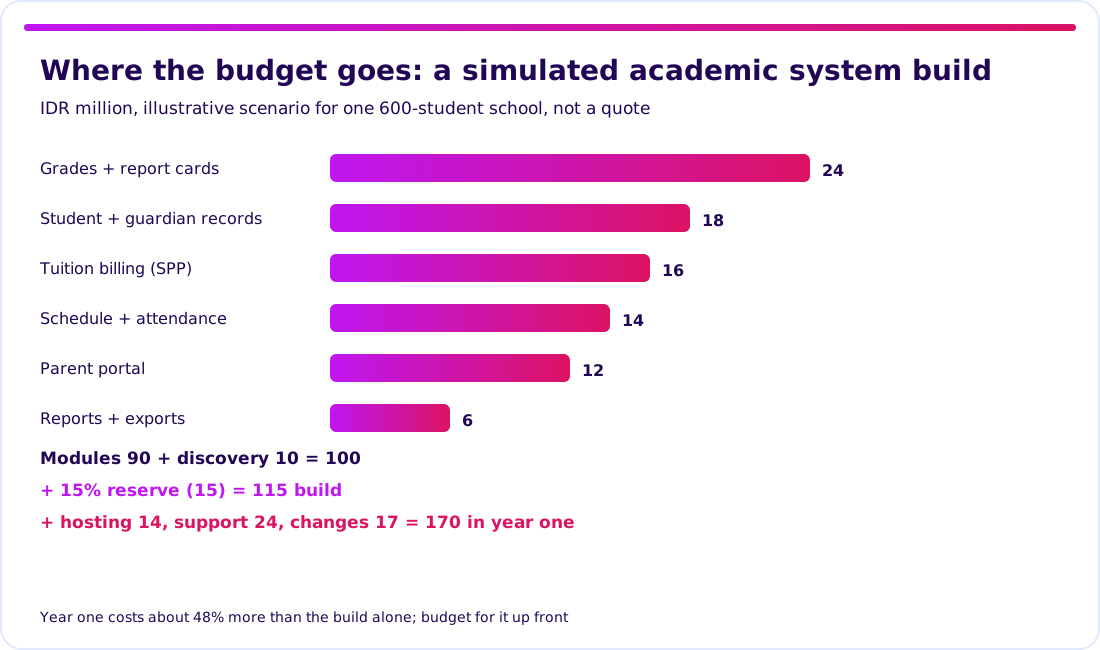
The arithmetic: modules 90 + discovery 10 = 100; a 15% reserve adds 15, so the build is IDR 115m. Hosting 14, support 24, and post-release changes 17 bring year one to IDR 170m, about 48% above the build alone. Discovery is under 9% of the build and the cheapest place to find a wrong assumption.
Synetica’s path is a two-week Blueprint & Prototype, eight weeks of Production Grade Software for validated scope, then monthly Launch & Grow. See also the app development cost breakdown and how the production phase works.
How do you roll out an academic information system without breaking the semester?
Roll out in gates: pilot with one grade level, dry-run the report cards, import data, then run in parallel before the switch. Move the remaining classes only after the agreed evidence is complete, and plan the switch for the start of a grading period, not the middle.
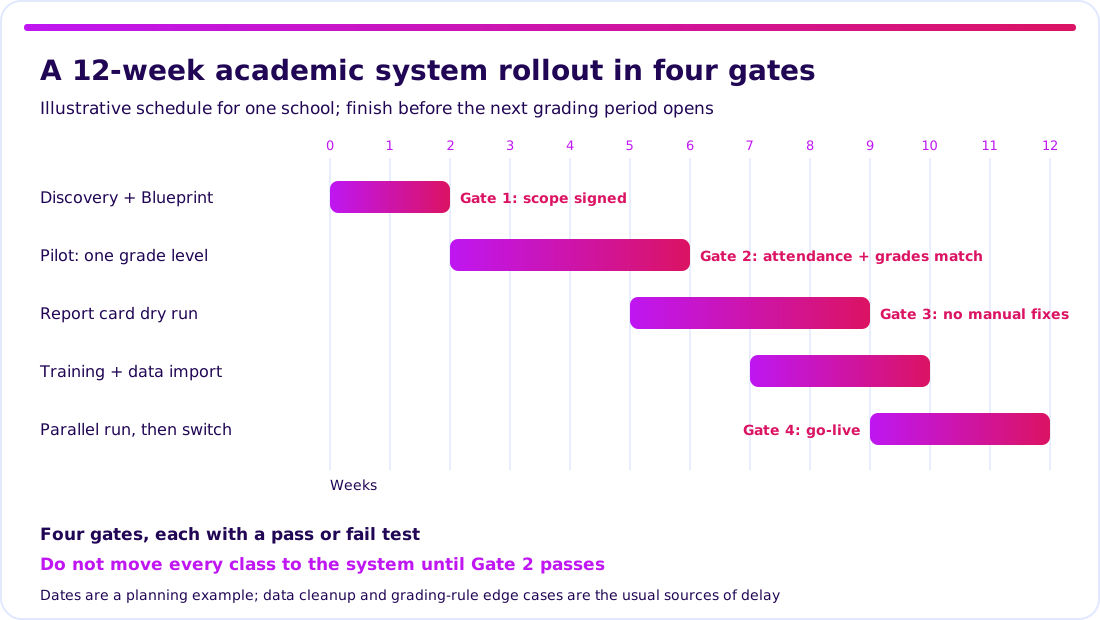
- Gate 1, scope signed: one institution, one owner, a written list of what is out of scope.
- Gate 2, pilot passes: one grade level runs attendance and grades for several weeks and matches the old sheets.
- Gate 3, report cards accepted: a dry run produces report cards with no manual corrections.
- Gate 4, go-live: a parallel run shows matching results, then the old spreadsheets stop on an agreed day.
The twelve weeks are a planning example. Data cleanup and unusual grading rules are the usual sources of delay, so keep a fallback date.
Plan the rollout with a Blueprint first.
What I’d do before choosing
I would time one ordinary semester-end, then pilot two shortlisted systems with one class each. That comparison beats any feature checklist.
For Growing Businesses running schools, training centers, or campuses, prioritise grading-rule proof, data export, and year-one cost. For Dreamers planning an education product, first check whether an existing system already solves the problem and where yours would only add friction.
Next step: bring your riskiest academic workflow to Blueprint & Prototype.
FAQ — sistem informasi akademik
What is a sistem informasi akademik?
An academic information system: software that keeps students, classes, grades, attendance, and fees in one live record, so teachers, admin staff, and guardians see the same data.
What features does an academic information system have?
Usually student records, class schedules and attendance, grades and report cards, tuition billing, a guardian or student portal, and official reporting exports. The right set depends on institution size.
How much does an academic information system cost?
It depends on scope and rules. Our simulation for one 600-student school is IDR 115m to build and IDR 170m in year one; it is a scenario, not a market price or a quote.
Is there a free academic information system?
There are free options for very small schools. Check support, security updates, how student data is protected, and whether you can export your data.
Can an academic information system be customised?
Yes, but customise only where your academic model differs from standard. Validate the workflow with your teachers and admin staff first, then build in phases.
Related Posts
Aditya S
Business Development Manager, Synetica.
Put it into practice
Need help putting this into practice?
We turn the ideas in this article into a prototype tested with real users in 2 weeks (from Rp49jt)—or production-grade software in 8 weeks (from Rp100jt).