E-Procurement: How to Digitise Company Purchasing
What is e-procurement? Compare ready-made, ERP-module and custom options, essential features, three-year cost, a vendor checklist and a phased rollout.
 By Aditya S November 11, 2026 12 min read

E-procurement is software that moves company purchasing online, from the first purchase request to the final supplier payment, with every approval and quote recorded. If your team still buys through WhatsApp messages, paper forms and spreadsheets, it is how you find out who approved what, and why you paid that price.
I’m Aditya S, Business Development Manager at Synetica, a tech-based business consultancy combining strategy and execution for Dreamers and Growing Businesses. This guide uses a fictional 120-person distributor so you can check every number. The figures are teaching assumptions, not Synetica client results, vendor prices or industry benchmarks.
You’ll learn what e-procurement does, how it differs from government e-procurement, how ready-made, ERP-module and custom options compare, which features matter, how to check a vendor, what it costs and how to roll it out in phases.
TL;DR — the whole guide in five lines
- E-procurement is a control system, not a shopping site: its value is knowing who asked, who approved and why that supplier won.
- Check your ERP first: if it already has a purchasing module, switching it on is usually cheaper than buying a new tool.
- User count flips the cost: in our example, ready-made is cheapest below about 53 users; above that, an ERP-based hybrid wins.
- Build custom only for unusual rules: many legal entities, layered approval limits or deep supplier integration justify it.
- Start with one category and one approval rule: prove the trail works before you move every purchase online.
What is e-procurement?
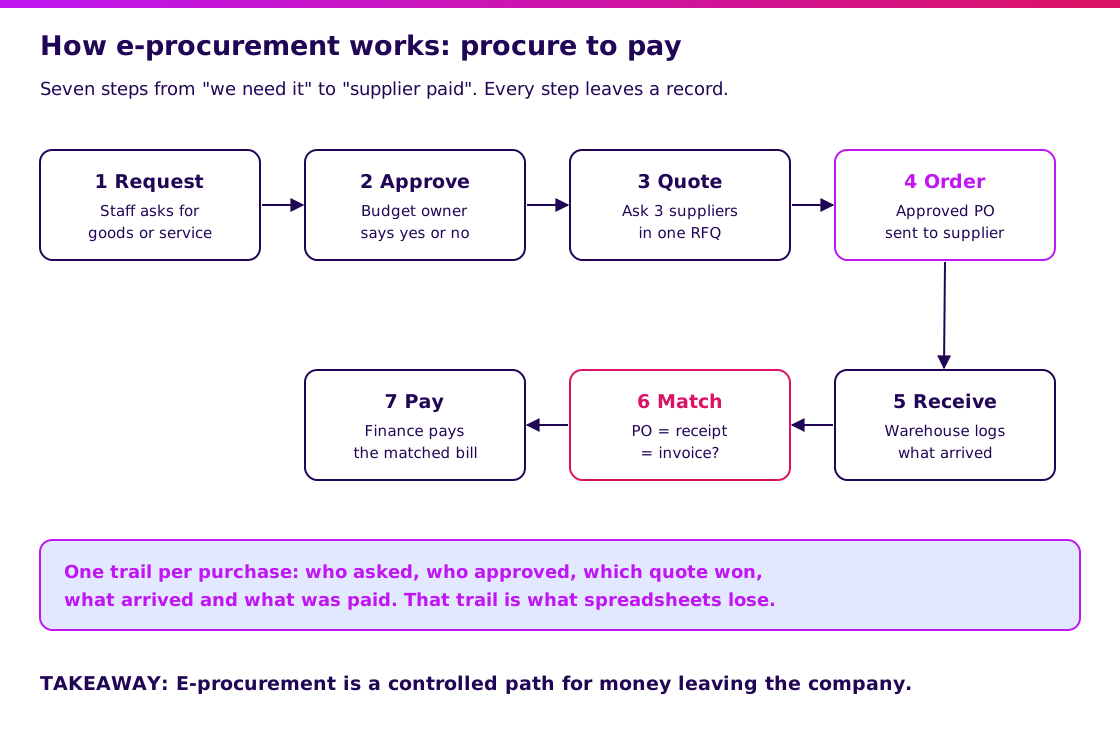
E-procurement is the digital version of your purchasing process: requests, approvals, supplier quotes, purchase orders, goods receipts and invoice matching in one system. Think of it as a purchasing desk that never loses a form and always knows the spending limit.
Its core functions are:
- Request goods or services through one form instead of chat messages.
- Approve automatically by budget, amount and department, with limits per approver.
- Compare quotes from several suppliers through a request for quotation (RFQ).
- Order with a numbered purchase order (PO) that the supplier receives directly.
- Match the PO, the goods receipt and the supplier invoice before finance pays.
That last step, the three-way match, is where most of the money is protected. If the invoice says 100 boxes but the warehouse received 90, the system stops the payment until someone explains the gap.
Is company e-procurement the same as government e-procurement?
No. Government e-procurement is how the state buys; company e-procurement is how your business buys. Many searches for “e procurement” in Indonesia are really about public tenders.
Public tenders in Indonesia run through SPSE, the electronic procurement system developed by LKPP, the national public procurement agency, and accessed through LPSE portals. If you only want to sell to government, you register as a vendor there. There is nothing to buy or build.
| Government e-procurement (SPSE/LPSE) | Company e-procurement | |
|---|---|---|
| Who buys | Ministries, regional governments, state bodies | Your company |
| Your role | Supplier bidding for tenders | Buyer controlling your own spending |
| Rules | Set by government regulation | Set by your own policy and approval limits |
| What you need | Vendor registration and documents | Software, a process owner and supplier data |
The rest of this guide covers company e-procurement: the system you use to control your own purchasing.
How much time does e-procurement save? A worked example
The first payback of e-procurement is admin time and a clean trail, not lower purchase prices. Here is a fictional 120-person distributor raising 100 purchase orders a month.
| Task per purchase order | WhatsApp, email and spreadsheet | With e-procurement |
|---|---|---|
| Chase approval | 40 minutes | 5 minutes (automatic routing) |
| Collect three supplier quotes | 50 minutes | 20 minutes (one RFQ) |
| Type the PO | 15 minutes | 3 minutes (from the approved request) |
| Match invoice to PO and delivery note | 35 minutes | 7 minutes (flagged exceptions only) |
| Total per PO | 140 minutes | 35 minutes |
At 100 POs a month, that is 14,000 minutes against 3,500 minutes, or about 233 hours against 58 hours. About 175 hours saved a month, roughly one full-time purchasing person. Time your own last 20 purchases and replace these numbers before you trust them.
We do not assume any saving on purchase prices. Better quote comparison often helps, but how much depends on your suppliers and your categories, so measure it after launch rather than promising it in the business case.
E-procurement: ready-made vs ERP module vs custom
Ready-made is fastest to start; a hybrid on your ERP’s purchasing module is cheapest at scale; custom costs most and only pays when your rules are unusual. Here is how they compare for our fictional distributor with 40 users: requesters, approvers, buyers and finance staff.
| Ready-made (SaaS) | Hybrid (ERP purchasing module + custom layer) | Custom build | |
|---|---|---|---|
| Upfront cost | IDR 15m setup | IDR 150m setup and customisation | IDR 450m build |
| Running cost | IDR 150,000 per user per month | IDR 50m a year | IDR 80m a year |
| Time to start | 2 to 4 weeks | 8 to 12 weeks | 12 to 16 weeks |
| Flexibility | Low: the vendor’s workflow | Medium to high | High |
| Best for | Standard purchasing, one entity | Many users, existing ERP, some unique rules | Group companies, unusual approval and supplier rules |
Three-year cost at 40 users: ready-made is 15 + 40 × 0.15 × 36 = IDR 231 million. Hybrid is 150 + 3 × 50 = IDR 300 million. Custom is 450 + 3 × 80 = IDR 690 million.
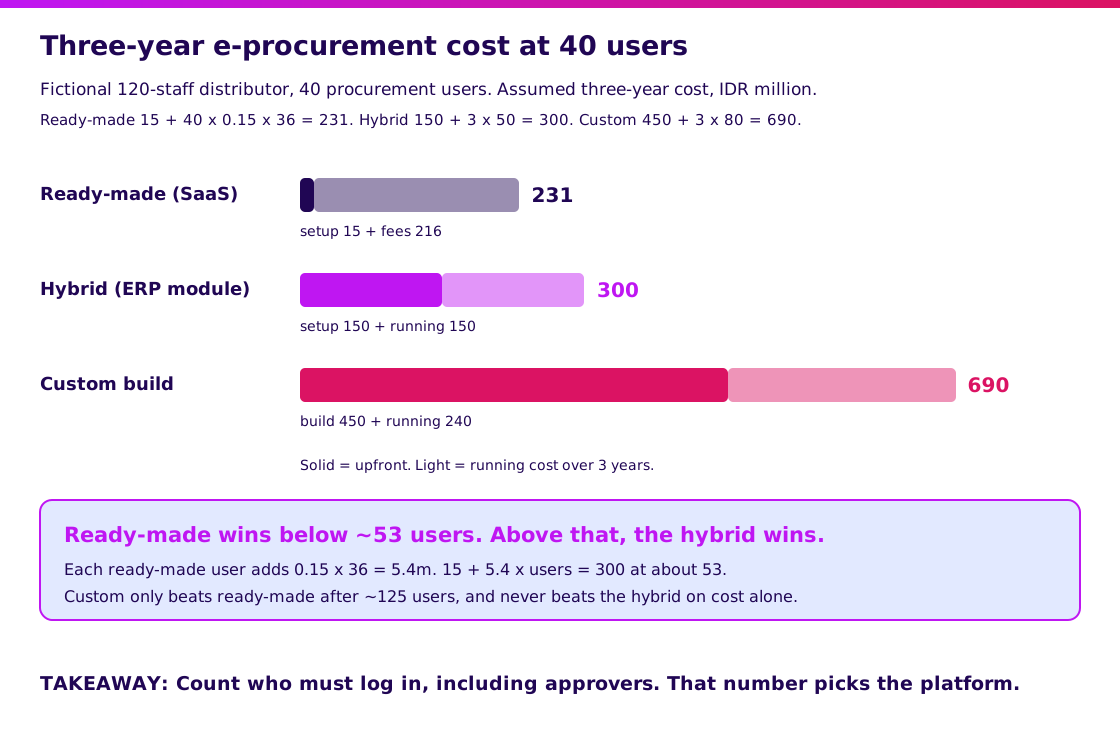
Each extra user adds 0.15 × 36 = IDR 5.4 million to the ready-made bill over three years. Ready-made stays cheaper than the hybrid until 15 + 5.4 × users passes 300, at about 53 users. It stays cheaper than custom until about 125 users.
Count approvers too. Managers who only click “approve” twice a month often still need a paid seat. Real quotes include tiers and discounts, so use the method, not the numbers.
Which e-procurement features are essential?
Pick features by the control you need, not by the length of the feature list. These six cover most Growing Businesses:
- Route approvals by rule: send each request to the right approver by amount, budget and department, with a backup when someone is on leave.
- Compare quotes side by side: collect supplier prices in one RFQ and record why the winner won.
- Keep one supplier master: one list of suppliers with tax details, bank accounts and contracts, so nobody pays a typo.
- Run the three-way match: block payment when the PO, goods receipt and invoice disagree.
- Work on a phone: approvers decide faster when they can approve from their phone between meetings.
- Connect to accounting and stock: push approved invoices to accounting and receipts to inventory, so nobody types the same PO twice. See how an accounting application fits in.
Nice-to-haves such as supplier scoring, spend dashboards and AI invoice reading matter less than these six. If people still buy outside the system, no dashboard will show the real spend.
When is an off-the-shelf e-procurement tool enough, and when do you need custom?
Off-the-shelf is enough when you are one company buying standard goods with simple approval limits. Build only when your rules are genuinely unusual. Run these five questions in order and stop at the first one that decides it.
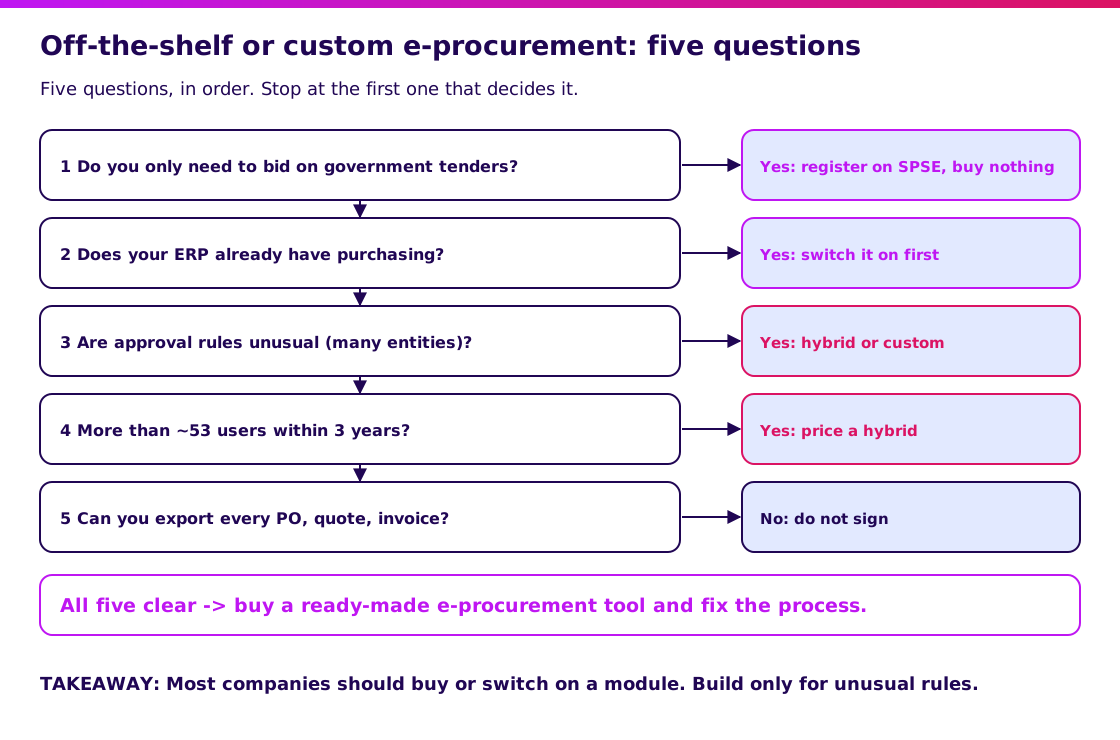
- Do you only need to bid on government tenders? Then register on SPSE. You do not need a tool of your own.
- Does your ERP already have a purchasing module? Switch it on and configure approvals first. It is often already paid for. Read what an ERP includes.
- Are your approval rules unusual? Several legal entities, shared budgets or project-based approvals often break ready-made workflows.
- Will you have more than about 53 users within three years? On our assumptions, per-user fees then cost more than a hybrid. Redo the sum with your own quotes.
- Can you export every PO, quote and invoice? If not, do not sign, whatever you choose.
What is the honest answer for most companies?
Honest answer: most single-entity companies with fewer than 50 users should simply buy, or switch on the module they already own. A good ready-made tool is cheaper and faster than anything we would build for them. See the full build-or-buy reasoning in our build vs buy guide.
Validate it in 2 weeks. Before you spend heavily on e-procurement, Blueprint & Prototype tests your assumptions: a spec, a clickable prototype in front of real requesters and approvers, and a real cost estimate. The two-week promise covers prototype validation; it does not guarantee a production launch.
At Synetica, Blueprint & Prototype takes 2 weeks, Production Grade Software takes 8 weeks, and Launch & Grow runs as an ongoing monthly retainer. If the answer is hybrid or custom, the 8-week build starts from the validated scope.
How do you choose e-procurement software? A vendor checklist
Choose with your own purchases and your own approvers, not with the vendor’s demo. Use this checklist before you sign:
- Run five of last month’s real purchases through the trial, from request to matched invoice.
- Ask three real approvers to approve on their own phones and time how long it takes.
- Check that your approval limits, including backups for people on leave, can be set without custom code.
- Confirm it imports your supplier list and exports every PO, quote and invoice.
- Ask how it connects to your accounting and inventory systems, and who maintains that link.
- Ask where data is stored and how you get all of it back if you leave.
- Check the price at your user count in year two and year three, including approver-only seats.
- Ask who answers support, in which language and how fast.
- Ask for two customers of your size and call them.
- Agree who owns setup, supplier data cleaning and training for new staff.
Use our vendor due diligence guide for the questions behind each point.
How much does e-procurement cost in Indonesia?
E-procurement cost is driven by user count, how many entities you run and how much you integrate. In our fictional example, the three-year totals run from IDR 231 million to IDR 690 million at 40 users, and the ranking changes as the team grows.
| Price driver | What to check | Why it moves the cost |
|---|---|---|
| Users | Whether approvers pay full price | The main driver of ready-made pricing |
| Entities and branches | How many budgets and approval chains you run | Each one adds setup and approval rules |
| Integrations | Accounting, inventory and banking links | Adds setup now and maintenance every year |
| Supplier onboarding | Duplicate suppliers, missing tax and bank data | Cleaning data and portal adoption take real effort |
| Custom rules | Project budgets, multi-currency, consignment, special tax handling | Pushes you from ready-made towards hybrid or custom |
Budget for supplier data cleaning separately. A new system loaded with duplicate suppliers will pay the wrong account faster.
How do you implement e-procurement without failing?
Start with one spending category and one approval rule, prove the trail, then expand. Big-bang launches fail because every requester, supplier and approval exception arrives on the same day.
- Weeks 1-2: scope. Pick one category, such as office supplies or spare parts, and one department. Clean that category’s suppliers.
- Weeks 3-4: pilot. Run every purchase in that category through the system. Track approval time and exceptions.
- Weeks 5-6: fix and connect. Fix confusing steps. Connect accounting so matched invoices flow straight to payment.
- Week 7 onward: expand. Add one category or department at a time, and stop paying invoices without a PO.
Name one owner for purchasing data who is responsible for the supplier list and approval limits. Without one, limits drift, old approvers stay in the chain and finance stops trusting the system. Supply chain management shows where purchasing sits in the wider chain.
What would I tell a founder choosing e-procurement?
Start from the one leak you want to close, then pick the smallest system that closes it. If the leak is “nobody knows who approved this”, almost any tool with approval routing will do.
- One company, fewer than 50 users: buy a ready-made tool, or switch on your ERP’s purchasing module, and spend the effort on clean supplier data.
- Several entities or a large team: price a hybrid on your ERP and build only the approval rules it cannot handle.
- Unusual supplier or project rules: validate the workflow with a prototype before building. Our MVP guide shows how.
My next step would be to book a scoping conversation with your monthly PO count, your approval limits and the two or three tools you are considering.
FAQ — E-procurement
What is e-procurement?
It is software that runs company purchasing online: purchase requests, approvals, supplier quotes, purchase orders, goods receipts and invoice matching, with every step recorded.
What is the best e-procurement software?
There is no single best one. The best tool fits your user count over three years, handles your approval limits without custom code, connects to your accounting system and lets you export all your data.
How much does e-procurement cost?
It depends on users, entities and integrations. In our fictional 40-user example, three-year cost ranges from IDR 231 million for a ready-made tool to IDR 690 million for a custom build, with an ERP-based hybrid at IDR 300 million.
Can e-procurement be custom built?
Yes. Custom fits group companies, layered approvals and special supplier rules, but it costs most upfront. A hybrid builds only the unique parts on top of your ERP’s purchasing module.
Which is better, e-procurement or a ready-made app?
A ready-made app is better for one company with standard purchasing and fewer than about 50 users. A hybrid or custom system is better when you run several entities, have many users or need approval rules no package supports.
Related Posts
Aditya S
Business Development Manager, Synetica.
Put it into practice
Need help putting this into practice?
We turn the ideas in this article into a prototype tested with real users in 2 weeks (from Rp49jt)—or production-grade software in 8 weeks (from Rp100jt).